
The world of web design is constantly evolving. New technologies arise and old ones are left behind. In this ever-changing landscape, it’s difficult to stay current. One of the most important things for a web designer to understand is CSS. CSS, or Cascading Style Sheets, is a language that allows you to control the look and feel of a website with formatting commands.
Why is CSS so powerful? An extensive library of properties and values gives you a lot of ways to customize your site without having to piece together many different codes from scratch. If you want your site to be accessible on any device, be responsive to all screens, make use of animations or other effects, or add interactivity to your site using CSS3
Websites, by definition, are either dynamic or static. A dynamic site is one that is always changing. Whereas a static site will always have the same look and feel. A very simple example of a dynamic website is Flipboard. A Flipboard is where you have a short description of the articles that are currently displayed, but the site is constantly changing to reflect the news that is popular.
CSS controls how your site renders across different devices and screen resolutions. It also controls how links look. In general, it’s a good idea to use a combination of CSS and JavaScript as mentioned in my last blog article to give your site an even more dynamic feel.
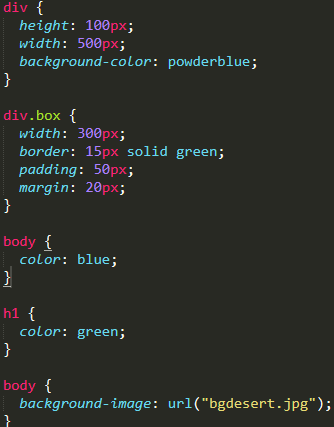
CSS is the bread and butter of any web design studio that seeks to differentiate itself from the pack. Today, this tool is almost as ubiquitous as HTML5, but the fact remains that every web designer should be familiar with how to use it. CSS makes it easy to design a site that not only looks good but works well too.
CSS is a tool, so as you might imagine, it does require some basic knowledge and experience to create some pretty slick websites. It’s not enough to merely understand CSS, you also need to be able to manipulate CSS to your liking. You can create your own code or use pre-made CSS. Once you’ve got it down, you can customize CSS to work exactly the way you want it to. But what does this mean? And how can you use it to your advantage? Read on.
Research shows that 36% of site visits come from mobile devices and desktops. It’s essential for your web design to cater to both types of user devices. Flexbox, which lets you easily modify the positioning of elements, is a great way to ensure that content and layout remain consistent on a wide variety of screen sizes.
A great way to ensure that your CSS is updated quickly is to use a micro framework, such as Bootstrap. These libraries allow you to build responsive websites using intuitive tools and technologies so that your site can quickly adapt to new screens.
When learning to design websites, you must understand and know the basics of HTML and CSS. They are a vital aspect of the web, so make sure you master them. If you find yourself in a situation where you’re struggling to understand CSS, the CSS There are a large amount of paid and unpaid courses that can be found online to help with your CSS journey.
JavaScript is a scripting language that runs in the browser and is used to create interactive web pages. It’s an integral part of your website and any other website you use that relies on it, such as Google Maps or YouTube. The language has been around since 1995 when it was created by Netscape. Since then it has evolved into a more powerful and versatile programming language. You’ve probably heard of HTML, CSS and now PHP after my previous blog post, but not JavaScript, which might make you wonder: what exactly does it do? If you’ve asked yourself this question, here are some things about JavaScript you should know.
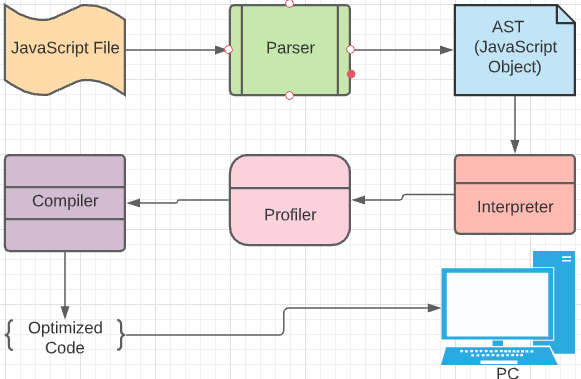
JavaScript is a highly configurable programming language that was designed by Brendan Eich, the inventor of the language, to be much more complex than Java or C++. In fact, it is written in an abstract syntax tree. So, what does this mean? It is a collection of parts and rules that are put together to create a webpage. The JavaScript interpreter, as well as other parts, like the window or event handlers, are all written as JavaScript code.
After all, this is coded, a webpage is produced by the browser, which in turn is a program that is programmed in JavaScript. You will often hear people refer to the web browser as a “browser”, but it is what is running in your browser and is essential to make sure your website functions correctly.
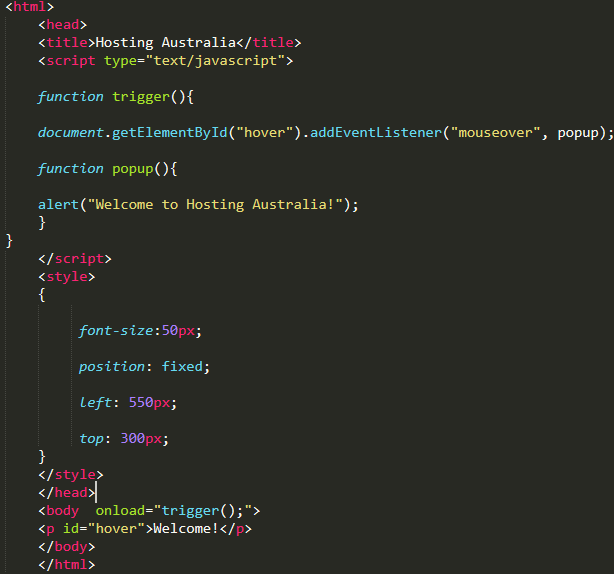
As previously mentioned without JavaScript you would not have such interactive web pages. For example, on YouTube, you can customize a video playback speed. With it you can select the speed you want your video to play at and the program will dynamically change the speed of the video.
JavaScript can also be used to handle “data-binding,” which is like Active Template Engine (ATE). When you link a data binding to the DOM (Document Object Model), your program will update the DOM (Document Object Model) whenever you change a value for that property. For example, with an, if statement you can add a condition to the HTML code that will trigger the program to execute when that condition is true.
Like most programming languages, JavaScript is a combination of both logic and syntax. However, unlike programming languages like Java or C, JavaScript has a built-in scripting capability that allows developers to create functions that create scripts that perform a variety of functions within the web browser. JavaScript is a scripting language that runs within the browser.
You probably already use it on your website by choosing a search engine or the right ad groups. You also use it on some forms of websites and apps. The most common use is writing scripts that interact with the user on your website. These are like mini-programs on your website. The user can click on links or buttons to perform actions like sending a tweet, playing a game, or even playing a video. This requires JavaScript.
Another common use is the ability to use your website without leaving your browser. This is particularly useful if you need to run your website behind a proxy or firewall that blocks it. You can also use it to access your website from other devices.
JavaScript has a lot of uses and applications. Although it was initially created for Internet browser programming, it’s versatile enough that you can use it on any web page. Using JavaScript ensures you’ll create a dynamic website that keeps your visitors engaged and talking to you. It allows you to create more engaging user experiences, with a better click-through rate (CTR) and a lower bounce rate. The next time you write a line of JavaScript code, do your research and make sure it’s for the right reasons and for your website.
<!DOCTYPE html>
<html>
<body>
<h1>Hosting-Australia</h1>
<?php echo "Find all your hosting needs!"; ?>
</body>
</html>
PHP is a programming language that can be used to create web pages. It's incredibly basic for beginners, yet includes sophisticated features for experienced programmers. Don't be intimidated by the long list of PHP's capabilities. You should hop right in and write your first PHP script in a matter of hours.
You've probably heard of a few other programming languages and are wondering why we chose PHP as our web programming language. Because PHP has a huge easily accessible online reference and a well-structured function structure.
As a result, the language is easy to pick up and has a significant online following. There are numerous forums and manuals available on various PHP approaches and challenges, so you should have no trouble seeking help if you require it. Here are some fundamentals.
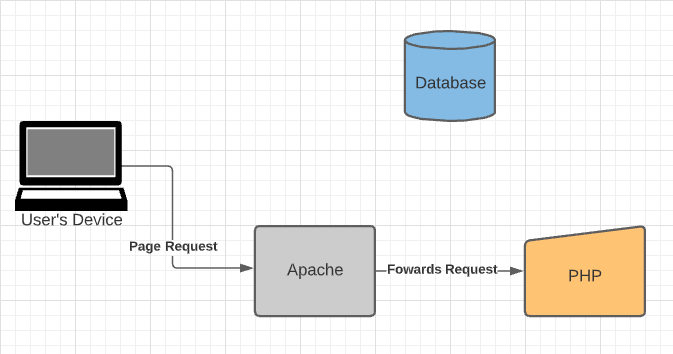
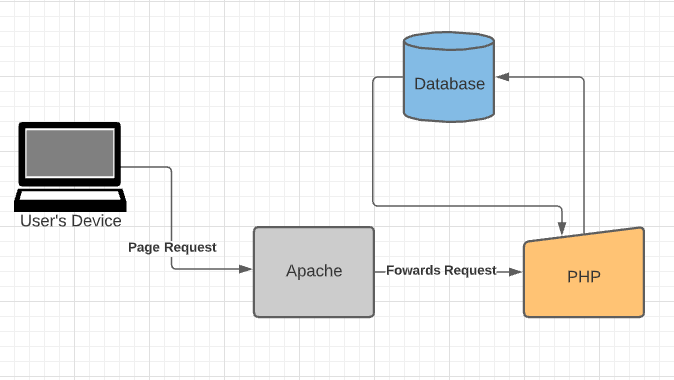
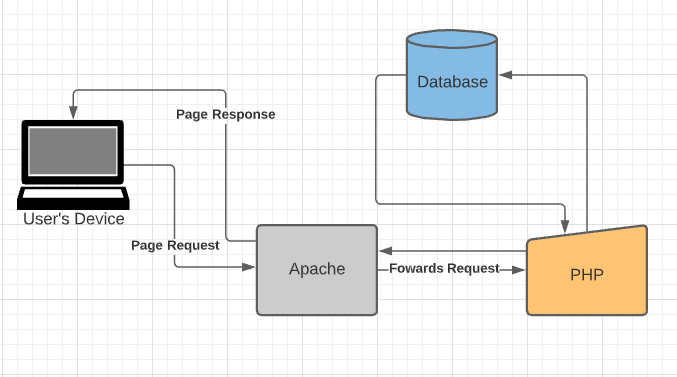
The PHP program communicates with the site server, which is the software that distributes web pages to the rest of the world. When you type a URL into your web browser's address bar, you're instructing the webserver at that URL to send you an HTML file. The web server responds by sending the requested file. Your browser reads the HTML file and displays the web page. When you request a file from the webserver by pressing a source on a web page, you're also requesting a file from the webserver. Additionally, when you click a button on a web page that submits a form, a file is processed by the webserver.
User send page request to the webserver
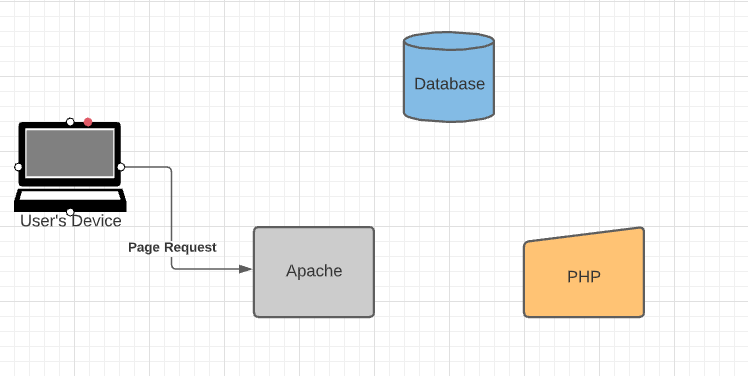
The server forwards that request to PHP
PHP will send the request to the Database and respond back to the server.
The request will be then sent back to the user's device
Essentially, a plugin is a piece of software that can enhance the functionality of your WordPress website. What’s unique about them is that they are independent of your website theme and are simply plugins. They work with WordPress and can be applied without the need to change any code on your website. A WordPress plugin is an advanced piece of software that you can add to your website to make it easier or more fun to use.
In order to be helpful, many plugins will connect to other services like Google Analytics, Google Maps, SoundCloud, or other services you may already have. For a more comprehensive look, consider searching around WordPress community forums. These communities often sell plugins as well. As a developer, it’s important to understand how plugins work as they integrate in and out of a website. For example, take WordPress Magento as an example. This plugin helps improve the speed of your site. However, this can have a negative impact on your site’s security. Using a plugin like Wordfence can solve this problem.
You’ll also want to consider what services you require a plugin to connect to. For example, you may not need to integrate your Google Analytics account.
YoastSEO is the one-stop-shop plugin when it comes to increasing your ranking on google.
Yoast SEO is packed full of features, designed to help visitors and search engines to get the most out of your website. Some of our favorites are:

WordFence is the one must-have security plugin; you may have seen this plugin brought up a couple of times in blog articles. Because we cannot recommend it enough.
Wordfence includes an endpoint firewall and malware scanner that was built from the ground up to protect WordPress. Our Threat Defense Feed arms Wordfence with the newest firewall rules, malware signatures, and malicious IP addresses it needs to keep your website safe. Rounded out by 2FA and a suite of additional features, Wordfence is the most comprehensive WordPress security solution available.
UpdraftPlus is the most widely used WordPress backup plugin. It enables you to create automatic backups and securely save them on Google Drive, Dropbox, S3, Rackspace, FTP, email, and other services.
It also makes restoring your website from a backup a breeze. Their free plugin is available, but they also offer a premium plan that includes additional features and priority support.
Because backups are such an important tool, this is an excellent plugin that should be installed on every WordPress blog and website.
WooCommerce is the most popular WordPress eCommerce plugin, with over 5 million websites using it.
It includes all the strong features you'll need to start an online business.
WooCommerce has established itself as the most popular eCommerce plugin for WordPress in recent years. It was created by the same people who created WordPress.com, Jetpack, and other well-known services.
WooCommerce currently has a healthy ecosystem with dedicated WooCommerce hosting, WooCommerce themes, and WooCommerce plugins.
Built-in tools and popular integrations help you efficiently manage your business operations. Many services are free to add with a single click via the optional Setup Wizard.
One of the most popular WordPress caching plugins is W3 Total Cache. It's a feature-rich WordPress cache plugin with a lot of settings, which can be intimidating for newcomers.
It has all the functionality you'll need to set up the WordPress cache properly. Page cache, object cache, gzip compression, limited minification support, CDN support, and other features are included.
There is a massive library of WordPress Plugins designed to help you increase the quality and functionality of your website. So, don’t be afraid to get out and give them all ago. But you can’t go wrong with the plugins previously listed to get started.
Because of its customizability and flexibility, WordPress is the most popular content management system. While it isn't flawless, it is generally simple to use.
Although WordPress issues can be daunting, most of them are simple to repair. You may perform basic troubleshooting on your own if you know the error and what caused it.
This post will teach you how to diagnose and fix three of the most common WordPress problems
Before making any major changes to your website, create a backup of your files so you have a copy in case anything goes wrong.
If you are unsure how to create a backup, please view our helpful guide in creating a backup via cPanel.
After troubleshooting, always make sure you clear your browser cache. This helps the changes you made reflect instantly on your website, as it is not reading old, saved data from previous views.
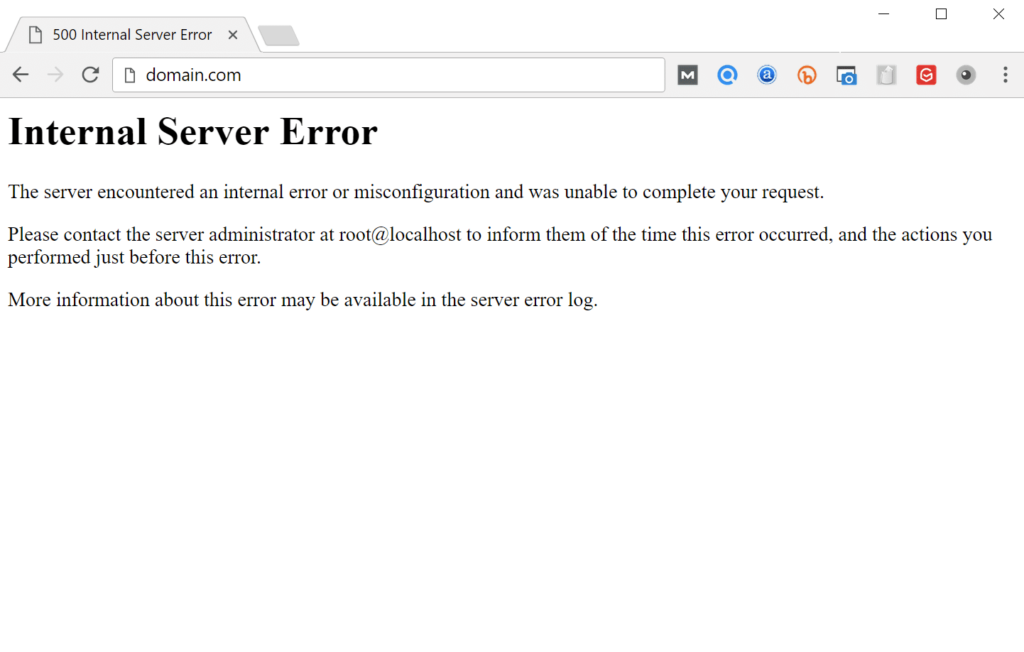
Internal server errors are frequently caused by a corrupted .htaccess file, but they can also be caused by theme or plugin issues.
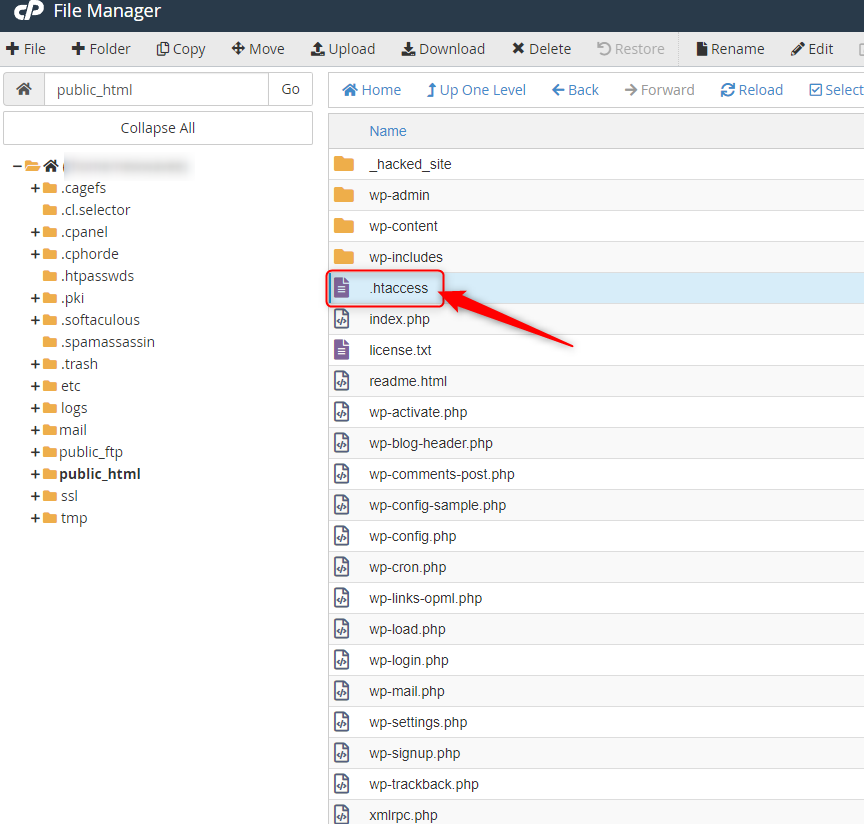
If you do get the internal server issue, try to use the file transfer protocol to get to the website root (FTP) or you can also access the website files via cPanel’s file manager.
Change the name of the .htaccess file (such as .htaccess-old). To see if reloading the website cures the problem, try it. If the problem has been resolved, go to Settings > Permalinks and create a new .htaccess file to reset your permalinks.
# BEGIN WordPress
<IfModule mod_rewrite.c>
RewriteEngine On
RewriteBase /
RewriteRule ^index.php$ - [L]
RewriteCond %{REQUEST_FILENAME} !-f
RewriteCond %{REQUEST_FILENAME} !-d
RewriteRule . /index.php [L]
</IfModule>
# END WordPres
If you've tried the first method and still get an error, it's possible that the issue is due to incompatible or outdated themes and plugins.
To fix your plugins, deactivate them via FTP or via the cPanel file manager. Then, reactivate them one by one until you find the error. Once you find the errant plugin, report it to the developer. You may also try reverting to the previous theme used when the website was still working.
Deactivate your plugins via FTP or the cPanel file manager to fix them. Then, one by one, reactivate them until you identify the issue. If you need assistance with reinstall your plugins, please contact Hosting Australia support. You might also try reverting to the old theme that was in use when the website was still up and running.

405 forbidden error may be caused by the following:
You may try these fixes for the 34 forbidden errors:
White Screen of Death (WSoD) error may be caused by the following:
You may try these fixes for the WSoD issue:
Try switching the admin side themes, renaming your directory, or modifying the "theme" and "stylesheet" entries in wp options if you get this problem message.
Although WordPress is typically stable, mistakes do occur from time to time. These challenges may appear daunting, but with the help of this guide, you'll be able to get your website up and operating in no time.
The majority of WordPress issues may be avoided by updating plugins and themes, double-checking your .htaccess files, and keeping your website secure.
If you are still having issues after attempting these troubleshooting issues. You can always contact Hosting Australia support via (07) 4914 2433 or alternatively via ticket support@hosting-australia.com.
Before getting into the meat of this post, I want to ask you one question. Do you think your website design is the best it can be? If not, then read on the main factors that a redesign can benefit your company! There are many reasons why companies invest in a new site or revamp their old one. Whether it's to make their business feel more current, give them an edge over competitors, or just because they're bored with what they have now - there are plenty of good reasons to jump on board with a web project!
Take a minute to think about your website. What makes it unique? What would you change if you could? Take a moment to imagine your website completely redesigned, from top to bottom, and maybe even redesigned to serve a different purpose than the one it does now. Have you noticed that your web page is not functional or is it being read from a different part of the page? Don't you think it would be better if it could be accessed from the top and bottom, which is the original way? Why a website redesign could give your business an advantage over the competition Your website needs to be up to date, whether you are running an online store or selling products to clients. Many sites that are 10+ years old lack up-to-date features and websites.
A new website or redesign can do wonders for your business's image. We've all experienced it. It seems like every week a new restaurant, clothing brand, or entertainment venue gets caught in a bad publicity storm. Their website design could've done a lot to prevent the problem. Whether it's outdated design, a poor link structure, or a completely non-existent social media presence - I'm sure you can think of plenty of reasons to overhaul your company's website design. More visibility. If you're having issues getting people to your website, your redesign could help! Your website needs to be optimized so that it can be found. Did your website get overlooked because it's too crowded? When Google looks at your search results, it's looking for sites that have the most relevant content.
Creating an entirely new site from scratch can be a costly, time-consuming endeavor. However, At Hosting Australia we have a team of in-house web developers that will be able to build your dream website, communicate with you during the build, and then teach you all the ins and outs of your new websites. This way you are not in the dark about the whole process. there are several aspects that can be completed quickly and with minimal effort and cost.
Why do some companies not put in the effort to properly design a website? I'm sure the reason could be that they do not take the time to research, plan, and execute the project properly. Usually, the outcome of their website is not what they were after. A website that looks cool may not be valuable to their company or their customers. So the next time you come across a company that doesn't have a great website, you should ask yourself why didn't they put in the effort to do it right. Make sure that your website reflects the value of your business and the experience you want to create.
When considering a redesign, there are a few things to keep in mind: Research the different websites on the market Before your redesign project, it's good to know what's already available. You want to avoid copying someone else's design or simply putting up another website that you've designed yourself. There are plenty of sites and resources online that provide content, directories, or even templates for you to use for your redesign. If you're not familiar with them, do some research! There are great resources out there! Research what features are available in the competition This step is especially important if you're redesigning or revamping your website from scratch. This is not something you want to do in an instant!
There are so many reasons to start a website redesign, but I hope this article gives you some ideas of ways to start your own rebranding project. What kind of changes have you made to your website recently? Have you made any changes you've discovered are actually working? What have you seen as the effect of your changes?
As mentioned previously in this article. Feel free to reach out to our web development team, who will help you rebuild or build the website you have always wanted.
[et_pb_section fb_built="1" _builder_version="4.10.6" _module_preset="default" global_colors_info="{}"][et_pb_row _builder_version="4.10.6" _module_preset="default" global_colors_info="{}" column_structure="1_2,1_2"][et_pb_column type="1_2" _builder_version="4.10.6" _module_preset="default" global_colors_info="{}"][et_pb_text _builder_version="4.10.6" _module_preset="default" global_colors_info="{}"]
When you have a website in mind, like anything else you should have a goal and a purpose. You can usually tell sites apart who have been able to find their goal and purpose as they are often indistinct, hard to navigate and present an overall bad experience for the user. You do not want your visitor left confused and wondering, “I'm not sure what I'm supposed to be doing here.”
[/et_pb_text][/et_pb_column][/et_pb_row][/et_pb_section][et_pb_section fb_built="1" _builder_version="4.10.6" _module_preset="default" global_colors_info="{}"][et_pb_row _builder_version="4.10.6" _module_preset="default" global_colors_info="{}"][et_pb_column type="4_4" _builder_version="4.10.6" _module_preset="default" global_colors_info="{}"][et_pb_text _builder_version="4.10.6" _module_preset="default" global_colors_info="{}"]When you decide to take the steps, in building a sitemap for your website. You need to start by answering important questions.
If you can answer these questions, then you are more than ready to start designing a website and plan your site map.
[/et_pb_text][et_pb_image src="http://hosting-australia.com/wp-content/uploads/2021/09/2021-09-13_15h12_45.png" _builder_version="4.10.6" _module_preset="default" title_text="2021-09-13_15h12_45" hover_enabled="0" sticky_enabled="0"][/et_pb_image][/et_pb_column][/et_pb_row][et_pb_row _builder_version="4.10.6" _module_preset="default" global_colors_info="{}"][et_pb_column type="4_4" _builder_version="4.10.6" _module_preset="default" global_colors_info="{}"][et_pb_text _builder_version="4.10.6" _module_preset="default" global_colors_info="{}"]
Every site has a primary navigation menu. So, you need to decide what these pages will typically be when users visit your website.
Once you figure out your main navigation, it is important to think of what pages you have within the main menu. For example, if you are products page, you may want to have a secondary page (dropdown) for each product within the initial product page.
If you answer question 6 of the initial sitemap questions. Then, it is important to leave room for site expansion in the future.
[/et_pb_text][/et_pb_column][/et_pb_row][et_pb_row _builder_version="4.10.6" _module_preset="default" global_colors_info="{}"][et_pb_column type="4_4" _builder_version="4.10.6" _module_preset="default" global_colors_info="{}"][et_pb_text _builder_version="4.10.6" _module_preset="default" global_colors_info="{}"]
 Slickplan includes the following features

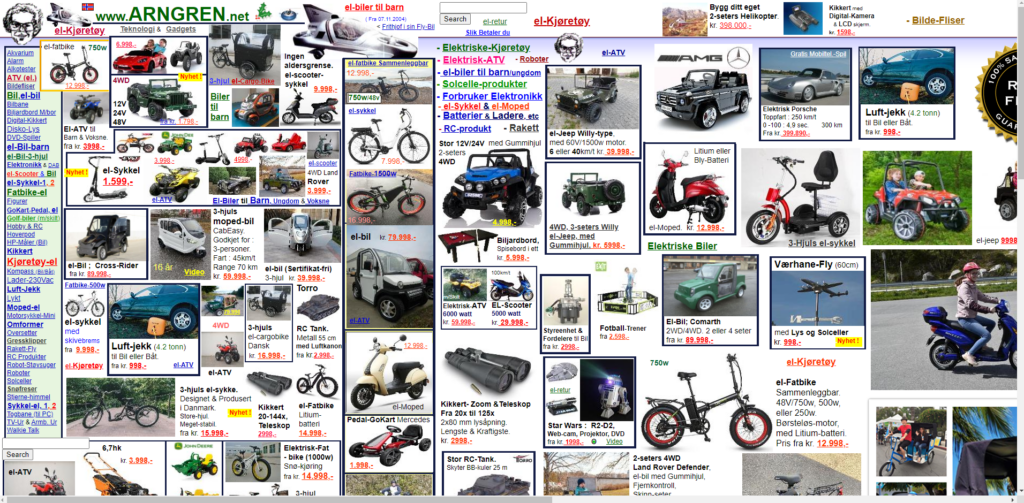
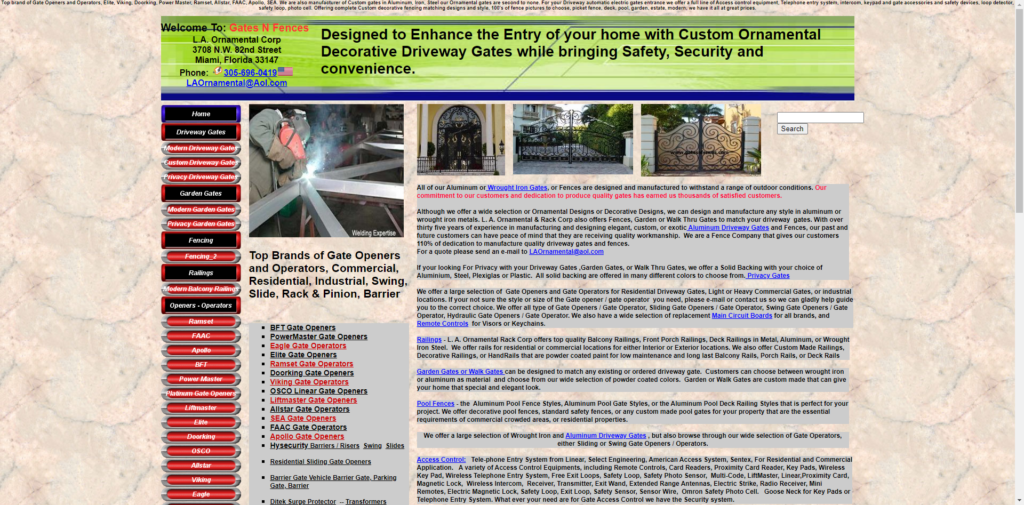

During 2020 - 2021 a lot of businesses have been required to make the switch over to an online platform. Without having a functional website before the pandemic, you may have found yourself in a bit of a tough situation trying to learn all the skills to improve your website.
So, if you are looking to learn web development, there are more than enough resources online and it can become overwhelming, not knowing where to begin, and how do you tell if you skills you are learning are useful or out of date.
As an owner of a website, it is important to be able to update your website on the fly. You can learn everything you need to know about web development online, taking the time to learn these skills will help take your website understanding and business to the next level.

Udemy is a massive open online course provider and my person going to for upskilling for anything. Udemy offers over 80,000 online courses in a wide variety of categories including web development. Each course that is offered within a category includes unlimited access to a series of video lectures by a specific instructor Plus you can always interact with the Udemy student community for extra help. Each course is paid separately allows you to preview the lectures for free before you start. They currently have a sale for new users looking for upskills.

You may already be familiar with LinkedIn as it is a must for professionals to connect in 2021. Therefore, LinkedIn has combined Lynda.com for a more personalized learning experience. Rather than taking you through a specific track, the site offers a staggering number of courses in various fields including almost a thousand courses for web development. For $29 a month you get unlimited access to courses that are broken up into a series of videos that are accompanied by walk-through examples and sample code when needed.
Codeacademy allows you to select a path you are wishing to learn, web development for example. The course-based online learning provides a unique hands-on approach to learning code. Each path includes lessons that begin with the basics and sends with advanced practical applications. Each lesson includes written instructions that help you write out actual code that progresses with each lesson.

Codewars is a great choice that allows you to master your web developer skills by solving challenges in the programming languages of your choice. You can even compare your solutions with other users for great understanding and great when learning with a partner.

W3schools does not providers courses as such but is more an index of knowledge that you can have in your back pocket and refer to. I still use W3schools.com to this day if I ever require a refresher on a certain topic.
When it comes to improving or learning a new skill, getting started can be the hardest part. But once you do, you might be surprised a just how much you can learn in a single day with online resources available.
2025.hosting-australia.com/ does also offer web development if you ever find yourself stuck on are wishing to upgrade your website to a newer and more updated version for your business. Just simply contact our support and one of our web developers will be in touch.
It's Tax time……. Here at 2025.hosting-australia.com/, we understand the tax man causes stress and robs you of precious time to focus on your business. Sifting through all your purchases and receipts, trying to work out all your yearly expenses ready for the 1st of July. Also collecting sales tax accurately from customers can be a hassle when you have an online store. There are so many variables you need to take into consideration. So how will you get the exact tax calculation right every time? Luckily, if you use a WooCommerce store, these plugins help calculate the tax rates according to your customer's state or area and there are plenty of options there to automate sales tax calculations.

This will be automatically built into your WooCommerce plugin as WooCommerce Tax is the official extension from Automattic for automatic tax calculations. Powered by Jetpack cloud services so you can start benefitting from free security, insights, and uptime monitoring.
Once you update your tax settings, your store will collect sales tax at checkout based on the store address in your WooCommerce Settings.
WooCommerce Tax is a free service if you are selling from one location. Sadly, if you are selling from more than one you will be required to use a standalone tax plugin which will discuss further.
TaxJar’s sales tax automation makes collecting sales tax easy by removing complex configurations and providing accurate rates for WooCommerce. Once you are synced up to TaxJar, you will see your sales tax collected by city and county, across all states, and including all the channels on which you sell.
At the cart and checkout page, TaxJar takes the following input from your store.
And returns accurate sales tax (including state, country, city, and special taxes) based on the following.
TaxJar offers a free 30-day trial, that does not require a credit card when signing up. However, after the 30 days are over, there are 3 monthly subscriptions you can choose from depending on your needs.
Quaderno uses real-time sales tax rates in your selected country while following the local tax laws of your customer that are set in the Quaderno plugin – this is extremely helpful if you dealing with customers outside of Australia. Quaderno has a feature that generates automated tax receipts for each sale made from your website, these receipts are also available in multiple languages and will show different currencies according to the customers’ location.
Quaderno integrates seamlessly with your chosen eCommerce platform, shopping cart, or payment processor. The secure APIs access your sales data and begin automating your sales tax processes in seconds.
All plans include.
Unlike TaxJar, Quaderno only offers a free 7-day trial. They have plans best suited to your site's traffic and transactions per month starting from $99 a month up to 1,000 transactions per month.



