Is Your WordPress Site Safe? Slider Revolution Flaw Exposes Critical Data
A newly discovered vulnerability in the Slider Revolution WordPress plugin has put over four million websites worldwide at immediate risk. This isn’t a minor bug—it’s a flaw that could allow attackers to access and download private files from your hosting account, potentially exposing configuration data, credentials, and even backups. For many small business websites, that’s a serious threat to reputation and revenue.
What the Vulnerability Allows
The exploit, identified by Wordfence researchers, is known as an arbitrary file read vulnerability. In simple terms, it gives unauthorised users a way to view sensitive files stored on your site’s server. That could include your wp-config.php file, which contains your database credentials and security keys. Once accessed, hackers can move laterally—installing backdoors, stealing data, or taking control of your WordPress installation entirely.
How This Could Affect Your Business
If your website relies on Slider Revolution for image sliders or banners, it’s likely vulnerable until the latest patch is installed. Attackers are already scanning the internet for unpatched versions, meaning time is critical. Compromised sites may experience data theft, SEO blacklisting, or full account suspension by their host. In short—this is not an exploit to ignore.
How to Know If You’re at Risk
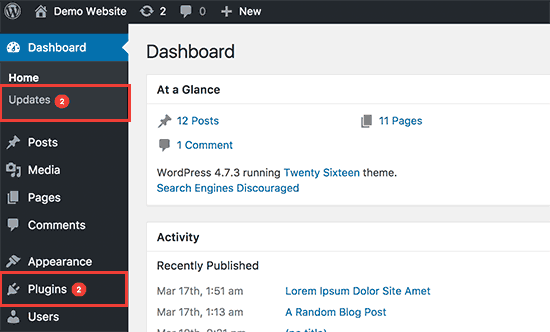
Any WordPress site running Slider Revolution versions earlier than 6.7.15 is affected. If you’re unsure what version you have, log into your WordPress admin panel and navigate to Plugins › Installed Plugins › Slider Revolution. You’ll see the version listed there. If it’s below 6.7.15, your site needs immediate attention.
Steps to Secure Your Site
- Update the plugin immediately. The developers have already issued a patch, and updating removes the vulnerability.
- Change your WordPress and database passwords. If your site may have been compromised, reset these credentials straight away.
- Scan your site for malware. Use a trusted tool or your web host’s security scanner to check for unauthorised changes or suspicious files.
- Back up your site. Always maintain secure, off-server backups so you can restore quickly if needed.
What Hosting Australia Clients Should Know
If you’re already subscribed to the Hosting Australia WordPress Management Package, your site is safe—our team has already applied the patch and confirmed security across all managed sites. No further action is required.
For those not currently on a management plan, now is the time to act. Our WordPress Management Packages include:
- Automatic plugin and core updates
- Daily offsite backups
- 24/7 security monitoring
- Expert support from Australian-based technicians
These proactive measures mean you’ll never have to worry about missing critical security updates like this one again.
Why Regular Maintenance Matters
WordPress powers over 40% of the web, which makes it a prime target for attackers. Vulnerabilities like this appear frequently—and by the time a public notice is released, automated bots are already exploiting them. Regular updates, consistent monitoring, and secure hosting are essential to staying ahead. A single outdated plugin can be all it takes to bring your site down.
Secure Your Site Today
If your website uses Slider Revolution, take this as a reminder that plugin management is not optional—it’s a vital part of website security. Don’t wait until your site is compromised.
Get protected with a WordPress Management Package from Hosting Australia and let our experts handle updates, security, and peace of mind.
Contact our support team today to discuss your options and safeguard your site against future threats.
DIY Web Design Disasters: Why Your Cousin’s Neighbour’s Dog Shouldn’t Build Your Site
Let’s be honest. Every small business owner has that one mate, cousin, or suspiciously enthusiastic neighbour who claims they can “knock up a website in a weekend.” They’ve watched a YouTube tutorial, downloaded a dodgy free template, and suddenly they’re the next Steve Jobs. Except instead of launching a billion-dollar company, you end up with a half-baked website that looks like it was built in 2003 and crashes every second click.
It’s a story as old as the internet itself: business owners trying to save money with DIY web design, only to end up spending twice as much later fixing the mess. Let’s break down why DIY websites so often turn into disasters – with a few laughs along the way.
The “Dog’s Breakfast” Website
You’ve seen them. Websites that load slower than a dial-up modem on a rainy day. Menus that look like a game of Where’s Wally. Contact forms that don’t work, leaving customers screaming into the void. This isn’t just ugly – it’s bad for business.
DIY websites often look like, well… a dog’s breakfast. Why? Because building a site isn’t just about dragging and dropping boxes. It’s about structure, SEO, user experience, and knowing that Comic Sans should have died with the fax machine. Professional web designers know how to make a site look sharp, load fast, and actually convert visitors into customers. Your cousin’s neighbour’s dog? Not so much.
“Free” Websites That Cost You Sales
DIY builders love to tempt small business owners with promises of “free” or “cheap” sites. But here’s the dirty little secret: you pay later. Slow hosting, limited features, and security holes big enough to drive a truck through. Customers click away faster than you can say “site not secure.”
Think about it: if your website looks like a $10 job, customers assume your business is worth about the same. A site built on reliable Australian web hosting with professional design behind it instantly builds trust – and trust equals sales.
The SEO Black Hole
Google isn’t stupid. It knows when a site is dodgy. DIY websites often come loaded with bloated code, poor mobile optimisation, and zero SEO strategy. Translation: they vanish into the internet’s black hole. If you’re not on page one, you might as well not exist.
A proper web design agency knows how to build with SEO baked in. That means faster load times, keyword-optimised pages, and structure that search engines love. DIY design? You’re lucky if your site even shows up for your own business name.
Security? What Security?
One of the naughtier truths: many DIY websites are about as secure as leaving your front door wide open with a sign that says “burglars welcome.” Hackers love them. Cheap plugins, outdated themes, no SSL certificates – it’s a recipe for disaster.
Professional Australian web hosting comes with proper firewalls, SSL, and backup systems. So when someone tries to brute-force their way in, they hit a brick wall instead of your customer database.
The Cost of “Mates Rates”
Sure, your mate might only charge you a slab of beer and a handshake for building your site. But how much are you losing in sales while your customers bounce off your dodgy homepage? That’s the real cost. DIY web design is the business equivalent of using sticky tape to fix a leaking roof – it might hold for a day, but eventually, the whole thing caves in.
Why Small Businesses Need the Pros
Here’s the slightly naughty truth: most DIY sites scream amateur. And customers can smell it a mile away. If you want to look professional, build trust, and actually convert leads into sales, you need experts who know how to design, host, and optimise websites properly. From WordPress web hosting to custom web design, a pro team makes all the difference.
So next time your cousin’s neighbour’s dog offers to “whip something up” for you, smile politely, give them a pat, and back away slowly. Then call someone who can actually build a site that works – because your business deserves more than a digital dog’s breakfast.
Final Bark
Your website is your shopfront. It’s what customers judge you on, often before they even pick up the phone. Don’t risk your reputation – or your sanity – on DIY disasters. Invest in proper web design and hosting and watch the difference it makes. Because when it comes to websites, “mates rates” is usually just code for “you’ll pay twice later.”
Get a pro site – not a dog’s breakfast.
The WordPress Plugin Graveyard: What to Ditch in 2025
WordPress is a powerhouse, but it can quickly become a bloated, slow-moving mess if you’re not careful with your plugins. For small businesses running on WordPress web hosting Australia wide, performance, security and SEO matter more than ever. And outdated, unused, or unnecessary plugins could be quietly costing you leads and rankings.
So, let’s take a guided walk through the “WordPress Plugin Graveyard” – a rundown of the plugins you should delete, replace, or avoid entirely in 2025.
Why Cleaning Up Plugins Matters
If you’ve been using WordPress for more than a year, chances are your site has collected some plugin clutter. Here’s why that’s a problem:
- Speed Impact: Each active plugin loads code and scripts that can slow your site.
- Security Risk: Abandoned or poorly maintained plugins are prime targets for hackers.
- Compatibility Headaches: Old plugins often don’t play nice with the latest WordPress updates.
- SEO Damage: A slow or buggy site can directly hurt your rankings.
In short, your plugin list might be the reason your site isn’t loading fast, ranking well, or staying secure. Time for a plugin audit.
RIP: Plugins You Should Retire in 2025
Below are plugins that are no longer maintained, have better alternatives, or are causing more problems than they solve.
1. Jetpack (Bloat Central)
Once a go-to for beginners, Jetpack has become a bloated mess trying to do too many things. It loads excessive scripts, slows down pages, and duplicates functionality you can get elsewhere with better performance. Unless you’re using a single specific module (like downtime monitoring), it’s better to remove it.
2. WPBakery Page Builder
Still hanging on from the early page builder wars, WPBakery is now outdated and often conflicts with modern themes or block-based editors. With Gutenberg and builders like Divi or Oxygen, WPBakery belongs in the past.
3. Revolution Slider
Big, flashy, and heavy on load time. Sliders in general are falling out of favour due to UX and performance issues. Plus, this plugin has had multiple security flaws in past years. Ditch it for lightweight image blocks or modern galleries.
4. Contact Form 7 (with no recaptcha or spam protection)
Yes, it’s popular. But if you’re still using CF7 without recaptcha or spam filters, you’re inviting bots and bad UX. Alternatives like WPForms Lite or Fluent Forms are faster, more secure, and mobile-friendly.
5. Broken Link Checker (Live Scanning = Server Drag)
This plugin checks every internal and external link... constantly. On shared WordPress hosting setups, it can drag performance into the ground. Instead, use a free online tool periodically or install and run it temporarily, then deactivate.
6. EWWW Image Optimizer
This plugin works, but it uses your server resources to compress images. In contrast, plugins like ShortPixel or TinyPNG process images offsite, keeping your load light and fast.
7. Google Analytics by MonsterInsights (free version)
The free version adds bulky scripts without giving you access to proper GA4 insights. Use Site Kit by Google for tighter integration or switch to server-side tracking setups.
Plugins That Might Be Quietly Harming Your Site
Some plugins aren’t broken – they’re just not necessary anymore. If your site has grown up, these may now be liabilities:
- XML Sitemaps plugin: WordPress has sitemap functionality built-in since version 5.5.
- Classic Editor: If you’re still relying on this, it’s time to embrace the block editor and move forward.
- Multiple caching plugins: One is enough. Using multiple can cause conflicts and strange bugs.
Signs a Plugin Needs to Go
Even if a plugin isn’t on our graveyard list, it might still need the axe. Ask yourself:
- Has it been updated in the last 6–12 months?
- Is it compatible with the current WordPress version?
- Is the plugin author responsive to support requests?
- Are there recent negative reviews about speed or bugs?
If the answer to any of the above is “no” – it’s time to replace it or remove it.
Smart Replacements for Retired Plugins
Here are some lighter, modern alternatives to commonly overused or outdated tools:
| Old Plugin | Modern Alternative |
|---|
| Contact Form 7 | Fluent Forms, WPForms Lite |
| Slider Revolution | Smart Slider 3 (only if needed), Block-based images |
| Jetpack | Separate tools: ShortPixel, UpdraftPlus, etc. |
| Broken Link Checker | Ahrefs or Screaming Frog (manual scans) |
How Hosting Impacts Plugin Performance
Even the best plugins will struggle on poor hosting. If you’re running bloated plugins on overseas servers or shared environments with no optimisation, you’re stacking the odds against yourself. Choose WordPress web hosting Australia plans that offer LiteSpeed caching, image compression, and database optimisation tools built-in.
Better hosting can eliminate the need for certain plugins altogether. For example, many VPS hosting environments come with built-in server-side firewalls, backups, and performance tuning that reduce your plugin dependence significantly.
Pro Tip: Regular Plugin Audits
Set a quarterly reminder to run a plugin audit. Use this checklist:
- Check plugin update history
- Review active plugin list for duplicates or overlap
- Use Query Monitor to spot performance hogs
- Deactivate and test – some plugins may not even be doing anything anymore
If you’re managing multiple client sites, consider a staging server to safely test plugin changes before pushing live.
Final Word: Keep It Lean, Fast, and Secure
Plugins are powerful – but too many, or the wrong ones, are a liability. Clean up your plugin list, keep only what’s essential, and rely on quality hosting to carry the rest. Your site will load faster, stay safer, and convert better – all without the drag of digital dead weight.
Need help moving to Australian WordPress Hosting that’s built for performance? Contact us here and we’ll assess your setup – plugin bloat and all.
WordPress Isn’t Set and Forget – Here's What Happens If You Do
Building a website on WordPress is a smart move. It’s flexible, SEO-friendly, and powerful. But here’s the catch: WordPress is not “set and forget.” Just like you wouldn’t leave your car unserviced for years and expect it to run perfectly, your WordPress website also needs regular maintenance – or it will break, slow down, or worse, get hacked.
For small business owners across Australia, the danger isn’t in building a bad site – it’s in building a great one and walking away. In this post, we’ll explore the very real consequences of WordPress neglect, and what you can do to prevent your website from quietly self-destructing while you’re busy running your business.
1. Updates Aren’t Optional – They’re Security Essentials
WordPress core, themes, and plugins release updates for a reason – most of the time, it’s to patch vulnerabilities. Hackers specifically look for out-of-date sites with known issues. If you’re not keeping your software current, you’re practically inviting malicious bots to try their luck.
In fact, over 52% of WordPress vulnerabilities exploited in the wild come from outdated plugins. Once exploited, attackers can deface your site, insert spam links, steal data, or inject malware that gets your site blacklisted by Google.
That’s why reliable Australian WordPress hosting should include proactive update monitoring – or better yet, managed updates done for you.

2. Forgotten Sites Get Slower Over Time
Even if your website still looks good, performance degradation creeps in slowly. Unused plugins accumulate. Databases fill with old revisions. Image folders grow bloated. Theme files go unoptimised.
The result? A slow, sluggish website that frustrates users and damages your SEO. Google considers speed a ranking factor – and users expect sites to load in under 3 seconds. If yours takes longer, don’t be surprised when bounce rates rise and rankings fall.
Proactive hosting with LiteSpeed cache, server-level optimisation, and regular clean-ups can help keep your WordPress site snappy without needing a developer on speed dial.
3. Your Backups Might Be Useless (Until You Need Them)
How confident are you that your site can be restored if something goes wrong today? If you’re relying on an old plugin or a vague promise from your host, you could be in for a nasty surprise.
Backups should be automatic, off-site, tested, and easy to restore. Too many small businesses find out too late that their backup failed, or worse, didn’t exist at all.
At Hosting Australia, our plans include daily backups with fast rollback options – because real peace of mind doesn’t come from crossing your fingers.
4. Broken Forms and Features Go Unnoticed
When was the last time you tested your contact form? Or clicked your own CTA button? Over time, things break. APIs change. Plugins conflict. A customer might try to reach out... and hit a dead end.
Most website owners don’t realise there’s a problem until someone tells them. By then, how many leads have been lost? How many frustrated users clicked away?
A monthly site audit – including basic functionality checks – is a simple way to catch these issues early. Or better yet, set up uptime monitors and form check tools that notify you automatically.
5. You Risk Losing Google Trust (and Rankings)
When Google detects issues like malware, slow performance, or mobile usability problems, it responds quickly – by demoting or even removing your site from search results.
Neglected WordPress websites often end up with:
- 404 errors from broken links or deleted pages
- Mobile layout issues after theme updates
- SSL problems or expired certificates
- Hacked files triggering security warnings in Chrome
If you rely on Google for traffic – and what business doesn’t – you need to stay in Google’s good books. That means keeping your site fast, clean, and secure.
6. Stale Content Hurts Your Brand and Credibility
Websites are not billboards. They’re living platforms that need fresh content and up-to-date messaging. An untouched blog from 2021? A homepage that still says “Happy Holidays” in July?
This kind of neglect doesn’t just affect SEO – it affects how potential customers perceive your business. You wouldn’t keep old newspapers in your reception area. Why let your digital front door look neglected?
Regular updates show you’re active, engaged, and evolving. Even a quarterly refresh of your homepage or blog can make a big difference.
7. WordPress Is Amazing – When Looked After
Let’s be clear – WordPress isn’t the problem. It’s the neglect that hurts. When maintained properly, WordPress is an incredibly powerful business tool. It ranks well, scales beautifully, and gives you total flexibility. But it demands upkeep.
Think of it like a commercial vehicle: you wouldn’t let a delivery van run without oil changes and tyre checks. The same goes for your business website.
How to Keep Your WordPress Site Healthy (Without Doing It All Yourself)
If you’re short on time (or technical confidence), here’s a quick solution:
- Choose WordPress web hosting Australia that includes ongoing maintenance
- Set up auto-updates for core, plugins and themes – with version control
- Install a security plugin like Wordfence or iThemes Security
- Schedule monthly or quarterly reviews (content, functionality, speed)
- Backup daily, and test restore processes every few months
Or outsource it all. We offer WordPress maintenance plans designed for small businesses who want their site taken care of – without lifting a finger.
Final Thought: A Website Should Work for You, Not Against You
Leaving your WordPress site on autopilot might seem convenient, but the risks are too high. Downtime, security breaches, lost leads, or a drop in Google rankings can cost your business far more than the small effort of regular upkeep.
Need help getting your site back in shape? Contact us today for a free WordPress health check – we’ll show you what’s working, what’s not, and what to fix first.
Unlock the Power of Integrated Hosting and Design Solutions
In today's competitive digital landscape, small businesses in Australia can't afford to settle for slow websites, misaligned support teams, or fragmented service providers. More than ever, efficiency, speed, and collaboration are essential to online success — and that's where integrated hosting and design services shine.
By partnering with a provider that offers both web design and web hosting under one roof, businesses gain more than convenience. They unlock real advantages in performance, support, and long-term ROI. Here’s why integrating your hosting and design solutions could be the smartest digital move your business makes in 2025.
The Case for Unified Web Hosting and Web Design
When you outsource your website design and hosting to separate providers, you risk miscommunication, technical bottlenecks, and unnecessary troubleshooting delays. A single point of contact streamlines operations and ensures your website’s architecture, content, and backend infrastructure are built to work together — not against each other.
For Australian businesses, the benefits are amplified. Local, all-in-one providers deliver low-latency performance, personalised support, and the peace of mind that comes from knowing your data is stored securely onshore. This is more than just a convenience — it’s a strategic advantage.
1. Faster Website Performance Starts With Local Coordination
Speed matters. Websites that load in under 2 seconds have significantly lower bounce rates and higher engagement. But what causes slowdowns? Often it’s a poorly optimised theme or bloated design elements that don’t pair well with your hosting stack.
When your hosting and design team are one and the same, they can ensure:
- Optimised image formats and compression techniques suited to your hosting environment
- Designs built to work with your cache settings, CDN strategy, and server configuration
- Custom themes coded cleanly with local page speed priorities in mind
The result is a website that looks great and loads fast — especially on Australian networks. This means better user experience, improved Google rankings, and higher conversion rates.
2. Troubleshooting Becomes a Breeze
When something breaks — and let’s face it, it eventually does — finger-pointing between your web designer and your web host wastes time and money. With an integrated team, there’s no back-and-forth or support tickets flying between vendors. Instead, your provider identifies and fixes issues on the spot.
Imagine being able to call one number and have the same local expert resolve a plugin conflict, fix a broken page layout, and restart a server service — without needing to escalate or wait. That’s the beauty of unified hosting and design support. It just works.
3. Built-in SEO and Conversion Optimisation
Smart design is about more than just aesthetics. When your website is built by a team that also manages your server infrastructure, the result is a seamless user experience that improves search rankings and drives more leads.
Here’s how integrated teams create a more optimised site:
- Built-in SEO foundations: URL structure, page speed, image alt tags, and schema markup are aligned from day one
- Responsive layouts tailored to mobile-first indexing, using hosting-native tools like LiteSpeed or NGINX acceleration
- Proactive monitoring of load times and uptime – and immediate design changes if issues arise
And because everything’s in-house, changes are implemented quickly, ensuring your site evolves with your business.
4. Clear Accountability and a Single Point of Contact
One provider. One team. One relationship.
This setup gives business owners clarity and confidence. You know who to call. You know who built what. And you have a team who understands your goals — not just the tech stack. This kind of partnership fosters long-term success, with your digital partner invested in your growth and success, not just the next invoice.
5. A Unified Approach to Security and Compliance
Security is not a plugin — it’s a strategy. When hosting and design are aligned, your provider can implement best-practice security protocols from the ground up. This includes:
- Server-level firewalls and application-level protection working in tandem
- SSL integration that doesn’t interfere with site functionality
- Australian data hosting that satisfies privacy laws and client expectations
This approach also enables proactive updates, backups, and threat detection, because your provider isn’t just passively hosting your site — they built it and understand how to protect it.
6. A Better Experience for You and Your Customers
Ultimately, integrated hosting and design solutions are about delivering a better digital experience — not only for your customers, but for you as a business owner. You’ll save time, reduce friction, and gain a website that performs at its peak from launch and well into the future.
And for your users? They’ll enjoy faster page loads, intuitive navigation, and a seamless journey from first click to conversion.
Example: A Real-World Australian Success Story
One of our clients, a Melbourne-based home renovation company, came to us with a WordPress website that was slow, unresponsive on mobile, and hosted overseas. We rebuilt the site using our in-house designers and migrated it to our Australian VPS hosting environment. The result?
- Page load time dropped from 4.6 seconds to 1.2 seconds
- Mobile bounce rate reduced by 37%
- Inquiries from the website increased by 42% over three months
By keeping everything local, streamlined, and fully managed, we gave them a website that not only looked good — it delivered real business growth.
Ready to Streamline Your Website Strategy?
If you're tired of dealing with disconnected vendors and disjointed support, it’s time to bring everything together under one roof. At Hosting Australia, we offer full-service web design and Australian web hosting — all built for performance, security, and business results.
Contact us today to learn how we can help you create a high-performing, integrated digital presence that supports your growth long term.
Related Services
Trends in WordPress Web Design for 2025
WordPress continues to evolve as one of the most popular content management systems globally. As we move through 2025, several exciting trends are redefining the standards of web design within the WordPress ecosystem. Staying updated with these trends is essential for web designers, businesses, and bloggers alike to maintain a fresh and engaging digital presence.
Enhanced Accessibility
Accessibility remains a strong focus in 2025, ensuring websites are inclusive and accessible to all users, including those with disabilities. This includes improved keyboard navigation, screen reader compatibility, and clear, understandable content structures. Utilising WordPress plugins and themes specifically designed with accessibility in mind has become increasingly popular, ensuring your website reaches a broader audience. Learn more about optimising your WordPress Web Design for accessibility.
Minimalism and Clean Layouts
Minimalistic design approaches continue to dominate WordPress websites, emphasising clarity, simplicity, and user-centric interfaces. Clean layouts with ample white space, minimalist typography, and intuitive navigation are central to this design trend. Such designs help visitors find information quickly, enhancing user experience significantly.
Advanced Micro-Interactions
Micro-interactions, subtle design elements that react to user actions, have become increasingly sophisticated and prevalent. These enhance user engagement and interaction, providing instant visual feedback. WordPress designers are integrating subtle animations, responsive buttons, and interactive form elements more seamlessly than ever.
Sustainable Web Design
Sustainability has become an essential aspect of web design, with developers prioritising eco-friendly practices to reduce carbon footprints. Websites optimised for speed and performance not only provide better user experiences but also reduce energy consumption significantly. Adopting sustainable practices is both an ethical choice and a practical approach to web development in WordPress.
Dark Mode Integration
The dark mode feature, offering visitors a choice of darker colour schemes, is now standard practice on most WordPress sites. Dark mode reduces eye strain, enhances readability in low-light environments, and helps conserve device battery life. Designers are leveraging CSS and dedicated plugins to provide seamless dark mode experiences.
Enhanced Mobile Responsiveness
With mobile devices continuously rising as the primary medium for internet access, mobile responsiveness remains critical. WordPress designers now ensure every aspect of the site, from typography to media elements, is mobile-first and adaptable across various screen sizes and resolutions.
Personalisation and Dynamic Content
Personalisation tools within WordPress have evolved significantly, allowing web designers to create more tailored experiences based on user behaviour, location, and previous interactions. Dynamic content delivery ensures users receive relevant information, enhancing engagement and conversion rates.
To keep your WordPress website up-to-date with these exciting trends or discuss your next project, feel free to Contact Us. Our team of experienced designers and developers is ready to bring your vision to life.
Essential WordPress Maintenance Checklist for Webmasters
Managing and maintaining your WordPress website is vital to ensure it performs optimally, remains secure, and continues to provide a positive user experience. Here’s an essential WordPress maintenance checklist to help webmasters streamline regular tasks and stay organised.
Regular Backups
Having regular backups of your website is your safety net. Ensure your website is backed up consistently—preferably daily or weekly, depending on how often your content changes. Consider using reliable backup plugins or services that allow easy restoration if something goes wrong.
WordPress Core Updates
Keep the WordPress core up-to-date. Regular updates help protect your website against vulnerabilities, improve functionality, and ensure compatibility with themes and plugins. Always perform backups before applying major updates to avoid data loss.
Plugins and Theme Updates
Plugins and themes require regular updates to patch vulnerabilities and ensure optimal performance. Regularly check for available updates in your WordPress dashboard and apply them promptly. Remove inactive plugins and themes to reduce security risks.
Security Checks and Malware Scans
Regularly scan your website for malware and suspicious activities. Use trusted security plugins to detect and remove threats, keeping your website protected from malicious attacks. Security should always be a high priority for webmasters.
Database Optimisation
Databases can quickly accumulate redundant data, causing slow website performance. Regularly optimise your database using plugins or manual methods to improve the loading speed and responsiveness of your website. Hosting Australia's database experts can help with this - contact our support team today!
Broken Link and 404 Error Checks
Broken links negatively impact user experience and SEO rankings. Regularly scan your website for broken links and fix them promptly. Implement redirects for removed pages to relevant content to maintain a smooth user experience.
Monitor Website Uptime
Your website's availability is critical for your visitors. Employ uptime monitoring tools to instantly detect downtime and resolve hosting-related issues quickly. Ensure your hosting service offers robust reliability and support.
Performance and Speed Optimisation
Website speed is crucial for visitor retention and SEO. Regularly test your website speed using tools like Google PageSpeed Insights or GTmetrix. Optimise your website performance by compressing images, leveraging caching plugins, and reducing resource-intensive scripts.
Fast, reliable WordPress hosting can also ensure your site is performing at its peak.
Content and SEO Review
Periodically review and refresh your website’s content. Check your website SEO health, optimise keywords, meta descriptions, and headers to maintain strong visibility in search engines. High-quality, updated content consistently attracts and retains users.
Accessibility and Compliance Checks
Regularly ensure your website complies with accessibility standards, making your site inclusive for all users. Utilise WordPress accessibility plugins to help audit and improve accessibility.
Keeping on top of these maintenance tasks might seem overwhelming, but it ensures your WordPress website remains robust, secure, and efficient. For professional assistance, or to enhance your WordPress Web Design, feel free to Contact Us. Our team of experts is always here to help you.
When it comes to web design, every detail matters. From layout to typography, each element plays a role in user engagement and conversion rates. One critical yet often overlooked factor is color. The right color choices can guide user behavior, evoke emotions, and significantly improve conversion rates. Let’s dive into how color impacts conversions and how you can use it effectively on your website.The Psychology Behind Colors
Colors have a profound psychological effect on users. Different colors evoke different emotions and actions. For example:
- Red: Associated with urgency and excitement, often used for call-to-action buttons like “Buy Now” or “Subscribe.”
- Blue: Conveys trust and reliability, making it a favorite for financial institutions and professional services.
- Green: Symbolizes growth and health, commonly used for eco-friendly or financial websites.
- Yellow: Represents optimism and attention-grabbing, often used sparingly to highlight key areas.
- Black: Denotes luxury and sophistication, frequently used in high-end e-commerce.
It’s essential to consider your brand’s message and target audience when selecting colors. For instance, a health-focused website may benefit from greens and blues, while a sale-focused e-commerce site may lean toward reds and oranges to create urgency.
Color Contrast and Readability
Contrast is key to ensuring text and key elements are easy to read and interact with. Poor contrast can lead to frustration and a higher bounce rate. Use tools like WebAIM’s Contrast Checker to ensure your colors meet accessibility standards.
Beyond accessibility, high contrast between background and text ensures users can quickly identify and absorb information. For example, pairing dark text with a light background or vice versa enhances clarity and reduces eye strain. This simple adjustment can make a significant difference in user engagement.
Call-to-Action Buttons: The Conversion Drivers
Your call-to-action (CTA) buttons are where color truly shines. The right choice can make these buttons stand out and encourage clicks. Some tips for effective CTA design:
- Use a contrasting color to make the button pop.
- Consider the psychology of colors—red or orange often works well for urgency.
- Keep the surrounding area clean to draw attention to the button.
For example, Hosting Australia could use a bold orange button for promotions like “30% Off Managed Hosting Plans” to encourage immediate action. Similarly, using green for a “Learn More” button can make it feel inviting and non-threatening.
The Role of Cultural Perception in Color
Color perceptions vary across cultures, and understanding these differences is vital when targeting a global audience. For example:
- In Western cultures, white symbolizes purity, while in some Eastern cultures, it represents mourning.
- Red is associated with luck and prosperity in China but may signify danger or urgency in Western contexts.
- Green is often linked to growth and health globally but may have religious connotations in certain regions.
Designing with these cultural differences in mind ensures your website resonates positively with your target audience.
Testing and Analyzing Color Choices
No two audiences are the same. A/B testing your color schemes can help identify what works best for your visitors. Many site builders, such as the powerful DIVI Theme for WordPress, offer A/B testing to allow you to see which combinations work best on your site.
Consider testing various elements such as:
- CTA button colors
- Background and text color combinations
- Accent colors used in navigation or headers
Analyzing metrics like click-through rates (CTR), time on page, and conversion rates will give you a clearer picture of which colors resonate best with your audience.
Examples of Effective Color Usage
Looking for inspiration? Here are some examples of effective color usage in web design:
- PayPal: Uses blue to build trust and encourage financial transactions.
- Spotify: Combines green with black for a modern, energetic feel.
- Coca-Cola: Leverages red to evoke excitement and passion.
- Slack: Incorporates a vibrant color palette to convey creativity and collaboration.
- Amazon: Uses a mix of orange and black for its CTAs, creating a sense of urgency and sophistication.
Practical Tips for Choosing Colors
Here are some actionable tips to help you choose the right colors for your website:
- Start with Your Brand Colors: Build your design around your existing brand palette to maintain consistency.
- Use Accent Colors Sparingly: Too many colors can overwhelm users. Stick to 2-3 primary colors and one accent color.
- Prioritize Accessibility: Ensure your design is inclusive by using high-contrast colors and avoiding color-dependent navigation.
- Leverage Color Psychology: Match your color choices with the emotions or actions you want to inspire.
Final Thoughts
Colors are more than just visual elements—they’re powerful tools that influence user behavior and conversion rates. By understanding color psychology, ensuring proper contrast, and testing your choices, you can create a web design that not only looks great but also drives results.
Need help optimizing your website for better conversions? Contact Hosting Australia today for expert advice and web design services tailored to your business needs.
Running an e-commerce store requires constant attention to speed, security, and customer experience. If you’re using WooCommerce, there’s a wealth of opportunities to optimize your site for better performance and a more personalized shopping experience. At Hosting Australia, we specialize in helping businesses take their WooCommerce sites to the next level with cutting-edge features, speed optimization, and expert WordPress development support.
Why Performance Matters for E-Commerce
In the world of e-commerce, speed is everything. Studies show that 40% of users abandon a website if it takes more than 3 seconds to load. Slow websites not only hurt conversion rates but also negatively impact your SEO rankings. Hosting Australia ensures your WooCommerce store is hosted on high-performance servers designed to deliver fast load times, reduce latency, and support the latest caching technologies, such as Redis and Varnish.
For example, when using Hosting Australia’s optimized servers, your website can benefit from automatic performance enhancements like image optimization, caching, and the use of content delivery networks (CDNs) to serve static assets from servers closer to your users. This ensures that your customers have a smooth shopping experience, increasing the likelihood of completing a purchase.
Personalize Your Store with AI
AI-driven features are changing the way online stores interact with customers. Tools like personalized product recommendations and AI-powered chatbots can significantly enhance the user experience. By analyzing browsing patterns and previous purchases, AI can suggest products that are more likely to convert into sales.
For example, using AI-powered plugins like WooCommerce Product Recommendations, you can automatically show personalized product suggestions on product pages, in the shopping cart, or during checkout. These recommendations can increase sales by as much as 10-30%. Similarly, AI chatbots like Tidio or LiveChat can assist customers in real time, answering questions and even guiding them through the purchase process. These tools provide not only a better customer experience but also improve overall efficiency by automating many aspects of customer interaction.
At Hosting Australia, our WordPress development team can help you seamlessly integrate these AI-driven tools into your WooCommerce store, ensuring they run smoothly and deliver the results you expect.
Optimizing the Checkout Process
The checkout process is a critical part of any e-commerce site. A complicated or slow checkout process can result in cart abandonment. Research shows that 70% of shoppers abandon their carts before completing a purchase, with a slow or complicated checkout process being one of the top reasons.
To improve this, Hosting Australia offers solutions to optimize your WooCommerce checkout. This includes streamlining the user interface, offering multiple payment methods, and integrating features like one-click purchasing. Additionally, by using tools like WooCommerce Checkout Field Editor, you can customize the checkout page to make it as simple as possible for customers to complete their transactions. With Hosting Australia’s expert team, we’ll help you reduce friction during checkout and turn more visitors into customers.
Why Hosting Australia?
With Hosting Australia’s managed WordPress hosting solutions, you get more than just fast and secure hosting. Our team of WordPress experts can help you implement performance-enhancing tools like caching, optimize your store for mobile responsiveness, and integrate AI-powered features seamlessly. Whether you're adding personalized product recommendations or improving the speed of your checkout, we ensure that your WooCommerce store is running optimally.
Our expert WordPress developers are just a call away, ready to assist with any custom development needs, from optimizing WooCommerce’s built-in features to integrating third-party AI tools. We understand that every e-commerce store is unique, and we tailor our solutions to meet the specific needs of your business.
Get Started Today
If you're ready to take your WooCommerce store to the next level, get in touch with Hosting Australia today. Our team will work closely with you to understand your goals and provide the support you need to succeed in the competitive world of e-commerce. Whether you're looking for AI integrations, performance enhancements, or expert WordPress development, Hosting Australia has the solutions you need to grow your business.
Contact us now to learn more about how we can help you enhance your WooCommerce store with cutting-edge AI tools and performance optimizations!
Discover the Enhanced Features in WordPress 6.7
WordPress 6.7 is here, and it's a game-changer for web creators and developers. Packed with advanced features, performance improvements, and enhanced usability, this release caters to both beginners and professionals. Let's dive into the key updates and how they can elevate your WordPress experience.
Zoom Out Mode: A Bird’s-Eye View
Managing complex layouts has never been easier. The new Zoom Out Mode provides a high-level view of your content, enabling you to see and organize your page structure effortlessly. This feature helps you focus on creating cohesive designs while saving time in arranging blocks and patterns.
Section Styles: Customized Page Layouts
Section Styles empower you to independently style different areas of your website, such as headers, footers, and call-to-action sections. Adjust colors, fonts, and backgrounds for each section to create a polished, visually distinct website that maintains brand consistency. Designers and developers will appreciate the creative freedom this feature brings.
Performance Upgrades for Faster Websites
WordPress 6.7 introduces critical performance enhancements, including optimized script loading, better PHP 8.x compatibility, and improved database queries. These updates lead to faster page load times, smoother navigation, and better SEO rankings. Sites heavy on content and media will particularly benefit from these optimizations.
Improved Media Handling
Media management is now more streamlined with support for HEIC image uploads, which are automatically converted to JPEG. Lazy-loaded images are now auto-sized, reducing bandwidth usage and improving user experience on mobile devices. Additionally, creating galleries with mixed media like videos, images, and audio is simpler than ever.
Advanced Writing Tools
Content creators will enjoy smoother workflows with WordPress 6.7. Link previews are clearer, and clickable phone numbers are automatically formatted with the tel: protocol. Background images can now be added directly to individual blocks like Quotes or Post Content, offering unparalleled design flexibility.
Global Font Library
Consistency across designs is made easier with the new global font library. Access and apply high-quality fonts that support multiple languages, ensuring a unified look and feel for your website, regardless of its audience.
Tools for Developers and Designers
Developers will love the new API features, like enhanced block bindings for custom fields and updated script modules for efficient loading. Section Styles and fluid typography give designers precise control over layouts and branding. These features simplify workflows and allow for the creation of dynamic, engaging websites.
Ready to Upgrade?
Excited to experience the benefits of WordPress 6.7 but unsure where to start? Hosting Australia is here to help! Our experts can guide you through the upgrade process, ensuring your website remains secure, optimized, and running smoothly. Contact us today to get started.