
You may have come across an issue with your WordPress site. Maybe it is not performing at the level it was once before. You may have done some research into the best troubleshooting steps, and one of the top troubleshooting methods is to clear the cache on your WordPress site.
But what is cache? You may have heard or seen the word before, but you are not familiar with what caching is or how clear the cache on your WordPress site works. Here at 2025.hosting-australia.com/ we are determined that your site is running at peak performance. So, here is the rundown on how and why to clear your WordPress cache.
You may have come across a site; it may have taken a too long to load or had been inconsistent. Therefore, site speed plays a huge role in a website’s performance. These slow speeds also affect search engine optimization (SEO).
Each time a user visits your website, the server must load all the various files that make up the web page they have visited. This also includes CSS, image files, text, videos, even WooCommerce. The more you have on your page, the longer it will take to load.
If you have WordPress caching set up, after loading your web page once, your server will remember what it looked like the next time someone visits. Instead of having to load each file all over again separately, it can more quickly load the webpage.
There is caching on multiple levels, now let us take a look at the different levels of caching.
Sever cache is a type of cache that is related to site caching, except instead of temporarily saving content on the client side, it is stored on a site’s server. Sever caching is also fully handled and administered on the server without any involvement of the end user, or browser.
A browser cache is a kind of client-side cache, which means it is also a type of site caching. It works in the same way and it is a cache system that is built into a browser.
Files and content that are saved are stored on your computer are grouped with other files associated with the browser you use.
A browser cache temporarily saves content such as:
There is not one WordPress cache to clear. Based on the apps and plugin you use, clearing your cache can mean several different things.
with the browser you use.
A browser cache temporarily saves content such as:
How to Clear your Cache.
There is not one WordPress cache to clear. Based on the apps and plugin you use, clearing your cache can mean several different things.

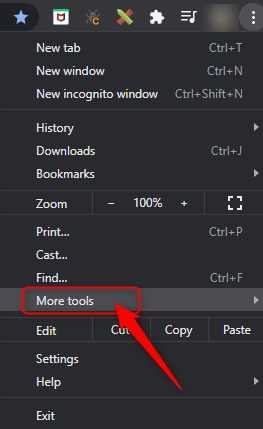
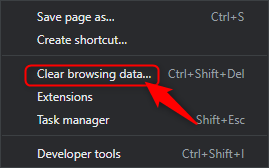

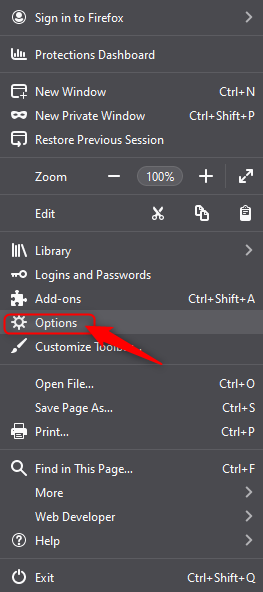
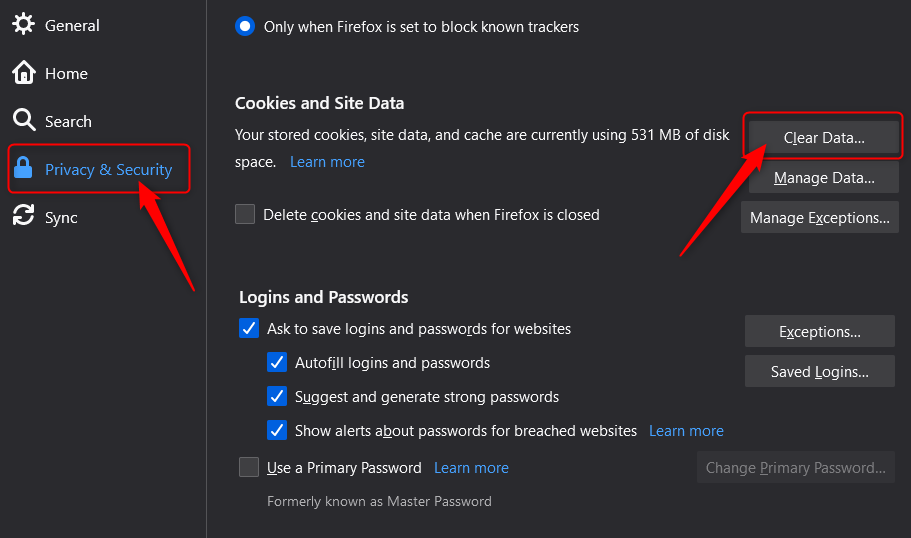
Any WordPress caching plugins you use should provide an easy way to clear your cache. Its as simple as install the plugin and the plugin will do the rest.
WP Super cache generates static html files from your dynamic WordPress blog. After a html file is generated, your webserver will serve that file instead of processing the comparatively heavier and more expensive WordPress PHP scripts.
W3 Total Cache improves the SEO and user experience of your site by increasing website performance and reducing load times by leveraging features like content delivery network CDN integration and the latest best practices.
Making sure your Website is performance is the best it can be!
Knowing how to clear the various caches in the different services and applications is a useful tip for any time you need to do some troubleshooting with your website. That is why Enabling caching on an ongoing basis in these different applications and places is a good way to keep the performance of your WordPress website up to the standards your users expect and deserve.
WordPress shortcodes are an incredibly useful way to customize your site and add new features. Without having to learn any code and code yourself. If you have installed any plugins or made any adjustment to your WordPress site, you have probably come across the term “shortcode”.
To put it simply, a shortcode is a small piece of code, indicated by brackets like [this], that performs a dedicated function on your site. This shortcode can placed about anywhere you would like, and it will add a specific feature to your page, post, or other content. For example, a shortcode can be used to display galleries, payment portals, or videos.
If you are still not completely sure what shortcodes are and how and why they are used within WordPress, Let's take a deep dive into more of the basics, show some examples, and plugins that you can use to expand your shortcode.
Most existing themes and plugins are equipped with their own shortcodes that allow you to tap into additional features or display certain plugins across your site.
Therefore, WordPress is such a power web designing tool. Since it is an open-source platform, it allows you to customize it in any way you would like. But as mentioned previously if you are not a developer and have no coding experience, adding code yourself is not really feasible. Therefore, shortcodes have been developed so you can achieve the same effect, without needing to know any coding.
Shortcodes can be used on any location in your WordPress post or page. That includes widget-ready areas like sidebars, headers, and footers, as well as in the main content.
So, now you have the basics down of what shortcodes are, how do you add them to your WordPress? But first let us see what shortcodes are incorporated into the WordPress:
To implement any of the above, you will need to go to the Default Editor within WordPress to add shortcodes:
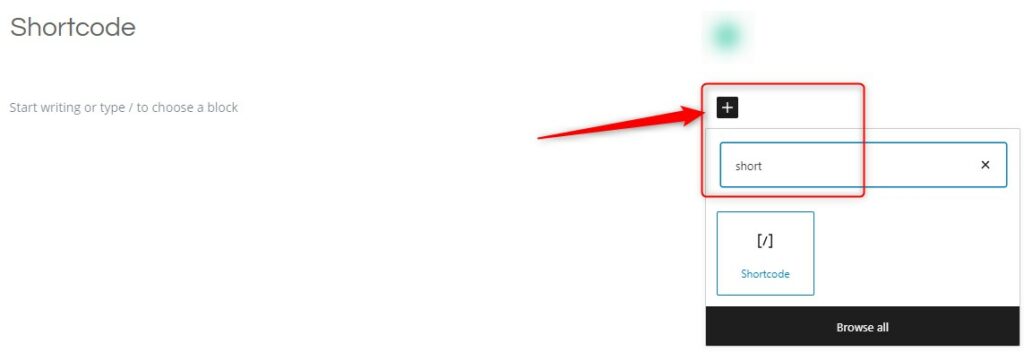
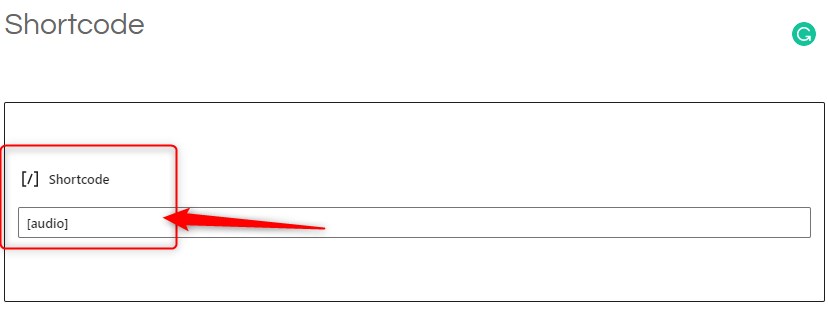
Sometimes you may wish to use the text which usually represents a shortcode in your posts. To do this, you need to escape the shortcode by using two sets of brackets instead of just one. So to display this in your post:
[audio]You would write this:
[[audio]]For shortcodes that have a start and end tag, you only need to scape the very first and very last brackets:
[[audio]] . . . [/audio]]If you are looking to add more shortcode functionality to you site, then using a WordPress shortcode plugin will be your best bet.
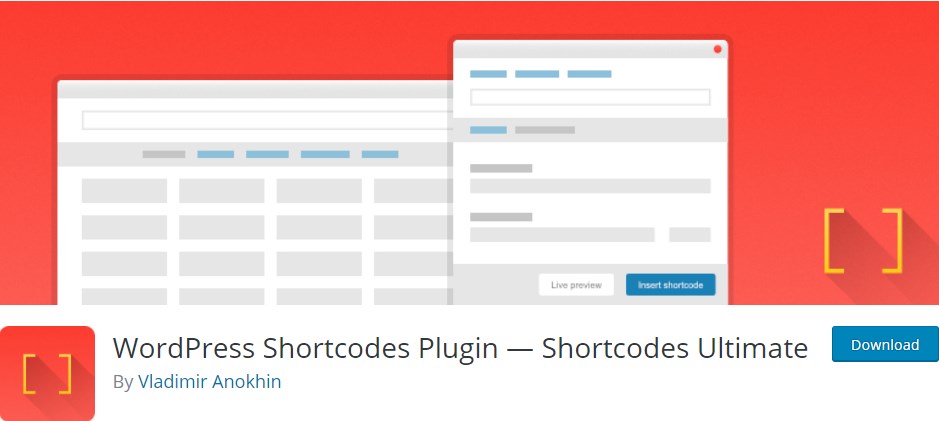
Shortcodes Ultimate is a free plugin for users who want a lot of options and each one easily available with the following features:
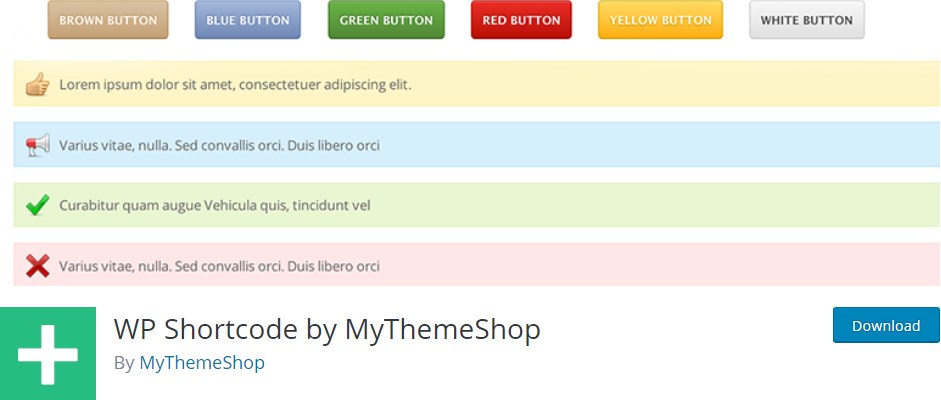
WP Shortcode by Mythemeshop is a lightweight and easy to use shortcode plugin. This plugin will allow you to add functions like:
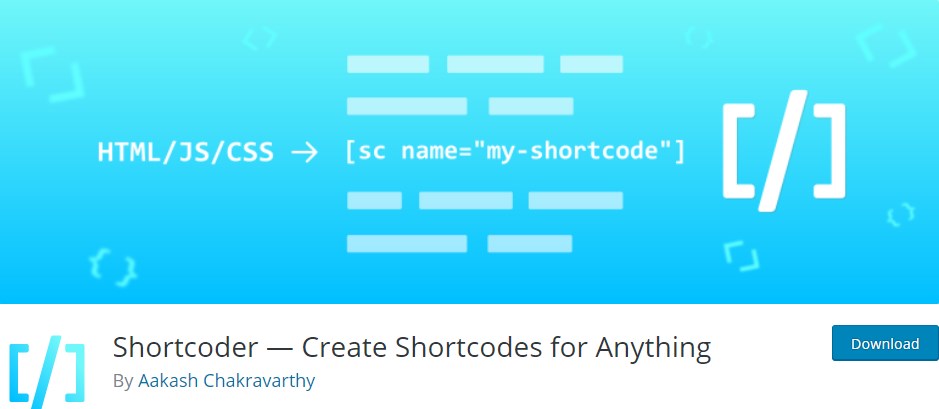
Shortcoder lets WordPress you generate custom shortcodes that contain HTML, CSS and JavaScript. Paste in your code, assign and recognizable name to your new shortcode, then place it anywhere on a page or post. Shortcoder also includes the following features:
Shortcodes are one of the most effective ways to customize your site without know how to code. Without the ability to shortcode you would have to take the time out of your day learning how to code as the original theme would be a nightmare to customize without them.
Here at 2025.hosting-australia.com/ we understand that your time is important. But, taking time to understand how effective features like shortcodes are to help grow your business.
If you have any issues or queries, about shortcodes please contact 2025.hosting-australia.com/ support here!
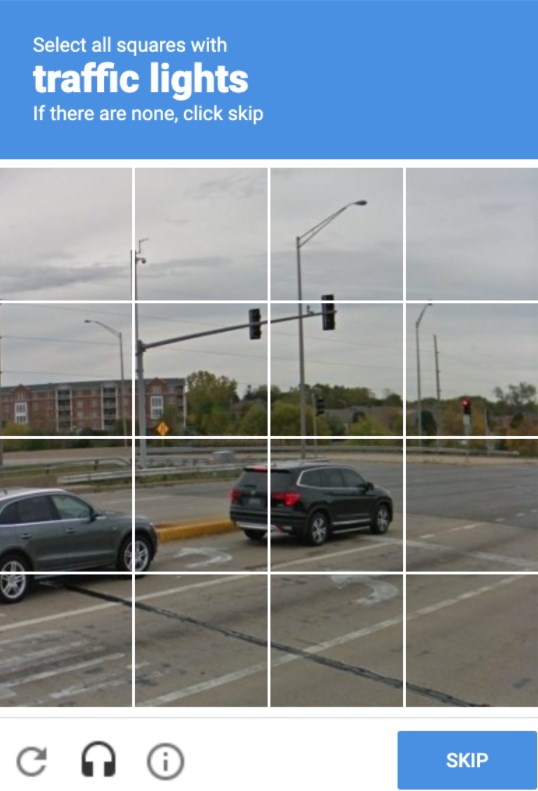
We have all come across them before, and will they annoyed you from time to time, trying to type in the displayed letters and number or finding that third photo of a fire hydrant that looks like a street sign. But, as annoying as these may be! They are there for a reason. These annoying but very important security checks are called a reCAPTCHA test. These are a necessary evil as they are a security system designed to tell humans and computers apart by making the user solve or insert a short series of letters in a box.
You may be unsure whether you require to have one installed on your website. But, no matter how big or small your site is, It is important to have these reCAPTCHA’s on your form early on to prevent any future security risks.
reCAPTCHA is a free service provided by Google that protects your site from malicious attacks and stops your forms from sending spam emails or making transactions via your store with fraudulent details. Without the installation of the one, your client may start receiving a large number of spam emails with inappropriate subjects. This will also cause issues with the bandwidth of your hosting as the increase of bandwidth may take you over your quota and shut down your site. If you do run into this issue, please contact support. reCAPTCHA will stop this issue as the bots installed by hackers on your form pages are unable to complete the form due to the puzzles created. which is why it is the tried-and-true way to stop this problem.
As time goes on hackers work out ways to bypass google's security. Luckily, Google Developers are always on top of updating the reCAPTCHA version to prevent any issues. Different versions allow you to choose which kind of security puzzle is required to be complete.
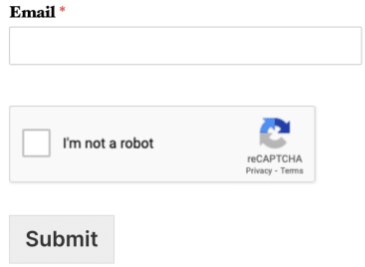
When Invisible reCAPTCHA is used, the user will not see any extra field within your form (no checkbox). A small badge is added to the lower right corner of the screen that links to Google’s terms of service and privacy policy.

Much like Invisible reCAPTCHA, in v3 reCAPTCHA the user will only see a small badge in the lower right corner of the screen that links to Google’s terms of service and privacy policy. However, v3 reCAPTCHA will never display a captcha like the image question shown above. Instead, it runs completely in the background.
Hopefully, this article has piqued your interest and help educate explain how the it is a must.
Adding JavaScript is the perfect option if you wish to add an array of extra elements to your WordPress website. you can do this without Javascript by installing multiple plugins, but doing this will cause the headache and issues of having to manage them all and also the risk of slowing down your website.
The interesting thing about JavaScript is that it is a coding language that instead of running on your server, within the file manager on your cPanel, it runs on the user’s browser. This allows you to adjust your website without the fear of your website loading times being affected.
WordPress will allow you to add JavaScript it, but it can just be a bit touch-and-go as WordPress does not allow you to add JavaScript code snippet directly into your page. If you attempt to add the code onto the page, there is a good chance WordPress will delete it when you have saved your edits. This will cause confusion and frustration when your site no longer works.
We will be covering in this article the easiest and most effective way you can add JavaScript to your website. But first, we need to cover what a script is.
So, you can understand JavaScript even more than just adding it, it is important to cover what a script even is. A script is a pre-made code language that developers and designers use to perform specific actions.
There are multiple different coding languages for writing scripts all with their own syntax’s, these are the most commonly used languages:
Adding a script using the JavaScript language your website will allow you to add various things to your website, for example:
So, how do you add JavaScript onto your page? There are two easy methods, let's go over them now.
To use this method for adding JavaScript code to your whole website, the best option is to download the Insert Headers and Footers plugin.
You can edit and add JavaScript code to your WordPress theme’s header.php or footer.php files within your file manager via cPanel. However, you must also keep in mind that if you do edit your theme files, every time you update your theme, WordPress will override the code deleting your edits.
Using Insert Headers and Footers plugin is an easy workaround for this problem. Even if you update your theme, your headers and footers code will stay put if you use the plugin.
Once you have added the changes to your header or footer, you will see your changes site-wide, even if you update your WordPress theme, this plugin will save your JavaScript code information, keeping your JavaScript changes active.
If you do not just want your JavaScript to be displayed on your headers and footers, but instead add it to a post or page. You will want to install the Code Embed plugin.
Below you will find the steps for adding JavaScript using Code Embed plugin:

Everyone has googled or searched for any and everything on all the various search engines and browsers. You may have wondered what is putting certain searches above others? These sites are utilizing the power of Search Engine Optimization (SEO).
SEO Stands for ‘Search Engine Optimization’. It is the practice of optimizing, improving the quality and quantity of website traffic of a website to make them reach a high position in search results of search engines such as ecosia, google, yahoo, bing and all of the other various search engines out there. SEO focuses on improving the rankings in a nonpaid search result.
There are steps to SEO just like everything else. These are quick steps y
ou can take to optimize your website for search engines to help push traffic to your website.
If you have a plumbing, book, dancing, or boating website these are all different products, but they all have something in common and that is a keyword. Deciding which keywords, you want to rank is especially important. You need to find keywords that will send targeted traffic to your site and enough search volume to be worth your efforts.
 There are plenty of helpful plugins-tools that help you find the correct keyword for your site.
Here are some of the top keyword tools to help your keyword research:
1. moz.com
2. uberSuggest
3. SEMrush
4. Google Keyword Planner
The meta title tag & meta description is an important HTML tag, it tells search engines what your webpage is about. It also an easy way for the user to see your website to help it stand out from the rest.
You can use this to your advantage and optimize your title tag and meta description making sure that you include your chosen keyword as detailed in the previous step.
Another important factor when ranking on search engines is determined by a website’s quality of inbound links to the site. A link from another website helps rank your website and shows that your site contains quality content. Getting links to your site, shows search engines that you are trustworthy and that you are creating content that people want to see.
There are many factors about links that search engines consider including.
What I mean by user experience is creating a website that will work on any device e.g.: mobile, tablet, desktop etc. Be sure that your site is easy to use and has intuitive navigation so that people can quickly find the content they are looking for.
Websites should load quickly, as slow loading sites frustrate users and cause them to leave, simply if you have users leave your website this causes your rankings to drop. This goes along with having annoying pop-ups and advertisements driving your users away from the site.
These are just some of the first simple steps for understanding SEO if you wish to keep learning about SEO we will be uploading weekly an SEO blog to help you better understand everything about SEO.
[et_pb_section fb_built="1" admin_label="section" _builder_version="3.22"][et_pb_row admin_label="row" _builder_version="3.25" background_size="initial" background_position="top_left" background_repeat="repeat"][et_pb_column type="4_4" _builder_version="3.25" custom_padding="|||" custom_padding__hover="|||"][et_pb_text admin_label="Text" _builder_version="4.6.6" background_size="initial" background_position="top_left" background_repeat="repeat"]
You've never built a WordPress website like this before. Divi is more than just a WordPress theme, it's a completely new website building platform that replaces the standard WordPress post editor with a vastly superior visual editor. It can be enjoyed by design professionals and newcomers alike, giving you the power to create spectacular designs with surprising ease and efficiency.
That’s what the people at DIVI say. We’ve heard it before. Visual page builders have been around for a long time and the demo videos look great but then you try to use them in the real world and the overheads and load speed are unworkable so you save no time.
That was then… NOW its different. There are a few page builders that all work at varying levels of ease and power. DIVI is one of the better ones. In fact its one of the Best.
The closest competition to DIVI are Beaver Builder and Elementor. Each has their own pluses and minuses but its basically a matter of opinion. Our opinion is DIVI is the one for us. This was based on the fact the DIVI was the first that we found that included a Front End editor.
This makes it easy for the novice user to design and build their own pages. You can still edit pages via the back end using DIVI but its not visual or as intuitive. So the Front End editor on any page builder should be the deal break these days. If it doesn’t have one what’s the point?
The most powerful feature of DIVI is that once you have installed the DIVI theme (includes DIVI builder) You can then build your site into any design you choose. You can build it to look like almost any site you want or simply use one of the inbuilt Layouts. Also the choice of free and commercial themes available from DIVI designers allows you a level of flexibility not seen before.
DIVI’s front end features and drag and drop functions allows you to build a site in a fraction of the time it used to. If something doesn’t fit just move it. Shorter time frames means you can build a website for a lot less than before. Sites no longer need to cost you Thousands of dollars to build a site whether you build it yourself or use a professional web developer.
[/et_pb_text][et_pb_video src="http://hosting-australia.com/wp-content/uploads/2020/10/build.mp4" _builder_version="4.6.6" _module_preset="default" hover_enabled="0" sticky_enabled="0"][/et_pb_video][et_pb_text _builder_version="4.6.6" _module_preset="default" hover_enabled="0" sticky_enabled="0"]
Article video courtesy of elegantthemes.com
[/et_pb_text][et_pb_text admin_label="Text" _builder_version="4.6.6" background_size="initial" background_position="top_left" background_repeat="repeat"]
Drag & Drop BuildingAdd, delete and move elements around on the front end of your website. No coding and no confusing back end options. | Inline Text EditingJust click and start typing! Editing your page has never been this easy. Draft pages on the front end and see the results instantly as you type. |
True Visual EditingDesign your page in real time and see the results instantly. Create and customize your pages using intuitive visual controls. | Save Your DesignsSave and manage unlimited custom designs. Easily re-use them to jump-start new pages. Create advanced design systems and streamline your work flow. |
Custom CSS ControlDevelopers can easily combine Divi's visual design controls with their own custom CSS. Divi's interface is simple yet not limiting. | Global Elements & StylesManage your entire website's design using global elements and website-wide design settings. Divi isn't just a page builder, it's a website design system. |
Responsive EditingBuilding beautiful responsive websites is easy. Divi is responsive by nature and also gives you full control over how your website looks on mobile devices. | Undo, Redo, & RevisionsDivi works like a modern software application. Easily undo, redo and travel through your entire editing history. If you make a mistake, Divi has your back. |
Design Options GaloreEnjoy dozens of unique page elements and thousands of design options. Divi gives you full design control over your website.
|
|
[/et_pb_text][/et_pb_column][/et_pb_row][/et_pb_section]
[et_pb_section fb_built="1" _builder_version="3.22"][et_pb_row _builder_version="3.25" background_size="initial" background_position="top_left" background_repeat="repeat"][et_pb_column type="4_4" _builder_version="3.25" custom_padding="|||" custom_padding__hover="|||"][et_pb_text _builder_version="3.27.4" background_size="initial" background_position="top_left" background_repeat="repeat"]While looking a bit daunting, code is really not that difficult of a language to learn as you may think, starting with the basics may seem obvious but they are often really simple and doing so is the first step to mastering any computer language.
In this day and age there are seemingly infinite free online sources available should you be interested in learning how to code. It has never been easier to pick up than it is now.
One place I recommend is a site called w3schools.com.
It has tonnes of tutorials, guides, quizzes and walkthroughs for all the major styles of code and can quickly assist you in becoming well versed in the fine arts of HTML or JavaScript and many other written languages. Did I mention it was free?
There are also plenty of useful YouTube channels if you’re struggling a bit to teach yourself, Khan Academy has a few channels with endless amounts of informative and detailed videos from the basic level to much more advanced techniques and skills. Their computing channel specific to computer science and code is where you’d find what you’re looking for but their main channel, Khan Academy, covers way more than just that, math, science and economics to name a few things.
If you’re looking for a more engaging style of learning though, codecombat.com is actually a fantasy style RPG game that helps teach code, it’s definitely a more fun way of learning and I’m not going to lie. I spent probably a bit too long playing while testing it out.
In summary, code is all around you and more accessible than ever before. Once you get into it and can begin to let your creative juices flow it’s can be quite fun and fulfilling too, although at times frustrating but we don’t talk about that.
[/et_pb_text][/et_pb_column][/et_pb_row][/et_pb_section]



