
A CNAME record is a DNS record that allows you to associate one name with another name. When you create a CNAME record, you can point your domain to another record — or alias — that has the same name as itself.
The purpose of the CNAME record is to provide a way for you to leverage a domain name (to which you have the rights) for purposes that you do not own. For example, you may have the rights to build a site on http://hosting-australia.com, but you do not own the name itself. You can create a CNAME record pointing the domain name to your domain. The name used for the CNAME record (e.g. http://au.hosting-australia.com) is the alias (or target) for the domain name.
A common misunderstanding is that a CNAME record must always resolve to the same website as the domain it points to, although this isn't true. The CNAME record merely directs the client to the root domain's IP address. The web server will still handle the URL properly once the client reaches that IP address. For example, au.hosting-australia.com might have a CNAME that links to 2025.hosting-australia.com/, pointing the client to the IP address of 2025.hosting-australia.com/. When the client connects to that IP address, the webserver checks the URL and sees that it is au.hosting-australia.com, thus the blog page is delivered instead of the home page.
| au.hosting-australia.com | TTL | Type | value: |
| @ | 3600 | CNAME | is an alias of au.hosting-australia.com |
You can see that au.hosting-australia.com points to 2025.hosting-australia.com/ in this case, and assuming that it is based on our example, We know that the IP address 151.139.128.10 will eventually resolve to a record.
It's impractical to point a CNAME record to another CNAME record because it needs numerous DNS lookups before the domain can be loaded, slowing down the user experience, but it's feasible. For example, au.hosting-australia.com may have a CNAME record that linked to www.hosting-australia.com's CNAME record, which then pointed to the A record for 2025.hosting-australia.com/.
| au.hosting-australia.com | TTL | Type | value: |
| @ | 3600 | CNAME | is an alias of www.hosting-australia.com |
This option adds a step to the DNS lookup process that should be avoided if at all possible. Instead, both au. 2025.hosting-australia.com/ and www. 2025.hosting-australia.com/ 's CNAME records should link to 2025.hosting-australia.com/.
MX and NS records must point to an A record (for IPv4) or a AAAA record instead of a CNAME record (for IPv6). A mail exchange record (MX record) is a record that routes messages to a certain mail server. An NS record is a 'name server' record that specifies which DNS server for a domain is authoritative.
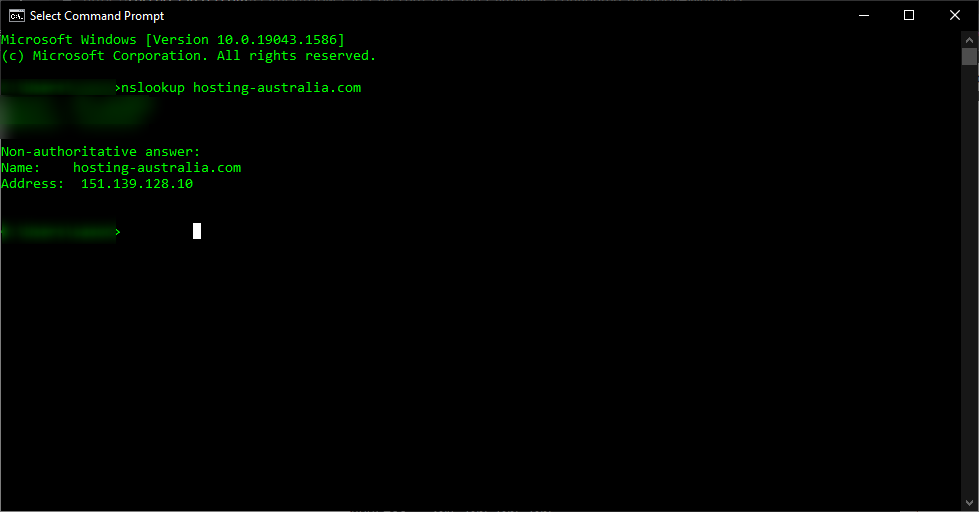
A domain name system (DNS) is a set of guidelines for mapping Internet Protocol (IP) addresses to domain names. A DNS A record is the resource record that maps an IPv4 address to a host name. The DNS server stores this information and can answer queries from other nodes on the Internet that are trying to resolve the IP address. This way, you don't have to memorize IP addresses for individual websites or servers on the internet. These A records are stored in a database called Zonefile.
There are different types of DNS records, and each one has a different function. It's important to know these records. But, this article will be focusing on the most common DNS record - The A record.
An A record is a mapping between a domain name and the IP address of the computer that hosts the domain. An A record is used to find the IP address of a computer connected to the internet using a domain name.
It’s quite simple, The A in A record stands for Address. The address you type every time you visit a website, send an email, connect to Twitter or Facebook, or do nearly anything else on the Internet is a collection of words connected by dots.
For example, to get our site Hosting Australia website, type www.hosting-australia.com into your browser. There is an A record on our name server that corresponds to the IP address 151.139.128.10. This implies that a request to www.hosting-australia.com from your browser gets forwarded to the server with the IP address 151.139.128.10.
A records are the most basic sort of DNS record, and they are one of the most commonly used records in DNS servers.
A records can be used for a variety of purposes, including providing redundancy and fallbacks by employing numerous A records for the same domain. Additionally, many names could point to the same IP address, in which case each would have its own A record.
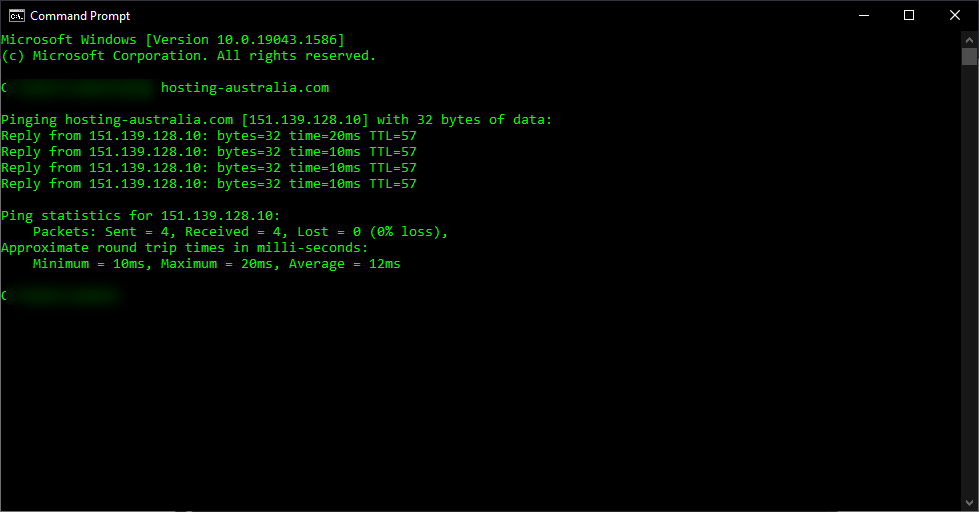
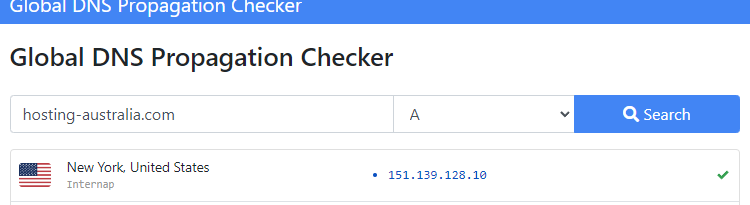
The A record is essential to the functioning of the Internet since it maps a domain name to an IP address for devices connected to the Internet.
With the rise of email, we’ve all become accustomed to using a webpage to check our email. After all, you can't exactly turn your phone upside down and shake it to see if you've received an email.
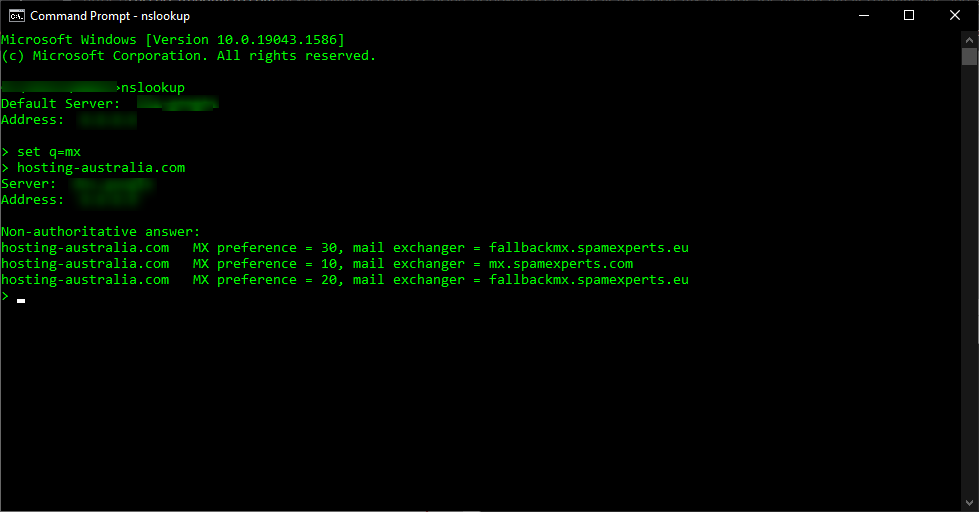
This is where MX records come in. MX stands for mail exchange and an MX record is the address that tells other computers how to deliver emails sent to your domain name. Here's what you need to know about DNS MX records and how they work, so you can make sure your emails are being delivered correctly.
Email is directed to a mail server using a DNS'mail exchange' (MX) entry. As per the Simple Mail Transfer Protocol, the MX record specifies how email messages should be delivered (SMTP, the standard protocol for all emails). An MX record, like a CNAME record, must always point to a different domain such as mail. or the Google MX records listed below

For these MX records, the 'priority' numbers preceding the domains indicate preference; the lower the 'priority' value, the better. Because 10 is less than 20, the server will always attempt mailhost1 first. The server will fall back to mailhost2 in the event of a message send failure.
First, you will need to have access to your cPanel. If you are not sure how to access your cPanel, CLICK HERE.
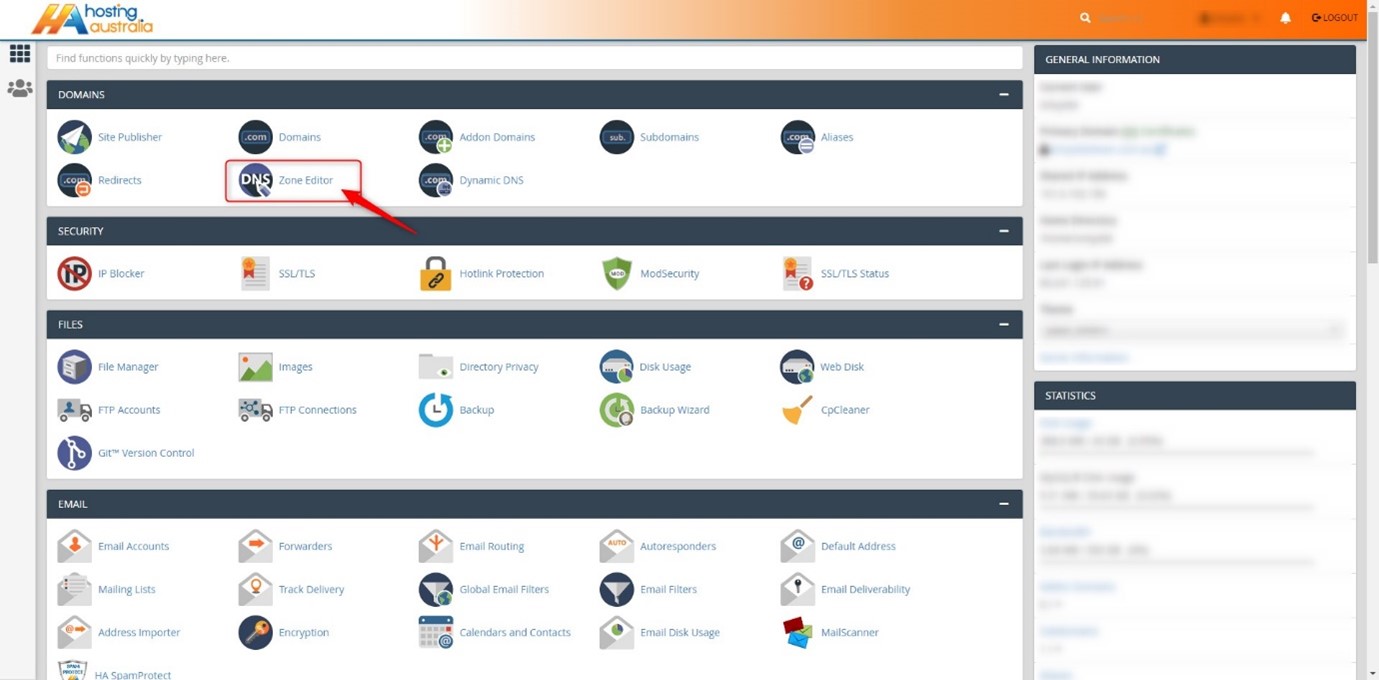
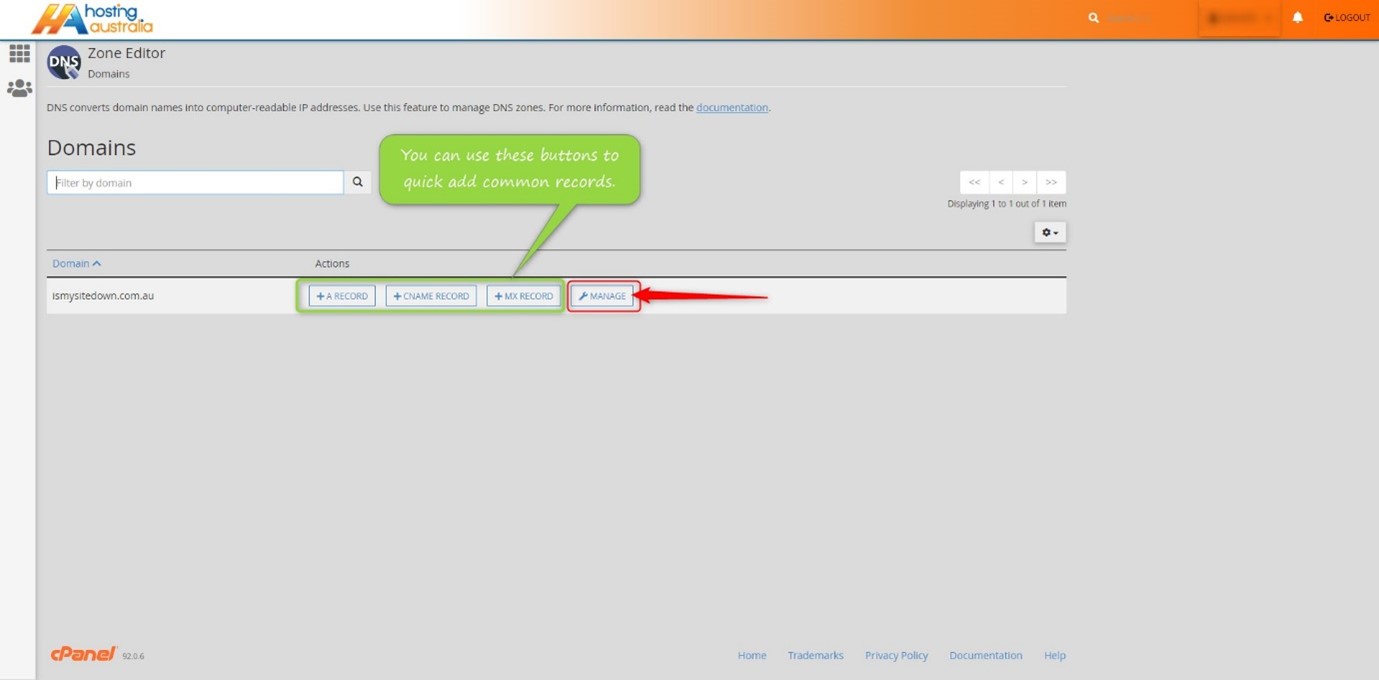
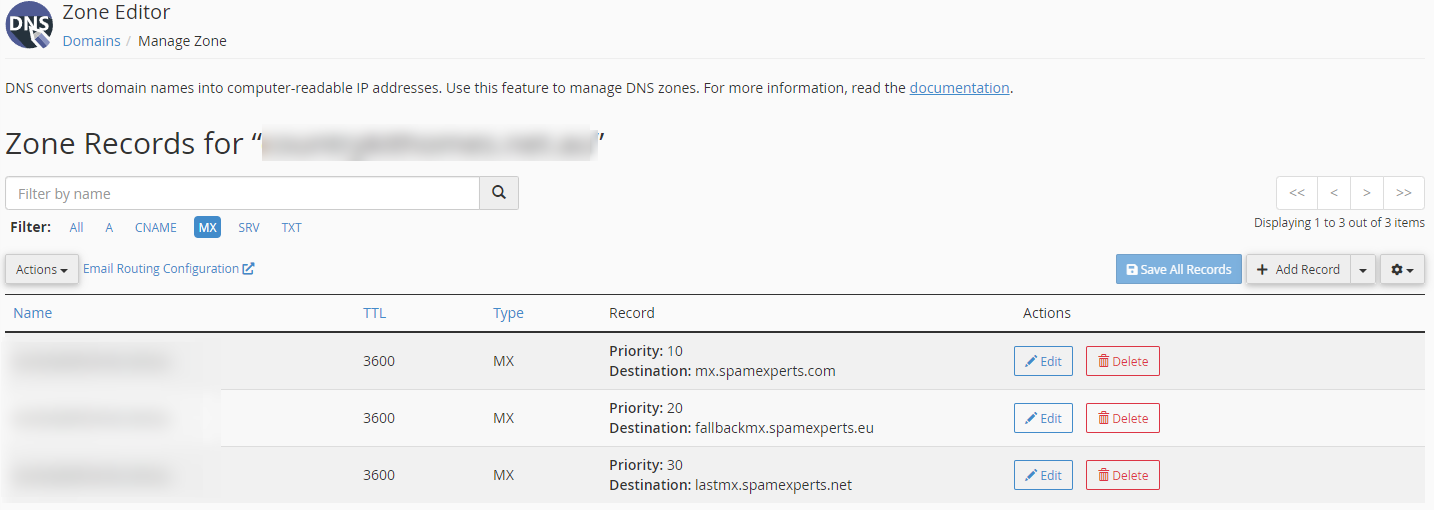
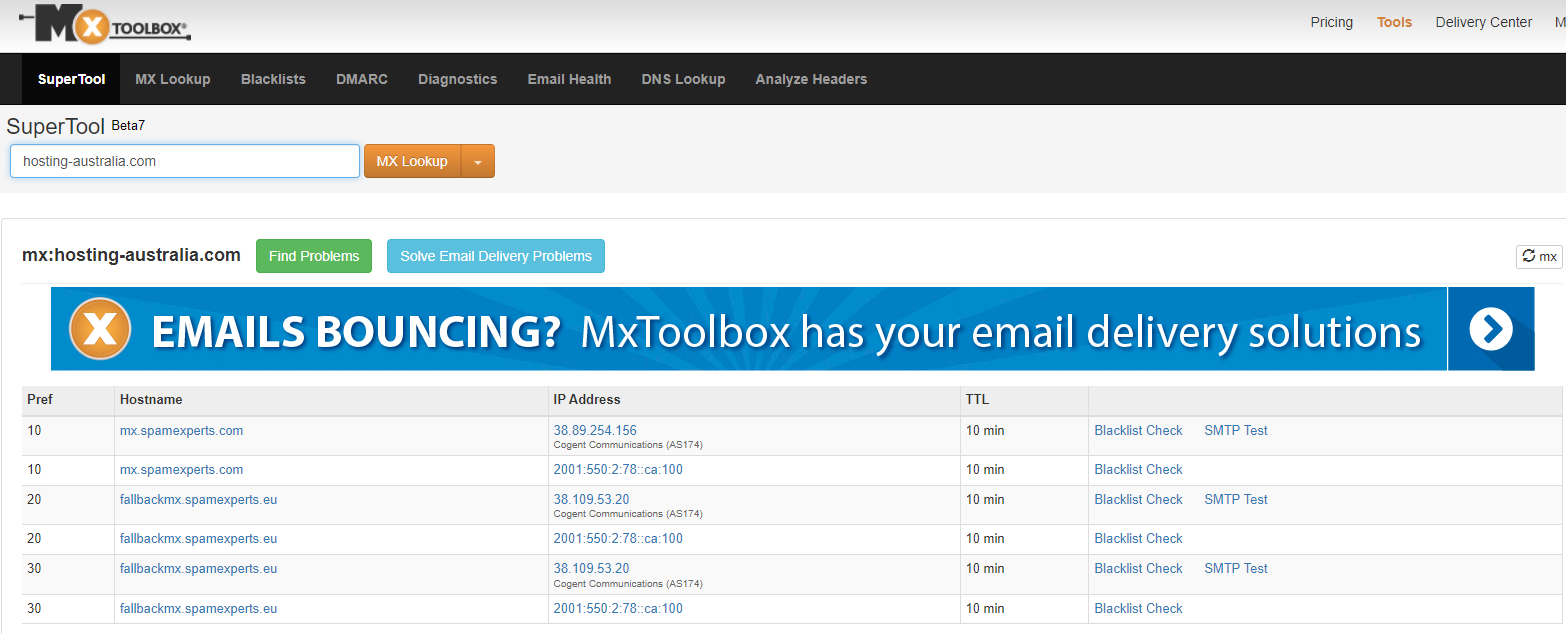
There are a lot of moving parts when it comes to managing your domain name. One of the most important things to have in order is an MX record. This is a record that controls how your email is delivered to your inbox. If you have a domain name, you have an MX record.
It's important that you know if your MX record is working correctly and if it's not, how to fix it. This is one of the simplest ways to keep your email flowing smoothly.
Have you ever wondered what an IP address is? An IP address is like your internet phone number. This number lets your computer talk to other computers over the internet. IP addresses usually look something like this: 192.168.1.1
If you want to visit a website, type in the web address (such as www.google.com) into your browser, and then hit enter to go there, your computer will contact another computer with the address of 192.168.1.1 and ask it for instructions on how to get there from where it is now.
a unique identifier is assigned to each machine in a network. Computers utilise unique identification to convey data to specific computers on a network, just like you would address a letter to send in the mail. The TCP/IP protocol is the standard for network communication in most networks today, including all computers on the internet. The IP address is a unique identifier for a computer in the TCP/IP protocol.
IP addresses are divided into two categories: IP Version 4 (IPv4) and IP Version 6 (IPv6) (IPv6). IPv4 addresses are used by all computers using IP addresses, and most also utilise the new IPv6 address scheme. The following are the distinctions between the two types of addresses:
IPv4 uses 32 binary bits to generate a single network address. Four integers separated by dots make up an IPv4 address. Each number is the decimal (base-10) representation of an octet, which is an eight-digit binary (base-2) number. Consider the following scenario: 14.203.8.145
To produce a single unique address on the network, IPv6 uses 128 binary bits. An IPv6 address is composed of eight groups of hexadecimal (base-16) numbers separated by colons, such as 2001:0db8:85a3:0000:0000:8a2e:0370:7334. To save space, groups of numbers with all zeros are frequently deleted, leaving a colon separator to highlight the gap (as in 2001:cdba::0370:7334).
The internet wasn't the commercial phenomenon it is now at the time of IPv4 addressing, and most networks were private and isolated from other networks around the world. With only 32 bits to establish a unique internet address when the internet first took off, there were fears that we'd run out of IP addresses before long. There are 232 potential IPv4 combinations, resulting in just over 4.3 billion distinct addresses. IPv6 increased the number of available addresses to a stress-relieving 2,128. Later, we'll look at how to decipher your computer's IPv4 or IPv6 addresses in more detail.
A dynamic or static IP address can exist. A static address is one that is assigned indefinitely. Internet service providers rarely assign static IP addresses. Static IPs can be assigned to devices on your local network, but doing so without a solid understanding of TCP/IP might lead to network problems. The most popular are dynamic addresses. The Dynamic Host Configuration Protocol (DHCP) is a network service that assigns them. Network gear, such as routers or dedicated DHCP servers, are commonly used to run DHCP.
A leasing system is used to issue dynamic IP addresses, which means the IP address is only operational for a certain time. The computer will automatically request a new lease if the current one expires. This may result in the computer receiving a new IP address as well, particularly if the computer was unplugged from the network between leases. Unless the computer alerts the user about a network IP address conflict, this process is normally invisible to the user (two computers with the same IP address). A conflict of address is uncommon, and today's technology usually resolves the issue automatically.
An IP address that does not change is known as a static IP address. When your device is given a static IP address, it usually stays that way until it is retired, or your network architecture changes. Servers and other key equipment typically utilise static IP addresses.
Internet Service Providers (ISPs) assign static IP addresses (ISPs). Depending on the terms of your service agreement, your ISP may or may not assign you a static IP address. Your options will be discussed later, but for now, except that a static IP address will increase the cost of your ISP contract.
A static IP address might be IPv4 or IPv6; the crucial quality is static in this situation. Every piece of networked equipment we have may one day have a unique static IPv6 address. We haven't arrived yet. For the time being, permanent addresses are normally assigned to static IPv4 addresses.
There are many reasons that you might need to have an IP address. For example, if you have an online business, you will need an IP address in order to connect to the internet. You can purchase one from your internet provider, or if you are looking to save some money, you can rent one. If you are running a business, it is important to know how IP addresses work, and how they can help you reach your goals.
An IP address is a unique number that distinguishes your computer on the internet. An IP address is separated by periods and is expressed as a set of four numbers – an example address might be 192.168.111.25.
Each number in the set can range from 0 to 255. So, the full IP addressing range goes from 0.0.0.0 to 255.255.255.255. Every device connected to the internet has its own IP address, which enables data packets to
be routed along with networks and prevents duplication of addresses.
IP addresses are not generated at random. The Internet Assigned Numbers Authority (IANA), a part of the Internet Corporation for Assigned Names and Numbers, creates, and assigns them mathematically (ICANN). ICANN is a non-profit organisation based in the United States that was founded in 1998 to assist keep the internet secure and accessible to everyone. Every time someone registers a domain name on the internet, they do so through a domain name registrar, who pays ICANN a nominal fee to do so.
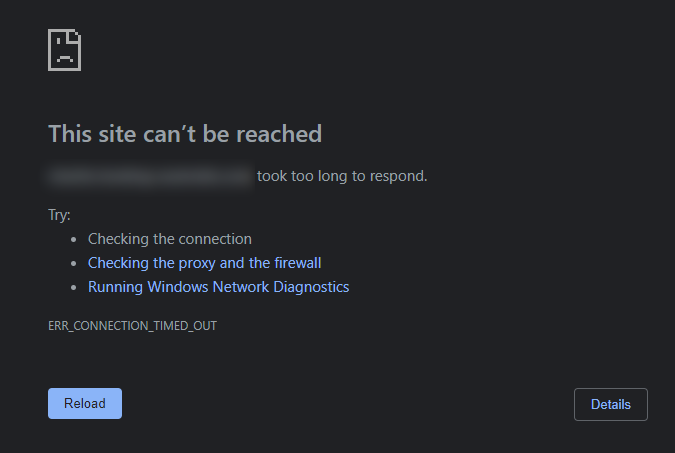
Hosting Australia servers have security features in place to protect and prevent themselves from malicious attacks and block the IP address.
An IP blacklist may be caused by the following:
You may have had your IP blacklisted if you are unable to receive emails or access your website. If you believe your IP address has been blacklisted, please contact support at (07) 4914 2433 or via our ticketing system with your IP address so that we can unblock it and investigate why it was blacklisted.
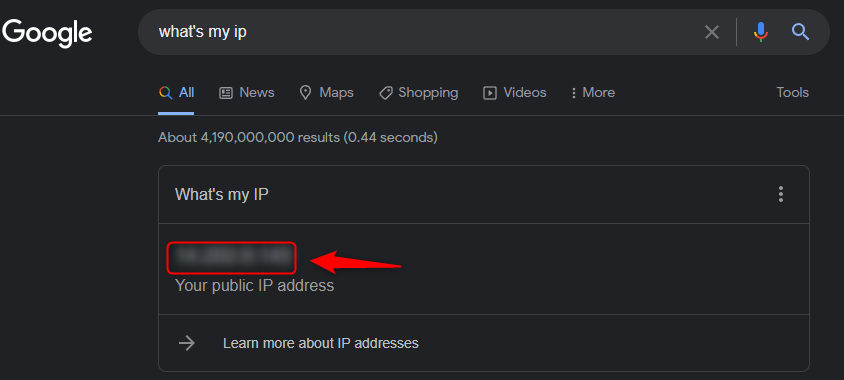
If you need to know our IP address for support, go to whatsmyip.org and it will be displayed at the top of the page, or just Google – What's my IP and it will be displayed at the top of the results.
There are methods you can use to unblock your IP address without contacting Hosting Australia support – You can follow our step-by-step guide HERE!
Hosting Australia's support team will explain why the IP was blacklisted, why it happened, and the best way to resolve the problem. If the IP has been blacklisted because of a failed IMAP login, for example. Support will notify you of the account that is causing the problem and advise you that the account's password must be updated on all devices, or the block will occur again.
Hosting Australia will temporarily whitelist your IP, this prevents your IP from being blocked again while trying to correct the problem devices. If an IP address is whitelisted indefinitely and a device or account is hacked, it would allow the hacker complete control over the server, causing a slew of problems for all accounts and the server's integrity.
So, if you can't access your emails or your website, it's possible that your IP has been blacklisted, and you'll need to contact support to find out why and what you can do to prevent it from occurring again.
It's hard to believe that the holiday season is already here! For a lot of us, it means a time of festivities and celebrations with friends and family. It also means it’s time to get your website ready for the holiday season. There are a few things you need to do before your site goes live to ensure your business stays at the top of its game. Check out these four tips for getting your website ready for the holidays.
It can be easy to get busy and not update your site for a while. But now is the perfect time to ensure everything is up-to-date, especially before the holiday season. There are many new things happening in digital marketing, like changes in Google's algorithm, so make sure you incorporate those updates on your website.
It might also be a good time to think about refreshing your branding or updating your images. You want to make sure that your site looks current and up to date with what's happening in the digital world.
What better time to have a broken link than during the busiest time of year? It sounds counterintuitive, but it happens. Even if your website is updated monthly, there's a chance that a link has been broken for a while and you just didn't notice.
One way to check for broken links is to do an internal crawl of your site. This involves navigating through all the pages on your website and checking to see if any of them are no longer live or lead back to 404 pages.
If you're not sure how to do this, let Google be your guide! You can use their free tool Fetch as Googlebot on Webmaster Central. It will tell you what pages Google sees and whether they're working properly for it.
This is the most obvious of the four steps. But it’s also one of the most important. Add some holiday decor to your website so that it matches the season. This doesn’t have to be anything too fancy. A simple banner or Christmas tree will do!
The holidays are a time for family and friends. So, make sure to add some images of people enjoying time with one another on your site, too! This will also create an emotional connection between your business and your customers.
Your site is your company's virtual storefront. As such, you're always looking for ways to increase traffic and conversions. The more people visit your site, the more money your business will make. Cyber threats are a major concern for businesses during the holiday season due to the increased traffic to their site.
What can you do to protect yourself from cyber threats?
Need assistance in sprucing up your website to reflect the festive season? Our web development team is always happy to help!
The internet is a big place with billions and billions of web pages and databases. As the only public forum on the web, it's important that we all understand how to use and create databases.
Database management systems help you organize and analyze huge amounts of data. They're what powers search engines, email services, social media platforms, and so much more. If you want to be an informed web user today, you need to know how to use them as well! Read on for some quick facts on databases and why they matter.
Databases are how you organize and manage data. The power many of the internet's most popular services, from Google to Facebook to 2025.hosting-australia.com/. But databases aren't just important on the web: They can even help you at home.
Let's say you want to track the history of customer entries i.e.: Products, orders, and countries, but don't have a whole lot of time on your hands. You could use a database to do it for you! Database software is powerful enough to handle all sorts of projects.
If you want more information about databases, keep reading! We'll cover what they are, how they work, and some best practices for using them below.
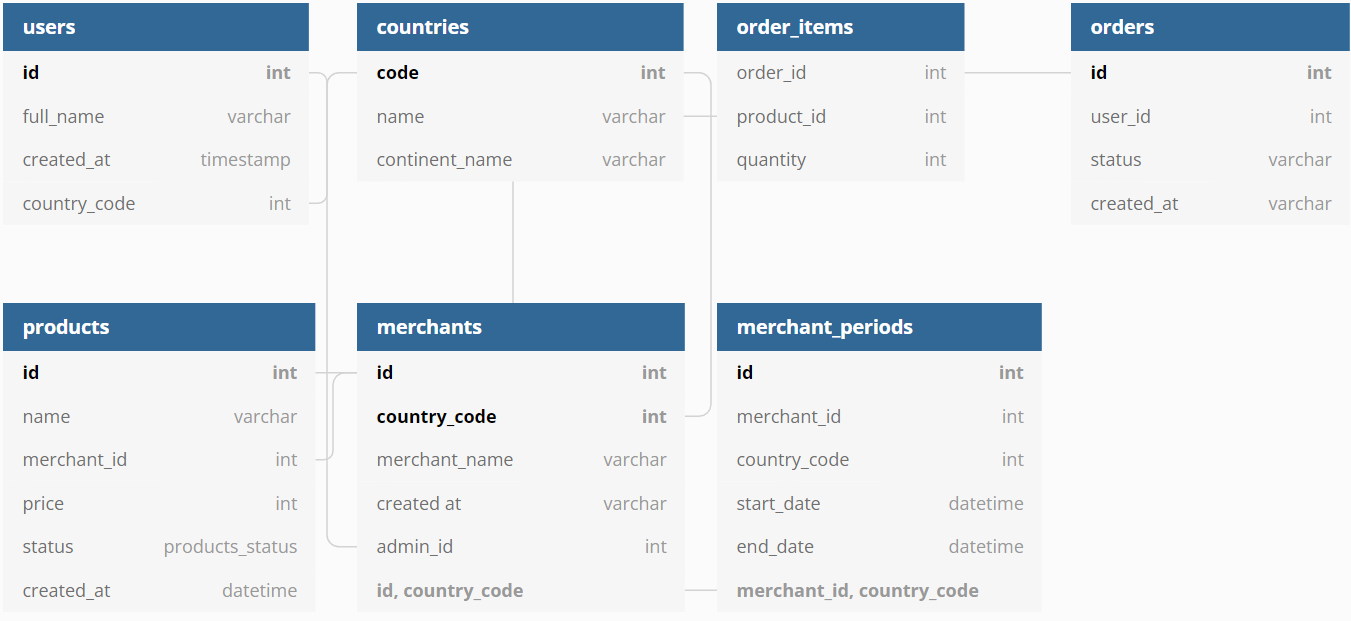
A database is a collection of data organized in an accessible way. They can be either structured or unstructured, but the goal of database management systems is to make the data easier to find and analyze.
This means that databases are organized information (ordered by categories, like articles or books) that can be searched for specific details. For example, if you want to find out how many people were born in your state this year, you could search for it on a database.
Databases can also be used to track information over time. They're what powers many popular websites, like Instagram or Google Maps - they record where you go and what you do so it's easy for them to show relevant ads to you when you log in again.
Database management systems were invented in the 1970s to help with computer storage and retrieval. They're a lot like a filing cabinet: they store information in a very organized way, with a specific table of contents.
Databases are also different from web servers, which store lots of content on the internet. Web servers make it possible for us to visit websites and use software without downloading all the data. Databases limit themselves to storing information from one area of the web, usually in an online form with a name and keyword indexing system. These databases can also be accessed by other programs through an API (Application Programming Interface). This is where programming languages such as SQL and PHP, previously mentioned in my other posts are used to communicate with the website pages to the database.
Database management systems are an essential tool for web users today. Not only do they power many of the most popular sites based on how much data is being stored, but they also make it possible for us to access and store information in a way that's easily accessed.
If you want your business to succeed in the 21st century, you need a good database system in place. You won't find success with a digital marketing strategy without them!
SQL is a programming language that lets you extract and manipulate data from a database. It's one of the oldest programming languages, but it's still widely used today. It has many uses. You can use it to create tables, run queries, define relationships between tables, and organize data in your database. In this article, we'll explore what it is and how it works. We'll also see some examples of SQL code so you can get familiar with the language. Keep reading to learn more about this important topic for website owners!
SQL stands for Structured Query Language. It's a programming language that's been used since the 1970s and is still widely used today. It has many uses, from creating tables to running queries to organizing data in your database. In this article, we'll explore how it works and some examples of SQL code!
The programming language designed to extract data from a database. The language is composed of four basic operations: SELECT, INSERT, UPDATE, and DELETE.
SELECT lets you pull data from the database. For example, you could use a SELECT operation to get a list of all clients at a company.
INSERT lets you add new data to the database.
UPDATE allows you to change the values in an existing row in the database. This can be useful if, for example, you need to update someone's phone number or email address on record with your business.
DELETE lets you remove rows from your database table entirely. You can think of it as "erasing" information from your table.




SQL is an important language for web developers because it lets them interact with databases.
It's also important for website owners to know about SQL for two reasons: You can use it to get information from your database and you can use it to create tables and organize data in your database.
Without the use of SQL, you would not be able to utilize websites how you do day today.
SQL is a crucial, structured, and object-oriented programming language. It is used by developers who need to manipulate data for websites. Developers use it to create tables, run queries, define relationships between tables, and organize data in your database.
A programmer that specializes in SQL is called a "DBA" or "database administrator." The DBA is responsible for all the actions related to building and managing databases. The DBA is also responsible for the security of your information.
You'll also often see SQL features in other languages like Python or PHP which I have spoken about previously in another blog article.
SQL is one of the most important skills for anyone in web development. There are many different ways to use SQL, and this article has given you some examples to get you started.
In summary, you can use SQL to extract data from your database, manipulate it in various ways, and use it again in reports or other analyses. SQL is an essential tool for anyone working in website design or development and the majority of websites would not be possible without the use of SQL.

Simply put, addon domains are different domains that point to the same site. They're often used by businesses for branding purposes or as an extra domain for a specific geographic location. A subdomain is a secondary domain that's tied to the parent domain and has its own webspace on the server. It may also be used as another way to access a site like adding another level of navigation for users who might not know how to spell the main domain name. An alias domain is essentially an additional address or URL pointing to one website. Alias domains can be used for marketing and promotional purposes and they're sometimes called vanity URLs.
A fully functional addon domain can be created from your cPanel. This addon domain is a new, distinct website that is housed in a new folder on your account so that you may manage several domains from a single dashboard. You may set up email addresses, forwarders, and other features for an addon domain, in the same manner, you can for a major (main) domain on the account.
When you create an Addon Domain the following will also be created.
The following routes (URLs) would be true if the primary domain was 'abc.com' and the Addon Domain 'xyz.com' was assigned to the folder 'XYZ:
A subdomain is a new domain that's related to a domain. For example, we know that this site exists as Domain A, but if someone were to search for Domain A, the results for Domain A would appear under Domain B, and so on. A subdomain is not tied to a specific domain, but it's sometimes referred to as an external domain. A subdomain is most commonly used for SEO purposes.
For example:
xyz.abc.com
In this example, ‘xyz' is the subdomain, ‘abc' is the primary domain, and ‘.com' is the top level domain in this example (TLD). You can use any text as your subdomain, as long as it's simple to type and remember.
There are multiple reasons why you would use a subdomain.
A subdomain is most commonly used to create a testing or staging version of a website. Developers frequently test new plugins and updates on a subdomain staging site before making them public.
Also, subdomains are also commonly used to create an online eCommerce store. Because eCommerce sites are often more difficult to set up, businesses often prefer a distinct subdomain to handle transactions.
You also find businesses use subdomains for their mobile websites (m.abc.com), location-specific sites (aus.abc.com), and creating sub-sections of the website.
You can install WordPress on your subdomain and have it function independently of your main website.
Subdomains such as ‘customer.abc.com.au,' ‘admin.abc.com.au,' and others can be used to serve a specific group of users on your site. Users can create custom websites using website builder platforms such as WordPress.com, Blogger.com, and others.
An alias domain is used as an address or URL for your website. It's often abbreviated to Alias. Instead of referring to your primary website, an alias domain has an address that points to a different website. Typically, you can register the domain using the service provider and then assign it to your site.
All three of these configurations can have very different benefits, so make sure to find the configuration that best suits your business needs.
You can create these domains via your cPanel. If you would like more information on how to access your cPanel, please visit our HA knowledgebase article.
If you require any more assistance. You can contact support via our ticketing system or (07) 4914 2433
Bandwidth is a measure of how much data you can transfer to or from a single computer. When we say that a website has 1000 bps, what we’re actually saying is that your site can transmit data at a rate of 1000 bps. So for instance, if your site can only transmit at the rate of 100 bps (because it has no bandwidth available), it would take 100 milliseconds to load that webpage. What are bytes? Bits are small numbers of data, most commonly used in computing. BitTorrent, for example, is a peer-to-peer file-sharing protocol that sends data using a stream of data called bits. Websites transmit data through a variety of methods. A typical example is HTTP. HTTP sends data through TCP, or Transmit TCP Protocol.
One of the best ways to measure your site’s bandwidth is to use a free speed test tool like Solarwinds Pingdom for example. These tools will show you your current speed. The tool will tell you the maximum speed you can expect, depending on your bandwidth. For example, a speed test tool on Mac OS X might tell you that your site can access and display a total of 1 MB/s. You might be tempted to play around with different web pages and graphics, but in reality, your actual traffic speed will always depend on your bandwidth. You can also find bandwidth meters, devices, and tools online that will help you measure and estimate your site’s bandwidth. The good news is that you can use some free tools to calculate the amount of bandwidth your website will require.
Bandwidth is related to a number of factors including, but not limited to: How many visitors your website has. How many devices are connected to your website at a time How much bandwidth is needed for each device What are those devices? These can include a PC, a Mac, an iPad, a desktop, or even a smartphone or tablet. What types of devices have more bandwidth than others? What types of devices require less bandwidth? For example, there are a lot of people who use web-based applications and websites. One example of this is the lightning network. Other examples are using mobile apps, emails, SMS, or apps on a tablet. Do different types of devices need different amounts of bandwidth? What type of website does Google use for their mobile search results?
In addition to this blog post, here are some of the best ways to maintain a healthy website:
Having a reliable hosting service will ensure that you have a fast, responsive site no matter. This is why being with Hosting Australia is such an important step and the number one choice for your website health. We are proud of our ability to answer your questions and concerns quickly so that you won’t feel like they’re getting the run-around.
it can be useful to limit the bandwidth of your website, especially if you’re running a page that frequently uses large numbers of images or the site is often used by thousands of people.
Depending on what your website is built also gets taken into consideration for your bandwidth, WordPress is our CMS of choice as we know it provides our customers with excellent bandwidth and responsive pages.
At the end of the article, you will have a general understanding of the different ways that internet bandwidth can be calculated. The information provided in this blog post will be useful for several different purposes: If you are an individual internet service provider (ISP), you will want to know how much bandwidth you are responsible for. If you’re a designer who needs a website to work efficiently, you will need to calculate and record the data usage yourself. If you’re running a business that requires high bandwidth or video streaming, you will want to understand how much bandwidth you can use. As a business owner, you will want to use the bandwidth information you’ve collected to make decisions about what resources to buy or develop for your website.



