
Your website is one of your most valuable business assets. It holds your product information, your customer enquiries, your bookings, and often your sales. Yet many small business owners never think about backups until something goes wrong. A website backup is simply a saved copy of your website that you can use to restore it if the original is lost, damaged, or locked by malware. This guide explains what backups involve, why they matter, and how to set up a simple backup routine that protects your business.
Websites fail for all sorts of reasons, and very few of them are your fault. A plugin update can bring a site down. A developer can accidentally delete a folder. Malware can take a site offline or hold its files for ransom. A server can fail, or a migration can go wrong halfway through.
Without a recent backup, recovering from any of these situations means rebuilding your website from scratch: rewriting pages, re-uploading images, and re-entering data you may not be able to recreate at all. For an online store, losing the database can mean losing order history, customer records, and years of product work. With a working backup, the same situation becomes an inconvenience rather than a disaster. Without one, it can become a full business interruption.
A widely used industry practice is the 3-2-1 rule. It is simple to remember:
The idea behind the rule is that no single failure should be able to destroy all of your data. If your server dies, you still have a copy stored elsewhere. If your cloud storage account is compromised, you still have a copy on a laptop or an external drive. Many hosting providers offer offsite backup storage as part of their plans, so the offsite copy does not have to be something you manage yourself.
A complete website backup has two main parts: the files and the database.
The files include everything that makes up your site: HTML pages, theme files, plugins, uploaded images, and downloaded documents. The database holds your actual content: pages, posts, product listings, customer details, orders, and site settings.
If you run an online store, the database is the part you can least afford to lose. Make sure your backup covers both parts, because restoring files without the database leaves you with an empty shell of a website. It is also worth checking whether your email is included. Email is usually managed separately from website hosting, so confirm with your provider what is and is not covered.
How often you back up should match how often your website changes. A simple brochure site that rarely changes may only need weekly backups. A blog, an online store, or any site where customers create accounts should be backed up daily, and ideally automatically.
Manual backups are easy to forget, which is why automated backups are strongly recommended. Most Australian web hosting providers, including Hosting Australia, offer automated backup tools as part of their hosting plans. Ask your provider what is included, how many restore points are kept, and how far back you can go if you discover a problem late.
You should also always take a fresh backup before big changes: updating your theme or plugins, adding new features, or migrating to a new host. That way, if anything goes wrong during the change, you can step back to the version you know worked.
Backing up is only half the job. You should also test your backups regularly by restoring them to a test location. A backup you have never restored is a backup you cannot be sure works. Restore testing sounds technical, but in practice it usually means asking your provider to restore a copy to a staging area, or doing a test restore yourself before you need it in an emergency.
A simple routine is all it takes: check that backups are running, spot check that restore points exist, and test a restore at least once or twice a year. That small investment of time can save you days of work later.
The thought of losing your website is stressful, but it does not have to be. A simple backup routine, set up once and checked regularly, gives you peace of mind and keeps your business safe from the most common website disasters.
If you are not sure whether your current setup is protected, the team at Hosting Australia can review your hosting and help you put a backup plan in place that fits your business. Get in touch with us today and we will help you find the right solution.
Every Australian small business relies on email. Leads, quotes, invoices, supplier updates, bookings — all of it flows through the inbox. So what happens when your inbox quietly stops receiving legitimate messages? When your next sale never arrives because it was silently blocked?
This is exactly what thousands of businesses across Australia face thanks to Microsoft 365’s increasingly aggressive spam filtering and arbitrary blocking decisions. And the cost isn’t just frustration — it’s lost revenue, lost clients, and irreparable damage to trust.
Microsoft markets 365 as an enterprise-grade email system with “world-class filtering”. But in 2025, their filter has become so heavy-handed that genuine emails from real businesses never reach the inbox at all.
Clients report missing enquiries from their own websites. Tradies miss job requests. NFP organisations lose donation confirmations. Online stores lose customer service tickets. And Microsoft’s system rarely shows a bounce, warning, or traceable event. The email just... vanishes.
Even worse, Microsoft support treats each customer like a ticket number in an endless queue — with no local context, no urgency, and no responsibility.
Microsoft’s filters are tuned for global threats, not the nuances of Australian business communication. Their systems block messages based on IP reputation, keyword heuristics, and obscure AI scoring that customers never see and cannot control. Even clean Australian servers — without a single spam complaint — regularly end up throttled, deferred, or bulked without explanation.
Independent hosting providers report waves of 451 and 550 errors from Microsoft, even when authentication (SPF, DKIM, DMARC) is perfect. The issue isn’t your hosting, your mail server, or your domain. The issue is Microsoft’s unchecked filtering policies and the company’s refusal to accept responsibility when it impacts paying customers.
If Microsoft mistakenly flags your legitimate mail as suspicious, it might never appear in your inbox. Consider the real-world implications:
1. Lost leads: A customer fills out your website form, expects a response, and then hears nothing because the email never arrived. The sale goes straight to your competitor.
2. Broken trust: Clients think you're ignoring them, unreliable, or too busy. Your brand takes the hit — not Microsoft.
3. Delayed operations: Invoices, approvals, supplier updates, payroll confirmations — any disruption creates costly delays.
4. Support fallout: You spend hours chasing Microsoft support agents who read from scripts and provide no resolution.
When emails disappear, you need answers fast. But Microsoft’s support process is notoriously slow, fragmented, and unhelpful. You're forced into a maze of ticket escalations, each handled by a new technician who repeats the same scripted steps. There is no local team. No dedicated technician. No accountability.
This is where the experience diverges sharply from Australian hosting providers who can look at server logs, inbound traces, and firewall events within minutes. Microsoft doesn’t offer that level of transparency — they simply decide what gets delivered and what doesn’t.
Unlike massive US corporations, Australian businesses operate on tight timelines and depend heavily on fast email turnaround. Missed emails can mean missed bookings, missed grants, missed NDIS plan updates, missed local council approvals — things that matter right now, not in three days when Microsoft replies with a generic copy-paste response.
Microsoft systems also frequently misjudge the reputation of Australian IP ranges. Many local hosts are unfairly treated as “medium risk” simply because they are small providers, not global giants. Meanwhile, legitimate traffic gets caught in Microsoft’s oversized net.
Why does Microsoft 365 block legitimate emails?
Because their global filtering AI often misclassifies normal Australian business traffic as suspicious, especially from smaller hosting providers.
Why don’t blocked emails show up in Junk or Message Trace?
Microsoft can silently drop mail when a sender IP is rate-limited, bulked, or flagged by internal scoring that customers cannot access.
Can Microsoft support fix the issue quickly?
No. Expect slow responses, repeated script-based troubleshooting, and little accountability.
Is the issue with my hosting or website instead?
Usually not. If your SPF, DKIM, and DMARC are correct, the issue is almost always Microsoft’s filtering layer.
What’s the safest workaround for my business?
Use an independent Australian mail service or ensure inbound mail routes through a host with transparent filtering and real support.
Australia runs on small business — and small business runs on reliable communication. When Microsoft 365 silently discards legitimate emails, it’s not a minor inconvenience. It’s a direct hit to our local economy. Big Tech may treat Australian customers as statistics, but local providers understand uptime, responsiveness, and accountability are non-negotiable.
If you’re tired of disappearing emails, useless support, and Big Tech indifference, it’s time to switch to an Australian provider who treats your business like it matters.
Talk to our team at Hosting Australia for reliable, transparent, small-business-friendly email hosting that puts you — not Microsoft — first.
Get a real email solution today
A newly discovered vulnerability in the Slider Revolution WordPress plugin has put over four million websites worldwide at immediate risk. This isn’t a minor bug—it’s a flaw that could allow attackers to access and download private files from your hosting account, potentially exposing configuration data, credentials, and even backups. For many small business websites, that’s a serious threat to reputation and revenue.
The exploit, identified by Wordfence researchers, is known as an arbitrary file read vulnerability. In simple terms, it gives unauthorised users a way to view sensitive files stored on your site’s server. That could include your wp-config.php file, which contains your database credentials and security keys. Once accessed, hackers can move laterally—installing backdoors, stealing data, or taking control of your WordPress installation entirely.
If your website relies on Slider Revolution for image sliders or banners, it’s likely vulnerable until the latest patch is installed. Attackers are already scanning the internet for unpatched versions, meaning time is critical. Compromised sites may experience data theft, SEO blacklisting, or full account suspension by their host. In short—this is not an exploit to ignore.
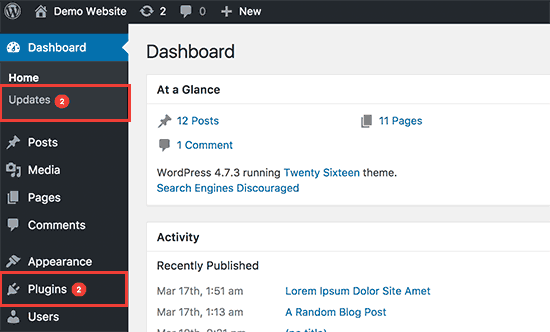
Any WordPress site running Slider Revolution versions earlier than 6.7.15 is affected. If you’re unsure what version you have, log into your WordPress admin panel and navigate to Plugins › Installed Plugins › Slider Revolution. You’ll see the version listed there. If it’s below 6.7.15, your site needs immediate attention.
If you’re already subscribed to the Hosting Australia WordPress Management Package, your site is safe—our team has already applied the patch and confirmed security across all managed sites. No further action is required.
For those not currently on a management plan, now is the time to act. Our WordPress Management Packages include:
These proactive measures mean you’ll never have to worry about missing critical security updates like this one again.
WordPress powers over 40% of the web, which makes it a prime target for attackers. Vulnerabilities like this appear frequently—and by the time a public notice is released, automated bots are already exploiting them. Regular updates, consistent monitoring, and secure hosting are essential to staying ahead. A single outdated plugin can be all it takes to bring your site down.
If your website uses Slider Revolution, take this as a reminder that plugin management is not optional—it’s a vital part of website security. Don’t wait until your site is compromised.
Get protected with a WordPress Management Package from Hosting Australia and let our experts handle updates, security, and peace of mind.
Contact our support team today to discuss your options and safeguard your site against future threats.
Building a website on WordPress is a smart move. It’s flexible, SEO-friendly, and powerful. But here’s the catch: WordPress is not “set and forget.” Just like you wouldn’t leave your car unserviced for years and expect it to run perfectly, your WordPress website also needs regular maintenance – or it will break, slow down, or worse, get hacked.
For small business owners across Australia, the danger isn’t in building a bad site – it’s in building a great one and walking away. In this post, we’ll explore the very real consequences of WordPress neglect, and what you can do to prevent your website from quietly self-destructing while you’re busy running your business.
WordPress core, themes, and plugins release updates for a reason – most of the time, it’s to patch vulnerabilities. Hackers specifically look for out-of-date sites with known issues. If you’re not keeping your software current, you’re practically inviting malicious bots to try their luck.
In fact, over 52% of WordPress vulnerabilities exploited in the wild come from outdated plugins. Once exploited, attackers can deface your site, insert spam links, steal data, or inject malware that gets your site blacklisted by Google.
That’s why reliable Australian WordPress hosting should include proactive update monitoring – or better yet, managed updates done for you.
Even if your website still looks good, performance degradation creeps in slowly. Unused plugins accumulate. Databases fill with old revisions. Image folders grow bloated. Theme files go unoptimised.
The result? A slow, sluggish website that frustrates users and damages your SEO. Google considers speed a ranking factor – and users expect sites to load in under 3 seconds. If yours takes longer, don’t be surprised when bounce rates rise and rankings fall.
Proactive hosting with LiteSpeed cache, server-level optimisation, and regular clean-ups can help keep your WordPress site snappy without needing a developer on speed dial.
How confident are you that your site can be restored if something goes wrong today? If you’re relying on an old plugin or a vague promise from your host, you could be in for a nasty surprise.
Backups should be automatic, off-site, tested, and easy to restore. Too many small businesses find out too late that their backup failed, or worse, didn’t exist at all.
At Hosting Australia, our plans include daily backups with fast rollback options – because real peace of mind doesn’t come from crossing your fingers.
When was the last time you tested your contact form? Or clicked your own CTA button? Over time, things break. APIs change. Plugins conflict. A customer might try to reach out... and hit a dead end.
Most website owners don’t realise there’s a problem until someone tells them. By then, how many leads have been lost? How many frustrated users clicked away?
A monthly site audit – including basic functionality checks – is a simple way to catch these issues early. Or better yet, set up uptime monitors and form check tools that notify you automatically.
When Google detects issues like malware, slow performance, or mobile usability problems, it responds quickly – by demoting or even removing your site from search results.
Neglected WordPress websites often end up with:
If you rely on Google for traffic – and what business doesn’t – you need to stay in Google’s good books. That means keeping your site fast, clean, and secure.
Websites are not billboards. They’re living platforms that need fresh content and up-to-date messaging. An untouched blog from 2021? A homepage that still says “Happy Holidays” in July?
This kind of neglect doesn’t just affect SEO – it affects how potential customers perceive your business. You wouldn’t keep old newspapers in your reception area. Why let your digital front door look neglected?
Regular updates show you’re active, engaged, and evolving. Even a quarterly refresh of your homepage or blog can make a big difference.
Let’s be clear – WordPress isn’t the problem. It’s the neglect that hurts. When maintained properly, WordPress is an incredibly powerful business tool. It ranks well, scales beautifully, and gives you total flexibility. But it demands upkeep.
Think of it like a commercial vehicle: you wouldn’t let a delivery van run without oil changes and tyre checks. The same goes for your business website.
If you’re short on time (or technical confidence), here’s a quick solution:
Or outsource it all. We offer WordPress maintenance plans designed for small businesses who want their site taken care of – without lifting a finger.
Leaving your WordPress site on autopilot might seem convenient, but the risks are too high. Downtime, security breaches, lost leads, or a drop in Google rankings can cost your business far more than the small effort of regular upkeep.
Need help getting your site back in shape? Contact us today for a free WordPress health check – we’ll show you what’s working, what’s not, and what to fix first.
With the rise of AI models like ChatGPT, Google Gemini, and Perplexity, more crawlers are accessing public websites to collect content for training datasets. If your site is hosted with Hosting Australia on cPanel, this guide explains how to control which bots can crawl your site, using tools built right into your hosting panel.
AI crawlers work like traditional search engine bots, but instead of indexing pages for search results, they scan content to train language models. Examples include:
ChatGPT-User (OpenAI)Google-Extended (used by Google Gemini)CCBot (used by Common Crawl)These crawlers may pull large amounts of text from your public pages. If you prefer to control how your content is used, you can restrict access directly from your cPanel account.
robots.txt File via cPanelpublic_html).robots.txt exists. If not, right-click anywhere and choose Create New File, name it robots.txt.robots.txtEdit the file and add the following:
User-agent: ChatGPT-User
Disallow: /

User-agent: CCBot
Disallow: /

User-agent: Google-Extended
Disallow: /
This tells those specific bots not to crawl your website. Reputable bots will obey these instructions, though some third-party scrapers may not.
Once done, save the file and confirm it’s publicly accessible at:
https://yourdomain.com/robots.txt
For more granular control, you can add meta tags inside the <head> section of specific pages. For example:
<meta name="robots" content="noindex, nofollow">
This prevents indexing and link following for a given page. If you’re using WordPress, SEO plugins like Yoast or Rank Math let you control this per page or post.
If you notice strange behavior, you can check visitor logs from cPanel:
ChatGPT-User or anything suspiciousAI crawlers are now a common part of web traffic. If you want to protect your content or reduce unwanted load, you can manage access easily through cPanel by editing your robots.txt file. This gives you full control over which bots can scan your site.
If you're unsure how to implement this or need assistance with anything in cPanel, reach out to Hosting Australia's support team. We're happy to walk you through the process or make the changes for you.
Managing and maintaining your WordPress website is vital to ensure it performs optimally, remains secure, and continues to provide a positive user experience. Here’s an essential WordPress maintenance checklist to help webmasters streamline regular tasks and stay organised.
Having regular backups of your website is your safety net. Ensure your website is backed up consistently—preferably daily or weekly, depending on how often your content changes. Consider using reliable backup plugins or services that allow easy restoration if something goes wrong.
Keep the WordPress core up-to-date. Regular updates help protect your website against vulnerabilities, improve functionality, and ensure compatibility with themes and plugins. Always perform backups before applying major updates to avoid data loss.
Plugins and themes require regular updates to patch vulnerabilities and ensure optimal performance. Regularly check for available updates in your WordPress dashboard and apply them promptly. Remove inactive plugins and themes to reduce security risks.
Regularly scan your website for malware and suspicious activities. Use trusted security plugins to detect and remove threats, keeping your website protected from malicious attacks. Security should always be a high priority for webmasters.
Databases can quickly accumulate redundant data, causing slow website performance. Regularly optimise your database using plugins or manual methods to improve the loading speed and responsiveness of your website. Hosting Australia's database experts can help with this - contact our support team today!
Broken links negatively impact user experience and SEO rankings. Regularly scan your website for broken links and fix them promptly. Implement redirects for removed pages to relevant content to maintain a smooth user experience.
Your website's availability is critical for your visitors. Employ uptime monitoring tools to instantly detect downtime and resolve hosting-related issues quickly. Ensure your hosting service offers robust reliability and support.
Website speed is crucial for visitor retention and SEO. Regularly test your website speed using tools like Google PageSpeed Insights or GTmetrix. Optimise your website performance by compressing images, leveraging caching plugins, and reducing resource-intensive scripts.
Fast, reliable WordPress hosting can also ensure your site is performing at its peak.
Periodically review and refresh your website’s content. Check your website SEO health, optimise keywords, meta descriptions, and headers to maintain strong visibility in search engines. High-quality, updated content consistently attracts and retains users.
Regularly ensure your website complies with accessibility standards, making your site inclusive for all users. Utilise WordPress accessibility plugins to help audit and improve accessibility.
Keeping on top of these maintenance tasks might seem overwhelming, but it ensures your WordPress website remains robust, secure, and efficient. For professional assistance, or to enhance your WordPress Web Design, feel free to Contact Us. Our team of experts is always here to help you.
[et_pb_section admin_label="section"]
[et_pb_row admin_label="row"]
[et_pb_column type="4_4"][et_pb_text admin_label="Text"]
Cybersecurity is a top concern for businesses and individuals managing online services. One of the best ways to protect your infrastructure is by hosting your own firewall. Instead of relying solely on cloud security solutions, self-hosting a firewall on a VPS gives you full control over network traffic, firewall rules, and security configurations. In this guide, we'll explore how you can set up a self-hosted firewall using a VPS from Hosting Australia.
A self-hosted firewall offers several advantages:
Many of our clients host websites on our shared hosting platform, where security measures are managed at the server level. However, for clients using a VPS, a self-hosted firewall can provide additional layers of protection, including:
If you are using shared hosting, many security protections are already in place at the network level. However, clients who need more control over their security policies should consider upgrading to a VPS and deploying a self-hosted firewall.
Before setting up your firewall, you need a reliable VPS that can handle network traffic filtering and security enforcement. Hosting Australia offers VPS plans with high availability, scalable resources, and DDoS protection, making them an ideal choice for hosting your own firewall.
There are several open-source firewall solutions available for self-hosting. Here are three popular options:
A powerful, open-source firewall with a web-based interface and extensive security features.
A widely used firewall that supports advanced networking features like VPN, VLANs, and traffic shaping.
A lightweight option built into Linux systems, perfect for quick firewall configurations.
sudo apt install ufwsudo ufw default deny incoming & sudo ufw default allow outgoingsudo ufw allow 22/tcpsudo ufw enableOnce your firewall is up and running, you can further harden your security with the following:
Self-hosting a firewall on a VPS provides a cost-effective, secure, and highly customizable solution for protecting your online assets. Whether you choose OPNsense, pfSense, or UFW, Hosting Australia’s VPS ensures you have the performance and reliability needed for robust firewall security.
For clients using shared hosting, security is already built into the platform. However, for those needing advanced configurations and greater control, a VPS with a self-hosted firewall is the best choice.
Ready to enhance your network security? Check out Hosting Australia's VPS plans today and start self-hosting your firewall with ease![/et_pb_text][/et_pb_column]
[/et_pb_row]
[/et_pb_section]
In the digital age, the security of online interactions is paramount. As cyber threats continue to evolve, safeguarding sensitive information and ensuring secure communication channels have become critical priorities for website owners and users alike. One of the key tools in this security arsenal is the SSL certificate. This article aims to demystify SSL certificates and explain why they are essential for website security and search engine optimization (SEO).
SSL stands for Secure Sockets Layer, a standard security protocol for establishing encrypted links between a web server and a browser. An SSL certificate is a digital certificate that authenticates a website's identity and enables an encrypted connection. This encryption ensures that any data transferred between the web server and browser remains private and integral.
When a website has an SSL certificate, it uses HTTPS (HyperText Transfer Protocol Secure) instead of the standard HTTP. You can identify such websites by the padlock icon in the address bar of your browser and the prefix "https://" before the website URL.
SSL certificates work by initiating an SSL handshake between the server and the browser. Here’s a simplified process of how this works:
In an era where online security and privacy are paramount, SSL certificates are indispensable for any website. They not only protect sensitive information and build user trust but also play a crucial role in enhancing a website’s SEO performance. By encrypting data, validating identity, and improving search engine rankings, SSL certificates serve as a foundational element for a secure and successful online presence. As the internet continues to evolve, adopting SSL certificates is not just a best practice but a necessity for every website owner committed to security and user satisfaction.
In today's online landscape, website security is a top priority for businesses of all sizes. Cyber threats are evolving, and no website is immune from malware, hacking attempts, or vulnerabilities. Thankfully, SiteLock offers an all-in-one solution to protect your website from malicious attacks and keep it running smoothly.
SiteLock is a leading website security tool designed to scan, detect, and resolve potential threats before they can cause damage. Whether your website is a small business site, an eCommerce store, or a personal blog, SiteLock provides advanced protection against a wide range of online threats. From malware detection to automatic fixes and a secure firewall, SiteLock ensures your website stays secure, fast, and trustworthy.
With over 18.5 million websites infected with malware at any given moment, online security isn't a luxury—it’s a necessity. Cyber attacks don’t just damage your website; they erode customer trust and can have devastating consequences for your business’s reputation and bottom line.
SiteLock provides peace of mind with its proactive security features, ensuring your website stays protected 24/7. Whether you're running a small business website or managing an online store, the need to keep your data and your customers' information secure cannot be overstated.
At Hosting Australia, we believe in offering robust security solutions to our clients, and that’s why we recommend SiteLock. This tool is more than just a website security solution—it’s an investment in your online presence and business success. SiteLock doesn’t just keep your site secure; it ensures you maintain trust with your customers by safeguarding their data.
Don’t leave your website vulnerable to cyber threats. Visit Hosting Australia’s SiteLock page to learn more about how SiteLock can protect your business and provide the security your website needs.
Keep your site safe, secure, and running at its best with SiteLock. Get started today and take control of your website's security!
In today's digital world, email remains one of the primary communication tools for businesses. However, with the increasing amount of spam, malware, and phishing attacks targeting inboxes, it's more important than ever to secure your email. That's where SPAM Protect comes in.
SPAM Protect is a powerful, cloud-based email filtering service that shields your inbox from unwanted and harmful content. Whether it's spam, viruses, or malicious links, SPAM Protect acts as a robust barrier, ensuring that your business communications remain clean and secure.
Did you know that the average office worker receives 121 emails per day, and around 45% of those are considered spam? This means that businesses spend a significant amount of time filtering through junk mail. In fact, studies show that dealing with spam emails can waste up to 30 minutes per day for each employee. That’s over 120 hours a year per person! With SPAM Protect, you can save your business from this unnecessary time drain and boost productivity by eliminating spam from your inboxes.
Your business can't afford the risks associated with unprotected email systems. With SPAM Protect, you get comprehensive email security that’s easy to use, highly reliable, and incredibly effective. Plus, Hosting Australia ensures local support, so you're never left waiting in a critical moment. Backed by SpamExperts technology, SPAM Protect gives you peace of mind, knowing your inbox is safeguarded 24/7.
Want to keep your email clean and secure? Visit Hosting Australia’s SPAM Protect page to learn more and get started today!
Don’t let spam slow your business down—let SPAM Protect do the heavy lifting so you can focus on what matters most!



