
This will probably be the first and main reason why you'll think you need a backup plan or maybe the reason you read this if you did have recently been hacked into your Web site. Websites can be compromised, especially if you are not familiar with the update on the framework and plug-in side of things. Brute force attacks are internet Bots that search the web for vulnerabilities on websites, from usernames to passwords of the week, weaknesses in a piece of code of a plugin, or WordPress install. The easiest way to keep those attacks on your door is to keep everything up to date on your website, with regular updates and upkeep, and having a viable backup solution is also the key to getting your website back up and running if it has been compromised by a brute force attack.
Even when you keep on top of your framework and plugin upgrades, things can always go wrong, having a viable backup solution in place is the key to getting your site to work again is a lifeguard in these situations. Sometimes an upgrade to a plugin or WordPress may cause conflicts between plugins or part of the encoding in your website. This can knock down your website and sometimes prevent you from connecting to the background of your website, your contact form might stop working, forcing you to lose business as prospective customers think you ignore their e-mails for you. If you have a backup solution in place, you can simply re-install your last backup from when your site was working well to see where everything went bad and have your website up and running.
Hosting Australia provides a fully integrated, off-server backup on selected hosting packages. This means that in addition to our nightly backups, which are included on all Hosting accounts, we also securely store backups based on the following archive schedule:
Because of the way the above backups cycle through, this means we can generally restore backups taken at least 30 days ago and up to a maximum of 60 days, depending on the cycle. We can also restore a backup up to 5 days or 1 or 2 weeks previous if required.
Overnight backups restorations are included with your hosting fees, however, there is a charge to have an archived backup restored, you can view the pricing of this on our PRODUCT PRICING page.

A website safety check is simple but effective to prevent future problems. There are multiple ways hackers and other malicious entities could infiltrate your network and website. Once they have access, they will be able to steal your data, use the website for nefarious purposes, they will destroy a business from the inside out. Therefore, it is so important to have a regular website safety check.
So, it’s best not to dwell on the idea of whether you should have a regular safety check that could only take a few hours. But save days, weeks, or even years of work.
So, this is a checklist that you can follow to make sure your website is safe.
You may have noticed that some websites have HTTPS:// before www. This is extremely important as the S in HTTPS stands for the Secure Socket Layer. Which encrypts traffic between the user’s browser and your website. This becomes so important; Google is now factoring the existence of an SSL into its SEO formula. This not only improves security but all the searchability of the website.
It is important to have your software and plugins up to date. You can easily update your plugins through the WordPress admin area. While you are updating your plugins, it's also important to remove plugins that are no longer required. Hackers can buy an out-of-date plugin, update it, and add their own malicious code. Then when the plugin is updated, you have the newer compromised version of the plugin. The hacker then uses this plugin as a backdoor into your site, risking all your and the user’s data.
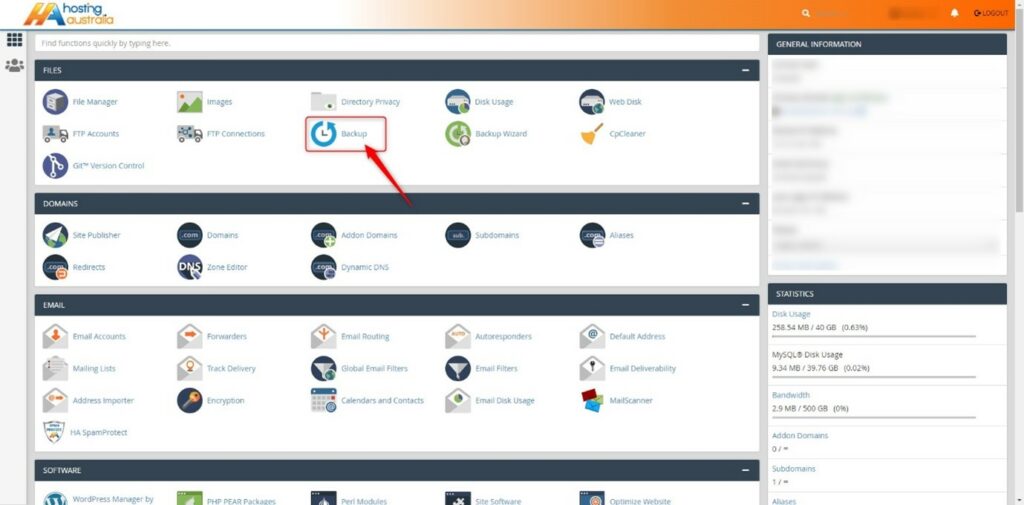
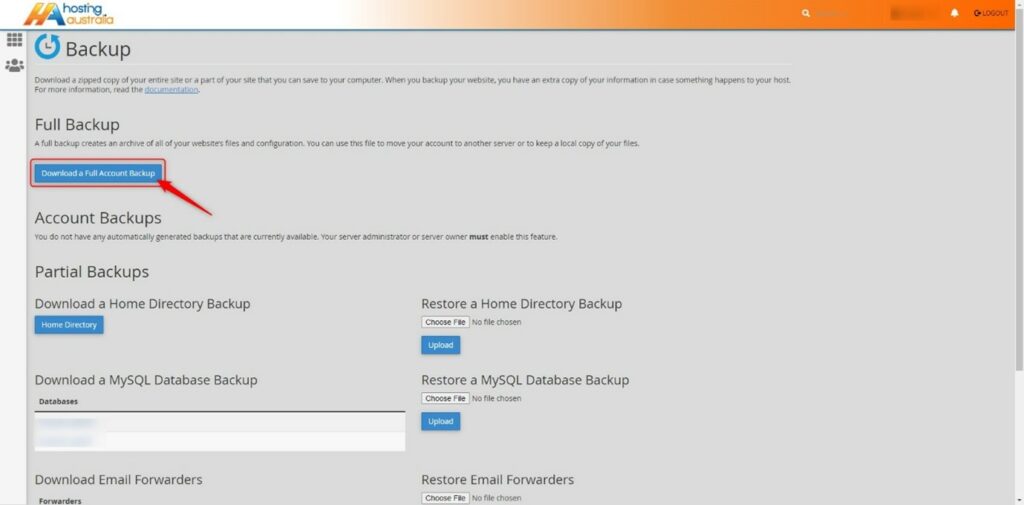
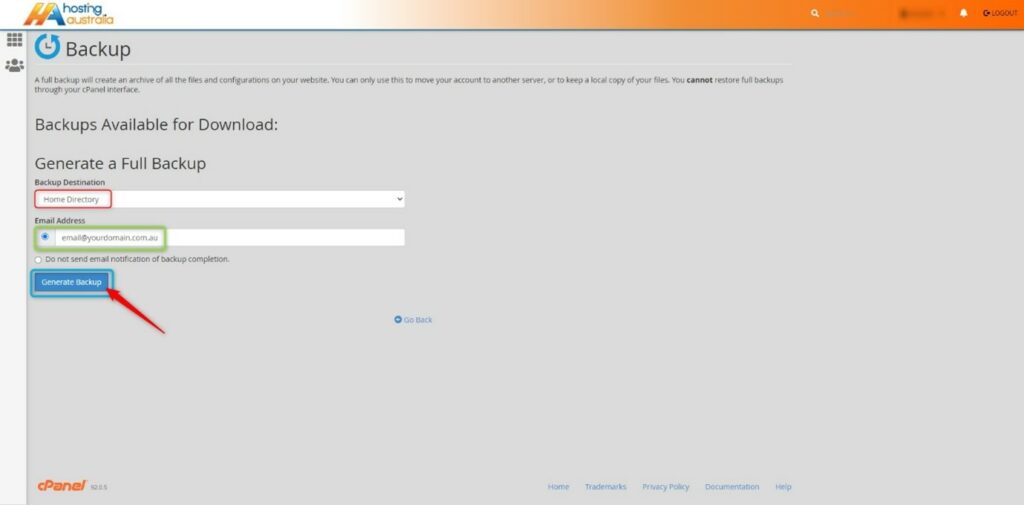
As mentioned before “It’s not a matter of if your website gets hacked, it’s when it will be”. I have seen firsthand entire websites that have been devastated by malicious attacks. Losing all their content and not having a backup to fall back on. Luckily, 2025.hosting-australia.com/ is backing up your cPanel and provides an off-server backup service. However, it is important to have your own personal backup. It doesn’t hurt to have two separate backups in case one of them fails. You can easily backup your cPanel, check your HA knowledgebase article for more information.
Pay attention to extra files you post on your website and include them in your website safety check. Any file that is uploaded such as, images, excel, Word, and PDFs may be corrupted.
Use complex passwords, with various letters, numbers, and special characters. WordPress also has an arrangement of plugins such as Limit Login Attempts Reloaded that are made to stop brute-force attacks and ban IP addresses.
A lot of people create a WordPress admin. But leave the username as “admin”. This is the first username hackers will use when they attempt to brute force into your website. Therefore, it is important to change your username to something less common.
You can use WHOIS to check to keep track of your registrar details for your domain. Hackers can reverse engineer email addresses then use the forgotten password feature on the domain registrar to take control of a domain. They then hold your domain at ransom and will not be released until the demands have been met.
If you are a customer of our cPanel shared hosting accounts, you may not know the resources are shared with multiple customers across the servers. To ensure one website is not using all the server's resources and affecting the performance of all the other websites, there are limitations in place. These limitations are decided by a maximum number of resources that can be used for CPU, RAM, I/O, inodes ad entry Processes by a particular hosting account.
Shared hosting is not a bad thing. As it is more cost-effective, this allows the cost of the server to be divided across multiple users without the requirements of purchasing an entire server for your website. 2025.hosting-australia.com/ providers support all services under the shared hosting services. There is no requirement to have extensive server knowledge to maintain the hosting. This is helped by the built-in control panel (cPanel) which enables you to smoothly manage your hosting. This is also where you may notice your cPanel resources, these are important as you want to make sure your hosting is staying within your hosting package requirements. As exceeded, these will create an issue with your services. I.E: Emails and website traffic.

Disk Usage is the total amount of storage space found for your hosting. These are taken-up files found in your File Manager. These files can include Website files, Email data, Databases, Backups.

Bandwidth is used to monitor the measured amount of data that can be transferred from users to your hosting. The bandwidth is dependent on the amount of traffic that visits your website or email traffic between domain accounts across users. If you find you are exceeding your bandwidth usage, you may be receiving more traffic to your site. You may also check your monthly bandwidth transfer within your cPanel. This allows you to monitor during what periods and the causes of the bandwidth spike.

CPU represents the number of central processing units (CPUs or cores) available to your account. For example, the Core Hosting package has 1 CPU allocated to the hosting. The ultimate hosting package has 3 CPUs allocated. If your site uses a database, is receiving a large amount of traffic, relies on scripts (such as PHP), or uses many resource-intensive add-on-on these and plugins, having an increased CPU size will enhance your site's performance.

Physical memory limit corresponds to the amount of memory used by end users’ processes. The cause of high physical memory can be due to, increased number of visitors, a high number of entry processes, updates to your website, presence of malware, new theme plugins recently installed. If you are running into a high physical memory issue, try optimizing your website by adding caching, scaling images, minimizing scripts and CSS.

I/O is the speed of data transfer between the HDD/SSD and the RAM. For example, a user visits your website and is required to download a large file. Depending on the I/O usage will determine the processing speed of the download.

The number of inodes on an account is countered by File Usage. Inodes, however, are not the same as files. They are pieces of data used by Linux-based systems to reference files and directories.

MYSQL is an open-source relational database management system. What does this mean? This allows the database to create, read, update, delete, all your website files. Depending on you are the size of the content of your website will determine the size of your MYSQL database usage.
At some point, we have all received a bounce-back message, and reading the bounce-back message you may not be able to work out if the issue is with your email/domain or the recipients. You should always contact our support if you are having difficulties with your emails, and our support staff will help your email be delivered.
There are tools you can use even before contacting support. these tools will help you figure out if the issue lies within your hosting or the recipients.
Before we get into the best tools for testing deliverability, it's important to understand the difference between Deliverability and Delivery.
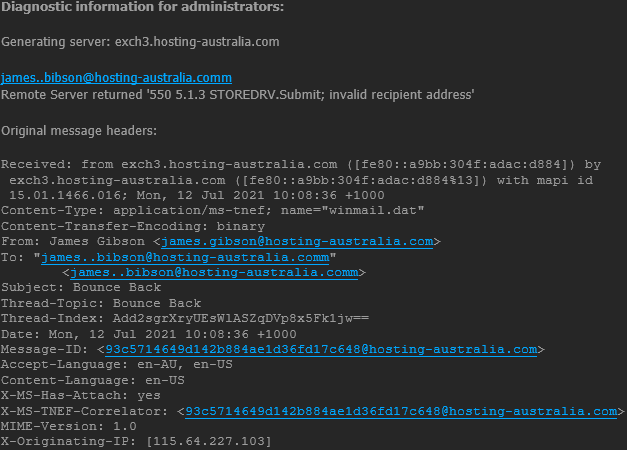
Email Delivery is in relation to if a recipient’s server has accepted your email or not. If it did, it's still not certain where a message ended up, but it already counts as a positive result. If a message bounces for any reason (misspelled email address, the domain does not exist, etc.), it counts as a failed delivery, and you are immediately notified of it with a bounce message with have grown to love.
Email Deliverability refers to if an email was delivered to the recipient’s inbox or straight to their spam folder. In that case, deliverability is often referred to as Inbox Placement. There can be multiple factors such as a sender’s reputation, authentications, or quality of content when automatic filters decide when the email is attempting to be delivered.
Now that you understand the difference between Deliverability and Delivery, let us look at four main tools to test your emails deliverability. All you need to access these tools are your browser, there are no installations required.
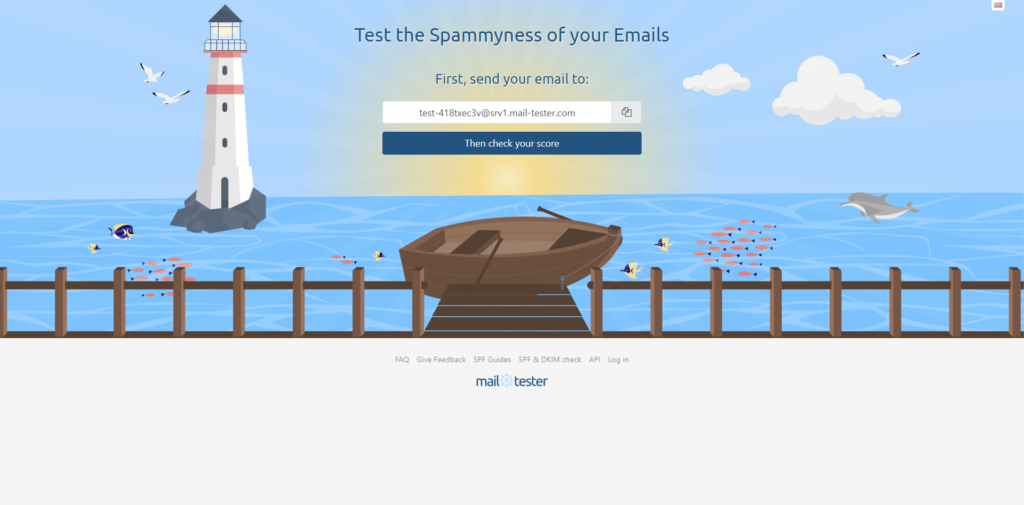
Mail-tester.com is a free tool for analyzing specific emails and their content. It is extremely simple, you will just be required to send an email to the address found in the middle of the screen, using your email. Once you have sent the email, wait a few seconds then simply click the “Then Check Your Score” button. Mail-tester investigates various factors that affect deliverability.
It checks the likelihood of it going to spam and gives tips on what to improve. It also takes into factor your domain and the authentication methods used with improvements or any blacklists that may be an issue.
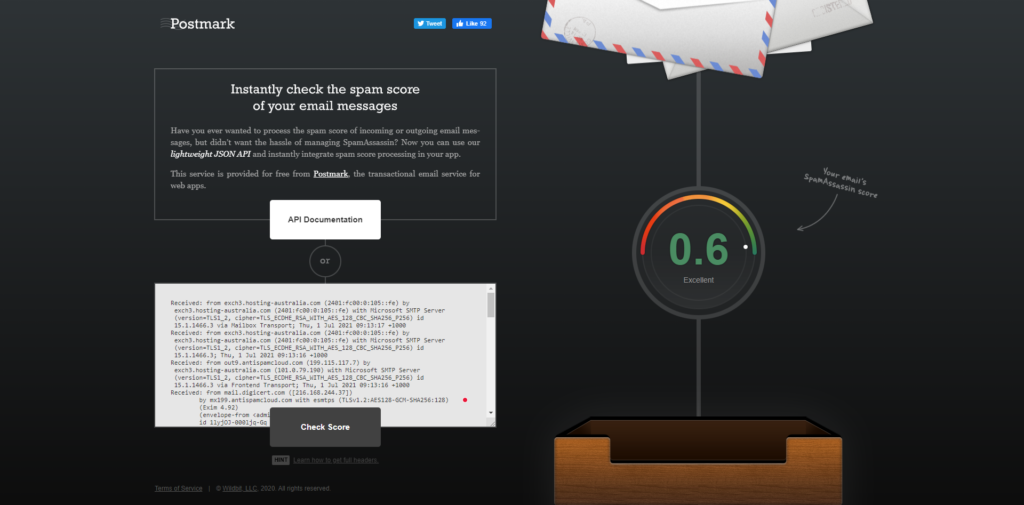
Spamcheck is easy to use, you just paste your email’s HTML code into the dialog box, along with all the headers. Then you will get back a score in just seconds, unlike Mail-tester the lower the score the better. You will also find displayed how to improve the email.
Postmark also allows you to integrate Spamcheck into your mail client and automatically run spam checks on all outgoing emails.
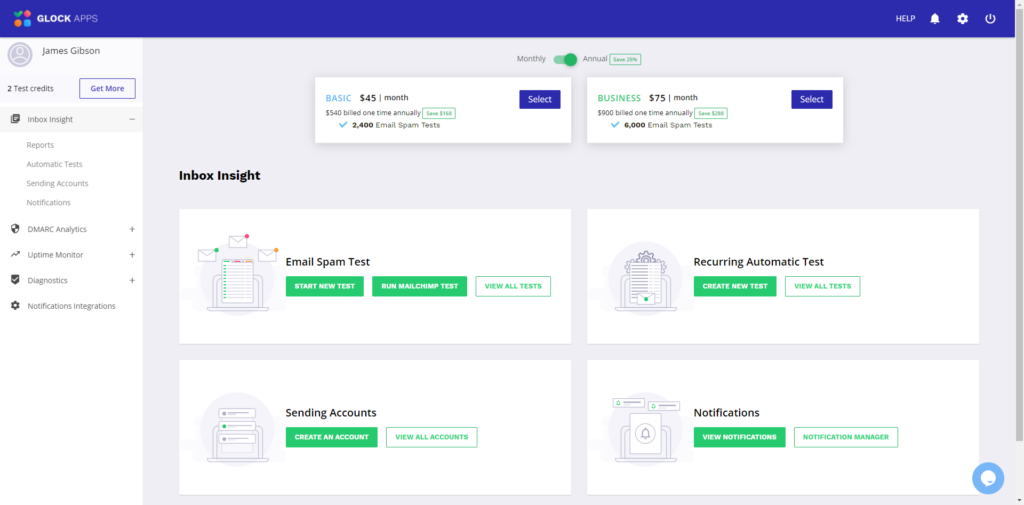
GlockApps emulates email sending through Postfix and two other platforms. It then estimates where your email would land using these services. GlockApps allows you to send test three emails for free. After that you will be required to sign up for a monthly or annual subscription plan, there are different levels of costing and services depending on your requirements.
GlockApps delivers a full detailed report to help you troubleshoot your emails. GlockApps also offers automatic testing, DMARC Analytics, Uptime Monitoring, and Diagnostics all accessible via the user dashboard.
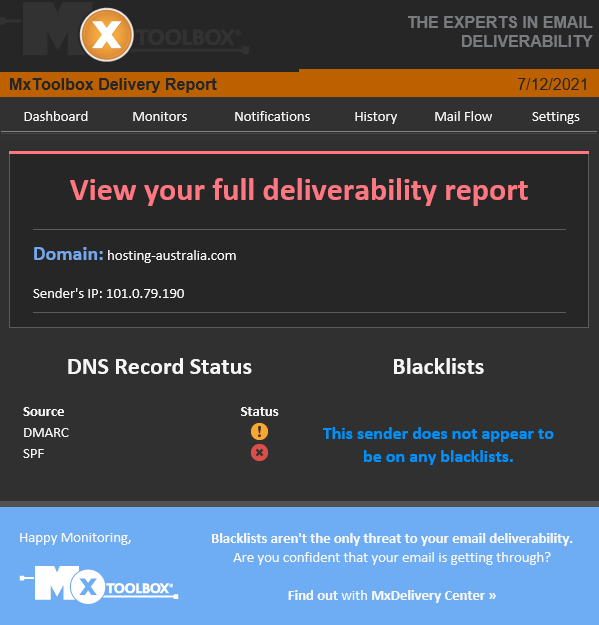
Authentications play a significant role in email deliverability. MX Toolbox offers various tools aimed at helping improve the domains’ capabilities. One of them is aimed strictly at validating a domain’s authentication methods.
All that is required is sending a test email to ping@tools.mxtoolbox.com. Unlike the other sites previously mentioned, you will receive an email back to your account with a link to your report.
MX Toolbox also offers the ability to test your domain name and records corresponding with the domain.
The following commands allow you to troubleshoot certain records.
| blacklist: | Check IP or host for reputation | |
| smtp: | Test mail server SMTP (port 25) | |
| mx: | DNS MX records for domain | |
| a: | DNS A record IP address for host name | |
| spf: | Check SPF records on a domain | |
| txt: | Check TXT records on a domain | |
| ptr: | DNS PTR record for host name | |
| cname: | DNS canonical host name to IP address | |
| whois: | Get domain registration information | |
| arin: | Get IP address block information | |
| soa: | Get Start of Authority record for a domain | |
| tcp: | Verify an IP Address allows tcp connections | |
| http: | Verify a URL allows http connections | |
| https: | Verify a URL allows secure http connections | |
| ping: | Perform a standard ICMP ping | |
| trace: | Perform a standard ICMP trace route | |
| dns: | Check your DNS Servers for possible problems |
Making sure all your email is delivered 24/7 is our top priority, we also understand that there are some issues from time to time. Therefore these email troubleshooting tools are such an important factor in having an email account.
Choosing a domain is such an important decision, you need to make sure it stands out from your other competitors. It must be short, smart, memorable, easily spelled it is not too long, because no one wants to type in a 13-letter domain name into their browser, plus there is a higher chance for error and the user is unable to find your website.
You may have a brilliant idea for a domain name, rush to the computer and visit the 2025.hosting-australia.com/ registration page to secure your amazing name. In your excitement, you then check your newly registered name to see......... teacherstalking.org. which isn't a good look at first glance, especially when you are only wanting to design a website to help teachers to reach out and talk about their experiences.
So, it's best to think about your domains and how the combinations of letters will look in the browser's URL. You can also look at these unfortunate names whose registers failed to check the domain before registering so, you also do not find yourself on one of these lists.







PHP is another important factor for your website. Upgrading and maintaining your current version of PHP is not just important for compatibly. But also for the security of your website. New security features are implemented with each new PHP version. While older versions reach their life cycle and are no longer supported, not receiving updates, creating security vulnerability as they are no longer patched for these new vulnerabilities.
PHP is a hypertext processor that is used with HTML to create scripts for your website. When anyone visits a website, the browser sends the site a request, and PHP scripts compile the HTML packets to send them back to the browser.
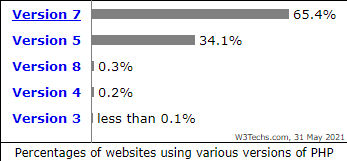
PHP version 7 alone is used by 65.4% of all the websites that use PHP. 34.1% are still using PHP version 5. It is also one of the best-maintained languages because new updates and features are constantly being pushed out, Version changes happen about once every year. So how do you know what version of PHP your current website is using, and how do you update it?
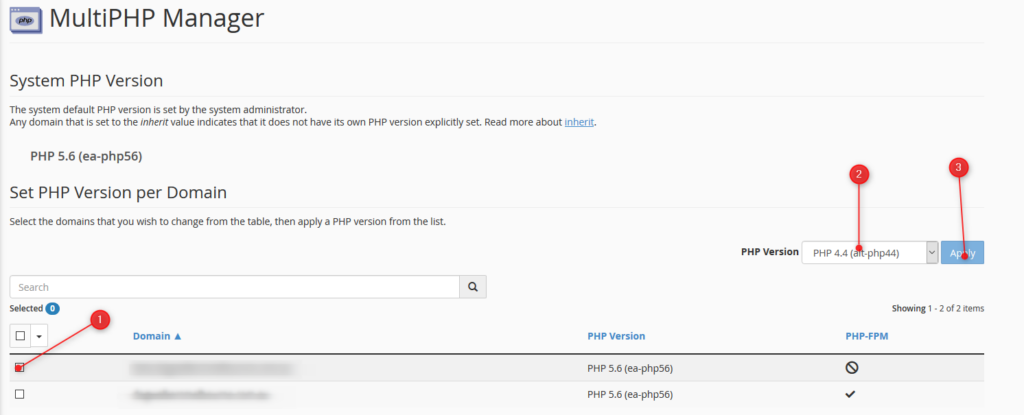
Finding out your version is simple; you can access all of PHP information by logging into your cPanel. Unsure how to access your cPanel? Its simple just follow this guide!
NOTE - The below will change the PHP version for the entire cPanel. If you have an independent site or development site, that requires a newer version of PHP than other installed sites in your cPanel, we recommend setting the newer site up as a Sub-Domain or addon domain, depending on what your scenario is. Then set the PHP version for that subdomain/addon domain as required via the MultiPHP Manager in cPanel. See THIS ARTICLE for details.

You can also check your PHP Compatibility with the WP Engine PHP Compatibility Checker. This plugin can be used by any WordPress website to check your PHP version. Once the plugin is installed follow the instructions to run a scan. The results report will help you identify any potential PHP version conflicts in your code, so you can have them fixed before upgrading.
Email Bouncebacks are a common occurrence, they happen to everyone. You maybe have received multiple bouncebacks and they sometimes can be confusing and convoluted. First, If you are unable to work out why an email is bouncing, it's important to contact our support team so can make sure all of your emails are delivered. But, it is also important to know what causing and what an email bounce message is.
An email bounce is an error message you receive when email you have sent is not delivered. Your email account will typically receive a Non-Delivery Report (NDR) instantly after sending an email or 72 hours depending on the type of bounce back, which we will get into later. These NDR also informs you what caused delivery failure of your email and are extremely important because they detail all the information for troubleshooting.
When you send out an email, the email is sent out via an SMTP server for delivery. The SMTP server checks your email with the DNS. The DNS is an address book for domain names and server IP addresses, like the yellow pages for the addresses on the internet. Once the recipient’s server is located, the SMTP server gives your message to their MTA to complete email delivery. This will allow the email to be delivered successfully.
However, sometimes the email may run into an issue during this process. This is where the bounce back messages come into play by telling yourself (the sender) what went wrong.
There a multiple reasons for email bounce backs including full inboxes, servers that are not responding, send to email addresses that no longer exist, or something as simple as misspelling the email address.
There are three types of bounce backs:
Emails soft bounce is when a server rejects an email temporality. Most email services try to resend email messages after they soft bounce. You will typically see that it will reattempt in 24 hours or 72 hours.
Mailbox full: If the recipient mailbox has reached capacity and will bounce until there is free space to deliver.
Email Size: The email attachment may exceed the server or mail client limit, or it might be bounced back if there is a filter in place.
Server is down: An unreachable server may have crashed, be overloaded, or be under maintenance.
A hard bounce happens when your email is permanently undeliverable to an email address.
Incorrect email address: This is a simple one but happens to the best of us. This the email address is spelt incorrectly you will receive the bounce back message.
Email blocked: Some domains have stricter spam filter settings. The recipient may have strict ruling in place. You will need to contact our support team regarding this issue.
You cannot fix hard bounce email issues what you can do is remove the reason behind the hard bounce, such as an incorrect email address.
Email blocklists are created by ESPs to filter harmful or exploitative content, like spam or malware. It is not created to make it harder to spend emails, it is designed to protect the recipients of the emails sent daily.

You can test your email against blacklists using helpful tools such as mxtoolbox.com.
Spam complaints: An email may become compromised by a malicious attacking causing large volumes of spam. This may find you on a blocklist.
High bounce rates: Another reason may be just too many bounce backs by the reasons mentioned before.
Bad content: If you use certain words in your subject that are typically found in a Spam. You may find yourself on this list.
With time: The block maybe removed automatically after a predetermined time.
Contact the blocklist: A request can be sent to the blocklist holder’s website to be delisted.
Contact us:If you are unsure and need help removing yourself off a block listed, contact our support team so we may look on a server level.
There are many reasons you may want to switch from your current web hosting provider to 2025.hosting-australia.com/, perhaps their pricing has changed over the years, their servers are slow or you’re finding it difficult to get in touch with their support team.
Switching your web hosting provider might seem like a daunting task, but we’re here to take the guess work and stress out of making this change.
2025.hosting-australia.com/ is 100% Australian owned and operated. Our support team are located in Australia, so you know if you are having any difficulties with your service, you can quickly get in touch with someone in our team and get the assistance you need.
So, if you’re ready to make the switch, what’s next?
First, you will need to contact us via (07) 4914 2433 or send an email to support@hosting-australia.com, informing us that you wish to migrate your services over to us.
When you contact us it's best to give us the following information so the transfer will be as smooth as possible. Providing this information upfront will help us eliminate downtime on your site.
There are pre-transfer checks you will need to make before transferring the domain across, because there are safeguards to keep individuals from taking your domain from right underneath you.
Your current hosting provider may use cPanel, if that is the case you are in luck! cPanel migrations are FREE! All we require are your cPanel username and password and our migration team can migrate your hosting files using our server migration script.
If you require a manual transfer our migration team are more than happy to do this for you as well. Manual transfers will incur a $75 manual migration fee as there are more steps taken in a manual migration.
We will require the following:
Once the migration is complete. It is important to Repoint your nameservers. 2025.hosting-australia.com/ will take care of this step if your domain has been transferred to us. However, if the domain is with another provider you will need to do this step yourself.
Shared or VPS hosting, deciding on the most suitable hosting package for your website can seem like a confusing and difficult process. If you have found this blog post, you have already found the right hosting company. But you may be unsure of the right type of hosting for your website.
These two versions of hosting, both have the same end goal. That is to ensure you have a site live on the internet accessible by the world. But, they both have very different ways of accomplishing that goal.
In this article, we will discuss shared vs VPS hosting. The major differences and in addition to their pros and cons, so you can select the right kind of hosting for your website.
Shared hosting allows multiple websites to utilize a single server. The server is built in a way it will be able to handle multiple resources across multiple users. This sharing across the server allows overall hosting to be more affordable by splitting the cost.
A simple way to think of this is if you purchase a car, it is cheaper for each member of your family to use the car, rather than each individual member of the family to purchase a car then pay for the upkeep for each induvial car.
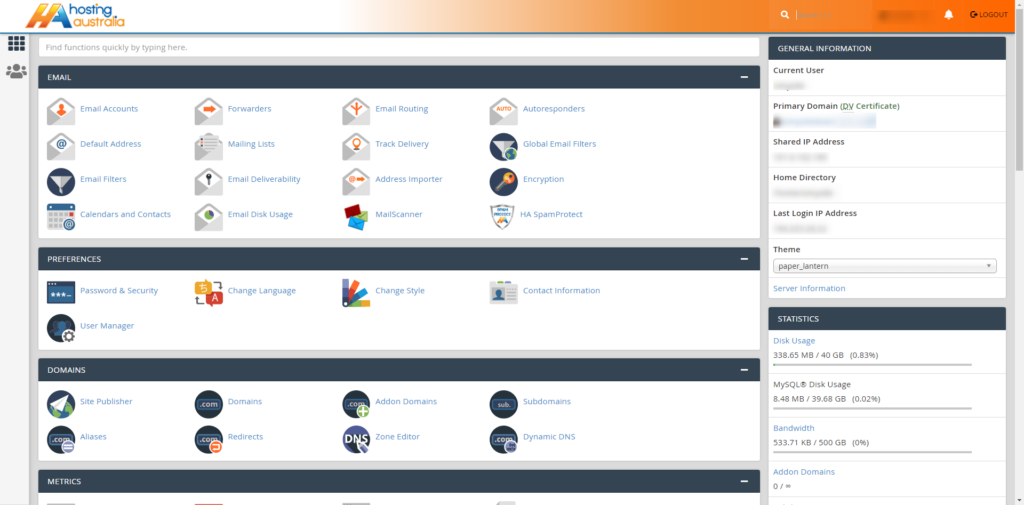
Each service is allocated an amount of resources depending on your hosting package. You will be able to view via your allocated usage statistics via your cPanel.
It is a known fact that shared hosting is a more affordable form of hosting that still provides you with all the features required for your website.
All shared hosting packages are preinstalled with cPanel, this is an easy-to-use hosting dashboard. cPanel allows easy manage your hosting, set up multiple domains, redirects, and manage email accounts. The cPanel also allows you to view your allocated server resources as mentioned earlier.
All the upgrades and maintenance are carried out by the 2025.hosting-australia.com/ technical team. These tasks are necessary if you want your server to continue to function. These are complex and require a wealth of knowledge if you were required to do these on your own.
As you are sharing your server with multiple users, there is a slight chance your site speeds may be lower compared to a dedicated server. Depending on the amount of traffic, you receive you may need to increase your allocated server resources.
Depending on your site growth, the server storage and bandwidth limits may not be enough. This will require you to upgrade your hosting package to provide more resources. However, with 2025.hosting-australia.com/ you can easily upgrade and downgrade your hosting packages to scale with your needs.
Shared hosting will not allow you to make direct changes to the server itself. So, if you need to make changes server side or install additional servers to your hosting, we recommend other hosting packages.
Shared hosting is perfect for beginners who are building their sites online, especially if you do not wish to be bogged down with server maintenance and the nitty-gritty of servers.
The VPS hosting provides you with a greater level of server resources. So, if you have big and bold plans and know that your site will be pushed further than shared hosting. VPS will be able to support a higher volume of users without a decline in performance.
VPS hosting offers you a higher level of security than shared hosting. Since your environment is virtualized, you will be isolated from other sites on shared hosting servers.
VPS hosting allows you access to more server customization options. The VPS will get root server access, which gives you greater server control and behaves like a dedicated server, allowing more power, freedom, and control.
The VPS is more expensive than shared hosting. Since you are getting access to more server resources they will increase as well.
Generally, the management of VPS hosting requires a higher level of technical skills to manage your server the right way. 2025.hosting-australia.com/ does not provide free support or does not maintain, upgrade, and optimize your server environment for you.
By reading this article. You will now have a better understanding of Shared and VPS hosting. Shared hosting will be a more affordable form of hosting depending on your requirements, but the benefits of the additional resources offered by VPS hosting.
Phishing, even though its spelled differently they are still trying to have the same effect. A fisherman will cast out their line not to target anything specifically, but just to hopefully get an unsuspecting victim. It might sound a bit bleak, but this is exactly what these hackers are attempting to do. They create emails using popular websites and services then legitimize these emails as much as possible for the unsuspecting eye. Hoping that they can get someone to click on a link that gives them access to private information.

Scammers use emails to trick you into giving them your personal information. They use these emails to try to steal your passwords, account numbers, if its any kind of sensitive information, they will try to take it. Unsuspecting victims can lose everything just by clicking on what they think is a legitimate and harmless link. Scammers launch thousands of phishing attacks like these every day. Just like a regular fisherman after casting out so multiple times, they will end up catching something no matter how big or small. Australians lost over $634 million to scams in 2019, according to the latest figures in the ACCC’s Targeting Scams report released 22/06/2020
No legitimate organization will send emails from an address that ends with - @gmail.com @yahoo.com @hotmail.com. even the actual companies that created these email addresses will not send from these emails. Therefore, it is important for a user to have their own business email to legitimize their own business. You can learn more about it in our previous blog article HERE.
For example, your inbox displays a name, like “cPanel Administration”, in the subject line. When you open the email, you already know who the message is from and jump straight into the content. When the scammers create the phishing email addresses, they often have the choice to select the display name, which does not have to relate to the email address at all.
This is just one small step they can take to create emails that look like they are from legitimate sources. Apart from creating fake email addresses they also mimic other emails sent from companies by doing the following:
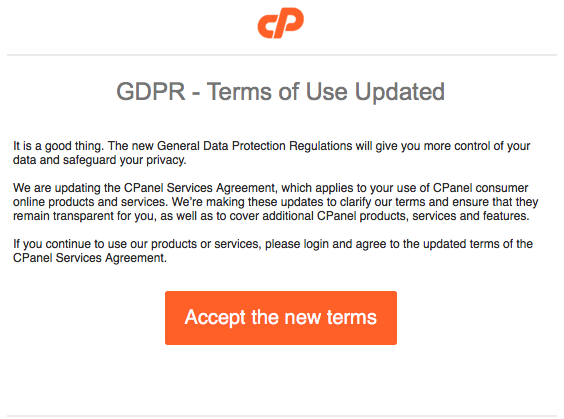
Another tip you can use to workout if you have received a phishing email. Simply mouse over the link found in the email, a pop up will appear with the linking address. Usually these links will take you to a random link such as “cslsdfbpaymentlsjd.com/askdfmcs” which is a dead give away that it is not from a legitimate source.
First of all you should cancel any cards or accounts with the information you had supplied via the email. Report scams to the ACCC via the Scamwatch report a scam page. Your report helps to warn people about current scams, monitor trends and disrupts scams where possible.
You are also able to contact IDCare on 1800 595 160 or via www.idcare.org for support if you believe your personal information has been put at risk.
Notify 2025.hosting-australia.com/, as soon as we are notified the support staff will take measures to secure your account with us.



