
Introduction
WordPress, the world's leading content management system, has revolutionized the way people create websites. Its user-friendly interface and vast array of customization options make it accessible to beginners and powerful for experts. In this article, we'll provide you with a comprehensive guide on how to use WordPress, supplemented with helpful video tutorials for visual learners.
Getting Started: Setting Up Your WordPress Site
a. Choosing a Domain Name and Hosting Provider Selecting a domain name and a reliable hosting provider is the foundation of your WordPress journey. Click here to search for you chosen domain to see if its available..
b. Installing WordPress Follow this link to set up your WordPress site with Hosting Australia.
2. Navigating the WordPress Dashboard
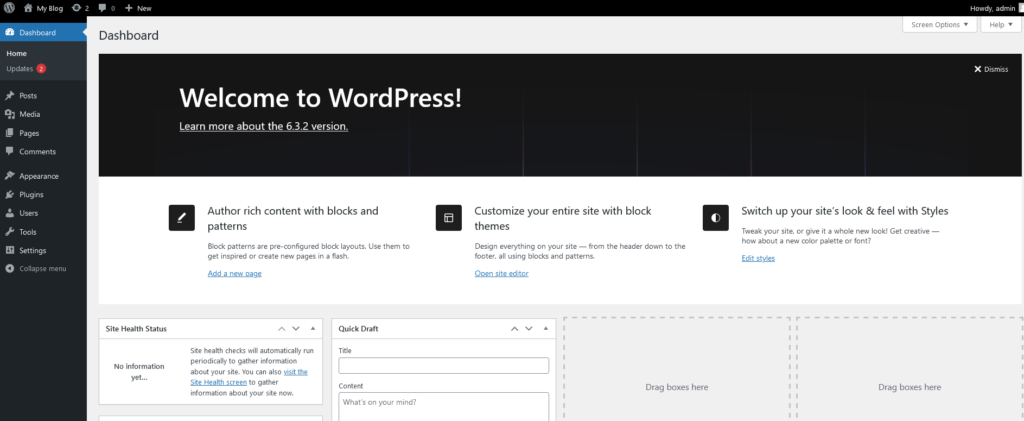
Once your site is live, familiarise yourself with the WordPress dashboard. Login using the URL: https://yourdomain/wp-admin. Login using your username and password then you will see this page.
3. Creating Content: Posts and Pages
a. Writing and Publishing Posts Learn how to create compelling blog posts. Pages are used mainly for the Menu links that go to "PAGES". A post is usually used as articles for your blog. Posts can be assigned to categories so you can show certain categories through certain pages to keep your topics organised. You can display multiple Posts in one page as excerpts and clicking a post link or a READ MORE button will take you to the Post Article. So the links are built in saving you having to add lots of links to a page.
b. Designing Static Pages Master the art of designing static pages such as About Us and Contact. PAGES as mentioned above are the main content of the site and is how you build your site. Generally a page will be build to contain all the content of a topic and can also be used to display all the posts of a category. Uusally the links in your menus will go to a page. Although you can use these links to go to a post. POSTS and PAGES are essentially the same thing. You just use them a little differently.
4. Selecting and Customizing Themes
Explore WordPress themes to find the perfect look for your website.
5. Enhancing Functionality with Plugins
Plugins extend WordPress's functionality.
6. Managing Media
Understanding media management is crucial.
7. Engaging with Your Audience
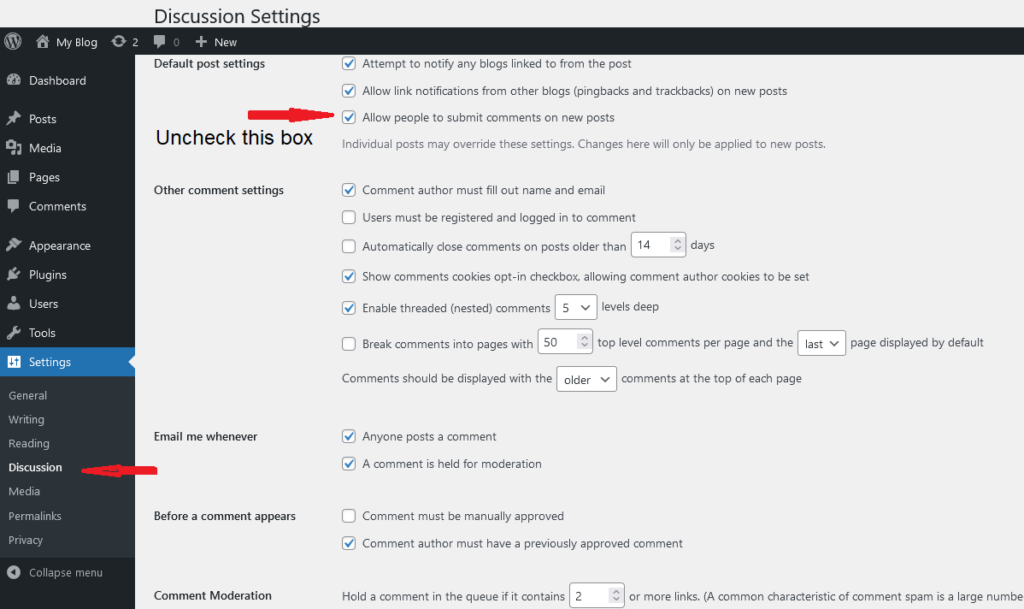
a. Enabling Comments Encourage interaction by enabling comments. NB: Comments can be used to bombard your site with spam. This can lead to hacking if not kept in check. If you don't need comments then you can disable them via the settings and in the Discussion section uncheck "Do Not allow Comments"
b. Social Media Integration Integrate social media seamlessly.
8. Search Engine Optimization (SEO)
Boost your site’s visibility on search engines. SEO is complete separate product to a web development and a specialised skill. There are 2 types. One off SEO where you can add some features in your site to help google find you. Ongoing SEO where you will manage your content and other off-site features such as Google Ads or Social Media marketing. Choose carefully when finding someone to do this because they can promise all sorts of results but can't prove it until your SEO campaign has been going for a few Months. You need to allow a minimum of 3 months to see any results.
9. Regular Maintenance
Ensure your site stays secure and up-to-date.
Conclusion
WordPress empowers you to create a stunning website, and with the help of these video tutorials, you can master it in no time. Remember, practice and exploration are key, so don’t hesitate to experiment with different features and functionalities. Happy WordPressing!
For all of the above you can find and appropriate Video to show you how.
In today's digital age, social media platforms have become indispensable tools for promoting businesses, building brand awareness, and engaging with target audiences. Social marketing offers unparalleled opportunities for businesses of all sizes to connect with potential customers, create meaningful relationships, and drive sales. This article explores effective strategies to promote your business using social media marketing.
**1. ** Understand Your Audience:
Before diving into social media marketing, it's essential to understand your target audience. Conduct market research to identify your ideal customers' demographics, interests, and online behavior. This understanding will help tailor your content and choose the right platforms for your social media campaigns. Any marketing or advertising requires you to expose your business to a large audience. Social Media allows you to target followers who already have an interest in your product or industry. However like any marketing campaign they will not work without an audience. So part of your strategy is to first build an audience or following. Build content build your following before doing any advertising.
**2. ** Choose the Right Platforms:
Not all social media platforms are created equal. Select platforms that align with your target audience and business goals. For instance, visual businesses might thrive on Instagram and Pinterest, while B2B companies often find LinkedIn more effective. Facebook is versatile and caters to a wide range of audiences. Don't spread yourself too thin; focus your efforts on platforms where your audience is most active.
**3. ** Craft Compelling Content:
Create high-quality, engaging, and shareable content that resonates with your audience. This can include informative articles, eye-catching images, entertaining videos, infographics, and user-generated content. Diversify your content to keep your audience interested and engaged.
**4. ** Consistent Branding:
Maintain consistent branding across all your social media channels. Use the same logo, color scheme, and messaging to reinforce brand recognition. Consistency helps in building trust and a recognizable brand identity.
**5. ** Utilize Social Media Advertising:
Social media advertising allows you to target specific demographics, interests, and behaviors. Invest in paid ads to expand your reach and increase brand visibility. Platforms like Facebook Ads and Instagram Ads provide detailed targeting options, ensuring your ads reach the right audience.
**6. ** Engage and Interact:
Social media is not a one-way street. Actively engage with your audience by responding to comments, messages, and mentions. Encourage discussions, ask questions, and seek feedback. Interacting with your audience creates a sense of community and strengthens customer relationships.
**7. ** Leverage Influencer Marketing:
Collaborate with influencers or micro-influencers who align with your brand. Influencers can promote your products or services to their engaged audience, providing social proof and expanding your reach. Choose influencers whose followers match your target demographic.
**8. ** Utilize Stories and Live Videos:
Platforms like Instagram, Facebook, and YouTube offer features like Stories and Live Videos. Utilize these formats to provide real-time updates, behind-the-scenes glimpses, product demonstrations, and exclusive offers. Stories disappear after 24 hours, creating a sense of urgency among viewers.
**9. ** Encourage User-Generated Content:
Encourage your customers to create content related to your products or services. User-generated content serves as authentic testimonials and helps in building trust. Repost customer content on your social media channels, acknowledging and appreciating your loyal customers.
**10. ** Track and Analyze Performance:
Utilize social media analytics tools to track your performance. Monitor metrics like engagement, reach, click-through rates, and conversions. Analyze this data to understand what works best and refine your strategies accordingly.
In conclusion, social media marketing offers a wealth of opportunities for businesses to connect with their audience, establish brand authority, and boost sales. By understanding your audience, crafting compelling content, utilizing advertising, engaging with your customers, and analyzing performance, you can create a robust social media marketing strategy that propels your business to success in the digital realm. Stay agile, adapt to trends, and consistently deliver value to your audience to thrive in the competitive world of social marketing.
In the fast-paced digital landscape, where trends come and go, email marketing has stood the test of time as a powerful and cost-effective tool for businesses. This article explores the manifold benefits of email marketing, strategies to build a robust email list, and a curated list of top-notch companies that provide email marketing services.
The Benefits of Email Marketing:
How to Build an Email List:
Top Email Marketing Service Providers:
Trying to send a mail out via your Mail Client is not a viable option. Most hosting providers will limit the amount of emails you can send in a period of time. If you have a small number you can always cut down the number you send and send out an email every few minutes with a group of emails. However if you have more than 100-200 emails this isn't viable and sending them all at once will have your email blocked. More importantly just sending emails out without qualification will get your email banned on certain Spam Sites for spamming. To avoid this you should use a Mail Platform that is design to do this for you. Which also allows you to follow up on what you send so you can see who has received and read your email. Most of them allow Free emails up to a certain amount so you can test their service before you have to pay anything.
In conclusion, email marketing remains an indispensable tool for businesses seeking direct, targeted, and measurable communication with their audience. By employing effective strategies and choosing the right email marketing service provider, businesses can harness the full potential of email marketing, driving engagement, fostering relationships, and ultimately, boosting their bottom line.
In the dynamic world of web development, creating stunning websites efficiently is crucial. WordPress page builders like Oxygen, Divi, and Elementor have emerged as popular tools that empower both developers and non-developers to design visually appealing and functional websites. In this article, we'll delve into the features and capabilities of each of these page builders, highlighting their strengths and differences.
Oxygen stands out as a powerful WordPress page builder that offers a unique approach to website creation. Unlike Divi and Elementor, Oxygen is not limited to a specific theme; instead, it enables you to build your entire site layout from scratch. This level of control appeals to advanced users and developers who seek complete design freedom.
True Design Freedom: Oxygen provides a blank canvas approach, giving users complete control over every aspect of their website's design.
Performance: Websites built with Oxygen tend to have excellent performance due to optimized code and the ability to reduce unnecessary bloat.
Developer-Friendly: Oxygen's code editor allows experienced developers to directly manipulate and customize the underlying code.
Dynamic Data: Oxygen integrates with various dynamic content sources, making it suitable for creating complex and data-driven websites.
Learning Curve: Oxygen's unique approach can have a steeper learning curve compared to more traditional builders like Divi and Elementor.
Customization Complexity: While it offers extensive customization, beginners might find it overwhelming to navigate its intricate settings.
Divi by Elegant Themes is one of the most popular WordPress page builders, known for its user-friendly interface and wide range of pre-designed templates and modules.
User-Friendly: Divi's drag-and-drop interface is intuitive and suitable for beginners.
Pre-Designed Content: Divi comes with a vast library of pre-designed templates and content modules, speeding up the website creation process.
Responsive Editing: Divi offers responsive editing, allowing users to easily adapt their designs for various devices.
Global Elements: The Global Elements feature lets you make site-wide changes from a single location.
Code Quality: Divi's generated code can sometimes be less optimized, potentially affecting site performance.
Dependency on Themes: Divi heavily relies on its theme, which might limit design flexibility compared to Oxygen's blank canvas approach.
Elementor Page Builder
Elementor has gained immense popularity for its user-friendly interface and comprehensive set of features. It offers a balance between customization and ease of use.
Live Editing: Elementor's live visual editing lets you see changes in real-time, speeding up the design process.
Vast Widget Library: It provides an extensive collection of widgets and templates, allowing for versatile design options.
Theme Compatibility: Elementor works well with a wide range of themes, offering more flexibility in choosing a base theme.
Popularity: A large user base means abundant resources, tutorials, and third-party add-ons.
Design Limitations: While highly customizable, the design options might be more constrained compared to Oxygen.
Code Quality: Similar to Divi, the generated code might not always be as optimized as hand-crafted code.
Choosing the right WordPress page builder depends on your specific needs and expertise. Oxygen suits advanced users and developers seeking ultimate design freedom and performance optimization. Divi's user-friendly interface and pre-designed content cater to beginners and those looking for a streamlined process. Elementor strikes a balance between customization and ease of use, making it suitable for a wide range of users.
Ultimately, Oxygen, Divi, and Elementor each bring their unique strengths to the table. Assess your requirements, technical proficiency, and design preferences to make an informed decision about which page builder aligns best with your web development goals.
Important factors to ensure the best hosting are Speed, Support, Security. As your site grows you need to be sure your bigger, more popular website can still load fast and allow all large surges of higher traffic.
Hosting services are available in a wide range of prices ranging from a few dollars a month to thousands of dollars. A small business just getting a web presence, a shared hosting service is the best way to start. This gives you all you need regarding disc space, bandwidth and support. Leaving the support and management to the experts.
Virtual Private Server (VPS) is an open for a business that has outgrown shared services. Maybe you need more space or need to run applications that aren’t available on shared server. However you will need to manage it all yourself. After all a VPS is YOUR server so you are responsible for the running and management of the server and your websites. So a high level of knowledge is required.
Hosting prices can vary from just AU$4 / month up to AU$100 / month. This will depend on your needs and what you get for the plan.
What does Hosting and Support Mean?
All Hosting Providers offer similar offerings. Web and Email Hosting, Email Only, DNS Hosting. Basic customer service provides access to email, ticket and phone support.
The main difference is in support. Turnaround time on requests, Ticket Response times, Even just answering the phone. Some service providers will offer 24-hour phone support.
Bear in mind hosting support includes,
1. Server Maintenance and support
2. General troubleshooting and advice
3. Domain and hosting related management
4. Service renewals to ensure you don’t lose your domain or your services go offline.
5. Regular backups (used as a last resort for restores if required)
1. Website maintenance
2. Web development or changes to site
3. IT related issues such as fixing your email client, exporting email
However at Hosting Australia we do provide the above support but it will be charged at a reasonable rate. This means you don’t have to go find a developer to fix or maintain your website.
Managed Services.
Although the above support isn’t included in the normal hosting package, Hosting Australia can help with development and management with our Managed Services Packages. This allows you to leave it all to us. Your site is managed and updated on a regular basis to keep it all up to date and secure. It also includes changes to content and images as required but does not include design changes.
If you don’t want to use a monthly Managed Services Package then we will still support your site as required but quote on an ad hoc basis to work on the site when you need.
Estimate the amount of traffic you expect.
Some plans will include a limit on Bandwidth. This is the amount of traffic coming to your site. Just starting our your site won’t generate a lot of traffic but when it does upgrading your site to a higher level is very easy. Also your site may be seasonal. If your normal traffic is low but when you have an event and promote it you may find that your traffic suddenly spikes for a few weeks before the event and during. So you will need to allow for this and make sure you have enough bandwidth to handle the traffic. Rather than upgrading your hosting package you may just need to use an Add On package for the period of the event.
Where are the Servers?
Server location is important to a lot of people. Having servers overseas can affect your site speed and even more important support level due to time zones. Hosting Australia staff and servers are all in Australia and fully Australian owned.
There are some hosts that promote a simple web builder to instantly build a “great” site. Companies such as WIX, Weebly among others offer this server. What they don’t mention is that once the site is built it is locked to their servers because you are using their site building software. This doesn’t allow you to move your hosting if you find they don’t provide the support or service you expect. This means you need to build a whole new site just to move away from them.
You most probably will prefer the option to move if you need so a portable hosted CMS is the best way to go and your host can help you with migrating your site and email when you pick a new provider.
Well Done Hosting Australia for fixing up my site after the hacking attempt with another provider. I will look forward to working with you.
When launching a new website, there are several steps that you must take to keep it safe. By following some basic security measures, you can save yourself a lot of headaches and trouble. In addition, making sure that your website is secure before you add any content is also important. In this article, we'll cover five of the most important security practices for your new website.
Use a Secure Content Management System CMS
A secure CMS helps keep your website safe from cyber-attacks. Its security features include strict controls over access and the ability to isolate users. To ensure your website's security, only a select group of users can edit, add, or delete content. Administrators should also follow procedures for offboarding unauthorized users. A secure CMS also separates its backend from the front end, which limits the damage in the event of a breach.
When choosing a CMS, you'll want to consider the size of your organization, the number of users, and the level of security you'd like to provide. Another consideration is the variety of digital content your business plans to share. All of this data should be easily indexed by search engines. You'll also want to get input from employees, leadership, the marketing department, and IT staff before you select a CMS.
The main reason CMSes are vulnerable is because most of the software they use is open source. This makes them a prime target for hackers. Additionally, many of these platforms have been vulnerable for a long time because they're not updated frequently. While they have some advantages, they also come with a number of flaws, which makes them a vulnerable target. In addition to this, open source CMSes have a lower degree of accountability than their commercial counterparts.
Control Who Has Access
When you first get a new website, the most important thing is to control who has access to it. You should not give your site administrator access to every feature. The CMS should also allow you to change the permissions of contributors and editors. CMSes generally let you control this. However, you need to be careful about what access each group should have. If you're creating a website for a non-profit, for example, you should set permissions for your readers.
Choose a Secure Reliable Hosting Platform
If you want to start a website for your business, you'll need to choose a secure, reliable hosting platform. Fortunately, there are plenty of options available. Bluehost, for example, offers shared and VPS hosting plans. This company offers blazing-fast SSDs, security monitoring, and 24/7 network security. It also offers a simple management console and one-click deployment tools.
To begin securing your website, you'll need an SSL certificate. An SSL certificate will create an encrypted link between your web server and your customers' browser. This secure link helps protect sensitive data from bad actors. When a customer visits your website, a green padlock will appear in the address bar. Some web hosts provide this security for free, while others charge up to $100 a year.
Before choosing a web hosting plan, compare prices and features. Also, make sure there are no hidden charges or blockages. If you are unsure, consider going with a free trial. This way, you can see whether the plan you select is suitable for your needs. If you like it, you can then choose to purchase the plan. If it's a good fit, you can also upgrade to a premium hosting plan.
As with all things, performance and security are important when it comes to the web hosting platform you choose for your new website. Choose a web hosting provider that understands the risks and has a commitment to keeping your site secure and protected. Your new website should also be protected by an SSL certificate, which means it will be backed up to a distant server in the event of a breach or other attack. You should also choose a web hosting provider that will offer ongoing technical support.
Install High-Grade Security Features
Effective website security requires design efforts across the entire website, including client-side code and server configuration. Besides using SSL, you can also install server-side web frameworks that can enable robust defense mechanisms. Another way to keep your website secure is to implement HTTPS (Hyper Text Transfer Protocol Secure). Using publicly available vulnerability scanner tools can help you identify obvious mistakes that can compromise your website. These vulnerabilities can lead to data theft, identity theft, and even malware infection.
In addition to securing your site against hackers, you should also use secure passwords for all users. Your passwords should be lengthy and contain special characters and numbers, and should not contain any obvious keywords. You should hold yourself and your team accountable for using secure passwords, and encourage everyone to use them. You should also consider offering a bug bounty to encourage people to report security issues. You should also make sure your website uses SSL to protect sensitive data.
Keep Everything Updated
The first step to securing your new website is to keep all of your software and hardware up to date. Companies and software developers constantly release patches and updates to plug security holes. If you don't update your software, you leave yourself vulnerable. Fortunately, most hosts will make it easy for you to update the software on your site. They will also remind you when a new version is available. Keeping everything up to date will help you prevent any website hacking attempts and keep your visitors safe.
Keeping everything up to date is particularly important for databases and applications. These are likely points of entry for hackers, so it is imperative to keep them updated. Additionally, it's important to keep your file structure organized, so you can easily identify changes and remove old files. Keeping everything updated will also save you money in the long run. Here are some other tips for keeping your website up to date:
Ensure that you backup your website on a regular basis. You'll want to ensure that you have off-site backups. Having these backups is essential, especially if there's a problem with your web host's data center. Consider your website as your virtual office - it's a vital part of your business, so you must protect it accordingly. You should also ensure that you regularly update your integrations and third-party applications.
Final Thoughts
After you set up your new website, you should take some basic steps to protect it. These protective measures are the easiest to implement and set up your website reasonably well. Hackers don't manually hack websites, they create bots to sniff out vulnerable sites and do the hacking for them. The bots aren't sentient, but they're programmed to do certain actions. By following these tips, you can secure your new website from hackers.
Too often business owners make the mistake of thinking all they need is a website online to suddenly make money for them. Or even more think that a website is just a waste of money because it doesn't make any.
Just like a normal shop on the side of the road you need to do certain things to make sure your business is profitable. You won't spend $250,000 on renovating a shop on a busy highway then just leave it without presenting your products in your shop in way to attract customers in. You will have signage out front you will display your products inside to be easy to find and you will promote and advertise that your store exists.
However this is exactly what business neglect when they build a website. Depending on what the site needs to do business owners may spend upwards of $2000-$10,000 to build a website but then do nothing with it and expect it to just sit there and get them business. There is work to do to make a site valuable to your business. Such as promote it online / offline, set it out in a way that makes it usable and present your products and make them easy to order if you have e-commerce.
All of those topics are for another blog but just as important to making sure people know your site exists you need to ensure you have the right information on your site.... What do you want your site to do?
However, when it comes to expanding customers online, there are many businesses that fail to make the most of their virtual stores. You don't want to be one of them. As a matter of fact, in order to boost the online presence of your business, your website must be able to:
Now, how can you help your website achieve all of this and much more?
Every website must have information that is genuine and unique. No web user is really interested in reading information that’s commonplace. Offer something extra to your visitors. Create compelling, rich media content. Remember that a majority of web users have a short attention span. They need quick information. So, be crisp and clear with all that you share on your website.
The importance of a business’ contact details couldn’t really be stressed enough. When a visitor finds it difficult to reach out to your business through phone, email, or even chat, it is out-and-out a frustrating experience. If you are not comfortable handling too many phone calls, you can just provide an email address, but do give your website visitors a way to connect with you.
The right call-to-action (CTA) strategy will turn your visitors into customers. Include free trial or demo as a CTA and give your prospects a chance to experience your offerings. With messages like ‘Call Today’, ‘Book Now’, ‘Click Here’, ‘Get a quote’, ‘Learn more’, ‘Hurry’, etc. you can lead your visitors to sales. Include these messages and enjoy increased revenues.
A website’s security is as important as the website itself. By having an SSL certificate, you give your visitors the assurance that you care about their security. Protect your website with the right measures in place and reduce the chances of identity theft.
In your pursuit to attract more customers, don’t complicate your website. Too much information can be as bad as not enough information. In particular your home page. Just paragraphs of text will lose you traffic fast. Your front page needs to engage the visitor to move quickly around the site. Go for an interesting yet equally simple layout that’s easy to use and navigate. Less text and more images gives the page a dynamic look and feel. Include white space to make the page visually pleasing and not too cluttered.
Having a mobile-responsive website design has become a necessity today. But, there are still many businesses who fail to capture the potential of this incredible technology. Avoid being one of them. Give your website users mobile accessibility. Get a responsive UI and utilize the ever-increasing mobile Internet usage for your business growth.
From Twitter to Facebook, YouTube, Pinterest, and Instagram, there are so many social media platforms that have transformed the way modern businesses engage with their customers. Promote your presence on all such platforms by integrating them into your website. This small step will also help you improve your ranks on search engines. Now, that’s an amazing two-for-one strategy, you must implement.
Your business needs a digital presence to stand out in the competitive market.
Hosting Australia can help with what you need to build new websites. Hosting Australia develops and manages rich and interactive websites — both static and dynamic, responsive web designs, ecommerce sites, mobile-friendly websites and much more across multiple platforms. We provide long-term website hosting and site maintenance services to facilitate on-time upgrades and regular support.
Contact us or call us on 1300 761930.
[et_pb_section fb_built="1" _builder_version="4.16" custom_padding="||111px|||" global_colors_info="{}"][et_pb_row _builder_version="4.16" background_size="initial" background_position="top_left" background_repeat="repeat" custom_margin="|auto|11px|auto||" custom_padding="||68px|||" global_colors_info="{}"][et_pb_column type="4_4" _builder_version="4.16" custom_padding="|||" global_colors_info="{}" custom_padding__hover="|||"][et_pb_text _builder_version="4.16" background_size="initial" background_position="top_left" background_repeat="repeat" global_colors_info="{}"]Having your website hacked or infected by malware is probably one of the worst things that can happen to any website, and its every site owner worst nightmare. Website get infected by malware or malicious software all the time, the best way is to prevent it with a best WordPress malware removal plugin. If you see there is a problem with your site you install and activate a plugin to clean your sit. However if you wait until your site is infected it can be too late to save your it. Its always best to install a malware plugin when you build the site or any time you like, preferably before you get infected. Its why they say prevention is better than cure. Sometimes the cure can mean a complete rebuild of your site because its too far gone to guarantee you have cleaned it completely.
Therefore we have list a couple options that we use and fin them to be effective in keep the hackers at bay. The one negative you will see is that you will suddenly get a lot of email telling you every time someone is trying to log into your site. This may be annoying but trust us this is a good thing. Because it means the plugin is working. It just highlights that people are trying to hack your site and our servers all the time. You just don't see it but now you do. This does get annoying so you can normally fix it by setting the plugin to only notify you when someone unauthorised DOES login. That's when you need to know. The strength of these plugins is that if you install them early they prevent people accessing your site and files.
Keeping your WordPress site and plugins up to date with regular updates plus a security plugin gives you the best chance to protect your site.
We have included some products that we use and recommend for your site security.
[/et_pb_text][et_pb_text _builder_version="4.17.4" _module_preset="default" header_font="|||||on|||" header_font_size="50px" custom_margin="50px||30px||false|false" global_colors_info="{}"]
[/et_pb_text][et_pb_image src="http://hosting-australia.com/wp-content/uploads/2022/07/wordfence-malware-scan-removal.webp" title_text="wordfence-malware-scan-removal" _builder_version="4.17.4" _module_preset="default" global_colors_info="{}"][/et_pb_image][et_pb_text _builder_version="4.17.4" _module_preset="default" hover_enabled="0" global_colors_info="{}" sticky_enabled="0"]
Wordfence includes a firewall and malware scanner that were built to protect WordPress. Wordfences major function is to prevent unauthorised logins. This prevent most attacks because they simply can't get it. However Wordfence also provides malware scanning to find any suspicious content in our web files
It is a free plugin but the a paid version is available to provide malware fixes and to block countries that you don't want access from.
An additional feature now available is 2FA to provide an extra layer of security when trying to log in. Wordfence is the most comprehensive WordPress security solution available. Malware scanner checks core files, themes and plugins for malware, bad URLs, backdoors, SEO spam, malicious redirects and code injections.
[/et_pb_text][et_pb_text _builder_version="4.17.4" _module_preset="default" header_font="|||||on|||" header_font_size="50px" custom_margin="100px||30px||false|false" global_colors_info="{}"]
[/et_pb_text][et_pb_image src="http://hosting-australia.com/wp-content/uploads/2022/07/logo-rsfirewall-for-wordpress.png" title_text="logo-rsfirewall-for-wordpress" _builder_version="4.17.4" _module_preset="default" custom_margin="||||false|false" custom_padding="||||false|false" global_colors_info="{}"][/et_pb_image][et_pb_text _builder_version="4.17.4" _module_preset="default" hover_enabled="0" global_colors_info="{}" sticky_enabled="0"]
RSFirewall was originally built for Joomla sites and most of their products are geared to Joomla and worked very well in protecting sites and blocking countries. However they now provide a firewall version for WordPress and it appears to work just as well as it did for Joomla.
RSFirewall is a paid plugin but if you order it from Hosting Australia we can add it to your wordpress site for a discounted price.
2FA login and Country blocking comes standard with RSFirewall so only one low price to pay to have your site secured.
[/et_pb_text][/et_pb_column][/et_pb_row][/et_pb_section]
[et_pb_section fb_built="1" _builder_version="4.16" global_colors_info="{}"][et_pb_row _builder_version="4.16" background_size="initial" background_position="top_left" background_repeat="repeat" global_colors_info="{}"][et_pb_column type="4_4" _builder_version="4.16" custom_padding="|||" global_colors_info="{}" custom_padding__hover="|||"][et_pb_text _builder_version="4.17.4" background_size="initial" background_position="top_left" background_repeat="repeat" global_colors_info="{}"]
There is an easy answer to this question. Depends!
Most people will have 1 or 2 sites that they can easily manage with 1 or 2 cpanels. In fact some people can run 5 or more sites on the same Cpanel. This is done using Parked or Add On Domains.
This is fine if you own all the domains and want to keep costs down rather than running a Hosting Package for each domain. However if you have 5-10 or more domains and they belong to other people (friends, colleagues or customers) you would be better off choosing to be a reseller.
For a couple of reasons.
If you own all the domains it’s a good way to at least manage your sites through one portal but this also allows you to grow into a business and now provide the server to others.
Hosting Australia reseller packages start at $29/month which allows you 10 cpanel accounts. When you consider the average hosting package can be between $150 - $200 / year, you can very quickly start up a profitable business simply by bringing in some paying customers.
Web Hosting may not be your core business but if your business is web related such as graphics or web development why not offer the extra service to your customer and earn a little more to cover your costs of hosting your own sites?
Remember as a reseller this is your business. You can run it as you see fit… with in certain guidelines. Also you can charge whatever you want or not at all…. That’s all entirely up to you.
However since it is your business and they your customers, it is your responsibility to provide all support to your customers. It is your hosting company. You’re just using Hosting Australia’s infrastructure. Therefore you customers go to you for support not Hosting Australia.
That doesn’t mean we don’t provide support. You can come to us with anything you aren’t able to handle. However charges may apply. We still provide all the server support but any customer related or email / Web hosting problems will be charged for.
So there is that to consider because if you don’t have time or the knowledge or just don’t want to bother then being a reseller may not be for you. Or be a reseller and let us take care of your customers. We do provide support packages for resellers who just want to concentrate on their core business.
Being a reseller can be profitable but if you don’t want to take on all the responsibilities of supporting your customer hosting then perhaps an alternative is to become an affiliate.
This topic for another day
[/et_pb_text][/et_pb_column][/et_pb_row][/et_pb_section]



