
[et_pb_section fb_built="1" _builder_version="4.16" custom_padding="||111px|||" global_colors_info="{}"][et_pb_row _builder_version="4.16" background_size="initial" background_position="top_left" background_repeat="repeat" custom_margin="|auto|11px|auto||" custom_padding="||68px|||" global_colors_info="{}"][et_pb_column type="4_4" _builder_version="4.16" custom_padding="|||" global_colors_info="{}" custom_padding__hover="|||"][et_pb_text _builder_version="4.17.4" background_size="initial" background_position="top_left" background_repeat="repeat" global_colors_info="{}"]
Google Business Profile is a free business listing from Google. It allows you to provide details and photos of your business, including your location, services, and products.
Creating this free profile is a great way to increase your visibility across Google services. Information from your Google Business Profile may appear in Google Search, Google Maps, and Google Shopping.
Google Business Profile is only available to businesses that have contact with customers. This includes businesses with a physical location (like a restaurant or store) and businesses that provide services by meeting with clients in other locations (like consultants or plumbers).
If you have an online-only business, you’ll have to stick to other Google tools like Google Ads and Google Analytics.
Whether you’re looking for foot traffic or web traffic, Google is the ultimate search referrer. A Google Business Profile helps ensure that people find your business when looking for products and services like yours in their local area.
Your Google My Business listing shows searchers where and how to visit your business. A Google Business Profile also improves your local SEO. In particular, a listing for a local business is more likely to appear when people search for a nearby business using Google Maps.
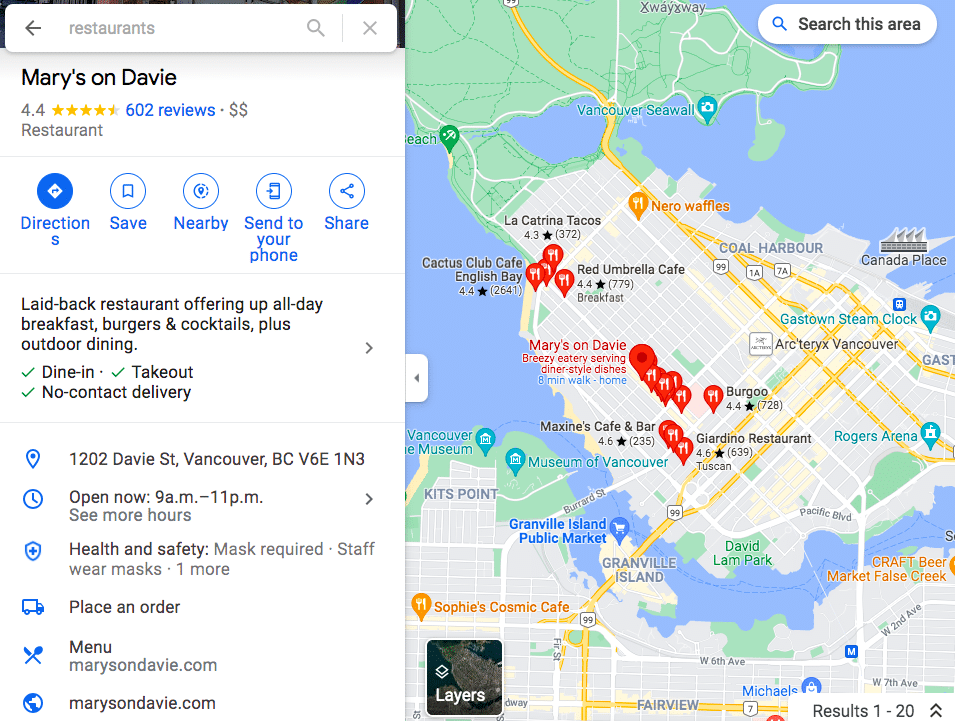
Your Google My Business profile allows you to control and update your contact information, business hours, and other essential details as needed.
You can post updates to share that you’ve expanded services, temporarily closed, or fully reopened (an especially useful feature during emergencies like COVID-19). Google Business Profiles have strong local SEO, so the information you share will rank above third-party sites that might have out-of-date details.
Reviews are a key element of social proof, and a meaningful way to build trust and credibility.
Google’s combined star rating and space for detailed reviews allows customers to share as much or as little information about their experience with your business as they like. All of it helps future potential customers decide which businesses to visit and products to buy.
It can be scary to think about reviews coming in on such a public platform, especially since you can’t pick and choose which Google My Business reviews to share. (Although you can respond to all reviews, as we’ll explain later.)
But don’t panic: Google finds that a combination of positive and negative reviews is more trustworthy than page after page of glowing recommendations.
Make sure to edit your business profile if you change your hours of operation, contact information, etc. Nothing annoys customers more than showing up within operating hours only to find you closed. If you have special hours for holidays or even as a one-off, make sure they are reflected in your Google Business Profile.
You can also create Google My Business posts to share updates, product news, offers, and events.
To edit your business information:
You can get back to the dashboard to make edits at any time at business.google.com. You can also edit your business information directly from Google search or Maps. Just search your business name on one of these tools to access the editing panel.
[/et_pb_text][/et_pb_column][/et_pb_row][/et_pb_section]
In the ever-evolving landscape of WordPress page builders, two names often dominate the conversation: Oxygen Builder and Elementor. While both are powerful tools for building stunning websites without needing extensive coding knowledge, they offer distinct advantages depending on your needs.
Oxygen Builder is renowned for its lean and efficient code output. Unlike Elementor, which can sometimes generate bloated code that impacts page load times, Oxygen focuses on creating clean, optimized code. This results in faster-loading websites, which not only improves user experience but also boosts SEO rankings. If performance is a priority, Oxygen Builder is a standout choice.
One of the key differences between Oxygen Builder and Elementor is the level of control you have over what is included in your site. Oxygen does not rely on the WordPress theme system, which allows you to start with a blank slate and only add the elements you need. This eliminates unnecessary bloat, ensuring that your website remains lightweight and efficient. Elementor, on the other hand, often comes with pre-built themes and widgets that may not always be needed, adding unnecessary weight to your site.
Oxygen Builder offers a one-time purchase model with no recurring fees, making it a cost-effective solution for developers and agencies. Elementor, while popular, operates on a subscription basis, which can become costly over time, especially if you manage multiple websites. With Oxygen, you pay once and own it for life, which can significantly reduce overhead costs.
For those who want complete control over their website’s design and functionality, Oxygen Builder is a dream come true. It offers deep integration with custom fields, dynamic data, and conditions, allowing you to create highly customized sites without the need for additional plugins. While Elementor also offers customization options, Oxygen’s approach is more developer-friendly, providing advanced users with the flexibility they need to build unique websites.
Oxygen Builder is tailored more towards developers who want to harness the full power of WordPress. It allows for advanced CSS, JavaScript, and PHP customization, making it easier to create complex designs and functionality. Elementor is more user-friendly for beginners, but it doesn't offer the same level of control and customization that seasoned developers might require.
Oxygen Builder’s clean code output not only improves site speed but also enhances SEO. The builder's minimalistic approach ensures that your website is easily crawled by search engines, giving you a better chance of ranking higher. While Elementor is also SEO-conscious, the additional elements and code can sometimes hinder optimal performance.
Both Oxygen Builder and Elementor offer responsive design options, but Oxygen gives you more granular control over how your website looks on different devices. You can create custom breakpoints and apply styles specifically for different screen sizes, ensuring a flawless experience across all devices.
Both Oxygen Builder and Elementor have their merits, but if you’re looking for a solution that offers superior performance, advanced customization, and long-term cost savings, Oxygen Builder is the clear winner. Whether you’re a developer looking for more control or a business owner wanting to ensure your website is fast and SEO-friendly, Oxygen Builder is a powerful tool that can take your WordPress site to the next level.
Talk to Hosting Australia today about building your new website in Oxygen Builder.
Google Analytics is an indispensable tool for understanding website performance and user behaviour.
To help you navigate this powerful platform, we at Hosting Australia have compiled a comprehensive glossary of essential terms used in Google Analytics. Whether you’re a novice or an experienced user, this guide will provide you with a clear understanding of the key metrics and concepts. Our goal is to empower you with the knowledge needed to effectively analyse your website’s performance and make data-driven decisions. With Hosting Australia's expertise and this glossary, you’ll be well-equipped to maximize the potential of Google Analytics and enhance your online presence.

Acquisition
The process of attracting visitors to your website. Acquisition reports show where your visitors are coming from, such as organic search, direct visits, social media, or paid advertisements.
Bounce Rate
The percentage of single-page sessions where users leave your site without interacting further. A high bounce rate can indicate issues with site content or user experience.
Channels
The different sources through which traffic comes to your site. Common channels include Organic Search, Direct, Referral, Social, and Paid Search.
Conversion
An action that counts as a completed goal on your website. Examples include making a purchase, filling out a form, or signing up for a newsletter.
Cookies
Small pieces of data stored on a user's device that help track and identify users across sessions and visits.
Dimensions
Attributes of your data that can be used to categorize and organize metrics. Examples include dimensions like city, browser, and landing page.
Events
User interactions with content that can be tracked independently from a page or screen load. Examples include video plays, downloads, and link clicks.
Filters
Tools used to include or exclude data from your reports, or to modify the data within your views. Filters can help you refine your analysis and focus on specific segments.
Goals
User-defined objectives that allow you to measure how well your site meets your target actions. Goals can track actions like purchases, form submissions, or time spent on site.
Landing Page
The first page a user views in a session. Analysing landing pages helps understand which pages attract the most traffic and how they perform in retaining visitors.
Metrics
Quantitative measurements that describe aspects of your data. Examples include pageviews, sessions, and bounce rate.
Pageviews
The total number of times a page is viewed or reloaded by users. This metric helps gauge the popularity of your site’s content.
Referral
Traffic that comes to your site from other websites. Referral reports show you which sites are sending visitors to your site.
Reports
The various types of data presentations available in Google Analytics. Common reports include audience, acquisition, behaviour, and conversion reports.
Segments
Subsets of your data that help you analyse specific groups of users or sessions. Segments can be based on behaviour, acquisition channel, demographics, and more.
Sessions
A group of user interactions with your website that take place within a given time frame. A session can include multiple pageviews, events, and transactions.
Traffic Source
The origin of your website’s traffic, categorized by medium (organic, direct, referral, etc.), source (Google, Facebook, etc.), and campaign (specific marketing efforts).
Users
Individuals who visit your website. Google Analytics distinguishes between new users (first-time visitors) and returning users (those who have visited before).
Views
A filtered view of your data. You can set up multiple views to analyse different aspects of your traffic and performance.
Understanding these terms will help you navigate Google Analytics more effectively, enabling you to gain deeper insights into your website’s performance and make data-driven decisions.
At Hosting Australia, our servers are optimized to enhance your SEO performance by ensuring fast load times, high uptime, and robust security measures. This means your website not only ranks higher on search engines but also provides a seamless experience for your visitors. Our packages offer exceptional value, combining cutting-edge technology with competitive pricing to deliver unmatched performance and reliability. Additionally, our Fusion Web Management plans offer comprehensive support, handling all technical aspects so you can focus on growing your business. Choose Hosting Australia for a hosting solution that boosts your online visibility and fits your budget.

If you have any questions or need further clarification, feel free to reach out to our friendly staff.
Are you tired of the same old browser, or just curious about what else is out there? We've all heard of Chrome, Firefox, Safari, and Edge, but what about Opera, Arc, and Brave?
But if you decide to swap - how will that effect how you do things? And in particular web development?
In this blog post, we're going to dive deep into the world of web browsers and compare these seven browsers to help you find the perfect fit for your browsing needs.
In today's digital age, choosing the right web browser can make a huge difference in your online experience. Each browser has its own unique features, speed, security, and design. Whether you're a casual internet surfer, a tech enthusiast, or a developer, there's a browser out there that's perfect for you.

Chrome, the reigning champion in the browser wars, is known for its speed, simplicity, and vast library of extensions. Developed by Google, Chrome dominates the market share with its clean interface and seamless integration with Google's ecosystem.
For Web Development: Chrome is widely regarded as the best browser for web development due to its excellent developer tools, extensive extension ecosystem, and strong support for modern web standards.
 Firefox
Firefox has long been the go-to browser for those who prioritize privacy and customization. Developed by Mozilla, Firefox offers a robust set of privacy features and a vibrant community-driven extension library.
For Web Development: Firefox is also highly regarded for web development, with robust developer tools, good performance, and a strong commitment to privacy and open standards.
 Safari
Safari, Apple's flagship browser, is known for its sleek design and integration with macOS and iOS devices. Safari is fast, energy-efficient, and tightly integrated with Apple's ecosystem, making it a favorite among Apple users.
For Web Development: Microsoft Edge has made significant improvements and is now based on Chromium, offering similar developer tools and compatibility to Chrome, making it a strong contender for web development.
 Edge
EdgeEdge, Microsoft's latest browser, has come a long way from its predecessor, Internet Explorer. Built on Chromium, Edge offers excellent compatibility with websites, strong privacy controls, and integration with Microsoft services.
For Web Development: Safari is the default browser on macOS and iOS, and while it has excellent performance and integration with Apple's platforms, its developer tools are generally considered less feature-rich compared to Chrome and Firefox.
 Opera
OperaOpera is a versatile browser known for its innovative features like built-in VPN, ad blocker, and battery saver mode. Opera has a sleek design and focuses on providing a fast and secure browsing experience.
For Web Development: Opera is based on Chromium and has a decent set of developer tools, but it's less commonly used compared to Chrome and Firefox.
 Brave
BraveBrave is another privacy-focused browser that stands out for its built-in ad and tracker blockers. Brave rewards users with Basic Attention Tokens (BAT) for opting into privacy-respecting ads, offering a unique approach to funding content creators.
For Web Development: Brave is another Chromium-based browser with a strong focus on privacy, but its developer tools are not as extensive as Chrome or Firefox.
 Arc
ArcArc is a relatively new entrant in the browser market, known for its minimalistic design and privacy-focused features. It aims to provide a simple and fast browsing experience without compromising on user privacy.
For Web Development: Arc is less well-known compared to other browsers on the list. If you meant Avant Browser (Arc Browser), it is not typically considered a top choice for web development.
Now, let's compare these browsers across a few key criteria:
Choosing the right web browser ultimately depends on your priorities. If you're deeply invested in Google's ecosystem, Chrome might be your best bet. For privacy-conscious users, Firefox and Brave offer strong protections against tracking. If you're an Apple enthusiast, Safari seamlessly integrates with macOS and iOS. Edge is a solid choice for Windows users looking for compatibility and integration with Microsoft services. Opera and Arc provide innovative features and a clean browsing experience.
In the end, the best browser is the one that meets your needs for speed, security, privacy, and customization. Try a few out and see which one feels right for you!
[et_pb_section admin_label="section"]
[et_pb_row admin_label="row"]
[et_pb_column type="4_4"][et_pb_text admin_label="Text"]
In the ever-evolving digital landscape, staying ahead of the competition means harnessing the power of data analytics. Google Analytics, a cornerstone tool for webmasters and marketers alike, has recently introduced a suite of new key events that promise to revolutionize how we understand and interact with our web traffic. Let's dive into these new features and explore how they can enhance your web analytics strategy, especially for businesses in Australia.
Google Analytics has always been robust in tracking user interactions, but the new updates take it a step further. The introduction of enhanced event tracking allows for more granular insights into user behavior. This means you can now track specific actions such as button clicks, form submissions, and video plays with greater precision. Enhanced event tracking provides a clearer picture of user engagement, enabling you to fine-tune your website for optimal performance.
Enhanced event tracking allows you to understand exactly how users interact with your site, identifying high-value actions and areas for improvement. By analyzing these interactions, you can optimize your user experience and drive more conversions.
Gone are the days of manually setting up event tracking for every action on your site. Google Analytics' new automated event detection leverages machine learning to identify and track significant user interactions without any manual configuration. This feature not only saves time but also ensures that you never miss out on critical data.
Automated event detection ensures comprehensive tracking of user interactions, providing a seamless way to gather data on all relevant activities. This helps in making data-driven decisions quickly and efficiently.
Understanding user behaviour across different devices is crucial in today's multi-device world. Google Analytics has enhanced its cross-device tracking capabilities, allowing for a more cohesive view of the user journey. This update ensures that you can track a user's interactions seamlessly, whether they switch from a mobile device to a desktop or vice versa.
Improved cross-device tracking provides a unified view of the customer journey, enabling better attribution and a deeper understanding of how users engage with your content across different platforms.
Google Analytics now allows for more customization in defining conversion events. This means you can tailor the conversion tracking to align with your specific business goals. Whether it's a purchase, a sign-up, or any other valuable action, you can now set up and track conversions that matter most to your business.
Customizable conversion events offer greater flexibility and precision in measuring success. By aligning conversion tracking with your unique objectives, you can gain more relevant insights and improve your ROI.
The new key events come with enhanced reporting and visualization tools. Google Analytics now offers more detailed and customizable reports, along with improved data visualization options. These enhancements make it easier to interpret complex data and derive actionable insights.
Enhanced reporting and visualization tools help you make sense of vast amounts of data, turning it into meaningful insights. This enables more informed decision-making and strategic planning.
For businesses in Australia, leveraging these new Google Analytics features can be even more impactful when paired with reliable and high-performance web hosting. Hosting Australia provides the perfect infrastructure to ensure your website runs smoothly, enabling you to maximize the benefits of these advanced analytics tools. Hosting Australia’s Core Hosting Package is the perfect plan to start. With faster load times, robust security, and excellent customer support, Hosting Australia ensures that your data-driven strategies are supported by a strong foundation.
Google Analytics' new key events are a significant leap forward in the realm of web analytics. By offering enhanced event tracking, automated event detection, improved cross-device tracking, customizable conversion events, and better reporting tools, Google Analytics is empowering businesses to gain deeper insights and drive more effective strategies. For businesses in Australia, combining these features with Hosting Australia's top-notch services will give you a competitive edge in understanding your audience and optimizing your web presence.
Stay ahead of the curve by integrating these new key events into your analytics strategy and watch as your data-driven decisions propel your business to new heights.[/et_pb_text][/et_pb_column]
[/et_pb_row]
[/et_pb_section]
One of the primary functions of SiteLock is to scan your website for malware and promptly remove any malicious code or scripts. Cyber criminals are constantly evolving their tactics, and even the most secure websites can fall victim to malware attacks. SiteLock acts as a virtual shield, actively monitoring your site and eliminating any security threats before they can wreak havoc.
SiteLock not only identifies and eliminates malware but also optimizes your website's performance. It ensures that your website runs smoothly and efficiently, providing visitors with a seamless browsing experience. By cleaning up unnecessary files and databases, SiteLock helps your website load faster, reducing bounce rates and increasing customer satisfaction.
Distributed Denial of Service (DDoS) attacks can overwhelm your website with traffic, causing it to crash and disrupting your online services. SiteLock offers robust DDoS protection, detecting and mitigating these attacks in real-time. By safeguarding your website against DDoS attacks, SiteLock ensures that your site remains accessible to legitimate users, even during malicious traffic surges.
For websites that handle sensitive customer information, such as personal details and payment data, security is paramount. SiteLock encrypts data transmission, making it extremely challenging for hackers to intercept and misuse customer information. This encryption ensures that your customers can trust your website with their data, fostering customer loyalty and confidence in your brand.
SiteLock plays a vital role in improving your website's search engine optimization (SEO) rankings. Search engines prioritize secure websites, considering them trustworthy and reliable sources of information. By securing your website with SiteLock, you not only protect your visitors but also enhance your visibility in search engine results, potentially attracting more organic traffic.
SiteLock doesn't just offer one-time protection; it provides continuous security monitoring for your website. Regular scans and reports keep you informed about your website's security status, allowing you to take immediate action if any vulnerabilities are detected. This proactive approach ensures that your website remains secure, giving you peace of mind and allowing you to focus on your core business activities.
In conclusion, SiteLock is not just an additional security measure; it is a fundamental necessity for any website owner. By safeguarding your website from malware, optimizing its performance, protecting against DDoS attacks, securing customer data, boosting SEO rankings, and offering continuous monitoring, SiteLock empowers your website to thrive in the digital landscape. Investing in SiteLock is an investment in the credibility, trustworthiness, and longevity of your online presence. Don't wait until it's too late – fortify your website with SiteLock today and ensure a secure and seamless experience for both you and your visitors.
Thanks to Hosting Australia’s SPAM Protect, your emails will be safer than ever before. We keep developing our technology so that it can block more of those pesky messages from finding their way into inboxes and on computer screens everywhere!
SPAMProtect helps protect inboxes, users, and IPs from the full range of email hazards while saving resources and costs. With competitive, per-domain pricing, you can have piece of mind, with minimal costs.
SPAMProtect offers a variety of services to keep your inbox flowing smoothly, even when you’re not online or our service goes down! You can store messages so they don’t disappear without being read and then retry delivery during outages for an uninterrupted flow of mail!
SPAMProtect Incoming Filtering software offers full inbox protection against spam, viruses and malware with the help of advanced algorithms, smart learning and spam pattern detection methods.
Hosting Australia Spam Protect provides enterprise grade protection against inbound spam, viruses, phishing, malware, ransomware and other email-based threats. Clean and safe inboxes with additional email continuity. Click Here to order and setup Spam Protect on your account.
In the dynamic world of web development, creating stunning websites efficiently is crucial. WordPress page builders like Oxygen, Divi, and Elementor have emerged as popular tools that empower both developers and non-developers to design visually appealing and functional websites. In this article, we'll delve into the features and capabilities of each of these page builders, highlighting their strengths and differences.
Oxygen stands out as a powerful WordPress page builder that offers a unique approach to website creation. Unlike Divi and Elementor, Oxygen is not limited to a specific theme; instead, it enables you to build your entire site layout from scratch. This level of control appeals to advanced users and developers who seek complete design freedom.
True Design Freedom: Oxygen provides a blank canvas approach, giving users complete control over every aspect of their website's design.
Performance: Websites built with Oxygen tend to have excellent performance due to optimized code and the ability to reduce unnecessary bloat.
Developer-Friendly: Oxygen's code editor allows experienced developers to directly manipulate and customize the underlying code.
Dynamic Data: Oxygen integrates with various dynamic content sources, making it suitable for creating complex and data-driven websites.
Learning Curve: Oxygen's unique approach can have a steeper learning curve compared to more traditional builders like Divi and Elementor.
Customization Complexity: While it offers extensive customization, beginners might find it overwhelming to navigate its intricate settings.
Divi by Elegant Themes is one of the most popular WordPress page builders, known for its user-friendly interface and wide range of pre-designed templates and modules.
User-Friendly: Divi's drag-and-drop interface is intuitive and suitable for beginners.
Pre-Designed Content: Divi comes with a vast library of pre-designed templates and content modules, speeding up the website creation process.
Responsive Editing: Divi offers responsive editing, allowing users to easily adapt their designs for various devices.
Global Elements: The Global Elements feature lets you make site-wide changes from a single location.
Code Quality: Divi's generated code can sometimes be less optimized, potentially affecting site performance.
Dependency on Themes: Divi heavily relies on its theme, which might limit design flexibility compared to Oxygen's blank canvas approach.
Elementor Page Builder
Elementor has gained immense popularity for its user-friendly interface and comprehensive set of features. It offers a balance between customization and ease of use.
Live Editing: Elementor's live visual editing lets you see changes in real-time, speeding up the design process.
Vast Widget Library: It provides an extensive collection of widgets and templates, allowing for versatile design options.
Theme Compatibility: Elementor works well with a wide range of themes, offering more flexibility in choosing a base theme.
Popularity: A large user base means abundant resources, tutorials, and third-party add-ons.
Design Limitations: While highly customizable, the design options might be more constrained compared to Oxygen.
Code Quality: Similar to Divi, the generated code might not always be as optimized as hand-crafted code.
Choosing the right WordPress page builder depends on your specific needs and expertise. Oxygen suits advanced users and developers seeking ultimate design freedom and performance optimization. Divi's user-friendly interface and pre-designed content cater to beginners and those looking for a streamlined process. Elementor strikes a balance between customization and ease of use, making it suitable for a wide range of users.
Ultimately, Oxygen, Divi, and Elementor each bring their unique strengths to the table. Assess your requirements, technical proficiency, and design preferences to make an informed decision about which page builder aligns best with your web development goals.



