
In today's competitive digital landscape, small businesses in Australia can't afford to settle for slow websites, misaligned support teams, or fragmented service providers. More than ever, efficiency, speed, and collaboration are essential to online success — and that's where integrated hosting and design services shine.
By partnering with a provider that offers both web design and web hosting under one roof, businesses gain more than convenience. They unlock real advantages in performance, support, and long-term ROI. Here’s why integrating your hosting and design solutions could be the smartest digital move your business makes in 2025.
When you outsource your website design and hosting to separate providers, you risk miscommunication, technical bottlenecks, and unnecessary troubleshooting delays. A single point of contact streamlines operations and ensures your website’s architecture, content, and backend infrastructure are built to work together — not against each other.
For Australian businesses, the benefits are amplified. Local, all-in-one providers deliver low-latency performance, personalised support, and the peace of mind that comes from knowing your data is stored securely onshore. This is more than just a convenience — it’s a strategic advantage.
Speed matters. Websites that load in under 2 seconds have significantly lower bounce rates and higher engagement. But what causes slowdowns? Often it’s a poorly optimised theme or bloated design elements that don’t pair well with your hosting stack.
When your hosting and design team are one and the same, they can ensure:
The result is a website that looks great and loads fast — especially on Australian networks. This means better user experience, improved Google rankings, and higher conversion rates.
When something breaks — and let’s face it, it eventually does — finger-pointing between your web designer and your web host wastes time and money. With an integrated team, there’s no back-and-forth or support tickets flying between vendors. Instead, your provider identifies and fixes issues on the spot.
Imagine being able to call one number and have the same local expert resolve a plugin conflict, fix a broken page layout, and restart a server service — without needing to escalate or wait. That’s the beauty of unified hosting and design support. It just works.
Smart design is about more than just aesthetics. When your website is built by a team that also manages your server infrastructure, the result is a seamless user experience that improves search rankings and drives more leads.
Here’s how integrated teams create a more optimised site:
And because everything’s in-house, changes are implemented quickly, ensuring your site evolves with your business.
One provider. One team. One relationship.
This setup gives business owners clarity and confidence. You know who to call. You know who built what. And you have a team who understands your goals — not just the tech stack. This kind of partnership fosters long-term success, with your digital partner invested in your growth and success, not just the next invoice.
Security is not a plugin — it’s a strategy. When hosting and design are aligned, your provider can implement best-practice security protocols from the ground up. This includes:
This approach also enables proactive updates, backups, and threat detection, because your provider isn’t just passively hosting your site — they built it and understand how to protect it.
Ultimately, integrated hosting and design solutions are about delivering a better digital experience — not only for your customers, but for you as a business owner. You’ll save time, reduce friction, and gain a website that performs at its peak from launch and well into the future.
And for your users? They’ll enjoy faster page loads, intuitive navigation, and a seamless journey from first click to conversion.
One of our clients, a Melbourne-based home renovation company, came to us with a WordPress website that was slow, unresponsive on mobile, and hosted overseas. We rebuilt the site using our in-house designers and migrated it to our Australian VPS hosting environment. The result?
By keeping everything local, streamlined, and fully managed, we gave them a website that not only looked good — it delivered real business growth.
If you're tired of dealing with disconnected vendors and disjointed support, it’s time to bring everything together under one roof. At Hosting Australia, we offer full-service web design and Australian web hosting — all built for performance, security, and business results.
Contact us today to learn how we can help you create a high-performing, integrated digital presence that supports your growth long term.
Both cPanel and Plesk are web hosting control panels. They provide a visual dashboard to manage domains, email, files, databases, backups, and more without needing to touch the command line.
cPanel is Linux-based and typically paired with WHM (Web Host Manager) for admin-level controls.
Plesk works on both Linux and Windows, offering flexibility if you run cross-platform environments.
Clean, grid-based layout with icons.
Familiar to many Aussies it’s long been the industry standard.
Separate logins for user (cPanel) and server admin (WHM), which can be a plus or a minus depending on your needs.
More modern, sidebar-style interface.
Single login for admin and user functions.
Arguably easier for beginners, especially if you’re managing multiple sites.
Verdict: If you prefer a traditional layout and you’re already familiar with hosting basics, cPanel feels like home. Plesk shines for those after a more unified experience.
cPanel: Only works on Linux (CentOS, CloudLinux, AlmaLinux, etc.).
Plesk: Works on both Linux and Windows.
Verdict: If your environment uses Windows servers, Plesk is your only choice. For Linux-based hosting (like most Hosting Australia plans), both are on the table.
Both panels cover the basics email, DNS, FTP, file manager, backups, and one-click installs (via Softaculous or similar).
cPanel:
Deep integration with CloudLinux, LiteSpeed, and other performance tools.
WHM allows detailed server-level control.
Strong ecosystem of plugins, but often at extra cost.
Plesk:
Built-in support for Docker and Git (great for developers).
Centralised management of multiple servers via Plesk Obsidian.
More granular user roles and permissions.
Verdict: Developers and power users might find Plesk more flexible out of the box. cPanel is a workhorse, but some features need third-party tools.
Both panels offer solid security features SSL management, brute-force protection, and firewalls.
cPanel tends to release updates more frequently, which is great for patching but can sometimes lead to minor breakages.
Plesk rolls out more measured updates, with a greater focus on stability across environments.
Verdict: cPanel leads in speed, Plesk in stability. If you're running production sites, that trade-off matters.
Licensing costs have gone up across the board in recent years, but here’s the general picture:
cPanel: Charges per account costs can scale up quickly if you're running a reseller business or lots of sites.
Plesk: Offers tiered packages based on the number of domains, which can be more cost-effective for developers or agencies.
Verdict: Budget-conscious users with multiple domains may find Plesk’s pricing easier to manage. cPanel remains popular despite the hike, mostly due to its legacy and reliability.
Here’s a quick cheat sheet:
| Use Case | Best Pick |
|---|---|
| You’re on a Linux server and want the “standard” hosting experience | cPanel |
| You need Windows hosting or run cross-platform environments | Plesk |
| You’re a developer using Git/Docker or need granular control | Plesk |
| You’re familiar with WHM and want performance-focused hosting | cPanel |
| You manage lots of domains and want flexible pricing | Plesk |
At Hosting Australia, we offer both cPanel and Plesk hosting options, depending on what works best for you. Our local support team can help you choose the right fit whether you’re hosting a small business site or managing a game server cluster.
If you’re unsure where to start, our fast cPanel hosting on Australian servers is a great entry point. But if you’ve got unique needs like Windows compatibility or development workflows Plesk may be worth a closer look.
Control panels are like toolkits you need the one that fits your workflow. Whether you go with cPanel’s tried-and-true reliability or Plesk’s developer-friendly polish, make sure it supports your long-term goals.
Got questions? Reach out to Hosting Australia, we’re happy to help you set up the control panel that suits your hosting setup best.
With the rise of AI models like ChatGPT, Google Gemini, and Perplexity, more crawlers are accessing public websites to collect content for training datasets. If your site is hosted with Hosting Australia on cPanel, this guide explains how to control which bots can crawl your site, using tools built right into your hosting panel.
AI crawlers work like traditional search engine bots, but instead of indexing pages for search results, they scan content to train language models. Examples include:
ChatGPT-User (OpenAI)Google-Extended (used by Google Gemini)CCBot (used by Common Crawl)These crawlers may pull large amounts of text from your public pages. If you prefer to control how your content is used, you can restrict access directly from your cPanel account.
robots.txt File via cPanelpublic_html).robots.txt exists. If not, right-click anywhere and choose Create New File, name it robots.txt.robots.txtEdit the file and add the following:
User-agent: ChatGPT-User
Disallow: /

User-agent: CCBot
Disallow: /

User-agent: Google-Extended
Disallow: /
This tells those specific bots not to crawl your website. Reputable bots will obey these instructions, though some third-party scrapers may not.
Once done, save the file and confirm it’s publicly accessible at:
https://yourdomain.com/robots.txt
For more granular control, you can add meta tags inside the <head> section of specific pages. For example:
<meta name="robots" content="noindex, nofollow">
This prevents indexing and link following for a given page. If you’re using WordPress, SEO plugins like Yoast or Rank Math let you control this per page or post.
If you notice strange behavior, you can check visitor logs from cPanel:
ChatGPT-User or anything suspiciousAI crawlers are now a common part of web traffic. If you want to protect your content or reduce unwanted load, you can manage access easily through cPanel by editing your robots.txt file. This gives you full control over which bots can scan your site.
If you're unsure how to implement this or need assistance with anything in cPanel, reach out to Hosting Australia's support team. We're happy to walk you through the process or make the changes for you.
Web hosting is the silent backbone of the internet, powering everything from one-page portfolios to massive ecommerce platforms. But what if you could sell web hosting yourself—without owning any servers or infrastructure?
That’s exactly what reseller web hosting allows you to do.
If you're a web designer, developer, digital agency, or entrepreneur looking to build recurring revenue and add value to your clients, reseller hosting could be the smartest business move you haven’t made yet.
Let’s break it down.
Reseller hosting is a business model that lets you buy web hosting services wholesale and then repack and sell them under your own brand.
You rent server space and bandwidth from a larger hosting provider (like us at Hosting Australia), and then divide that space into smaller hosting accounts for your own clients. You handle the customer relationships and pricing; we handle the infrastructure, uptime, and back-end support.
In short, you become a hosting provider—without the hassle of managing servers.
Here’s the simple version:
It’s a win-win: you build your brand, generate recurring income, and we keep your hosting rock-solid.
Here’s where it gets interesting. Reseller hosting is one of the most cost-effective and low-barrier ways to start a new income stream in the tech space.
Key Benefits:
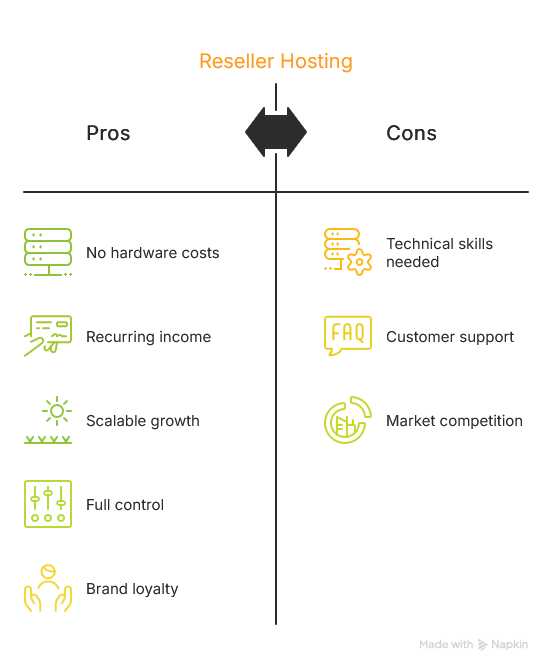
You’re not just adding value—you’re adding a service that increases client retention and builds long-term relationships.
Reseller hosting isn't for everyone—but it's perfect for:
If you already have a digital skillset and a client base, reseller hosting gives you a simple way to monetise both.
Here’s a quick litmus test:
If you answered yes to any of the above, reseller hosting could be the missing link in your business model.
We’re not just another faceless hosting provider. We’re 100% Australian-owned and operated, with fast local servers, personal support, and decades of industry know-how. Our reseller plans are designed for ease, flexibility, and performance—with no lock-in contracts.
You focus on your business, we’ll handle the hosting.
Ready to start selling web hosting under your own brand?
Check out our reseller hosting plans →
At Hosting Australia, we know no two projects are the same — and that's exactly why we offer flexible, powerful VPS services designed to fit your needs, whether you're hosting websites, databases, game servers, or something completely custom.
We’re excited to announce another addition to the list of possibilities: Coolify is now available as an application option on our VPS platform.
Coolify is a platform that makes it easy to deploy and manage websites and applications, without needing deep technical knowledge. It acts like your own private version of cloud platforms such as Vercel or Netlify — but instead of relying on a third-party service, everything runs on your own VPS, giving you full control and ownership.
With Coolify, you can launch websites, manage databases, deploy apps, and monitor everything through a simple dashboard. It supports a wide range of popular technologies like Next.js, Laravel, Node.js, static websites, and even backend services — all powered by Docker under the hood, but without needing to manage Docker yourself.
Real world example:
Imagine you have a business website built with WordPress, and you are also developing a new custom online booking app for your customers. Normally, you would need separate hosting services or complex cloud infrastructure to run these different parts.
With Coolify on your VPS, you can deploy your WordPress site, launch your booking app, host a database, and even add future projects — all managed in one place, with a few simple clicks.
Coolify gives developers, businesses, and creators the freedom to launch new ideas faster, without needing a whole IT team to do it.
High Performance: Powered by fast NVMe storage and premium Australian data centres, our VPS servers deliver outstanding speed and reliability.
Total Control: Full root access means you can install anything you want — including Docker, Coolify, and any other tools your projects require.
Flexible Scaling: Easily upgrade your VPS as your business or project grows. More CPU, RAM, or storage is just a request away.
Local Support: Our expert Australian-based support team is available when you need them, without overseas call centres or long wait times.
Coolify Ready: We make it easy to start using Coolify on your VPS, giving you a powerful, private platform for modern app deployment.
The possibilities are only limited by your imagination — and with your infrastructure fully under your control, you can scale and customise freely.
If you are looking for a hosting solution that offers power, flexibility, and full ownership of your infrastructure, Hosting Australia's VPS services are the answer. With Coolify available as an option, building, managing, and scaling your projects has never been easier.
[et_pb_section admin_label="section"]
[et_pb_row admin_label="row"]
[et_pb_column type="4_4"][et_pb_text admin_label="Text"]In the world of web design, it's easy to think that a visually stunning site is all you need to impress visitors and win business. But even the most beautiful websites can deliver frustrating experiences if the hosting behind them doesn't hold up. In fact, poor hosting is one of the fastest ways to undermine great design.
At Hosting Australia, we see this every day: gorgeous websites crippled by slow load times, frequent downtime, and clunky server responses.

Here's how bad hosting can wreck even the best-designed websites — and what you should watch out for.
1. Slow Loading Speeds Kill First Impressions Designers obsess over aesthetics — layout, colours, typography. But users care first and foremost about speed. Studies show visitors form an opinion about a website in just 0.05 seconds. If your page takes longer than 3 seconds to load, most users won't even stick around to admire your design. Poor hosting — especially overcrowded shared servers — is often the culprit behind sluggish speeds. Make sure your site is hosted on a fast and reliable hosting server.
2. Downtime Destroys Trust Even an occasional hosting outage sends the wrong message: unreliability. Visitors don't differentiate between a hosting issue and your brand — if your site doesn't load, your business seems unprofessional. This is brutal for beautifully designed websites that aim to build credibility, especially for businesses in finance, healthcare, or e-commerce.
3. Poor Hosting Limits Design Choices Designers increasingly use advanced features like high-res video backgrounds, dynamic animation, and interactive elements. These features demand solid server resources and bandwidth. On a weak hosting platform, these features either lag badly or fail outright, forcing designers to downgrade their creative visions.
4. SEO Takes a Hit Google factors site speed and uptime into its search ranking algorithm. That means a beautifully designed website hosted on a slow or unreliable server will likely be buried in search results. Good design without visibility is wasted effort.
Conclusion Great design gets you noticed. Reliable hosting keeps you respected. In today’s digital world, the two are inseparable. If you’re investing in a beautiful website, don’t let bad hosting sabotage your success. Choose a hosting partner who supports your design — and your business — every step of the way.
Need a hosting upgrade? Talk to the experts at Hosting Australia and make sure your site’s beauty shines through with every click.
[/et_pb_text][/et_pb_column]
[/et_pb_row]
[/et_pb_section]
If you’ve been exploring web hosting options for your WordPress site, chances are you’ve stumbled across something called Managed WordPress Hosting. It sounds fancy—and it usually comes with a higher price tag than shared or basic hosting. So the big question is: Is it actually worth the cost?
Let’s take a deep dive into what managed WordPress hosting really is, what you're paying for, and whether it’s the right move for your website.
In simple terms, managed WordPress hosting is a premium service where your web host takes care of all the technical aspects of running WordPress for you. That includes:
Automatic WordPress updates
Daily backups
Security monitoring
Performance optimization
Staging environments
Expert WordPress support
Think of it like having a concierge for your website—they handle the backend stuff, so you can focus on creating content, growing traffic, or running your business.
Here’s what makes managed hosting different—and why it can be worth the higher price point:
Managed hosts often use faster server tech (like NGINX or LiteSpeed), server-level caching, and CDNs out of the box. Your site will be optimized specifically for WordPress, which means faster load times, even during traffic spikes.
Why it matters: Google loves fast websites. So do your visitors.
With managed hosting, security isn’t just a plugin—it’s baked into the system. Most providers offer real-time malware scanning, firewalls, login protection, and DDoS mitigation. And if your site does get hacked, they’ll usually fix it for free.
Why it matters: WordPress is a common target for hackers. Managed hosting keeps you safer by default.
Your host will automatically back up your site daily and update your WordPress core, themes, and plugins. No more worrying about version conflicts or losing data after a failed update.
Why it matters: A single update gone wrong can bring your whole site down.
Managed WordPress hosts typically offer WordPress-specific support, meaning you’re getting help from people who actually understand the platform—no more generic tech support frustrations.
Why it matters: When your site is down, you want fast, relevant help from someone who knows WordPress inside out.
You can clone your site in a staging environment to test changes before making them live. Some plans also come with Git integration, SSH access, and other developer tools.
Why it matters: For developers and tinkerers, this is a huge time-saver—and prevents costly mistakes.
Managed WordPress hosting isn’t for everyone. But here’s who it does make sense for:
Businesses that rely on their website for sales or leads
Bloggers and content creators with growing traffic
eCommerce sites using WooCommerce
Agencies or developers managing multiple client sites
Anyone who values peace of mind and doesn’t want to deal with technical headaches
If you’re just starting out with a personal blog or a small site and want to keep costs down, shared hosting or a basic WordPress hosting plan might be enough—for now.
However, as your site grows or becomes mission-critical, upgrading to managed hosting becomes a smart investment rather than an expense.
When choosing a web hosting plan, most people focus on the basics—speed, storage, uptime, and price. And while those are crucial, there’s a whole world of hosting add-ons that can take your website from standard to standout. These hidden gems can boost your site's performance, security, and overall functionality in ways you might not expect.
Here are the top hosting add-ons you didn’t know you needed—but definitely should consider.
Why it matters: Speed is everything online. A CDN stores your website’s static content (like images, CSS, and JavaScript) on servers around the world. This means users load your site from a location closer to them, drastically improving page load times.
Who it’s for: Anyone with international traffic or a media-rich site. Think photographers, bloggers, eCommerce stores, or global businesses.
Bonus: Some hosting providers partner with Cloudflare or similar services to offer easy one-click CDN activation.
Why it matters: Stuff happens—whether it’s accidental deletion, an update gone wrong, or a malware attack. Automatic backups ensure you’re always a click away from restoring your site to a stable version.
Who it’s for: Literally everyone. If your site matters to you, you need reliable backups.
Tip: Look for hosting plans that include off-site or cloud backups for extra peace of mind.
Why it matters: Want to test a new design or plugin before it goes live? A staging environment lets you clone your site and make changes without affecting your live website.
Who it’s for: Developers, designers, or DIYers who like experimenting.
Cool part: With one-click deployment, you can push updates from staging to live without breaking a sweat.
Why it matters: Cyber threats are real. This add-on regularly scans your site for vulnerabilities, malware, or suspicious activity—and often includes cleanup services if something’s found. Hosting Australia provides Malware support along with Cleanup service when required.
Who it’s for: Site owners without a dedicated IT team. Peace of mind is priceless.
Pro move: Pair this with a web application firewall (WAF) for layered protection.
Why it matters: A branded email (like you@yourdomain.com) looks way more professional than a Gmail or Yahoo account.
Who it’s for: Small businesses, freelancers, and anyone trying to build trust online.
Note: Some hosts include basic email, but advanced email hosting (with better spam filters and storage) may be an upgrade worth paying for.
To find the hosting package that suits your needs call us or check the packages available with Hosting Australia.
Why it matters: Many hosting providers now offer SEO dashboards or plugins that help optimize your site structure, keywords, and meta data—all from your hosting control panel.
Who it’s for: Bloggers, marketers, and small business owners looking to improve search rankings without hiring an expert.
Look for: Tools that offer actionable recommendations, not just data.
Why it matters: These high-performance web servers can handle more traffic and reduce load times compared to traditional Apache servers.
Who it’s for: Anyone serious about performance. Your site will be noticeably faster, especially under heavy loads.
Bonus: Some LiteSpeed setups include built-in caching systems.
It’s easy to stick with the default settings when launching your site—but a few smart add-ons can take things to the next level. Whether you’re focused on speed, security, or scalability, these under-the-radar features could be exactly what your website needs to thrive.
Before you skip the upsell screen, take a second look—some of those extras might just be the secret weapons your site’s been missing.
Want help picking the right add-ons for your hosting plan? Drop your hosting provider or use case, and I can give personalized recommendations!
When it comes to selecting a hosting provider for your website, there are numerous factors to consider—server speed, customer support, pricing, and security. However, one of the most critical aspects that often gets overlooked is the uptime guarantee. Uptime refers to the amount of time a hosting server is operational and accessible to users. An uptime guarantee ensures that your website will experience minimal downtime, which can significantly affect both user experience and your business performance. In this article, we’ll explore why uptime guarantees matter and why they should be a priority when choosing a hosting provider.
The primary reason uptime is crucial is its direct effect on the user experience. Websites that are frequently down or slow to load can frustrate visitors, leading them to abandon the site in favor of a competitor. This is particularly true for e-commerce sites, where every second of downtime can result in lost sales and revenue.
A hosting provider with a strong uptime guarantee ensures that your website remains accessible at all times, providing a seamless experience for users. An uptime guarantee of 99.9% means that, in any given month, your website will be down for no more than 43 minutes. While this might seem like a small amount of time, it can make a significant difference when it comes to maintaining a positive user experience.
Search engines like Google prioritize websites that offer great user experiences, and uptime is a key component of that. Websites with frequent downtimes or slow loading speeds are penalized in search engine rankings, which can hurt your visibility online. A hosting provider that offers a reliable uptime guarantee ensures that your site will stay up and running, preventing it from being negatively affected by search engine algorithms that favor stability and performance.
Additionally, search engines tend to crawl websites more frequently when they are reliable and always accessible. If your site experiences significant downtime, search engine bots may miss crawling important pages, further impacting your rankings.
Your website’s uptime is also closely tied to the reputation and trustworthiness of your business. If potential customers or clients encounter frequent outages or issues when visiting your website, they may begin to question the reliability of your business. In today's digital age, maintaining a professional online presence is essential, and any downtime can be perceived as a sign of neglect or incompetence.
An uptime guarantee, particularly one that is backed by solid service-level agreements (SLAs), demonstrates that the hosting provider is committed to ensuring your site remains operational. This can go a long way in building trust with your audience, who will feel confident knowing your website is reliable.
For online businesses, every minute of downtime equates to potential lost revenue. Whether you run an e-commerce store, provide digital services, or rely on ad revenue, an inaccessibly website means missed opportunities. Even with minor downtime, customers may leave your site without making a purchase, subscribing, or completing their intended actions.
A hosting provider that offers an uptime guarantee helps mitigate the risk of financial losses caused by downtime. Many hosting providers offer compensation if they fail to meet their uptime promises, either by offering service credits or refunds, which can offset the losses incurred due to outages.
Hosting providers that offer uptime guarantees typically invest in their infrastructure, such as redundant systems, load balancing, and failover mechanisms, to ensure that your website remains available even in the event of hardware failure or unexpected traffic spikes. This level of stability ensures that your website will continue to perform reliably over the long term, which is essential for businesses that rely on their website as a key part of their operation.
When you choose a hosting provider with a strong uptime guarantee, you are essentially investing in the long-term stability of your online presence. These providers are more likely to provide continuous updates and support to keep their infrastructure running smoothly, ensuring your website remains available 24/7.
Hosting providers that guarantee uptime are also likely to offer better customer support in the event of downtime or technical issues. Since uptime is so important, these providers are motivated to resolve any problems quickly to meet their uptime promises.
Having responsive customer support available around the clock ensures that if your site does experience downtime, you can get it back online as quickly as possible. This is essential for minimizing any negative impact on your business or customer experience.
Not all uptime guarantees are created equal. When evaluating hosting providers, make sure you understand the specifics of their uptime promises. Here are a few key considerations:
Percentage of Uptime: The most common uptime guarantees are 99.9%, 99.95%, and 99.99%. Each level represents the percentage of time your website will be operational, with 99.99% uptime being the most reliable.
Service-Level Agreements (SLAs): Check whether the provider offers SLAs that outline the compensation you can receive if they fail to meet their uptime guarantee. Many providers offer service credits or refunds for downtime exceeding the agreed-upon threshold.
Monitoring and Reporting: Choose a hosting provider that offers transparency and detailed reports about uptime performance. This ensures that you can track your website’s availability and have a clear record of any downtime incidents.
Uptime guarantees should be a top priority when choosing a hosting provider, as they directly impact user experience, SEO, business reputation, and potential revenue. By selecting a provider that offers a solid uptime guarantee, you can ensure your website remains accessible to users, maintain your search engine rankings, protect your business reputation, and minimize financial losses caused by outages. Make sure to carefully review the terms of any uptime guarantees and SLAs to find a provider that meets your website’s needs and ensures reliable performance for the long term.



