
It’s a story every small business owner has heard – or lived through. You sign up with a big-name overseas host like GoDaddy, Crazy Domains, or HostPapa. The price looks cheap, the ads promise the world, and at first glance, it all seems like a bargain. But then reality kicks in. Something breaks, you need help, and suddenly you’re waiting on hold for hours, explaining your problem to support staff who treat you like Ticket #456734 instead of a paying customer. Sound familiar?
Here’s the truth: for small Australian businesses, overseas hosting giants don’t deliver. They treat you like a number, load your account with expensive add-ons, and leave you stuck in endless support queues. Local Australian web hosting providers, on the other hand, know your name, understand your market, and actually care about your success.
GoDaddy and similar companies love to lure businesses in with $2.99 hosting deals. But read the fine print, and you’ll discover those low rates only cover the basics – and sometimes not even the essentials. Need an SSL certificate? Extra. Backups? Extra. Email hosting? Extra again. By the time you’ve added all the essentials, that “cheap” plan costs more than reliable Australian web hosting with everything included.
Worse still, these overseas companies thrive on upsells. Every time you log in, you’re bombarded with “special offers” for services you didn’t ask for. The real cost of cheap hosting? Lost time, hidden fees, and frustration.
When your website crashes at 10am on a Monday, your business stops. Customers can’t reach you, sales stall, and your reputation takes a hit. This is when support matters most. But with overseas providers, “support” often means reading from a script, transferring you between departments, or sending you links to articles that don’t solve your issue.
Small business owners don’t have hours to waste. You need a real person, preferably local, who understands your setup and can fix problems fast. That’s where Australian-based hosting providers shine. With real people on the other end of the line – not faceless call centres – you get answers, not excuses.
Websites hosted on overseas servers can be painfully slow for Australian visitors. Every millisecond counts online, and customers won’t wait around for a page that drags its feet. Google won’t either – slow sites sink in rankings. Hosting in Australia keeps your data close, reduces latency, and ensures your site loads quickly where it matters most – for your local customers.
When you host overseas, your customer data is subject to foreign laws. That means less control, less compliance with Australian privacy standards, and more risk. Hosting locally means your data stays onshore, protected by Australian regulations. For industries like healthcare, finance, or government contracts, this isn’t just smart – it’s essential.
Local hosting providers like Hosting Australia invest in Aussie infrastructure, support Aussie jobs, and understand Aussie businesses. Instead of being just another number in a global call centre, you’re a valued customer with direct access to people who know your name – and your needs.
Features like 24/7 Australian-based support, inclusive SSL certificates, proper backups, and servers based in Sydney or Melbourne aren’t “add-ons” – they’re standard. And when something goes wrong, you won’t be explaining your problem three times to someone on the other side of the world. You’ll be speaking to someone who understands you straight away.
The bottom line? Overseas hosting giants might win on advertising, but they lose where it matters – on service, support, and reliability. For small Aussie businesses, the choice is clear: don’t be a number, don’t get lost in overseas call centre hell. Choose local, get real support, and give your business the web hosting it deserves.
Don’t be a number – host local, get real support.
If you're still reaching for FileZilla every time you want to manage your website files, it might be time to upgrade your workflow. The cPanel File Manager is a fast, secure, and powerful tool – and it's already built into your Australian cPanel hosting account.
Whether you're updating your WordPress config file, uploading an image, unzipping a backup, or tweaking permissions, File Manager lets you do it all – no FTP client required.
Let’s dig into the features you can start using right now to manage your website smarter and faster with cPanel File Manager.
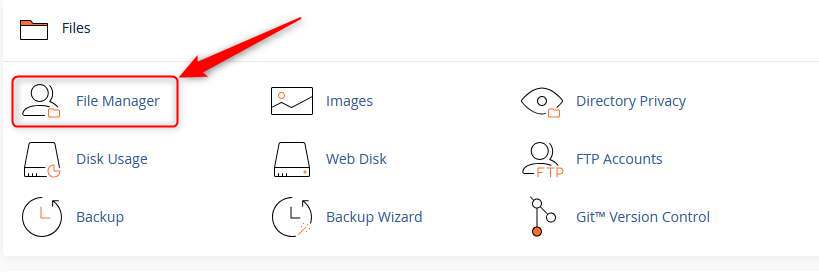
First things first: log into your cPanel dashboard via your hosting account. Once inside, find the File Manager icon (usually near the top under the “Files” section).
Click it and you’re in – no setup, no FTP credentials, no hassle.
Your website lives inside the public_html folder. Think of it as the “root directory” for your domain. Here’s a breakdown:
Tip: If you don’t see hidden files like .htaccess, click “Settings” in the top-right and enable “Show Hidden Files”.
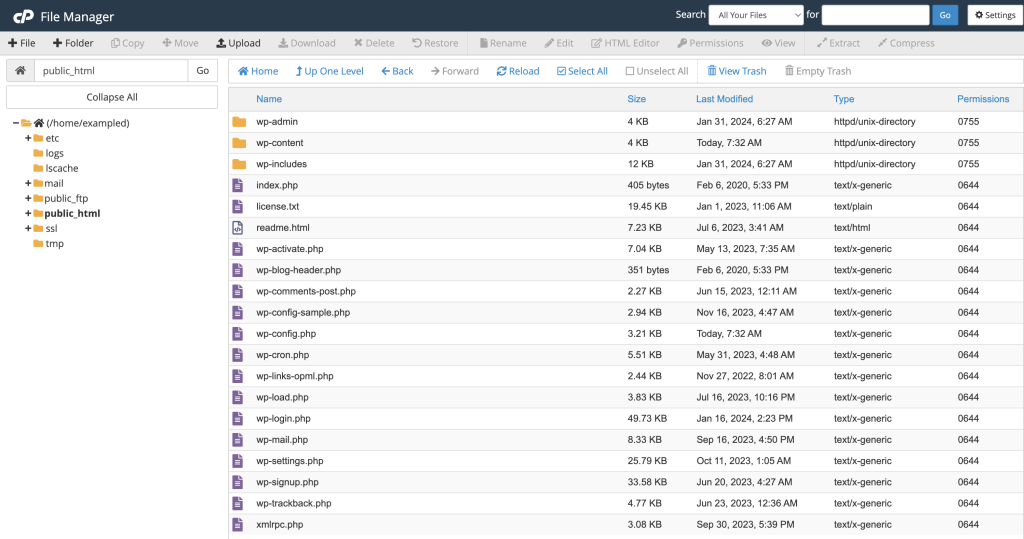
You can upload anything – WordPress themes, PDFs, images, zip archives – directly into any folder. Here’s how:
Pro Tip: Upload .zip files and extract them inside File Manager – way faster than uploading 50 individual files.
Need to back up a folder? Or unpack a theme? File Manager handles compression and extraction with ease.
This is especially handy for backups, migrations, or packaging up a dev copy of a site.
No need to open a code editor – File Manager has one built in. Just right-click any file and choose Edit or Code Editor.
This is perfect for:
wp-config.php to update database credentials.htaccess for redirects or security rulesSyntax highlighting, line numbers, and quick saves make it feel like VS Code Lite – right inside your browser.
Every file and folder has permissions that determine who can read, write or execute them. In File Manager, click “Permissions” in the toolbar or right-click > Permissions.
For most WordPress sites:
755644Never set folders to 777 – that’s a big security risk. If unsure, your hosting provider can help restore safe defaults.
Need to test a static page? Or create a temp folder? Use the + File or + Folder buttons to create them instantly anywhere in your structure.
Examples:
robots.txt filemaintenance.html pageWhen you first open File Manager, you’ll get a choice: open in home directory or the Web Root (public_html).
Choose Web Root to jump straight to where your actual website lives. It saves time, especially if you’re doing daily maintenance or uploads.
If you’ve broken your site by installing a bad plugin or theme, File Manager is your friend. Just:
wp-content/pluginsplugin-name-disabled)WordPress will deactivate it automatically – letting you get back into wp-admin to fix things!
For small business owners managing their own websites or working with a developer occasionally, File Manager is the perfect middle ground. It gives you full access, with none of the technical roadblocks of FTP clients or SSH access.
On premium Australian cPanel hosting, File Manager is lightning-fast, secure, and always available – giving you total control of your site files from anywhere in the world.
File Manager is encrypted via HTTPS and requires cPanel login credentials. To stay safe:
You don’t need a developer, an FTP client, or a computer science degree to manage your website files. With File Manager in cPanel, it’s all at your fingertips:
If you're using small business web hosting and want to take more control of your site – or simply save time – File Manager is where to start.
Want access to blazing-fast, feature-packed cpanel web hosting? Get in touch and we’ll help you find a hosting plan that gives you all the tools (and none of the clutter).
Running an online store or small business means juggling sales, marketing, support, and admin - all at once. With n8n, you can automate repetitive tasks and even build smart AI-driven workflows that help you work faster and more efficiently.
Whether you're running an e-commerce site or managing customer data across platforms, n8n gives you the power to create automation that fits your exact needs, no bloated apps or expensive software required.
n8n (short for "node-node") is an open-source workflow automation tool that lets you connect over 300 services visually. You can build powerful automations by dragging and dropping nodes in a browser, no coding required.
It is also AI-ready. n8n integrates with OpenAI, Hugging Face, and other AI services, allowing you to automate content generation, summarise emails, route customer tickets, or power chatbots, all within a single flow.
Here’s why e-commerce stores and small businesses are adopting AI workflows through n8n:
This is automation that works for you - and thinks with you.
Auto-process orders from WooCommerce or Shopify, send alerts to Slack, update Google Sheets, and notify your fulfillment partner. Use AI to flag high-priority orders based on keywords or customer notes.
Automatically pull new tickets from your helpdesk or contact form. Let AI summarise the message and classify it. Route to the right department or respond with a pre-filled draft.
Feed topic ideas into OpenAI and generate blog posts or Instagram captions. Schedule them with Buffer or publish directly using WordPress nodes.
Track stock changes, update your store listings, notify the team, and forecast demand using AI models, all within a single workflow.
At Hosting Australia, our VPS Hosting comes with n8n pre-installed and ready to go (choose the n8n application upon order). No need to mess around with Docker or setup scripts. Just log in and start building workflows.
Whether you're using it for AI integrations, e-commerce automations, or day-to-day admin tasks, your workflows run smoothly and securely on our local infrastructure.
n8n is designed to be simple to pick up. There are hundreds of guides and video tutorials that walk you through everything from beginner automations to advanced AI workflows.
And if you're stuck or want help building out your ideas, our support team is ready to assist.
n8n makes it easy to automate your business with real intelligence. From order processing to content generation, AI workflows are no longer out of reach.
Get started today with Hosting Australia's VPS Hosting and bring your automation ideas to life. If you need a hand, feel free to reach out to our support team.
WordPress is a powerhouse, but it can quickly become a bloated, slow-moving mess if you’re not careful with your plugins. For small businesses running on WordPress web hosting Australia wide, performance, security and SEO matter more than ever. And outdated, unused, or unnecessary plugins could be quietly costing you leads and rankings.
So, let’s take a guided walk through the “WordPress Plugin Graveyard” – a rundown of the plugins you should delete, replace, or avoid entirely in 2025.
If you’ve been using WordPress for more than a year, chances are your site has collected some plugin clutter. Here’s why that’s a problem:
In short, your plugin list might be the reason your site isn’t loading fast, ranking well, or staying secure. Time for a plugin audit.
Below are plugins that are no longer maintained, have better alternatives, or are causing more problems than they solve.
Once a go-to for beginners, Jetpack has become a bloated mess trying to do too many things. It loads excessive scripts, slows down pages, and duplicates functionality you can get elsewhere with better performance. Unless you’re using a single specific module (like downtime monitoring), it’s better to remove it.
Still hanging on from the early page builder wars, WPBakery is now outdated and often conflicts with modern themes or block-based editors. With Gutenberg and builders like Divi or Oxygen, WPBakery belongs in the past.
Big, flashy, and heavy on load time. Sliders in general are falling out of favour due to UX and performance issues. Plus, this plugin has had multiple security flaws in past years. Ditch it for lightweight image blocks or modern galleries.
Yes, it’s popular. But if you’re still using CF7 without recaptcha or spam filters, you’re inviting bots and bad UX. Alternatives like WPForms Lite or Fluent Forms are faster, more secure, and mobile-friendly.
This plugin checks every internal and external link... constantly. On shared WordPress hosting setups, it can drag performance into the ground. Instead, use a free online tool periodically or install and run it temporarily, then deactivate.
This plugin works, but it uses your server resources to compress images. In contrast, plugins like ShortPixel or TinyPNG process images offsite, keeping your load light and fast.
The free version adds bulky scripts without giving you access to proper GA4 insights. Use Site Kit by Google for tighter integration or switch to server-side tracking setups.
Some plugins aren’t broken – they’re just not necessary anymore. If your site has grown up, these may now be liabilities:
Even if a plugin isn’t on our graveyard list, it might still need the axe. Ask yourself:
If the answer to any of the above is “no” – it’s time to replace it or remove it.
Here are some lighter, modern alternatives to commonly overused or outdated tools:
| Old Plugin | Modern Alternative |
|---|---|
| Contact Form 7 | Fluent Forms, WPForms Lite |
| Slider Revolution | Smart Slider 3 (only if needed), Block-based images |
| Jetpack | Separate tools: ShortPixel, UpdraftPlus, etc. |
| Broken Link Checker | Ahrefs or Screaming Frog (manual scans) |
Even the best plugins will struggle on poor hosting. If you’re running bloated plugins on overseas servers or shared environments with no optimisation, you’re stacking the odds against yourself. Choose WordPress web hosting Australia plans that offer LiteSpeed caching, image compression, and database optimisation tools built-in.
Better hosting can eliminate the need for certain plugins altogether. For example, many VPS hosting environments come with built-in server-side firewalls, backups, and performance tuning that reduce your plugin dependence significantly.
Set a quarterly reminder to run a plugin audit. Use this checklist:
If you’re managing multiple client sites, consider a staging server to safely test plugin changes before pushing live.
Plugins are powerful – but too many, or the wrong ones, are a liability. Clean up your plugin list, keep only what’s essential, and rely on quality hosting to carry the rest. Your site will load faster, stay safer, and convert better – all without the drag of digital dead weight.
Need help moving to Australian WordPress Hosting that’s built for performance? Contact us here and we’ll assess your setup – plugin bloat and all.
In a world where your competitor is just one click away, website speed is no longer just a technical concern – it's a psychological trigger. For small businesses, especially those in Australia competing locally, load times can make or break a sale. If your website is slow, you're not just losing traffic – you're losing trust, conversions, and long-term customers.
This post breaks down the science behind why speed matters, how the brain reacts to slow websites, and what you can do – from smarter Australian VPS hosting to front-end fixes – to stop users from bailing in seconds.
According to a Google study, users form an opinion about your website in just 50 milliseconds. That’s faster than the blink of an eye. If your site lags during that crucial first second, you’ve already triggered negative impressions. Visitors may not consciously say “this site is slow” – but their brain already decided it feels clunky, outdated, or untrustworthy.
The psychology is simple: we associate speed with competence. Just like you’d question a plumber who took 5 minutes to answer a knock at the door, users instinctively distrust slow-loading websites. Speed conveys professionalism. Lag implies risk.
Research in neuropsychology shows that waiting – even just a few seconds – activates the amygdala, the part of our brain associated with stress and fear. When a user clicks a button and nothing happens right away, their body registers it as a micro-stressor. Do that a few times in a session, and you're effectively conditioning people to leave.
Amazon famously reported that every 100ms of latency cost them 1% in sales. Now imagine that impact on a local bakery or Geelong tradie with 2–3 seconds of delay on mobile. You’re not Amazon – you can’t afford to lose that conversion window.
Emotions influence how people interact with websites. A slow website triggers frustration, anxiety, or apathy. A fast site creates a sense of ease and control. Positive emotions lead to action: filling out a form, making a purchase, booking a service. Negative ones lead to bouncing – and they remember the feeling more than your branding.
That’s why optimising speed isn’t just about SEO or performance metrics – it’s about creating a calm, confident user experience that nudges people to trust and engage with your business.
Over 60% of Australians now browse primarily on mobile. And mobile users are brutal: they expect faster results and have even shorter attention spans. A delay of just 3 seconds can increase bounce rates by over 30% on mobile. If your mobile site isn’t loading quickly – and cleanly – you’re not even in the running.
This is particularly important for service businesses that rely on quick mobile access – like emergency trades, local cafes, gyms, or consultants. These users are often on the go, looking for fast answers. They won’t wait for a bloated homepage or oversized images to load.
Yes, Google officially uses site speed as a ranking factor. But beyond that, speed directly impacts your behaviour metrics – time on site, bounce rate, and conversion rate – which indirectly influence your SEO rankings.
If someone visits your page and leaves within 5 seconds, that sends a clear signal: the content (or experience) wasn’t useful. Google picks up on that. And your competition? They’re happy to welcome that visitor instead.
This is especially important if you rely on local SEO to attract business in areas like Geelong, Melbourne, or Brisbane. Fast sites rank better. Period.

You can optimise images and minify scripts all you like – but if your site is on cheap, oversold, offshore hosting, it’s like tuning up a Ferrari and then driving it on a gravel road. The foundation matters.
Switching to Australian VPS hosting or high-performance WordPress hosting can reduce latency dramatically. Local servers mean faster time-to-first-byte. No unnecessary overseas routing. No traffic congestion from noisy neighbours.
Plus, good hosting providers (like us) include built-in caching tools, LiteSpeed optimisation, and server-level security – all of which improve performance without needing a developer.
Here are the top offenders we see when auditing slow websites:
Many of these can be resolved in under 30 minutes. Others (like hosting) require a more strategic move – but one that pays dividends long-term.
Want a fast win? Start by switching to fast, local hosting. Then install a caching plugin (or use your host’s built-in tools), compress images using tools like TinyPNG, and audit your plugins. Need help? We offer free speed reviews for Aussie sites.
If you're running WordPress, make sure you’re using optimised hosting designed specifically for it. Our WordPress hosting plans are built for this exact scenario – and we’ll help you migrate, test, and tweak performance in days, not weeks.
You wouldn't greet a customer in your store by ignoring them for five seconds. Don’t do that online. Website speed is psychological. It impacts mood, trust, and action. And in 2025, it’s one of the most important conversion levers for small business websites in Australia.
Need help speeding things up? Contact us today for a free performance check and we’ll show you exactly where your site can go faster.
If you’ve ever logged a support ticket and waited 48 hours for a copy-paste answer that doesn’t even solve your issue, you already know the frustration. Small business owners don’t have time for back-and-forth with outsourced help desks or bots that loop you through scripted questions. When your website goes down, email breaks, or sales stop flowing — you need real help, fast.
Here’s the thing: web hosting isn’t just about servers. It’s about having the right people in your corner when things go wrong. In this article, we explore why having a local, human support team is the single most underrated feature of modern web hosting — and why it matters more now than ever for Australian small business owners.
Most budget hosting providers advertise "24/7 support" — but what they don’t tell you is that support usually means submitting a ticket, waiting in a queue, and dealing with someone in another timezone with little technical expertise. Your problem may be urgent, but their response is anything but.
Common issues small business owners face when using ticket-based support:
This type of support isn’t just frustrating — it’s bad for business. Every hour your website is down or running slowly, you’re potentially losing leads, customers, and revenue.
Now imagine this instead: You call or email and within minutes, you’re speaking with someone in Australia who understands WordPress, understands your website, and actually listens. Even better — they’ve likely helped you before.
Here’s how real, local support makes a measurable difference:
When you host your website with a team that treats your problem like their own, it shows. Downtime drops. Stress goes away. And your confidence in your website goes up.
Let’s take a real example. An ecommerce business owner in Victoria had been hosting their site with a global provider. When their site crashed during a sale event, they were left submitting a ticket and waiting over 24 hours for help. By the time the issue was resolved, they’d lost hundreds in sales and even more in customer trust.
After switching to our Australian cPanel hosting, they experienced an outage again a few months later. This time? A local support team member jumped on the issue immediately, identified a plugin conflict, and restored the site within 30 minutes.
The business owner said it best: “I didn’t just get a fix. I got peace of mind.”
Your website is your digital storefront. If it’s not working properly, it reflects poorly on your brand. Hosting support isn’t just a technical issue — it’s customer service for your online presence.
Ask yourself this:
Of course not. But that’s effectively what happens when your website isn’t loading and your hosting provider can’t (or won’t) help in real time. Investing in quality website hosting with local support is investing in your customer experience — and your bottom line.
All support teams are not created equal. Here’s what small business owners in Australia should look for when choosing a hosting provider:
All of the above form the foundation of Hosting Australia’s customer service model. We’ve built our support systems around what local businesses actually need — not what a global help desk thinks they can get away with.
It might sound surprising, but there’s a direct link between great hosting support and better SEO performance. How?
And when support is proactive — like recommending a LiteSpeed tweak or PHP upgrade — it’s even better. These “invisible” wins add up and lead to better search performance, more trust, and more leads.
If you’re paying $5 a month for hosting and getting no help when it matters, that’s not cheap — it’s expensive. Every hour spent chasing support, every lost lead, every failed email — it all adds up.
For small businesses in Australia, website hosting is about reliability, not just resources. The right support team isn’t just a cost — it’s an asset. And if you value your website, your customers, and your time, it’s worth making the switch.
Learn more about our Australian-based hosting with real support here, or talk to our team about how we can make your website less stressful — and more successful.
In today’s digital landscape, every second counts when it comes to your website’s loading speed. Slow websites frustrate visitors, increase bounce rates, and negatively impact search engine rankings. Studies show that a delay of just one second in page load time can reduce conversions by up to 7%. That’s why choosing the right web hosting technology is crucial for online success. LiteSpeed offers a powerful solution designed to dramatically improve site speed and overall user experience. Whether you run an e-commerce platform, a blog, or a corporate website, leveraging LiteSpeed can give you a competitive edge through blazing-fast performance and enhanced reliability.
LiteSpeed is a type of web hosting service that uses LiteSpeed Web Server software instead of traditional Apache or Nginx servers. LiteSpeed is a high-performance, commercial-grade web server known for its speed, stability, and security. It’s designed to handle heavy traffic loads efficiently while delivering faster content delivery.
– LiteSpeed uses an event-driven architecture, which allows it to handle thousands of simultaneous connections with minimal resource consumption.
– It includes built-in caching features that drastically reduce page load times without requiring complex external plugins.
– LiteSpeed supports HTTP/3, QUIC, and SPDY protocols to optimise content delivery over the internet.
– It integrates seamlessly with popular control panels such as cPanel and supports PHP, making it accessible to most website owners.
These features make LiteSpeed Hosting a smart choice for businesses seeking reliable speed improvements without increasing hosting costs.
Choosing LiteSpeed unlocks numerous benefits that help your website perform better across the board.
LiteSpeed’s advanced caching systems, including LiteSpeed Cache (LSCache), serve cached pages instantly, reducing server load and dramatically accelerating responses. On average, websites using LiteSpeed hosting can see page speed improvements of 50% or more compared to Apache-based hosting.
LiteSpeed includes built-in anti-DDoS and anti-brute-force protections, keeping your site safe against common cyber threats. It also supports mod_security, a powerful Web Application Firewall module that helps prevent attacks.
LiteSpeed can efficiently manage sudden traffic spikes, making it ideal for websites that experience variable visitor loads. Its event-driven model prevents server crashes under high demand, ensuring your site remains available when visitors need it most.
LiteSpeed works seamlessly with CMS platforms like WordPress, Magento, Joomla, and Drupal. The LSCache plugin for WordPress, for example, is highly regarded for optimizing website speed with minimal configuration.
To get the most out of LiteSpeed, implementing best practices can further enhance your website’s speed and efficiency.
One of the simplest ways to improve load times is to activate the LSCache plugin or built-in caching features. This drastically reduces server processing time for dynamic websites. Benefits include:
– Automated page caching and content delivery
– Image optimisation and lazy loading support
– Minification of CSS, JavaScript, and HTML files
– Browser cache control for repeat visits
LiteSpeed Hosting provides the foundation for fast delivery, but optimising your content is also essential. Consider these strategies:
– Compress images using tools like TinyPNG or ShortPixel.
– Minimize unnecessary plugins or scripts that slow down your site.
– Structure content for fast rendering by simplifying complex elements.
LiteSpeed supports HTTP/3 and QUIC, which reduce latency significantly for modern browsers. Enabling these protocols improves speed especially for mobile users or those accessing your site from distant locations.
Several businesses have seen measurable improvements after switching to LiteSpeed Hosting. For instance:
A popular Australian e-commerce retailer reported a 60% decrease in bounce rate and a 40% increase in mobile conversions after migrating to LiteSpeed.
A content-heavy news site slashed its average page load time from 5 seconds to under 2 seconds, improving user engagement and ad revenue.
WordPress-powered blogs utilising LSCache noticed faster dashboard performance and smoother user experience during traffic surges.
Such examples highlight how LiteSpeed Hosting’s technology can translate into tangible results for websites of all sizes and types.
Hosting Australia offers LiteSpeed Hosting plans tailored to meet the needs of small businesses, startups, and growing websites. Here’s why you should consider us:
– Optimised server infrastructure across Australian data centres for local speed advantages.
– Expert support dedicated to helping you unlock your site’s best performance.
– Flexible plans allowing seamless upgrades as your website grows.
Our LiteSpeed Hosting not only delivers superior speed but also comes with features designed for security and reliability, ensuring your website remains fast, secure, and accessible.
Investing in LiteSpeed is a strategic move to enhance your website’s loading speed, optimise user experience, and improve search rankings. Start by assessing your current hosting environment and consider migrating if you encounter slow load times or reliability issues.
Remember to:
– Enable LiteSpeed Cache and optimise your website content regularly.
– Stay updated with the latest LiteSpeed versions and security patches.
– Monitor your website’s performance using tools like Google PageSpeed Insights or GTmetrix.
By leveraging LiteSpeed Hosting with Hosting Australia, you ensure your website is prepared to provide a fast, smooth experience that keeps visitors coming back.
Got questions or want to know more? Reach out to our support team https://hosting-australia.com/contact-us/ - we're here to help.
In today's competitive digital landscape, small businesses in Australia can't afford to settle for slow websites, misaligned support teams, or fragmented service providers. More than ever, efficiency, speed, and collaboration are essential to online success — and that's where integrated hosting and design services shine.
By partnering with a provider that offers both web design and web hosting under one roof, businesses gain more than convenience. They unlock real advantages in performance, support, and long-term ROI. Here’s why integrating your hosting and design solutions could be the smartest digital move your business makes in 2025.
When you outsource your website design and hosting to separate providers, you risk miscommunication, technical bottlenecks, and unnecessary troubleshooting delays. A single point of contact streamlines operations and ensures your website’s architecture, content, and backend infrastructure are built to work together — not against each other.
For Australian businesses, the benefits are amplified. Local, all-in-one providers deliver low-latency performance, personalised support, and the peace of mind that comes from knowing your data is stored securely onshore. This is more than just a convenience — it’s a strategic advantage.
Speed matters. Websites that load in under 2 seconds have significantly lower bounce rates and higher engagement. But what causes slowdowns? Often it’s a poorly optimised theme or bloated design elements that don’t pair well with your hosting stack.
When your hosting and design team are one and the same, they can ensure:
The result is a website that looks great and loads fast — especially on Australian networks. This means better user experience, improved Google rankings, and higher conversion rates.
When something breaks — and let’s face it, it eventually does — finger-pointing between your web designer and your web host wastes time and money. With an integrated team, there’s no back-and-forth or support tickets flying between vendors. Instead, your provider identifies and fixes issues on the spot.
Imagine being able to call one number and have the same local expert resolve a plugin conflict, fix a broken page layout, and restart a server service — without needing to escalate or wait. That’s the beauty of unified hosting and design support. It just works.
Smart design is about more than just aesthetics. When your website is built by a team that also manages your server infrastructure, the result is a seamless user experience that improves search rankings and drives more leads.
Here’s how integrated teams create a more optimised site:
And because everything’s in-house, changes are implemented quickly, ensuring your site evolves with your business.
One provider. One team. One relationship.
This setup gives business owners clarity and confidence. You know who to call. You know who built what. And you have a team who understands your goals — not just the tech stack. This kind of partnership fosters long-term success, with your digital partner invested in your growth and success, not just the next invoice.
Security is not a plugin — it’s a strategy. When hosting and design are aligned, your provider can implement best-practice security protocols from the ground up. This includes:
This approach also enables proactive updates, backups, and threat detection, because your provider isn’t just passively hosting your site — they built it and understand how to protect it.
Ultimately, integrated hosting and design solutions are about delivering a better digital experience — not only for your customers, but for you as a business owner. You’ll save time, reduce friction, and gain a website that performs at its peak from launch and well into the future.
And for your users? They’ll enjoy faster page loads, intuitive navigation, and a seamless journey from first click to conversion.
One of our clients, a Melbourne-based home renovation company, came to us with a WordPress website that was slow, unresponsive on mobile, and hosted overseas. We rebuilt the site using our in-house designers and migrated it to our Australian VPS hosting environment. The result?
By keeping everything local, streamlined, and fully managed, we gave them a website that not only looked good — it delivered real business growth.
If you're tired of dealing with disconnected vendors and disjointed support, it’s time to bring everything together under one roof. At Hosting Australia, we offer full-service web design and Australian web hosting — all built for performance, security, and business results.
Contact us today to learn how we can help you create a high-performing, integrated digital presence that supports your growth long term.
With the rise of AI models like ChatGPT, Google Gemini, and Perplexity, more crawlers are accessing public websites to collect content for training datasets. If your site is hosted with Hosting Australia on cPanel, this guide explains how to control which bots can crawl your site, using tools built right into your hosting panel.
AI crawlers work like traditional search engine bots, but instead of indexing pages for search results, they scan content to train language models. Examples include:
ChatGPT-User (OpenAI)Google-Extended (used by Google Gemini)CCBot (used by Common Crawl)These crawlers may pull large amounts of text from your public pages. If you prefer to control how your content is used, you can restrict access directly from your cPanel account.
robots.txt File via cPanelpublic_html).robots.txt exists. If not, right-click anywhere and choose Create New File, name it robots.txt.robots.txtEdit the file and add the following:
User-agent: ChatGPT-User
Disallow: /

User-agent: CCBot
Disallow: /

User-agent: Google-Extended
Disallow: /
This tells those specific bots not to crawl your website. Reputable bots will obey these instructions, though some third-party scrapers may not.
Once done, save the file and confirm it’s publicly accessible at:
https://yourdomain.com/robots.txt
For more granular control, you can add meta tags inside the <head> section of specific pages. For example:
<meta name="robots" content="noindex, nofollow">
This prevents indexing and link following for a given page. If you’re using WordPress, SEO plugins like Yoast or Rank Math let you control this per page or post.
If you notice strange behavior, you can check visitor logs from cPanel:
ChatGPT-User or anything suspiciousAI crawlers are now a common part of web traffic. If you want to protect your content or reduce unwanted load, you can manage access easily through cPanel by editing your robots.txt file. This gives you full control over which bots can scan your site.
If you're unsure how to implement this or need assistance with anything in cPanel, reach out to Hosting Australia's support team. We're happy to walk you through the process or make the changes for you.
Web hosting is the silent backbone of the internet, powering everything from one-page portfolios to massive ecommerce platforms. But what if you could sell web hosting yourself—without owning any servers or infrastructure?
That’s exactly what reseller web hosting allows you to do.
If you're a web designer, developer, digital agency, or entrepreneur looking to build recurring revenue and add value to your clients, reseller hosting could be the smartest business move you haven’t made yet.
Let’s break it down.
Reseller hosting is a business model that lets you buy web hosting services wholesale and then repack and sell them under your own brand.
You rent server space and bandwidth from a larger hosting provider (like us at Hosting Australia), and then divide that space into smaller hosting accounts for your own clients. You handle the customer relationships and pricing; we handle the infrastructure, uptime, and back-end support.
In short, you become a hosting provider—without the hassle of managing servers.
Here’s the simple version:
It’s a win-win: you build your brand, generate recurring income, and we keep your hosting rock-solid.
Here’s where it gets interesting. Reseller hosting is one of the most cost-effective and low-barrier ways to start a new income stream in the tech space.
Key Benefits:
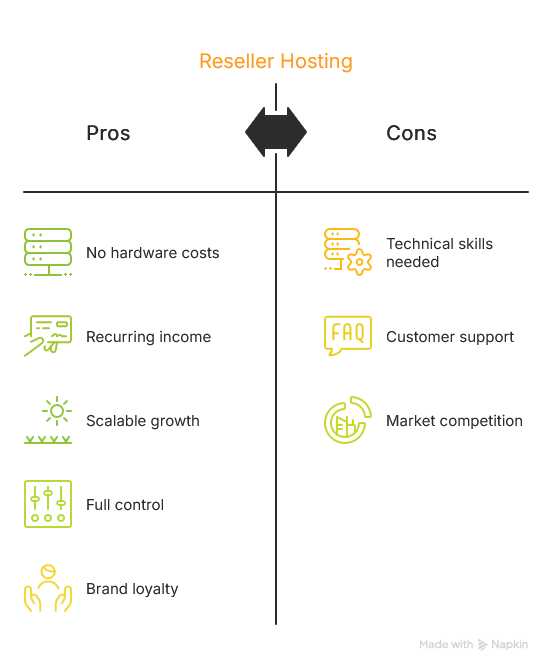
You’re not just adding value—you’re adding a service that increases client retention and builds long-term relationships.
Reseller hosting isn't for everyone—but it's perfect for:
If you already have a digital skillset and a client base, reseller hosting gives you a simple way to monetise both.
Here’s a quick litmus test:
If you answered yes to any of the above, reseller hosting could be the missing link in your business model.
We’re not just another faceless hosting provider. We’re 100% Australian-owned and operated, with fast local servers, personal support, and decades of industry know-how. Our reseller plans are designed for ease, flexibility, and performance—with no lock-in contracts.
You focus on your business, we’ll handle the hosting.
Ready to start selling web hosting under your own brand?
Check out our reseller hosting plans →



