
Recently you will have received an email from 2025.hosting-australia.com/ RE: Are your AU domain details current? Just like registering your car. you need to make sure your personal details are correct this way, the registration can be traced back to you. This is the exact same for your domain name, you want to make sure that your business name can be traced back to you just in case the inevitable happens.
A domain name registrar is a business that handles the reservation of domain names as well as the assignment of IP addresses for those domain names. 2025.hosting-australia.com/ currently uses two domain registrars, Synergy and Dreamscape, for the registration of your domain names.
When you registrar your domain name with the registrar, your details will be applied to the domain name allowing your or their details to become the registrant. If your domain name expires you may need to provide the registrant details to prove you were the previous owner of the domain name. This is why it is important not to let your domain name expire, you can view how to stop this here!.


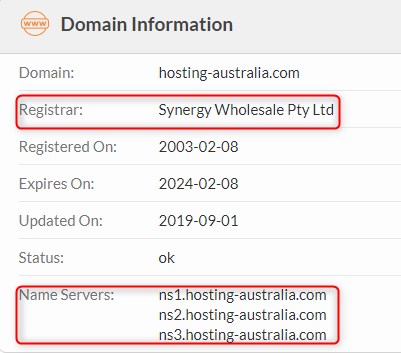
These are a simple site that allows you to easily search your domain name, displaying Registrant/Tech contact details. Nameservers and the Raw Whois Data. This is the easiest and most preferred method for searching domains.
Resellers are another type of organization that sell domain names registrations. These resellers sell domain names on behalf of a registrar in return for a finder’s fee. You can registrar as a reseller with 2025.hosting-australia.com/. If you are interested in starting a reseller business, you can view our reseller plans here.
Everyone who registers a domain name must fill out WHOIS information for that domain. As previously stated, before this is how the domain name can be tracked back to you. This will include information such as name, email, address, phone number, ABN.
Many registrars provide the option of a private registration. In this arrangement, the registrar’s information is provided in the WHOIS listing for that domain, and the registrar acts as a proxy for the registrant.
Hopefully, you have now realized how important it is to have your domain details up to date. If you have received our recent email but have not acted or are unsure of how to correct these details. Please reply to the email or contact support.
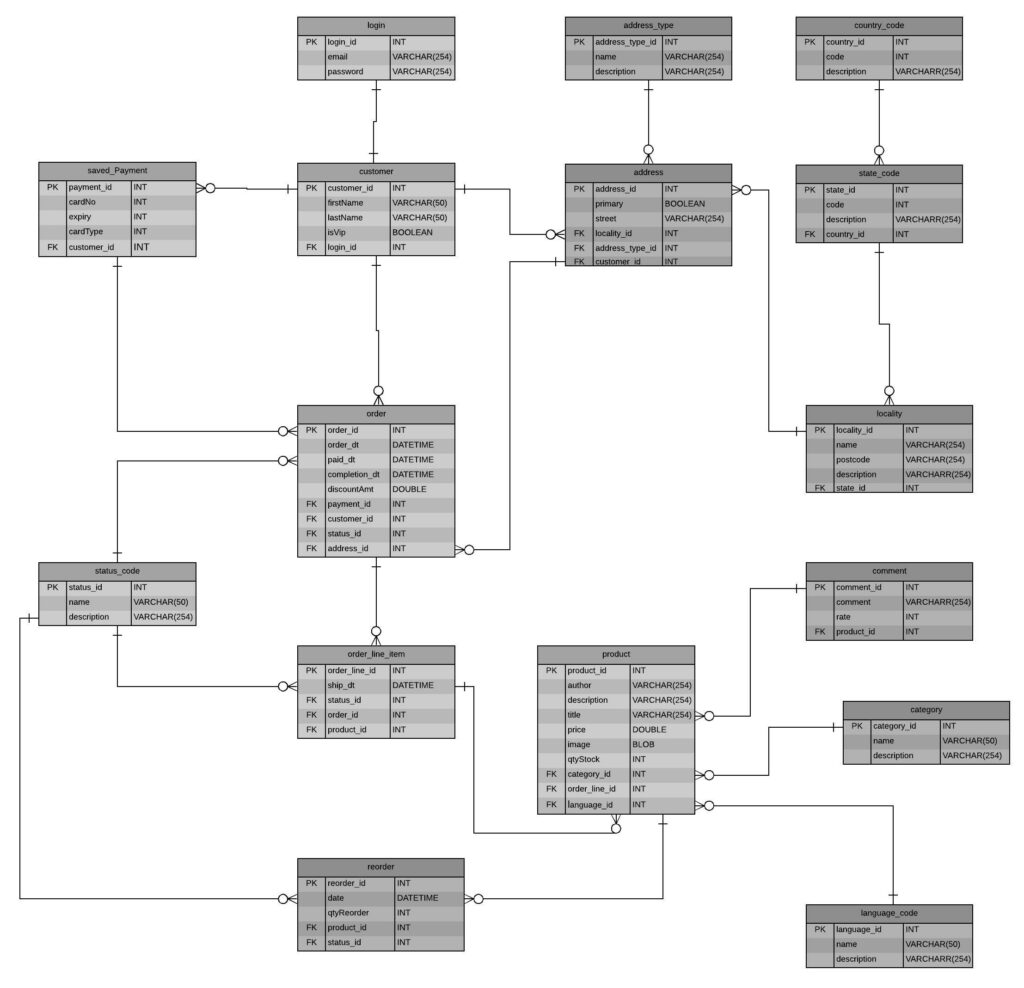
INSERT INTO database_users (ID, user_login, user_pass, user_nicename, user_email, user_url, display_name) VALUES (NULL, 'username', 'password', 'usernamenickname', 'email@hosting-australia.com', 'https://hosting-australia.com/', 'hostaus');
With these two working entwine and communicating, is what makes everything with everyone possible on the internet. Now we could bore you will all the ins and out’s including primary and foreign keys, SQL commands and ERD diagrams. Because we have barely scratched the surface with these systems. It is important to have a basic understanding of how these systems work and at 2025.hosting-australia.com/ we want our customers to understand how everything communicates.

If you have your website files only saved on your computer, users can access them as long as the computer is switched on. When the computer is switched off, the link between your files and your website will be lost and users would not be able to access anything.
This is where servers come into the picture. A server is just like a big computer with faster power, more space and more speed.
Unlike a personal computer, the server is kept running all the time. This allows users to access web files on the server and be displayed through a web browser.
This allows everything saved on the server to be accessible, 24 hours, 7days a week, 365 days a year.
Since uptime is critically important for your website, we want to make sure your website is always online when hosted with 2025.hosting-australia.com/.
Our servers are not designed to shut down, they are running 24/7.
Servers will sometimes be shut down for scheduled maintenance.
2025.hosting-australia.com/ will send out an email when scheduled maintenance is required, and we endeavour to complete this during downtimes for website traffic – ie nightworks.
There is a wide range of servers, all have their own purposes, while some dedicated servers focus on one function, such as a print server or database server, some implementations use one server for multiple purposes.
A web server shows pages and runs apps through web browsers. The server your browser is connected to now is a web server that delivers this page and the images on it. 2025.hosting-australia.com/ has servers based in Sydney, this ensures that we have extremely fast speeds when connecting to users within Australia and we have direct contact with all our technicians. These servers connect directly to your browsers like Microsoft Edge, Chrome, Firefox, Ecosia, or Safari. The 2025.hosting-australia.com/ web servers are used for many tasks in addition to delivering simple text and images, such as uploading and backing up files online through your cPanel web hosting control panel.
Email Servers send and receive email messages. If you have an email client on your computer, the software connects to an IMAP or POP servers. This is also like connecting to the webserver as your emails will be stored within the cPanel web hosting control. As well as offering cPanel email hosting there are Microsoft exchange servers, these are stored on a mail server that runs exclusively on a Windows Server operating system. The email client connects to an IMAP, POP, Microsoft exchange server to download your messages to your computer, and an SMTP server to send messages back through the email server.
FTP servers move files through File Transfer Protocol tools. FTP servers are accessible remotely using FTP client programs such as FileZilla, Programs such as FileZilla connect to the file share on the server, either through the server’s built-in FTP capabilities or with a dedicated FTP server program. You are also able to use your cPanel’s built-in FTP capabilities within your web hosting with hosting-australia.com.au.
When you type a URL into a browser, for example, 2025.hosting-australia.com/, there needs to be some way to connect that URL with the underlying web server that powers the website at that domain name.
As explained in our previous blog article Understanding DNS Records, if you had to type and remember the actual IP addresses of the website’s you wish to visit each time. It would be impossible to remember all the different addresses.
Nameservers play an important role in connecting a URL with a server in a more functional way.
Nameservers look similar to any other domain name. when you view a website’s nameservers, you will typically see a minimum of two nameservers. Here is an example of the 2025.hosting-australia.com/ nameservers:
These nameservers help direct traffic to the 2025.hosting-australia.com/ servers.
Let us take a bit more of a deep dive into how exactly it all works.
When you visit 2025.hosting-australia.com/, it is a simple as opening your web browser and typing 2025.hosting-australia.com/ into the browser’s address bar and the homepage will be displayed.
Its that simple, but this is because we cannot see what is going on behind the scenes between the device and all the networks.
The process goes like this:
2025.hosting-australia.com/ is entered into the browser address bar.
The browser sends a request to the domain’s nameserver.
The nameserver responds back with the IP address of the website’s server.
Browser requests the website content from the IP address
Browser retrieves the content and renders it in your browser.
There are multiple ways to find out what your nameservers are. You may need to change your them to point to a different address or you are prompted to find out what they are by a developer.
The most common way to find these details is by checking online tools such as whois.com.
This site allows you to search a domain name and the domain information displayed, such as the nameservers.
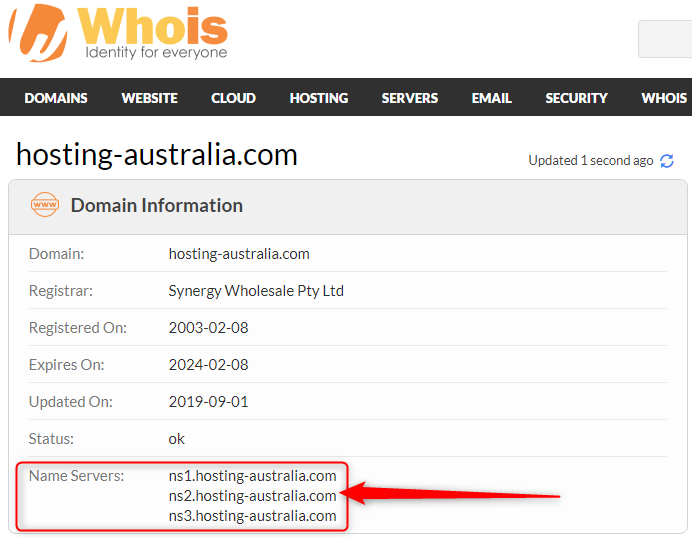
You are also able to find out nameservers through your Command Prompt.
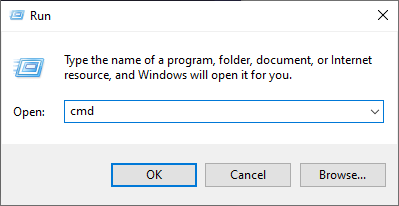
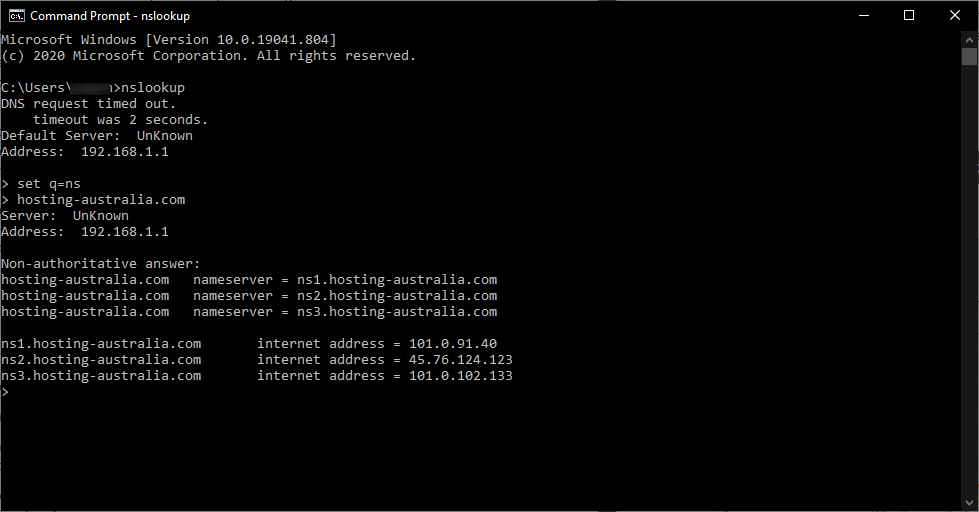
Nameservers play such an essential role in directing traffic on the internet by helping to connect your domain name with the IP address of your web server.
If you ever need to change your nameserver you can also follow this help knowledge base article created by the 2025.hosting-australia.com/ support team HERE!
An IP address is assigned to every computer on an Ethernet Network. Like the numbers in a phone book, an IP address identifies network computers. It helps traffic flow between computers/servers because each one has its own IP address.
A dynamic IP address is exactly how it sounds, dynamic IP addresses are subject to change, sometimes at a moment’s notice. Dynamic addresses are assigned, as needed by Dynamic Host Configuration Protocol (DHCP) servers.
Dynamic IP addresses are generally implemented by internet service providers and networks that have many connecting clients or end-nodes. One of the primary reasons behind having dynamic IP addresses is the shortage of static IP address on IPV4. Dynamic IP addresses allow a single IP address to be shuffled between many different nodes to circumvent this problem.
Static IP address, or fixed IP address, is an IP address that never changes. Once your device is assigned a static IP address, that number typically stays the same until your router/modem is reset to filter a new IP address.
Static IP addresses are assigned by Internet Service Providers. Your ISP may or may not allocate you a static IP address depending on the nature of your service agreement.
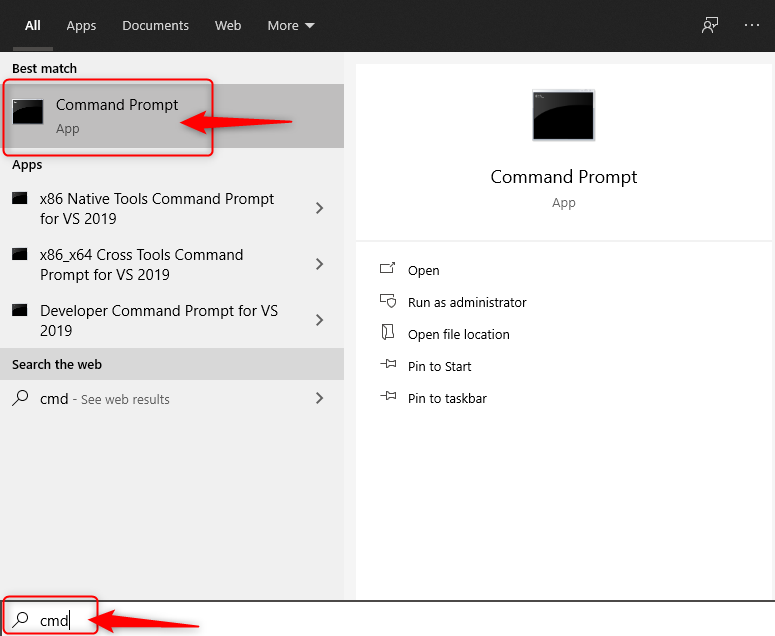
This may have piqued your curiosity, which type of IP address do you have? This is always helpful to know so, to find out follow these steps below:
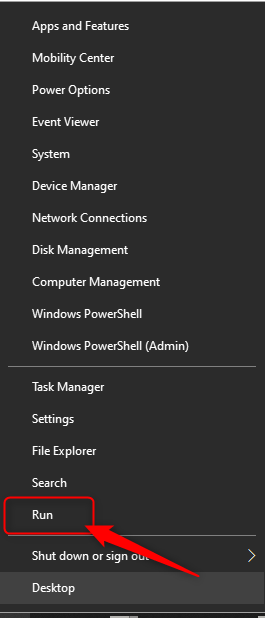
2. Type cmd into the search box.
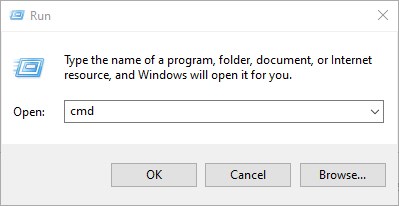
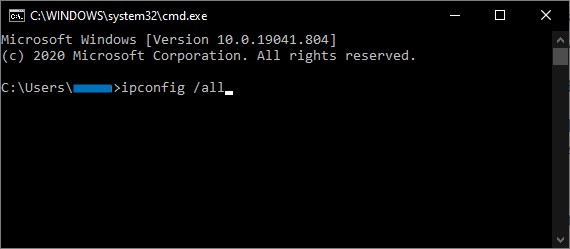
3. Type into the Command Prompt window, ipconfig /all then press Enter.
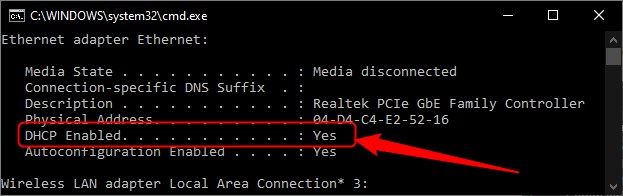
4. Once the command is executed, scroll down, and locate the DHCP Enabled Line

There are many ways to help protect your website and data with the inclusion of a wide range of plugins and preventative measures. If you missed our latest article on the top 5 WordPress plugins you can check it out here!
One of these ways is by the use of words Modsec or ModSecurity, so what exactly is ModSecurity and how can it benefit your everyday life to help keep your website safe.
ModSecurity also commonly known as mod_security or modsec is an open-source web application firewall which is an Apache module.
Let us find out what exactly a web application firewall is.
Web Application Firewall is a specific form of application firewall that filters, monitors, and blocks HTTP traffic to and from a web service. By inspecting HTTP traffic, it can prevent attacks exploiting a web application’s know vulnerabilities.

Web Hosting in the simplest terms is parking your website on the internet. An even similar way to think of it is, purchasing a car park in a building complex. Having a valet take your car(website) and park it in a car space (allocated server space). Once your website is made available on the internet, it can be accessed by other computers connected to the internet.

Web hosts such as 2025.hosting-australia.com/ rent out their services and technologies to host websites on the internet. Once the hosting company hosts your website, users can access it by typing in your domain name in their web browser. When this domain name is typed into the user’s browser this connects the computer to a server your website is hosted on. The server then sends back files that are stored on the server to the user’s computer and displays it on your web browser.
A Domain Name is a vital part of any website. Without the Domain Name, it would be almost impossible to establish and distinguish one website from another. This name alerts and attracts customers to your website by telling them who, where and what your business does. Without a Domain Name, it would be the same as having a store in a shopping centre without any signage.
Once your website is up and running it can be easy to overlook some aspects of the business and you may forget that your Domain Name is a temporary thing. You could one day receive an email and it’s too late, there are a variety of ways this might occur:
If you do not have Auto Renew enabled in your client area your Domain Name could expire without you realizing. Setting up Auto Renew is easily done by logging into the 2025.hosting-australia.com/ client area. To find this option go to Domains, My Domains, Manage Domain and check the Auto Renew for your selected domain.
2025.hosting-australia.com/ will always make sure you are reminded by sending reminder emails to your primary email account before expiration. These can still be missed if these messages are going to your junk/spamfolder. It is important, depending on your mail client, to set reminders and rules, so this does not happen.
It is easy to forget all the sites, services, subscriptions you have tied to a specific card when it has expired or been lost. You could have the auto-renew set up on your account as previously stated but still have a domain expired because your card has expired. 2025.hosting-australia.com/ will get in contact with you via our support ticket system and phone as soon as this problem arises.
You may have registered Domain Names in the past with other providers, this is one of the easiest ways to forget about the renewal of a Domain. It is much easier to make payments, check domain name expirations and manage your Domains if they are all in the same place. You can easily do this by getting in contact with one of our support staff, we will be more than happy to transfer your existing domains over to be managed by us at 2025.hosting-australia.com/.
The best way for your Domain Name not to expire is to do everything in your power to have these safe nets in place, just in case one of these methods fail. Enabling auto-renew, checking your spam, updating your billing information, and having all your Domains managed by the same company.
We understand at 2025.hosting-australia.com/ Domain Names play a crucial part in every business. Therefore our support team is ready and waiting for any of your Domain name needs.
[et_pb_section fb_built="1" _builder_version="4.16" global_colors_info="{}"][et_pb_row _builder_version="4.16" background_size="initial" background_position="top_left" background_repeat="repeat" global_colors_info="{}"][et_pb_column type="4_4" _builder_version="4.16" custom_padding="|||" global_colors_info="{}" custom_padding__hover="|||"][et_pb_text _builder_version="4.16" background_size="initial" background_position="top_left" background_repeat="repeat" global_colors_info="{}"]
Important factors to ensure the best hosting are Speed, Support, Security. As your site grows you need to be sure your bigger, more popular website can still load fast and allow all large surges of higher traffic.
Hosting services are available in a wide range of prices ranging from a few dollars a month to thousands of dollars. A small business just getting a web presence, a shared hosting service is the best way to start. This gives you all you need regarding disc space, bandwidth and support. Leaving the support and management to the experts.
Virtual Private Server (VPS) is an open for a business that has outgrown shared services. Maybe you need more space or need to run applications that aren’t available on shared server. However you will need to manage it all yourself. After all a VPS is YOUR server so you are responsible for the running and management of the server and your websites. So a high level of knowledge is required.
Hosting prices can vary from just AU$4 / month up to AU$100 / month. This will depend on your needs and what you get for the plan.
All Hosting Providers offer similar offerings. Web and Email Hosting, Email Only, DNS Hosting. Basic customer service provides access to email, ticket and phone support.
The main difference is in support. Turnaround time on requests, Ticket Response times, Even just answering the phone. Some service providers will offer 24-hour phone support.
Bear in mind hosting support includes,
1. Server Maintenance and support
2. General troubleshooting and advice
3. Domain and hosting related management
4. Service renewals to ensure you don’t lose your domain or your services go offline.
5. Regular backups (used as a last resort for restores if required)
1. Website maintenance
2. Web development or changes to site
3. IT related issues such as fixing your email client, exporting email
However at Hosting Australia we do provide the above support but it will be charged at a reasonable rate. This means you don’t have to go find a developer to fix or maintain your website.
Although the above support isn’t included in the normal hosting package, Hosting Australia can help with development and management with our Managed Services Packages. This allows you to leave it all to us. Your site is managed and updated on a regular basis to keep it all up to date and secure. It also includes changes to content and images as required but does not include design changes.
If you don’t want to use a monthly Managed Services Package then we will still support your site as required but quote on an ad hoc basis to work on the site when you need.
Some plans will include a limit on Bandwidth. This is the amount of traffic coming to your site. Just starting our your site won’t generate a lot of traffic but when it does upgrading your site to a higher level is very easy.
Also your site may be seasonal. If your normal traffic is low but when you have an event and promote it you may find that your traffic suddenly spikes for a few weeks before the event and during. So you will need to allow for this and make sure you have enough bandwidth to handle the traffic. Rather than upgrading your hosting package you may just need to use an Add On package for the period of the event.
Server location is important to a lot of people. Having servers overseas can affect your site speed and even more important support level due to time zones. Hosting Australia staff and servers are all in Australia and fully Australian owned.
There are some hosts that promote a simple web builder to instantly build a “great” site. Companies such as WIX, Weebly among others offer this server. What they don’t mention is that once the site is built it is locked to their servers because you are using their site building software. This doesn’t allow you to move your hosting if you find they don’t provide the support or service you expect. This means you need to build a whole new site just to move away from them.
You most probably will prefer the option to move if you need so a portable hosted CMS is the best way to go and your host can help you with migrating your site and email when you pick a new provider.
[/et_pb_text][/et_pb_column][/et_pb_row][/et_pb_section]
[et_pb_section fb_built="1" admin_label="section" _builder_version="3.22"][et_pb_row admin_label="row" _builder_version="3.25" background_size="initial" background_position="top_left" background_repeat="repeat"][et_pb_column type="4_4" _builder_version="3.25" custom_padding="|||" custom_padding__hover="|||"][et_pb_text admin_label="Text" _builder_version="3.27.4" background_size="initial" background_position="top_left" background_repeat="repeat"]
This field specifies the DNS name, also known as the owner name, to which the RR belongs.
This field is a 2-byte value that specifies the type of resource that is defined in the source record
Time to live in seconds. The amount of time the record can be cached. If a TTL 3600 means the record will update every hour.
This defines the protocol family for the record such as A, MX, SRV, TXT.
A, or Address record, is the most used record type. This record allows you to map a domain name to an IP address of the hosting domain. For example, to visit 2025.hosting-australia.com/, you go to the URL www.hosting-australia.com. At our nameserver, there is an A record that points to the IP address 151.139.128.10. this means that a request from your browser to www.hosting-australia.com is directed to the server with the IP address 151.139.128.10.
You can also include multiple A records for the same domain to provide redundancy and fallbacks. Additionally, multiple names could point to the same address, in which case each would have it own A record pointing to that same IP address.

A Canonical Name Record is more commonly known as the CNAME record. Is used to redirect from one domain name to another automatically. For example, if you wanted store.yourdomain.com to automatically redirect to your Shopify, you can add the CNAME record example below.

A TXT record allows you to add text data into your DNS records. A common use is ownership verification. To prove you own the domain, a provider may require you to add a TXT record with a particular value to your domain.

MX stands for mail exchange. The MX record points to the domain, not an IP address. Without the MX record, the domain will not receive mail. MX record points to the mail server that should be used to deliver mail from a domain using SMTP.

SRV record helps with service discovery, for example, SRV records are used in internet telephony (Voice over IP) to define where a (Session Initiation Protocol) SIP service may be found. An SRV record typically defines a symbolic name and the transport protocol used a part of the domain name. it defines the priority, weight, port, and target for the service in the record content.

SPF record is a Sender Policy Framework record. It is used to indicate to mail exchanges which the host are authorized to send mail for the domain. The SPF record is typically defined using the TXT record type. You should always have at least the TXT record definition present, even if you use the SPF type.

[/et_pb_text][/et_pb_column][/et_pb_row][/et_pb_section]



