
The success of an online store depends heavily on the reliability, performance, and features of its web hosting service. E-commerce websites have unique requirements that go beyond those of a standard website, making it crucial for store owners to choose a hosting solution tailored to their needs. Here’s a comprehensive guide to the essential features and considerations for selecting the right web hosting for your e-commerce business.
Why It Matters:
In the fast-paced world of online shopping, speed is critical. A delay of even a few seconds in page load times can lead to significant drops in conversion rates. Fast-loading websites not only provide a better user experience but also rank higher in search engine results, which drives more organic traffic.
What to Look For:
Why It Matters:
E-commerce sites handle sensitive customer information, including payment details. A breach can not only lead to financial loss but also damage your brand's reputation.
What to Look For:
Why It Matters:
As your e-commerce business grows, your website will need to handle more traffic, more products, and more complex transactions. Your hosting solution should be able to scale with your business.
What to Look For:
Why It Matters:
Downtime translates to lost sales and frustrated customers. Reliable uptime ensures that your store is available to customers whenever they want to shop.
What to Look For:
Why It Matters:
Your hosting service should seamlessly integrate with the e-commerce platforms and tools you use to run your store.
What to Look For:
Why It Matters:
A smooth and secure payment process is crucial for conversions. Your hosting provider should support various payment gateways and ensure that transactions are processed securely.
What to Look For:
Why It Matters:
Technical issues can arise at any time, and having access to knowledgeable and responsive customer support is vital for quickly resolving problems.
What to Look For:
Why It Matters:
While cost shouldn’t be the sole factor in your decision, it’s important to get good value for the money you spend on hosting.
What to Look For:
Why It Matters:
A user-friendly control panel simplifies managing your hosting environment, allowing you to focus more on running your business rather than dealing with technical complexities.
What to Look For:
Selecting the right web hosting for your e-commerce store is a critical decision that can impact your business’s performance, security, and scalability. By focusing on the essential features outlined above, you can choose a hosting solution that supports your business goals, provides a seamless shopping experience for your customers, and grows with your store as it expands. Remember to evaluate multiple hosting providers, read reviews, and even consider starting with a short-term plan or trial to ensure you’re making the best choice for your online store.
When setting up a web hosting environment, choosing the right control panel is crucial for managing your server and website efficiently. The control panel is the interface through which you interact with your server, configure settings, manage domains, and deploy applications. Among the most popular options are cPanel, Plesk, and custom solutions. Each has its strengths and weaknesses, and the best choice depends on your specific needs and technical expertise. This article will compare cPanel, Plesk, and custom solutions to help you make an informed decision.

The choice between cPanel, Plesk, and custom solutions depends on your specific needs, budget, and technical capabilities:
Ultimately, the right control panel for your hosting needs will balance ease of use, feature set, cost, and the level of control you require over your server environment. By carefully evaluating these factors, you can choose the best solution to manage your hosting efficiently and effectively.
In the fast-paced digital world, the speed and reliability of a website are crucial factors that determine its success. Users expect websites to load instantly, and any delay can lead to a significant loss in traffic and revenue. This is where Content Delivery Networks (CDNs) come into play, acting as a backbone for accelerating global website performance. Let's delve into the role of CDNs in web hosting and how they enhance website speed and reliability.
A Content Delivery Network (CDN) is a system of distributed servers strategically located across various geographical locations. These servers work together to deliver web content, such as images, videos, HTML pages, and scripts, to users based on their geographic location. The primary goal of a CDN is to reduce latency, which is the delay before a transfer of data begins following an instruction for its transfer.
When a user accesses a website, the CDN directs the request to the nearest server in its network. This is achieved through several mechanisms, such as DNS routing, server load balancing, and intelligent caching algorithms. Here’s a simplified process of how CDNs operate:
Several leading global companies rely on CDNs to ensure their websites perform optimally for users worldwide. For example, streaming giants like Netflix and YouTube use CDNs to deliver high-quality video content with minimal buffering. E-commerce platforms like Amazon and eBay leverage CDNs to provide fast and reliable shopping experiences, which is critical for retaining customers and driving sales. Now you can use the same technology the big Techs use with Hosting Australia
In today's digital landscape, where user expectations for speed and reliability are higher than ever, Content Delivery Networks (CDNs) play an indispensable role in web hosting. By leveraging a global network of servers to deliver content swiftly and securely, CDNs enhance website performance, ensure high availability, and provide robust security. As the internet continues to grow and evolve, the importance of CDNs in accelerating global website performance will only become more pronounced, making them a vital component of modern web hosting strategies.
Welcome, dear readers, to the whimsical world of emojis, those tiny digital doodles that have revolutionized the way we communicate! 🥳 Whether you’re a seasoned emoji pro or someone who still thinks the eggplant 🍆 is just a vegetable, there’s no denying that these little symbols have a big impact on our daily conversations.
Once upon a time, in the late 1990s, a brilliant mind in Japan, Shigetaka Kurita, decided that words alone were just too boring. And so, emojis were born! From humble beginnings with just 176 basic symbols, we now have thousands of emojis, from dancing girls 💃 to dinosaurs 🦕. The emoji evolution is real, folks!
Emojis are the ultimate multitaskers. They can turn a dull work email into a delightful message. Need to remind your colleague about that deadline? Add a little alarm clock ⏰ emoji to stress the urgency! Want to apologize for eating the last donut in the break room? A sad face 😢 and a donut 🍩 emoji combo should do the trick. Just make sure your boss doesn’t see that party popper 🎉 emoji in your email signature, or you might have some explaining to do!
But beware, dear friends, emojis can be a slippery slope. What might seem like a friendly smiley face 😊 to you could be interpreted as a creepy smirk 😏 by someone else.

And let's not even get started on the great eggplant 🍆 and peach 🍑 debacle of 2015! (If you know, you know.)
Emojis can also lead to some hilarious misunderstandings. Like that time your grandma sent you a bunch of fire 🔥 emojis to compliment your cooking, and you thought she was warning you about a kitchen fire. Or when your friend replied with a thumbs up 👍 to your heartfelt confession of love. Ouch!
Speaking of love, emojis have become the unsung heroes of modern romance. Gone are the days of penning long love letters. Now, you can sweep someone off their feet with a heart-eyed face 😍 and a couple of hearts 💕. Planning a romantic date? A simple string of emojis can say it all: 🍕🍷🎬🌙. That’s pizza, wine, a movie, and a moonlit walk, for the emoji-challenged among us
But beware the dreaded single emoji reply in the dating world. A lone thumbs up 👍 or a casual smiley 😊 can send you spiraling into a pit of romantic despair. Are they interested? Are they not? The emoji tea leaves are hard to read!
As technology advances, so do our beloved emojis. Who knows what the future holds? Perhaps one day we’ll have 3D holographic emojis that pop out of our screens, or smell-o-vision emojis that let you sniff that virtual bouquet of flowers 🌹. One thing’s for sure: emojis are here to stay, and they’ll keep evolving in ways we can’t even imagine.
In web design, emojis are like the sprinkles on top of a digital cupcake 🧁 — they add a pop of color and personality that can make a website more engaging and user-friendly. Strategically placed emojis can help to convey emotion, guide users through content, and inject a touch of humor into the user experience. Whether it's a smiling face at the end of a welcoming message or a thumbs up next to a call-to-action button, emojis can bridge the gap between formal web content and a more conversational tone, making interactions with your website feel more human and approachable. Just remember to use them sparingly and in context, so your website maintains a professional appearance while still being fun and inviting!
If you have any questions about how and where you can use Emojis - get in touch with Hosting Australia, and our team of developers can assist you.
So, next time you’re crafting that perfect text or composing an email, don’t be afraid to sprinkle in a few emojis. They add color, humor, and a touch of personality to our digital lives. Just remember to use them wisely – nobody wants to be that person who sends a string of random emojis that look like you accidentally leaned on your keyboard.
Until next time, keep smiling 😊, stay cool 😎, and may your emojis always convey exactly what you mean (and nothing you don’t)!
Today, WordPress is utilized by over 40% of websites on the internet, representing a vast reach and a significant responsibility. With such widespread usage, it's crucial for the WordPress community to consistently seek ways to enhance the user experience, particularly in terms of website performance.
The speed at which web pages load, the responsiveness of actions like button clicks, and the smoothness of scrolling all greatly influence how users perceive a site. Improved performance can result in increased engagement from readers and higher conversion rates. Fortunately, in recent years, the WordPress project has made substantial improvements to performance across its core platform, plugins, and themes.
Many of these enhancements are readily available without the need for configuration, benefiting both the frontend of websites that visitors see and the administrative experience, such as the editor.
Highlighted below are some performance upgrades from the past year:
Apart from these core enhancements, the WordPress project continues to focus on efforts that indirectly improve performance across the ecosystem. For example, automated tooling is utilized to monitor performance continuously, enabling contributors to detect and address potential issues early in the development process.
Furthermore, the introduction of the WordPress plugin checker allows developers to assess plugins for performance best practices, fostering greater awareness and ultimately leading to faster plugins.
WordPress 6.5 introduced the Interactivity API, simplifying the implementation of interactive website features and enhancing overall performance.
These performance updates are the result of collaborative efforts from the WordPress community, particularly the Performance Team established in 2021. Thanks to these efforts, more WordPress sites now deliver good load time performance compared to a year ago, outpacing the overall web's improvement in load times.
Experience the full benefits of WordPress on super-fast web hosting available from Hosting Australia at the following URL: https://hosting-australia.com/australian-cpanel-hosting/.
A website marketing strategy plays a crucial role in the success of small businesses in Australia. It allows businesses to connect with potential customers, attract, engage, and convert browsers into buyers. Creating a powerful website marketing strategy can be challenging, but by following a step-by-step process, small businesses can achieve their goals. This includes conducting thorough research to understand themselves and their target customers, auditing their website to ensure it delivers a positive user experience, leveraging the power of Google to drive targeted traffic, and creating high-quality content that resonates with their audience. It's important to optimize the website for search engines with the right keywords, focus on producing valuable and relevant content, and utilize social media and email marketing to connect with the audience effectively.
Key Takeaways:
Step 1: Research: Know Yourself and Your Customer
Conducting comprehensive research is the first step in creating a successful website marketing strategy. As small businesses, it's essential to understand what sets us apart from our competitors and identify our unique selling proposition (USP). By researching our target customers, we can gain valuable insights into their wants, needs, and preferences. This knowledge will help us craft a marketing strategy that effectively reaches and engages our customers.
Market research plays a crucial role in understanding our industry and identifying trends that can impact our business. By staying informed about our competitors, we can analyze their strategies, identify gaps in the market, and differentiate ourselves. This competitive analysis allows us to position our business effectively and tailor our marketing messages to stand out.
Knowing our business goals and understanding our target customers is the foundation of a successful website marketing strategy. With thorough research and analysis, we can develop a strategy that speaks directly to our audience, addresses their pain points, and delivers results.
Benefits of Step 1: Research
Example Quotes:
"Research is the backbone of any successful marketing strategy. It helps us understand our customers, our industry, and our competitors. With these insights, we can create targeted and impactful marketing campaigns that resonate with our audience."
"By conducting thorough research, we can uncover opportunities and gaps in the market. This knowledge allows us to differentiate ourselves, position our business effectively, and gain a competitive edge."
| Research Steps | Purpose |
| Identify unique selling proposition (USP) | To differentiate ourselves from competitors |
| Understand target customers | To tailor marketing messages and meet their needs |
| Analyze industry trends and competitors | To identify opportunities and gaps in the market |
| Position the business effectively | To stand out and attract the right customers |
By conducting thorough research and gaining insights into our business, industry, target customers, and competitors, we can lay a strong foundation for our website marketing strategy. This knowledge will guide our decision-making process and ensure that our marketing efforts are focused, targeted, and effective.
Step 2: Audit Your Website
Auditing the website is a critical step in crafting a winning website marketing strategy. A user-friendly website design and navigation play a crucial role in delivering a positive user experience and building trust with potential customers. By ensuring that your website is accessible, visually appealing, and trustworthy, you can create a compelling online presence that resonates with your target audience.
Evaluating Website Design and Navigation
When auditing your website, it's essential to assess its design and navigation elements. A visually appealing design with a cohesive color scheme, well-chosen fonts, and high-quality images can capture visitors' attention and lend credibility to your brand. Additionally, intuitive navigation allows users to find the information they need quickly and easily, enhancing their overall experience on your website.
Consider evaluating the placement and visibility of key elements such as your logo, menu options, search bar, and contact information. Ensuring that these elements are easily accessible can help visitors navigate your site effortlessly and encourage them to engage with your business.
Ensuring Mobile Optimization and Fast Loading Speeds
In today's digital landscape, mobile optimization is crucial. With a growing number of users accessing websites on their smartphones and tablets, it's essential to ensure that your website is responsive and displays correctly across all devices. By offering a seamless experience on mobile, you can cater to a broader audience and increase your chances of converting visitors into customers.
Furthermore, website loading speed is a critical factor in user satisfaction. Slow-loading websites can frustrate users and drive them away. To enhance loading speeds, consider optimizing image sizes, minimizing the use of plugins, and leveraging browser caching techniques. These optimizations can improve your website's performance, keeping visitors engaged and reducing bounce rates.
| Key Elements to Assess during Website Audit | Actions to Enhance User Experience |
| Website design and color scheme | Ensure visually appealing and cohesive design elements |
| Navigation structure | Make navigation intuitive and easily accessible |
| Responsiveness and mobile optimization | Ensure the website displays correctly on all devices |
| Loading speed | Optimize images and minimize plugins for faster page loading |
| Trustworthiness indicators (security certificates, customer testimonials) | Showcase trust elements to build credibility and instill confidence |
Building Trust with Website Trustworthiness Indicators
Trustworthiness is a critical factor for online success. Incorporating trust indicators on your website can help build credibility and establish a strong foundation for customer relationships. Consider elements such as security certificates, customer testimonials, verified badges, and privacy policies to assure visitors of the safety and reliability of your website.
During the website audit, assess the presence and positioning of trust indicators on your website. Placing them strategically can boost visitors' confidence in your brand and increase the likelihood of them engaging with your business.
By auditing your website, you can identify areas for improvement and ensure a user-friendly experience that aligns with your marketing goals. Take the time to assess design, navigation, mobile optimization, loading speed, and trustworthiness indicators to maximize the impact of your website marketing strategy.
Step 3: Leverage the Power of Google
Now that we have conducted thorough research and audited our website, it's time to leverage the power of Google to drive targeted traffic. By utilizing effective keyword research, search engine optimization (SEO), and creating high-quality content, we can improve our website's visibility and attract the right audience.
Keyword Research: Targeted Traffic Starts with the Right Keywords
Keyword research is key to understanding what our target audience is searching for and identifying the most relevant keywords to optimize our website. By using tools like Google Keyword Planner or SEMrush, we can discover valuable insights into search volume, competition, and related keywords. This allows us to strategically incorporate these keywords in our website's content, meta tags, and headers, improving our organic rankings and attracting targeted traffic.
Search Engine Optimization: Optimize for Visibility
Optimizing our website for search engines is crucial to ensure that it is not only visible but also easily discoverable by our target audience. By implementing on-page SEO techniques such as optimizing meta titles and descriptions, using header tags, and creating descriptive URLs, we can improve our website's visibility in search engine result pages (SERPs). Additionally, optimizing technical aspects like site speed and mobile responsiveness can enhance the user experience, ultimately leading to higher rankings and increased targeted traffic.
High-Quality Content: Engage and Convert Visitors
Creating high-quality content that resonates with our audience is essential for attracting and engaging targeted traffic. By addressing the needs, challenges, and interests of our target audience through informative blog posts, engaging videos, or valuable downloadable resources, we can position ourselves as industry experts and build trust with our visitors. This not only increases the time users spend on our website but also encourages them to take desired actions, such as making a purchase or subscribing to our newsletter.
While leveraging the power of Google is crucial, it's important to remember that targeted traffic is just the first step. Once we have successfully attracted visitors to our website, our next step is to focus on creating content that captivates and converts them into loyal customers.
| Benefits of Leveraging Google | Key Strategies |
| Increased website visibility | Effective keyword research |
| Higher organic rankings | Search engine optimization |
| Targeted traffic | Optimizing technical aspects |
| Improved user experience | Creation of high-quality content |
Step 4: Create Content that People Love
Content marketing is a powerful strategy that allows small businesses to attract and engage their target audience effectively. By creating targeted content that addresses the specific needs and interests of their customers, businesses can build trust, establish thought leadership, and drive valuable actions. Whether it's informative articles, engaging videos, interactive webinars, insightful ebooks, or visually appealing infographics, the key is to deliver content that people love.
To ensure that your content reaches the right audience, it's important to promote it through social media marketing. Identify the platforms where your target audience gathers and share your content there. Engage with your audience, respond to their comments, and encourage them to share your content with their networks. This not only increases your content's visibility but also helps in building brand awareness and driving website traffic.
Another effective strategy is email marketing. Segment your email list based on demographics, interests, or buying behavior to deliver personalized content directly to your audience's inbox. Automate the process to send timely and targeted messages, such as promotions, product updates, or newsletters. By nurturing leads and building customer relationships through email marketing, you can turn prospects into loyal customers.
In conclusion, content marketing, combined with social media marketing and email marketing, plays a crucial role in the success of small businesses. By creating targeted content that resonates with your audience, promoting it strategically, and delivering personalized messages, you can build lasting relationships, drive website traffic, and achieve your business goals.
Introduction
WordPress, the world's leading content management system, has revolutionized the way people create websites. Its user-friendly interface and vast array of customization options make it accessible to beginners and powerful for experts. In this article, we'll provide you with a comprehensive guide on how to use WordPress, supplemented with helpful video tutorials for visual learners.
Getting Started: Setting Up Your WordPress Site
a. Choosing a Domain Name and Hosting Provider Selecting a domain name and a reliable hosting provider is the foundation of your WordPress journey. Click here to search for you chosen domain to see if its available..
b. Installing WordPress Follow this link to set up your WordPress site with Hosting Australia.
2. Navigating the WordPress Dashboard
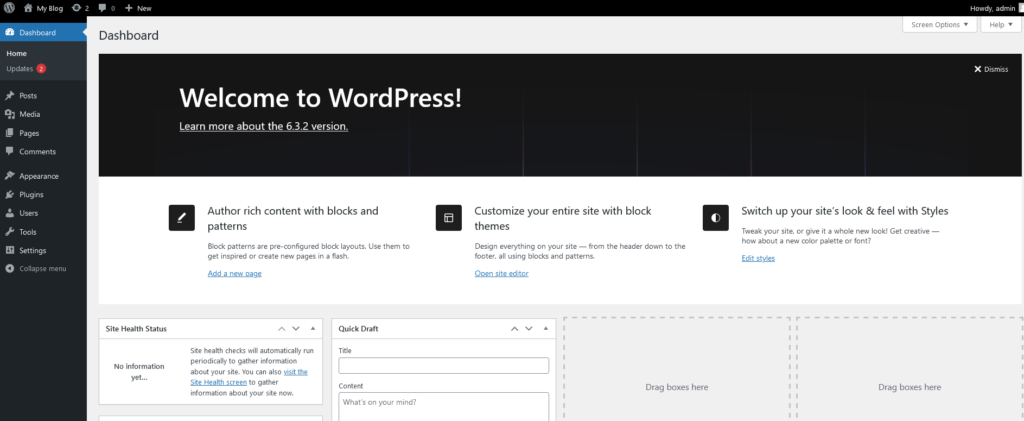
Once your site is live, familiarise yourself with the WordPress dashboard. Login using the URL: https://yourdomain/wp-admin. Login using your username and password then you will see this page.
3. Creating Content: Posts and Pages
a. Writing and Publishing Posts Learn how to create compelling blog posts. Pages are used mainly for the Menu links that go to "PAGES". A post is usually used as articles for your blog. Posts can be assigned to categories so you can show certain categories through certain pages to keep your topics organised. You can display multiple Posts in one page as excerpts and clicking a post link or a READ MORE button will take you to the Post Article. So the links are built in saving you having to add lots of links to a page.
b. Designing Static Pages Master the art of designing static pages such as About Us and Contact. PAGES as mentioned above are the main content of the site and is how you build your site. Generally a page will be build to contain all the content of a topic and can also be used to display all the posts of a category. Uusally the links in your menus will go to a page. Although you can use these links to go to a post. POSTS and PAGES are essentially the same thing. You just use them a little differently.
4. Selecting and Customizing Themes
Explore WordPress themes to find the perfect look for your website.
5. Enhancing Functionality with Plugins
Plugins extend WordPress's functionality.
6. Managing Media
Understanding media management is crucial.
7. Engaging with Your Audience
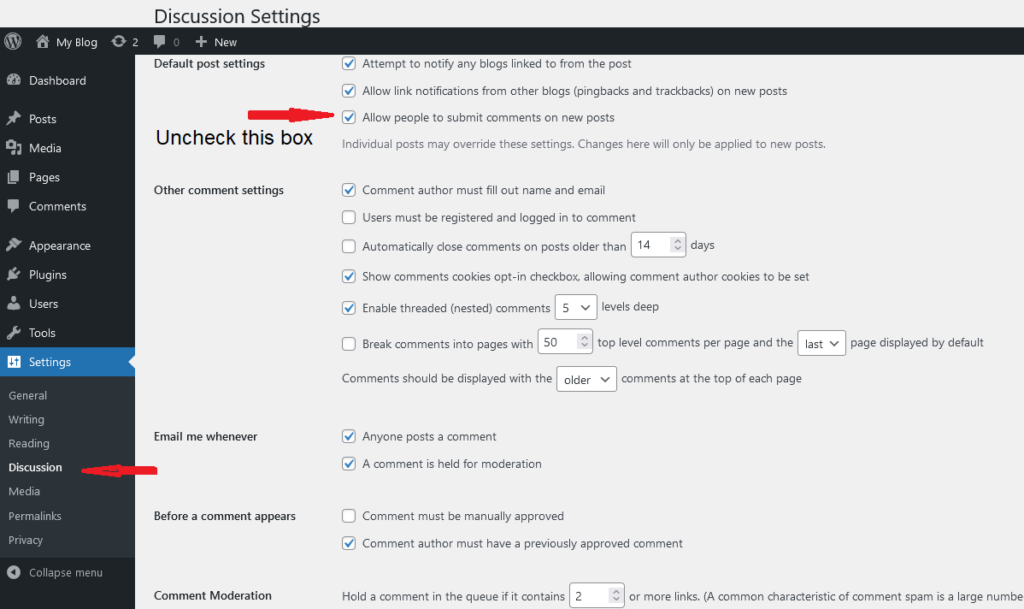
a. Enabling Comments Encourage interaction by enabling comments. NB: Comments can be used to bombard your site with spam. This can lead to hacking if not kept in check. If you don't need comments then you can disable them via the settings and in the Discussion section uncheck "Do Not allow Comments"
b. Social Media Integration Integrate social media seamlessly.
8. Search Engine Optimization (SEO)
Boost your site’s visibility on search engines. SEO is complete separate product to a web development and a specialised skill. There are 2 types. One off SEO where you can add some features in your site to help google find you. Ongoing SEO where you will manage your content and other off-site features such as Google Ads or Social Media marketing. Choose carefully when finding someone to do this because they can promise all sorts of results but can't prove it until your SEO campaign has been going for a few Months. You need to allow a minimum of 3 months to see any results.
9. Regular Maintenance
Ensure your site stays secure and up-to-date.
Conclusion
WordPress empowers you to create a stunning website, and with the help of these video tutorials, you can master it in no time. Remember, practice and exploration are key, so don’t hesitate to experiment with different features and functionalities. Happy WordPressing!
For all of the above you can find and appropriate Video to show you how.
In the dynamic world of web development, creating stunning websites efficiently is crucial. WordPress page builders like Oxygen, Divi, and Elementor have emerged as popular tools that empower both developers and non-developers to design visually appealing and functional websites. In this article, we'll delve into the features and capabilities of each of these page builders, highlighting their strengths and differences.
Oxygen stands out as a powerful WordPress page builder that offers a unique approach to website creation. Unlike Divi and Elementor, Oxygen is not limited to a specific theme; instead, it enables you to build your entire site layout from scratch. This level of control appeals to advanced users and developers who seek complete design freedom.
True Design Freedom: Oxygen provides a blank canvas approach, giving users complete control over every aspect of their website's design.
Performance: Websites built with Oxygen tend to have excellent performance due to optimized code and the ability to reduce unnecessary bloat.
Developer-Friendly: Oxygen's code editor allows experienced developers to directly manipulate and customize the underlying code.
Dynamic Data: Oxygen integrates with various dynamic content sources, making it suitable for creating complex and data-driven websites.
Learning Curve: Oxygen's unique approach can have a steeper learning curve compared to more traditional builders like Divi and Elementor.
Customization Complexity: While it offers extensive customization, beginners might find it overwhelming to navigate its intricate settings.
Divi by Elegant Themes is one of the most popular WordPress page builders, known for its user-friendly interface and wide range of pre-designed templates and modules.
User-Friendly: Divi's drag-and-drop interface is intuitive and suitable for beginners.
Pre-Designed Content: Divi comes with a vast library of pre-designed templates and content modules, speeding up the website creation process.
Responsive Editing: Divi offers responsive editing, allowing users to easily adapt their designs for various devices.
Global Elements: The Global Elements feature lets you make site-wide changes from a single location.
Code Quality: Divi's generated code can sometimes be less optimized, potentially affecting site performance.
Dependency on Themes: Divi heavily relies on its theme, which might limit design flexibility compared to Oxygen's blank canvas approach.
Elementor Page Builder
Elementor has gained immense popularity for its user-friendly interface and comprehensive set of features. It offers a balance between customization and ease of use.
Live Editing: Elementor's live visual editing lets you see changes in real-time, speeding up the design process.
Vast Widget Library: It provides an extensive collection of widgets and templates, allowing for versatile design options.
Theme Compatibility: Elementor works well with a wide range of themes, offering more flexibility in choosing a base theme.
Popularity: A large user base means abundant resources, tutorials, and third-party add-ons.
Design Limitations: While highly customizable, the design options might be more constrained compared to Oxygen.
Code Quality: Similar to Divi, the generated code might not always be as optimized as hand-crafted code.
Choosing the right WordPress page builder depends on your specific needs and expertise. Oxygen suits advanced users and developers seeking ultimate design freedom and performance optimization. Divi's user-friendly interface and pre-designed content cater to beginners and those looking for a streamlined process. Elementor strikes a balance between customization and ease of use, making it suitable for a wide range of users.
Ultimately, Oxygen, Divi, and Elementor each bring their unique strengths to the table. Assess your requirements, technical proficiency, and design preferences to make an informed decision about which page builder aligns best with your web development goals.



