[et_pb_section fb_built="1" _builder_version="4.3.1"][et_pb_row _builder_version="4.3.1"][et_pb_column type="4_4" _builder_version="4.3.1"][et_pb_text _builder_version="4.3.1"]
Hi everyone, about a week and a half ago WordPress released a maintenance update titled WordPress Version 5.2.3. Within it were several minor security and quality of life fixes. Here’s a link to the patch notes.
https://wordpress.org/support/wordpress-version/version-5-2-3/
If you read through those notes you might be thinking they seem like pretty vague and insignificant changes. You might even consider not updating your WordPress to this new version to save time and effort.
But now, ask yourself, how many times have you updated your WordPress recently, when was the last time you updated your WordPress? 6 months? 1 Year? 2 Years? Say 2 years is the case, there have been 40 WordPress updates released in those 2 years. Imagine every release has security fixes like this one.
There were 7 security fixes in this version. Some releases may have more, some may have less. But if we say that every patch has 7 fixes. Then there are potentially 280 different known ways to breach your site and cause havoc. Now do you see why at Hosting-Australia we are constantly preaching about updating your core CMS and plug ins as often as possible in order to keep them safe and secure.
We provide a managed hosting service where we do all of this for you, every month. We will check your site for updates and peruse whatever security plug ins you have installed to check for threats to make sure your site is safe and sound. We keep up to date, so you don’t have to.
If you’re interested send an email to support@hosting-australia.com or just give us a quick call on (07) 4914 2433 and ask about managed hosting. Our friendly support team are always willing to answer any and all questions.
[/et_pb_text][/et_pb_column][/et_pb_row][/et_pb_section]
[et_pb_section fb_built="1" _builder_version="4.3.1"][et_pb_row _builder_version="4.3.1"][et_pb_column type="4_4" _builder_version="4.3.1"][et_pb_text _builder_version="4.3.1"]
Hi everyone, this is a public service announcement to spread awareness of a series of new exploits being used to hack WordPress sites.
The hack in questions uses a few vulnerabilites in WordPress plugins to plant code in the back end of your site resulting in redirects to unknown locations and also creates a back door entry point by generating a rogue admin account.
As far as we know this issue is still ongoing, last week we posted about updating your site and plugins to prevent intrusions exactly like this. If you haven’t already read the following article linked. It provides more information about the hack and what you can do to prevent it.
There are a few specific plug ins you should check your site for that are the root cause, if you have these plugins installed then you should remove them NOW.
Below are the afflicted plug ins
If you’re concerned that maybe your site could have these installed then contact our support team and we’ll be able to help.
You can reach us by phone on (07) 4914 2433 or by email at support@hosting-australia.com.
[/et_pb_text][/et_pb_column][/et_pb_row][/et_pb_section]
[et_pb_section fb_built="1" _builder_version="4.3.1"][et_pb_row _builder_version="4.3.1"][et_pb_column type="4_4" _builder_version="4.3.1"][et_pb_text _builder_version="4.3.1"]
Hello everyone, WordPress has recently released their newest rendition of their software and have titled it ‘Kirk’.
I’d like to start by reminding everyone to update their WordPress because as always this one came with several security patches that improve the quality of your site.
Some of the notable additions in this update are a new default theme titled ‘Twenty Twenty’. From what I’m hearing this theme considering it is completely free is fantastic. It has a very minimalist style and is very easy to read and take in content.
Another one is the added compatibility for PHP Version 7.4 which many developers will be appreciative of.
The main focus of the update was to improve the block editor introduced in WordPress 5.0. You now have more freedom to design your layout and style so as to truly put you in control over the sites appearance. The reason the ‘Twenty Twenty’ theme mentioned above is so good is because it was designed with the improved block editor in mind. They work hand in hand like like bacon and eggs.
You can read more about ‘Kirk’ in the recently posted developer blog here https://wordpress.org/news/2019/11/kirk/.
If you have any questions regarding the update, give us a ring on (07) 4914 2433 or send an email on through to support@hosting-australia.com, we’re always happy to answer your questions.
If you had any trouble with the terminology in this article, check out our constantly expanding glossary of terms below.
https://clients.hosting-australia.com/knowledgebase/242/Glossary-Of-Terms.html
[/et_pb_text][/et_pb_column][/et_pb_row][/et_pb_section]
[et_pb_section fb_built="1" _builder_version="4.0.3" custom_padding="0px||0px|||"][et_pb_row _builder_version="4.0.3" custom_padding="0px||0px|||"][et_pb_column type="4_4" _builder_version="4.0.3"][et_pb_text _builder_version="4.0.3"]
Here at Hosting Australia our developers have noticed a concerning trend.
We are seeing more and more incidences of WordPress websites being hacked or compromised in someway.
Unfortunately, we are seeing one common theme. Inevitably, access to website has been made possible through the lack of security implemented by iether the website's developer or owner.
Listed in this article are 5 of the top ways reasons your website is vulnerable.
If any of the following apply to your website, please make sure you fix them ASAP. It’s just not worth putting your business at risk!
If there’s one commonality among WordPress hack victims, it’s this:
Not updating WordPress!
According to Sucuri’s Hacked Website Report, somewhere between 55-61% of WordPress hack victims were running out-of-date WordPress when they got infected, and that’s definitely not a coincidence:
| City | Q1 2016 | Q2 2016 | Q3 2016 |
|---|---|---|---|
| WordPress | 56% | 55% | 61% |
| Joomla | 85% | 86% | 84% |
| Magento | 97% | 96% | 94% |
| Drupal | 81% | 84% | 86% |
(Charts by Visualizer Lite.)
From reflection on the sites that we see being compromised we see 3 times of people who don't update their WordPress installs.
If you belong in group 1, then stop procrastinating already! – it just takes a few seconds to update your site.
If you belong in the group 2, you can take some steps to ensure nothing breaks your site.
Always make a full and complete backup of your site before you run an update.
In the unlikely event that your site does crash, you can easily roll back the previous version.
If you are in group 3? Then we are here to help! Open a support ticket by emailing support@hosting-australia.com or contact your developer and ask about updating your site.
See this as the same as updating your WordPress install. It is just as important, if not more so, to update the plugins that you use in your site.
If you use outdated plugins and do not update them, you are exposing yourself to potential security issues and bugs…
Again, Sucuri’s study has some helpful data – 18% of WordPress hack victims were hacked just because they hadn’t updated plugins with known vulnerabilities. The plugin developer knew there was a problem and fixed it – people just didn’t update the plugin to secure their site!
| Plugins | Share |
|---|---|
| RevSlider | 0.46 |
| GravityForms | 0.22 |
| TimThumb | 0.32 |
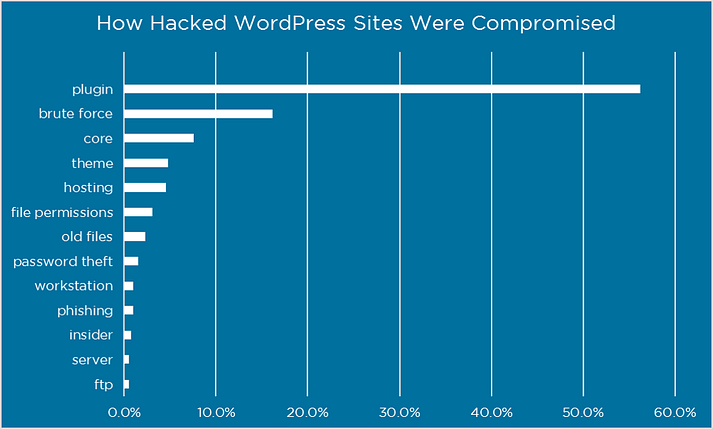
Additionally, in a survey of WordPress hack victims from Wordfence, over 55% of people who knew how the hacker got in said it was because of a plugin issue.
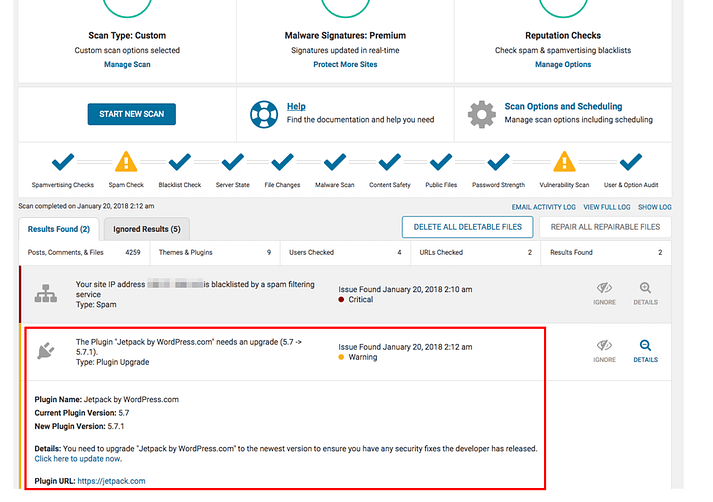
If you’ve got a ton of plugins and you find it hard to keep track of all the updates, we recommend using Wordfence.
This plugin comes with a malware scanner that will check your other plugins for malware, bad URLs, backdoors, SEO spam, malicious redirects and code injections. It also draws your attention to potential security issues when a plugin you’re using has been closed or abandoned.
In that same Wordfence survey, one of the most common WordPress hack attempts involved getting access to your WordPress login credentials, either through brute force attacks or password theft:
To prevent that from happening, you’ll want to protect your WordPress admin directory (your /wp-admin page).
First and foremost, make sure you password protect your WordPress admin page.
By default, you’ll require a password to get into the directory, but we’re talking about adding another layer on top of that.
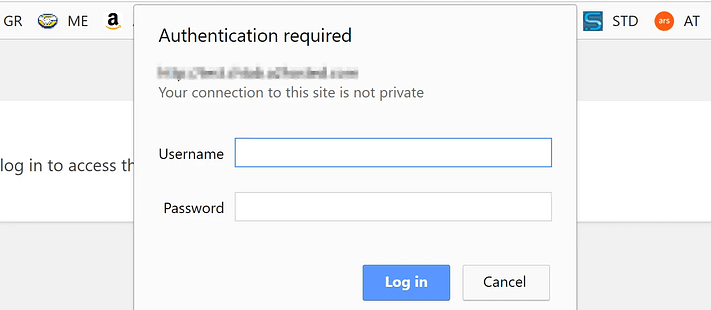
That way, anyone trying to access your WordPress admin will need to provide an extra username and password.
If you need a walkthrough on how to do this, check out Step 2 of our article: 4 Ways to Tighten WordPress Security.
If you don’t like that approach, another good alternative is two-factor authentication.
With two-factor authentication set up, your site users won’t just require a password to log in – they’ll also need to input a code that’s sent to them via text message, email, or an app.
To do this, check out our WordPress two-factor authentication guide.
Last but not least, it’s not a good idea to use “admin” as your WordPress username.
Hackers might attempt to get into your site using this default username, so you should definitely switch it up.
While WordPress doesn’t let you directly change your username, you can still do it by following these methods.
This one’s pretty obvious – if you use weak passwords, it’s easier for hackers to access your accounts.
We’re not just talking about the password that you use for your WordPress admin account, though.
The same thing applies to your other passwords, including your:
To learn more about generating a strong password, read How Secure Is My Password? Here’s Your Answer, Plus How to Pick a Strong Password.
Additionally, some hosts (like Kinsta and WP Engine) let you use two-factor authentication for your hosting account. That’s another good layer of security.
If you do a quick Google search, you’ll find a good handful of websites that distribute paid WordPress themes for free.
At first glance, this might look like a cool money-saver for website owners on a tight budget.
In actuality, though, most of these sites are pretty dodgy…
If you download and install a theme from them, you might end up compromising the security of your website.
Remember, there’s no such thing as a free lunch.
If you want to use a premium theme on your website, then get it from a reputable theme developer website and PAY for it. Or you can check out our free WordPress themes (no hacks here – promise!).
Sad to say, the average WordPress site owner doesn’t consider security a priority.
When you’re setting up your site for the first time, you’re probably more concerned with the look and feel of your website than anything else.
And once you get your site up and running, you’ll turn your focus to churning out great content, neglecting security as you go along.
Obviously, this is a huge mistake.
You don’t wait to wait for a WordPress hack attempt BEFORE you start caring about your site’s security – when that happens, it’ll be too late.
So set aside an hour or two and make sure that your WordPress site is secure and up-to-date.
Forget analyzing your traffic from Google Analytics or optimizing your pages for SEO — this is the one most important thing you can do for your WordPress site.
[/et_pb_text][/et_pb_column][/et_pb_row][/et_pb_section]