
Cyber attacks happen every day. They’re a part of the new reality we live in. Advanced hackers use software and technology to infect your computer, steal your information and hold it for ransom. Cybercriminals and cyber terrorists alike are taking advantage of this digital age we live in.
The world is now more connected than ever, with countless ways to get involved online, from paying bills to arranging travel. But those connections also make us more vulnerable, as the bad guys find more ways to make their way into our lives. And they’ve become more brazen as well. In 2016 alone, there were 78 million people who had their personal data breached due to a cyber attack. It's important to know what you should do if you're faced with a similar situation. Here are some reasons why it's essential that you protect yourself by knowing your risk factors and getting educated on the basics of cybersecurity before it happens to you!
A cyber attack is any malicious act that gains unauthorized access to a computer or network with the intent to steal data or disrupt normal operations. This includes everything from a phishing email to a ransomware attack.
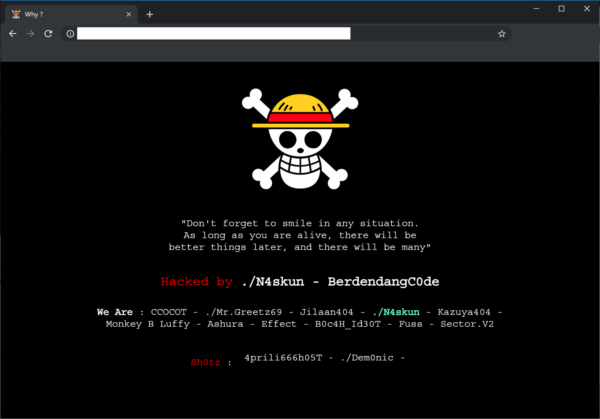
There are a few common warning indicators of a website breach, some of which are more obvious than others:
Viruses, worms, Trojan horses, ransomware, and spyware are examples of malware that can steal your customer data. If Google examines your website and detects anything harmful, it may blacklist your site.
If you have been the victim of a cyberattack, there are a few steps you should take to protect your information and minimize the damage.
First, if you have not been notified by Hosting Australia, you should contact us immediately via our ticketing system or (07) 4914 2433. We will then be able to identify where the attack originated and assist in removing the malicious files and restoring the site.
Make sure all new passwords are what security experts call complex making sure the length (the longer the better), a mix of letters (upper and lower case), numbers, and symbols, no connections to your personal information, and no dictionary words are all important features of a strong password.
If you are struggling to fix a password you can always use sites such as passwordsgenerator.net, random.org, or a password keeper like LastPass, KeePass Password Safe, which enables you to use very strong, complex passwords. No need to remember them — these services do it for you.
Malware is frequently transmitted from one connected device to the next. This is why you should have anti-virus software installed on all of your devices, including tablets and smartphones, such as Bitdefender, Kaspersky, or Malware Bytes. They'll protect your gadgets from incoming threats and notify you if there's a problem. You may buy a license online, and most of them will protect up to five devices.
If you suspect that your customers' data has been compromised, notify them right away. Notify them that there has been a security breach when it occurred, and what information has been compromised. Customers should be encouraged to change their passwords.
The best way to prevent a cyber attack is to educate yourself on the threats. If you know the threats, you will be better equipped to defend yourself. This means understanding your risk factors and getting informed about what different types of cyberattacks look like.
When you receive notifications that an update for your computer or mobile device is available, install it. It's most likely a security patch to keep you safe from a cyber assault. Make sure your website is up to date as well. If it's based on the WordPress platform, for example, make sure to update the WordPress core as well as any plugins you've added on a regular basis to ensure maximum security.
We have noticed there have been more and more phishing emails being sent out recently, If you are unsure about any of these emails DONT click any links. Contact us and forward the email so we can take a look.
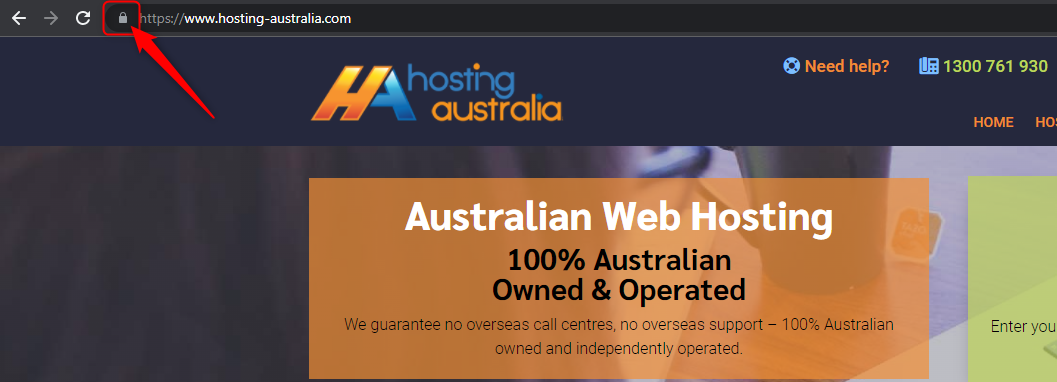
Look for a padlock in the browser bar if you're about to fill out an online form with any personal information you'd like to keep private. The website URL will begin with HTTPS if the lock is present. The lock and the HTTPS prefix indicate that the data sent from your browser to the website server is encrypted and secure. Hackers can steal your data if you don't observe these security indications.
As previously said, anti-virus software should be installed on your computer as well as any internet-connected devices, such as tablets and smartphones. We live in a world that is becoming increasingly connected, and one insecure gadget can expose your life to a cyber assault and the theft of your personal information.
When you use any client portal, such as cPanel, banking, social media, you'll almost certainly double-check that you've logged out successfully before continuing your web browsing. However, when it comes to other online accounts, consumers are less cautious, exposing their personal information. So, when you're finished, remember to log out of all of your internet accounts.
If you think you have been the victim of a cyber-attack, the first thing that you should do is to disconnect your computer from the internet. Don't connect it to any other computers on your network. You will need to change all your passwords on every account that you use. This will include your email, bank, social media, and anything else that you log on to.
Once you have done this, find a good internet security suite and install it on every computer in your house. You should also make sure that you have a firewall enabled on your router.
With these safety precautions in place, you will be able to protect yourself from any future cyber-attacks.
The threat of a hacked website isn't just on the internet – when a hacker breaches your network, he can use your credentials to hijack your personal aspects of your life. The threat is real:
Unfortunately, a hacked website is not the exception to the rule. In fact, data breaches are becoming more and more common, and a surprising number of individuals lose control of their personal data - even when they use the most secure methods, such as two-factor authentication.
But even if you think you’ve secured your site, you should still be wary of hacking attempts. In fact, just this past week, companies like Twitch and Twitter suffered large-scale data breaches.
Accessing your website can be achieved via social engineering(Phishing Email) – this involves tricking a web user into giving up their username and password (or, in some cases, device ID and/or IP address).
A variety of hack tools can be used to steal data from a computer without the user’s knowledge. Your website can also be broken into by hacking your visitors – the malware found on your computer can be used to gain access to your website.
Loss of personal information - in the form of credit card numbers, bank account details, or other identifying information - is the most frequent reason why hacking targets are breached. With the help of these tools, hackers can carry out impersonation attacks on your site.
(SSL) is shorthand for Secure Sockets Layer. It's a method of encryption that establishes a secure connection between your website and your customer's browser. It's not necessary to wait for an attack to obtain an SSL certificate; in fact, it's recommended to do so right away. Once installed padlock displays in the browser bar, indicating that your site is secure to the rest of the world.
The URL of any SSL-protected website will begin with HTTPS rather than HTTP. This is just another indicator to customers that your company takes data security seriously. The lock and HTTPS prefix indicate that data flowing between your company's website and the browser of your customers is encrypted.
If an update for your website, apps, or mobile devices is available, we recommend installing it right away. Yes, we're all busy, but acting quickly reduces the risk of you being a victim of a security flaw that the update is supposed to address. Quick action can literally save your life in the event of a cyber assault.
It can be tempting to use the same password for everything, but this is a recipe for disaster. This entails creating a password that includes numbers, symbols, and both upper and lowercase characters. Encourage your clients to change their passwords and settings on a regular basis if you have a customer portal on your website that requires login.
There's no need to try to remember these; password managers like DashLane or RoboForm Password Safe make it simple to use and update complex passwords on a regular basis.
The majority of hacking attempts occur as a result of website owners failing to update their software. This is frequently the case with WordPress websites, as hackers are attracted to old plugins and themes. It makes no difference if you have a small blog or a large website. If your software is old, dangerous bots can simply explore your website and hack it at some time.
Unfortunately, many small website owners are still ignorant of this flaw and fail to upgrade or backup their CMS until their site is hacked.
Malware frequently travels from one connected device to another, which is why anti-virus software should be installed on your website. Among the most often used programs are:
If you do not have any of these programs installed. We recommend these apps should be installed on all of your devices, including your smartphone and tablet. They'll protect your gadgets from online threats and notify you if hackers are prowling around.
Two-factor authentication is essentially an extra layer of protection. When you enter your login and password on a website, you'll receive a confirmation code via text message or email. This aids in the verification of your identification.
Change passwords on all of your devices straight away.
Then run one of the antivirus programs install on your device that we have recommended.
Contact HA support, so we can run our state-of-the-art malware scanner across all your website files to detect where there is a website breach.
**Fees will apply If you require HA support to assist in the removal of the malicious files after the malware scan**
Having a business email always draws unwanted attention. This is great, to have your email address posted on your website, Otherwise, how will clients or users communicate with you?
So you end up receiving countless spam and phishing emails generally with the topic like: "Improve your SEO" "Get your ranking higher on Google”. These emails ultimately flood your inbox and you will never be able to find important emails again.
Luckily there are methods you can put in place to prevent and keep spamming at bay. Let's discuss the three best methods for keeping spam under control.
Log into your cPanel. If you need assistance logging into your cPanel, you can view our Knowledgebase article HERE.
From the Email Accounts page, click Email Filters.

Select Manage Filter, then Create New Filter.

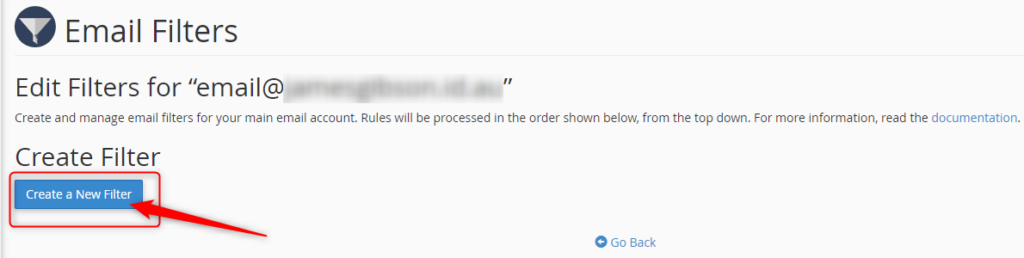
Name your filter in the Filter Name text area.

If you want to filter out certain email keywords that you have noticed are used in the spam email subject lines.
Choose your Roles and enter keywords.

Choose how you wish to deal with the email caught in the filter.
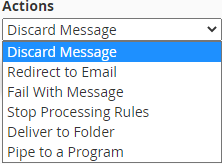
Click Create once you are happy with your filter.

All Hosting Australia hosting services include a basic SPAM Filtering service, called Mail Scanner. This service will deal with low-level spam and provide some form of filtering.
From the Email Accounts page, click Email Filters.

You can use this to allow (Whitelist) or block (Blacklist) all emails from a particular address.
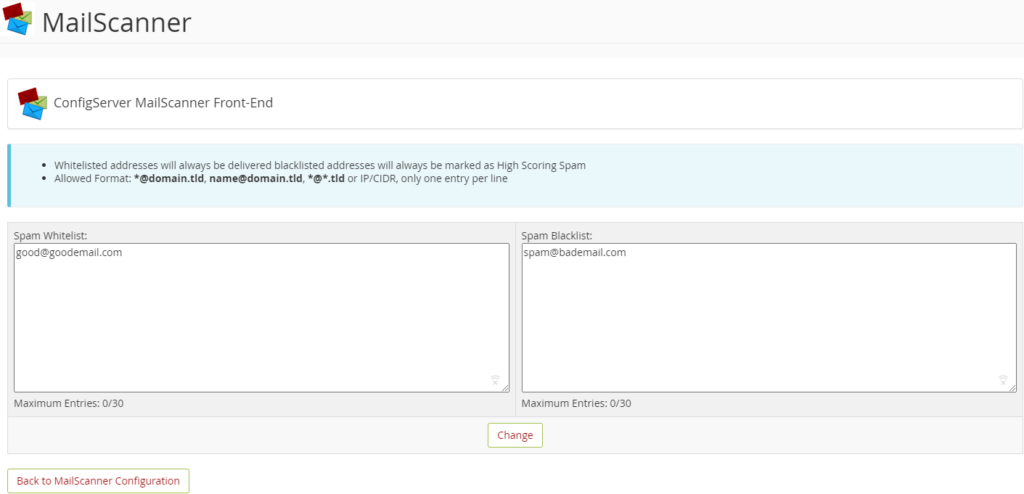
This page will allow you to adjust the filter settings. There are two settings to adjust here, and both are related to SPAM Scoring. Each email filtered via Mail Scanner is assigned a score based on several factors, including Email Content, Location of Sender, Type of attachments, To/From address, and many other factors.

For example, if an email is scanned that ticks all boxes as being deemed legitimate, it will be given a SPAM Score of zero or one.
However, should the email originate from a known SPAM location, have a zip file and a large list of random TO addresses, it would be assigned a higher score, such as 20 or 30.
The two settings available on the Other Settings Page are:
Low Scoring Spam: This setting refers to the lower end of the threshold. And you can set this as whatever score you like. It’s recommended to leave this setting as DELIVER in the delivery options section mentioned below, which makes this setting defunct.
High Scoring Spam: This is the most important option when configuring filtering.
The default setting is 20, but if you are seeing a lot of SPAM Delivered, you may wish to lower this to 15 or even 10. This means that any email reaching 10 or 15, will be handled as per the settings below, which is generally to Delete that email from the queue.
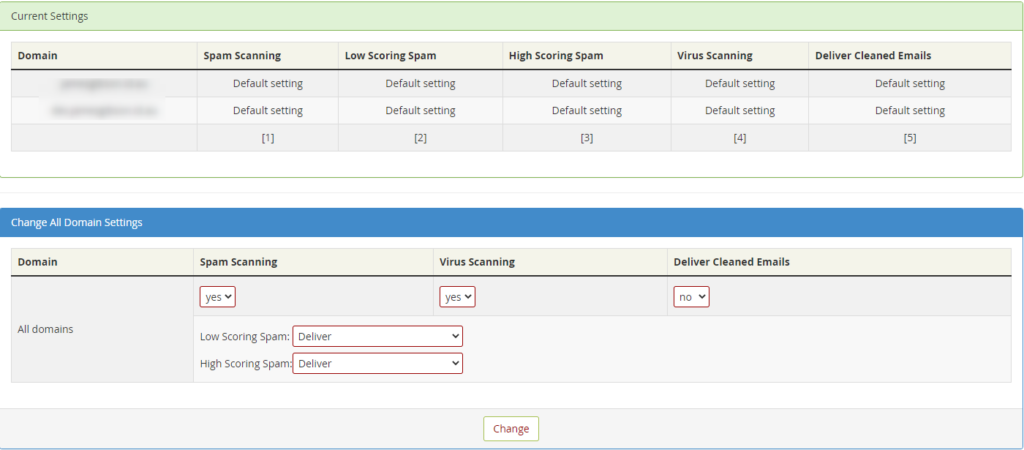
This shows an overview of the settings for all the email domains you have configured under this cPanel account.
From this section you can choose a number of options, they are:
SPAM SCANNING - Choose to disable or enable the scanning process.
VIRUS SCANNING - Choose to disable or enable the scanning process.
DELIVER CLEANED EMAILS - This will deliver emails that are cleaned of virus files. It’s recommended to leave this as "NO" as any virus-laden emails can still potentially contain dangerous links.
LOW SCORING SPAM - Choose what will happen to emails that reach the low-scoring spam threshold, as described above.
HIGH SCORING SPAM - Choose what will happen to emails that reach the high scoring spam threshold, as described above. Choose to disable or enable the scanning process.
The final method is your tried and true to Stop SPAM in its tracks, with Hosting Australia's Powerful Industry Grade email filtering product. 99.98% Accuracy when identifying and filtering SPAM. An incredible 0.0001% Rate of false SPAM Identification.
The SPAMProtect package options include inbound and outbound email filtering and archiving solutions. Powered by a cutting edge continuously updated Intelligent Protection & Filtering Engine to ensure your emails are always protected from threats, no matter how often new attacks emerge.
No contracts. You can upgrade, downgrade, or cancel as you need to. No risk.
Having a strong password is your first line of defense against online hackers. But you might find yourself having to reset your password a little too often. This can make the entire process frustrating when you are told that the password you have forgotten has already been used.
In frustration, you might want to revert and create an old password and hope for the best. However, this is an easy way to find yourself under a malicious attack after a hacker guesses your password.
So, how do you create a strong and secure password while still being able to remember it? Let’s explore the best strategies for creating and remembering a strong password.
In 2008, security expert Bruce Schneier suggested a new, clever password method. His advice is simple: take a sentence and turn it into a password. Assign each word a series of characters to help you remember it.
You can find some examples below:
The more random and stranger your series of characters the better. So, rather than having to remember a string of random letters and numbers, you’ll just need to remember a sentence.
You have reached your limit; you need to create a new password, but you have run out of ideas.
Luckily there is a site just like passwordsgenerator.net that helps you create a password. This can allow you to select and choose the Length, symbols, numbers, including lowercase, uppercase.
This will help you create a strong password with an easy click of a button.
Use 2FA (Two-Factor Authentication)
Two-Factor Authentication is a security system that requires two distinct forms of identification to access your account.
First, you will enter your newly secure password and then provide proof with something you have, or something you are. You may be required to answer questions about your favorite sports team or first job. You may also download an app on your devices and be required to enter a randomized number within a time limit.
Now that you have created your new strong password. You can test your password strength by visiting howsecureismypassword.net to see how long a computer is to break your password.
A website safety check is simple but effective to prevent future problems. There are multiple ways hackers and other malicious entities could infiltrate your network and website. Once they have access, they will be able to steal your data, use the website for nefarious purposes, they will destroy a business from the inside out. Therefore, it is so important to have a regular website safety check.
So, it’s best not to dwell on the idea of whether you should have a regular safety check that could only take a few hours. But save days, weeks, or even years of work.
So, this is a checklist that you can follow to make sure your website is safe.
You may have noticed that some websites have HTTPS:// before www. This is extremely important as the S in HTTPS stands for the Secure Socket Layer. Which encrypts traffic between the user’s browser and your website. This becomes so important; Google is now factoring the existence of an SSL into its SEO formula. This not only improves security but all the searchability of the website.
It is important to have your software and plugins up to date. You can easily update your plugins through the WordPress admin area. While you are updating your plugins, it's also important to remove plugins that are no longer required. Hackers can buy an out-of-date plugin, update it, and add their own malicious code. Then when the plugin is updated, you have the newer compromised version of the plugin. The hacker then uses this plugin as a backdoor into your site, risking all your and the user’s data.
As mentioned before “It’s not a matter of if your website gets hacked, it’s when it will be”. I have seen firsthand entire websites that have been devastated by malicious attacks. Losing all their content and not having a backup to fall back on. Luckily, 2025.hosting-australia.com/ is backing up your cPanel and provides an off-server backup service. However, it is important to have your own personal backup. It doesn’t hurt to have two separate backups in case one of them fails. You can easily backup your cPanel, check your HA knowledgebase article for more information.
Pay attention to extra files you post on your website and include them in your website safety check. Any file that is uploaded such as, images, excel, Word, and PDFs may be corrupted.
Use complex passwords, with various letters, numbers, and special characters. WordPress also has an arrangement of plugins such as Limit Login Attempts Reloaded that are made to stop brute-force attacks and ban IP addresses.
A lot of people create a WordPress admin. But leave the username as “admin”. This is the first username hackers will use when they attempt to brute force into your website. Therefore, it is important to change your username to something less common.
You can use WHOIS to check to keep track of your registrar details for your domain. Hackers can reverse engineer email addresses then use the forgotten password feature on the domain registrar to take control of a domain. They then hold your domain at ransom and will not be released until the demands have been met.
Business and customers data is one of the most important assets of a company. When hackers and malware sneak in, this data can be compromised, resulting in data breaches and disruption of business operations.
Since the beginning of the pandemic, a lot of businesses have realized they are just as effective if not more since moving their operation to an online workspace and working remotely. This has been shown that employees have been more productive since the change to working from home.
But with the change, this also brings issues. In your workplace, IT professionals were able to monitor and keep the security up to date. Most employees or business owners are required to do this themselves from work home.
With the threat of cyber-attacks becoming more common since this change. Here at 2025.hosting-australia.com/, we want to make sure you prevent any malicious attacks and stay up to date with security by installing one of these chosen Malware Removal Programs

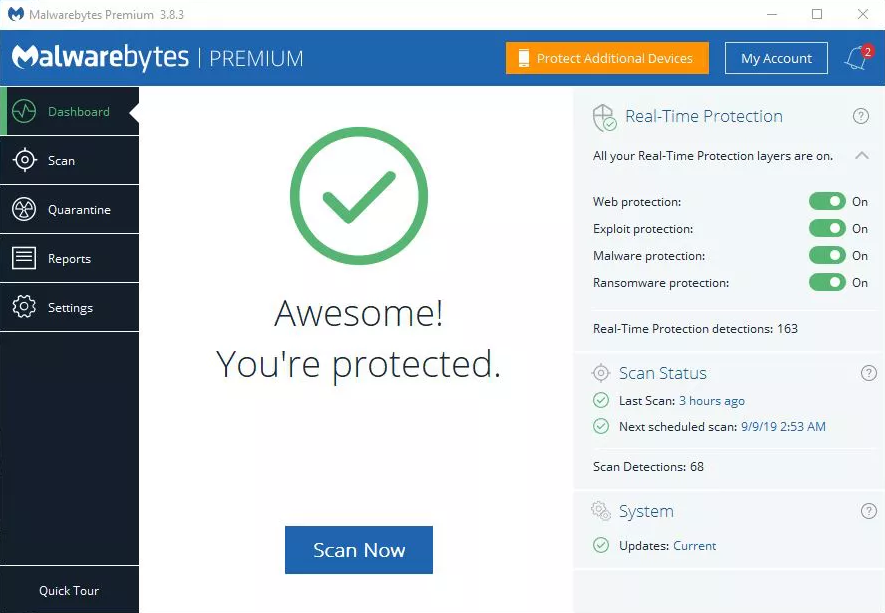
Malwarebytes is personally my go-to choice when it comes to malware programs. Malwarebytes is accessible on Windows, Mac, Android, iOS so you can keep all your devices risk-free. With the use of anti-spyware, anti-malware, and anti-rootkit technology that helps shield you from threats by removing viruses in real-time.
Malwarebytes also has four layers of defense that wrap browser and software programs, preventing them from being taken over by infectious attacks.

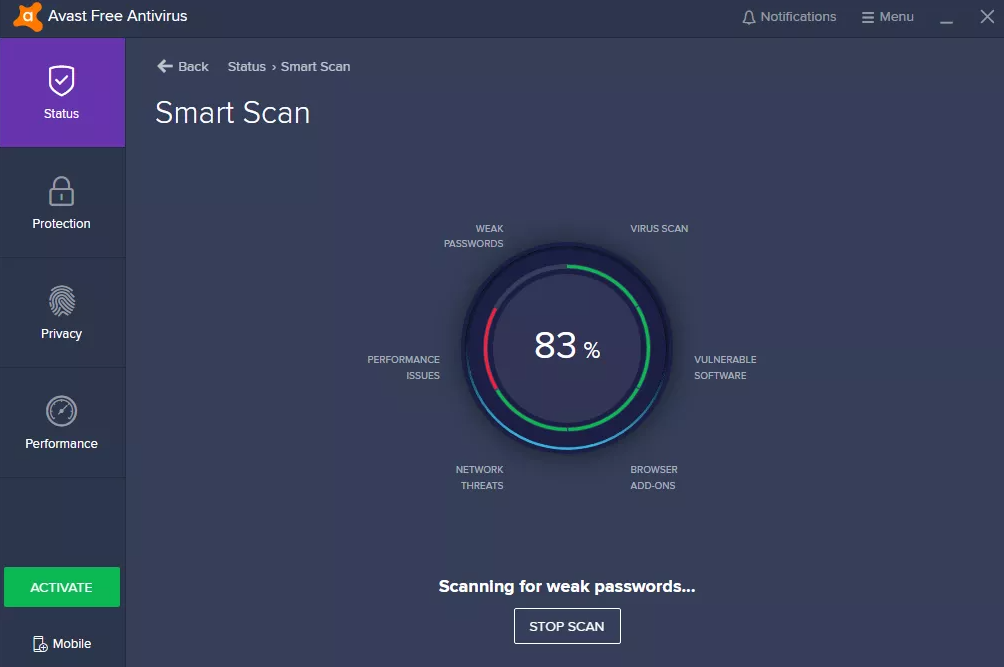
Avast is simple and does not require in-depth IT and antivirus knowledge and expertise. Once it is up and running, accessing multiple devices is simple with the user interface. The dashboard centralizes access to all the devices and workstations, granting you total over the behavior and actions of the antivirus on devices.
AVG is extremely popular and known for being accessible for home users. AVG is loaded with safety features and s designed with simplicity in mind.
AVG is an excellent choice for android users through the antivirus app. It offers anti-theft features for lost or stolen phones or tablets. While protecting from the latest viruses, malware, spyware, unsafe apps, and settings, also warning users of scams or unwanted callers.
Passwords are such an important factor in all aspects of life. They are used to keeping your personal belongings locked away or a code on the security system of your home or even a password you were told to get access to an exclusive party.
The days of writing down all your passwords in an old book that you keep by your computer are gone. There are applications created to do this for you and help manage and keep safe your passwords. This way when you are searching your booking for your email password, you will not be trying to work out with the that I, is a lower-case L.
You may be thinking. But I use my browsers password manager isn’t that good enough?
All web browsers such as – Chrome, Firefox, Safari, Ecosia have integrated password managers. These are not always the safest ways to save a password. Chrome and Edge store your passwords on your computer in an unencrypted form. People could access the password files on your computer and view them. Also, these companies are always victims of hackers, compromising your password and allowing it to be used for brute force attacks.
A dedicated password manager will store your passwords in an encrypted form, help you generate secure random passwords, offer a more powerful interface, and allow you to easily access your passwords across all different computers, smartphones, and tablets you use.
So which password manager should you use?
Here is a listed of 2025.hosting-australia.com/’s top password managers to keep your passwords safe.
Dashlane uses 256-bit AES encryption, zero-knowledge architecture, and 2FA to help protect user’s data. Dashlane uses these security features to ensure that no one other than you can access your password vault or gain access to your sensitive data.
Dashlane was originally a desktop app but is now slowly transition to becoming a web-based password manager only. Dashlane is installed through browser extensions for Firefox and Chrome and its mobile app is reliable and easy to use. Dashlane consistently generates extra-strong passwords, instantly syncs data across each device, and accurately auto-fills even the most advanced web forms.
Dashlane features include:
Dashlane is a free service. However, there are also monthly subscription with additional features available.
1Password interface is bright, simple, and extremely user-friendly, which is the perfect choice for any beginners. Is similar to Dashlane as the 1Password extension can be installed on your default browser of choice, or using the desktop or mobile, tablet application.
1Password offers convenience with their automatic form fillers that allows you to sign in with a single click, look or touch, also including safety features such as:
RoboForm is known for its ability to auto-fill some of the most complex web forms with perfect accuracy in just one click. With RoboForm, you can create multiple profiles for your web forms, with 8 different categories of information, including passport, credit card, and vehicle info. This is extremely useful if know you need to fill out multiple forms requiring different information. You can easily autofill which form is required with the correct information with a simple click.
Roboform offers multi-platform support for, Windows, Mac, iOS, and Android and their respective major browsers, including Chrome, Firefox, Safari, Ecosia.
Roboform features include:
Unlike the other two discussed previously, RoboForm is not free but is only $1.30/Month.
With any of these 3 password managers there will be no need to keep that old book that you keep your passwords in. And never forget a password again.
You want to make sure you keep your WordPress site secure, it is crucial for any site – no matter how big or small. WordPress site security is such an important factor, you can never have enough security when your site and data might be at risk, therefore 2FA is a must.
2FA (two-step verification or multi-factor authentication) adds an extra layer of protection to your site by requiring at least two types of user verification on your WordPress login page. 2FA help's against attacks like brute-force attacks.
With this said, we will discuss why two-factor authentication is important for site security and how it can limit your exposure to data loss and identity theft and the steps you can take in adding it to your WordPress website.
There are countless ways hackers may try to gain access to your WordPress site. Vulnerable plugins, Injection attacks, cookie stealing, phishing and data theft. But most commonly are brute force attacks. A brute force attack is where hackers use bots to repeatedly guesses login credentials, until they have your details.
2FA can prevent these attacks and stop them from gaining access to your site. Even if they do guess the correct password, the bot then requires an additional password which is impossible without this 2FA code. This additional password or code is randomly generated and sent to an email or phone. Once a user submits their logins associated with that account to successfully log in.
First, you will need to install the google authenticator app on your mobile device. On your mobile device simply navigate to the google play or app store, then search Google Authenticator and install.
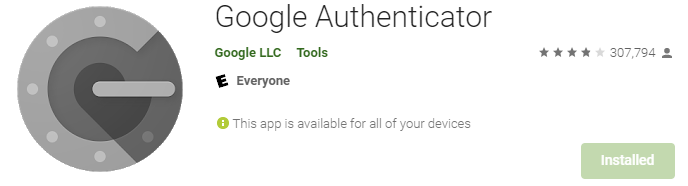
Once you have the Google Authenticator App Downloaded to your device, the next step is to install the plugin to your WordPress site. There are multiple authenticator plugins available for WordPress.
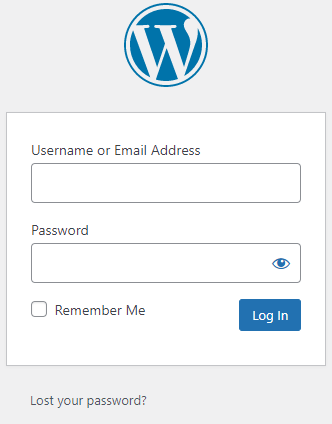
Navigate to your WP Admin dashboard. (if you are having difficulties access your WP admin dashboard, contact HA support).
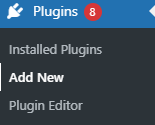
On the left-hand side Click on Plugins > Add New
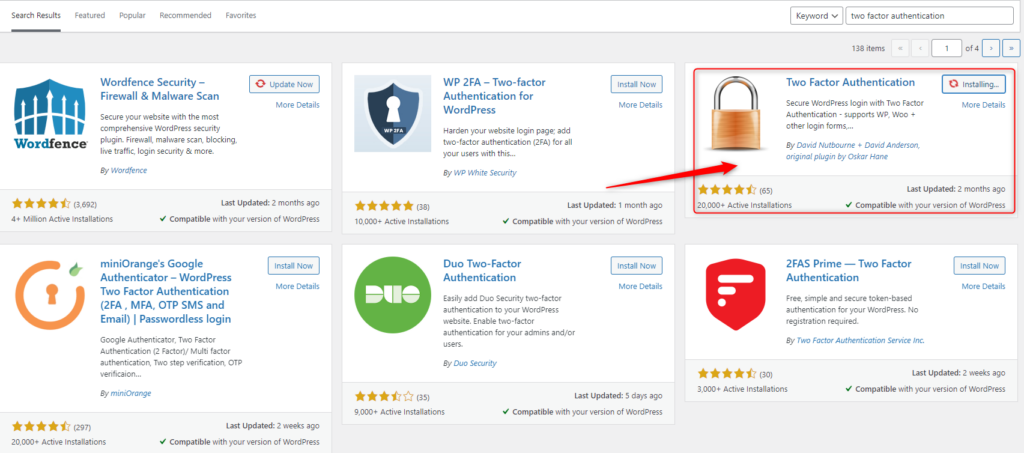
Search Two Factor Authentication in the search bar found on the Add Plugins Page, then Click Install now then Active.
Once Two Factor Authentication is installed, navigate to the plugin, check the radio button, then click Save Changes.

Scan the QR code with your mobile/tablet device via the Google Authenticator app, then save changes.
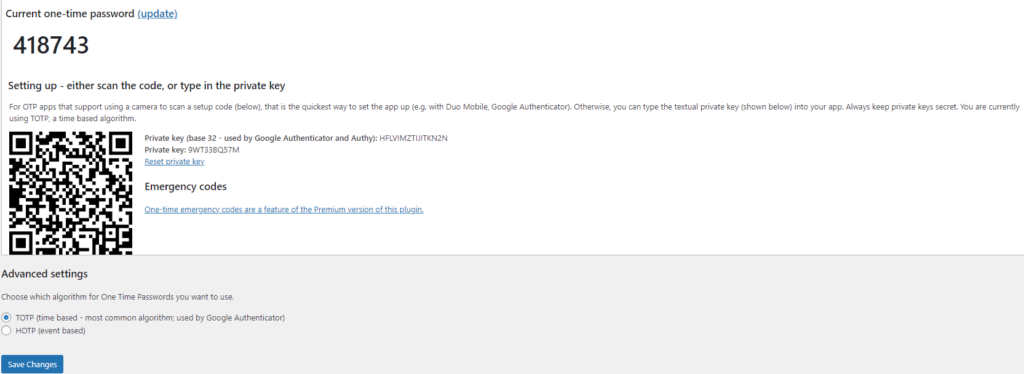
Google Authenticator will create a time-based code on your applicator you will need to enter next time you log in.
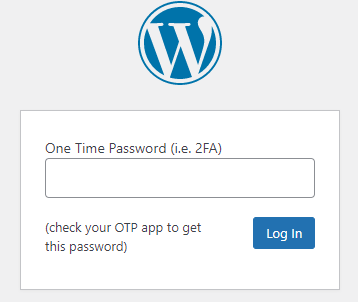
Phishing, even though its spelled differently they are still trying to have the same effect. A fisherman will cast out their line not to target anything specifically, but just to hopefully get an unsuspecting victim. It might sound a bit bleak, but this is exactly what these hackers are attempting to do. They create emails using popular websites and services then legitimize these emails as much as possible for the unsuspecting eye. Hoping that they can get someone to click on a link that gives them access to private information.

Scammers use emails to trick you into giving them your personal information. They use these emails to try to steal your passwords, account numbers, if its any kind of sensitive information, they will try to take it. Unsuspecting victims can lose everything just by clicking on what they think is a legitimate and harmless link. Scammers launch thousands of phishing attacks like these every day. Just like a regular fisherman after casting out so multiple times, they will end up catching something no matter how big or small. Australians lost over $634 million to scams in 2019, according to the latest figures in the ACCC’s Targeting Scams report released 22/06/2020
No legitimate organization will send emails from an address that ends with - @gmail.com @yahoo.com @hotmail.com. even the actual companies that created these email addresses will not send from these emails. Therefore, it is important for a user to have their own business email to legitimize their own business. You can learn more about it in our previous blog article HERE.
For example, your inbox displays a name, like “cPanel Administration”, in the subject line. When you open the email, you already know who the message is from and jump straight into the content. When the scammers create the phishing email addresses, they often have the choice to select the display name, which does not have to relate to the email address at all.
This is just one small step they can take to create emails that look like they are from legitimate sources. Apart from creating fake email addresses they also mimic other emails sent from companies by doing the following:
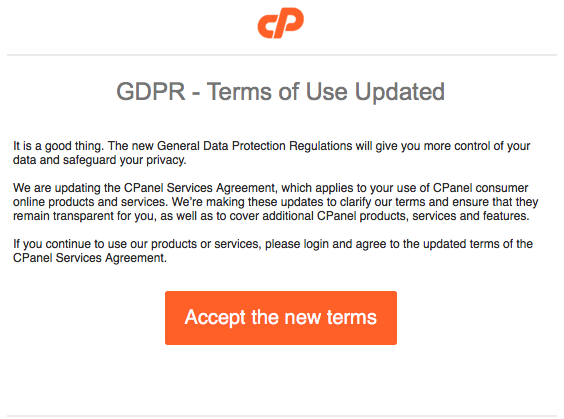
Another tip you can use to workout if you have received a phishing email. Simply mouse over the link found in the email, a pop up will appear with the linking address. Usually these links will take you to a random link such as “cslsdfbpaymentlsjd.com/askdfmcs” which is a dead give away that it is not from a legitimate source.
First of all you should cancel any cards or accounts with the information you had supplied via the email. Report scams to the ACCC via the Scamwatch report a scam page. Your report helps to warn people about current scams, monitor trends and disrupts scams where possible.
You are also able to contact IDCare on 1800 595 160 or via www.idcare.org for support if you believe your personal information has been put at risk.
Notify 2025.hosting-australia.com/, as soon as we are notified the support staff will take measures to secure your account with us.
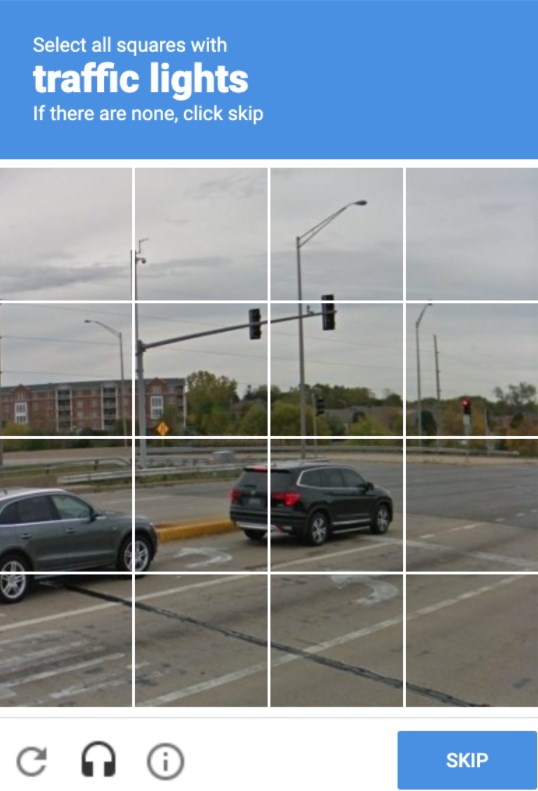
We have all come across them before, and will they annoyed you from time to time, trying to type in the displayed letters and number or finding that third photo of a fire hydrant that looks like a street sign. But, as annoying as these may be! They are there for a reason. These annoying but very important security checks are called a reCAPTCHA test. These are a necessary evil as they are a security system designed to tell humans and computers apart by making the user solve or insert a short series of letters in a box.
You may be unsure whether you require to have one installed on your website. But, no matter how big or small your site is, It is important to have these reCAPTCHA’s on your form early on to prevent any future security risks.
reCAPTCHA is a free service provided by Google that protects your site from malicious attacks and stops your forms from sending spam emails or making transactions via your store with fraudulent details. Without the installation of the one, your client may start receiving a large number of spam emails with inappropriate subjects. This will also cause issues with the bandwidth of your hosting as the increase of bandwidth may take you over your quota and shut down your site. If you do run into this issue, please contact support. reCAPTCHA will stop this issue as the bots installed by hackers on your form pages are unable to complete the form due to the puzzles created. which is why it is the tried-and-true way to stop this problem.
As time goes on hackers work out ways to bypass google's security. Luckily, Google Developers are always on top of updating the reCAPTCHA version to prevent any issues. Different versions allow you to choose which kind of security puzzle is required to be complete.
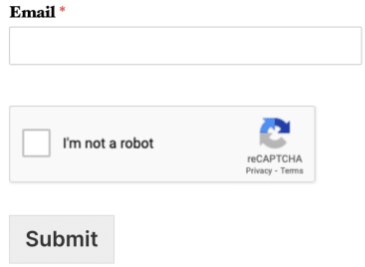
When Invisible reCAPTCHA is used, the user will not see any extra field within your form (no checkbox). A small badge is added to the lower right corner of the screen that links to Google’s terms of service and privacy policy.
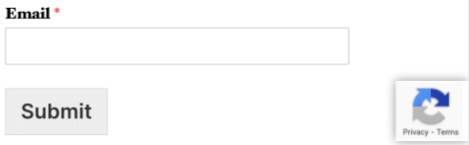
Much like Invisible reCAPTCHA, in v3 reCAPTCHA the user will only see a small badge in the lower right corner of the screen that links to Google’s terms of service and privacy policy. However, v3 reCAPTCHA will never display a captcha like the image question shown above. Instead, it runs completely in the background.
Hopefully, this article has piqued your interest and help educate explain how the it is a must.



