
[et_pb_section fb_built="1" admin_label="section" _builder_version="3.22"][et_pb_row admin_label="row" _builder_version="3.25" background_size="initial" background_position="top_left" background_repeat="repeat"][et_pb_column type="4_4" _builder_version="3.25" custom_padding="|||" custom_padding__hover="|||"][et_pb_text admin_label="Text" _builder_version="3.27.4" background_size="initial" background_position="top_left" background_repeat="repeat"]
This field specifies the DNS name, also known as the owner name, to which the RR belongs.
This field is a 2-byte value that specifies the type of resource that is defined in the source record
Time to live in seconds. The amount of time the record can be cached. If a TTL 3600 means the record will update every hour.
This defines the protocol family for the record such as A, MX, SRV, TXT.
A, or Address record, is the most used record type. This record allows you to map a domain name to an IP address of the hosting domain. For example, to visit 2025.hosting-australia.com/, you go to the URL www.hosting-australia.com. At our nameserver, there is an A record that points to the IP address 151.139.128.10. this means that a request from your browser to www.hosting-australia.com is directed to the server with the IP address 151.139.128.10.
You can also include multiple A records for the same domain to provide redundancy and fallbacks. Additionally, multiple names could point to the same address, in which case each would have it own A record pointing to that same IP address.

A Canonical Name Record is more commonly known as the CNAME record. Is used to redirect from one domain name to another automatically. For example, if you wanted store.yourdomain.com to automatically redirect to your Shopify, you can add the CNAME record example below.

A TXT record allows you to add text data into your DNS records. A common use is ownership verification. To prove you own the domain, a provider may require you to add a TXT record with a particular value to your domain.

MX stands for mail exchange. The MX record points to the domain, not an IP address. Without the MX record, the domain will not receive mail. MX record points to the mail server that should be used to deliver mail from a domain using SMTP.

SRV record helps with service discovery, for example, SRV records are used in internet telephony (Voice over IP) to define where a (Session Initiation Protocol) SIP service may be found. An SRV record typically defines a symbolic name and the transport protocol used a part of the domain name. it defines the priority, weight, port, and target for the service in the record content.

SPF record is a Sender Policy Framework record. It is used to indicate to mail exchanges which the host are authorized to send mail for the domain. The SPF record is typically defined using the TXT record type. You should always have at least the TXT record definition present, even if you use the SPF type.

[/et_pb_text][/et_pb_column][/et_pb_row][/et_pb_section]

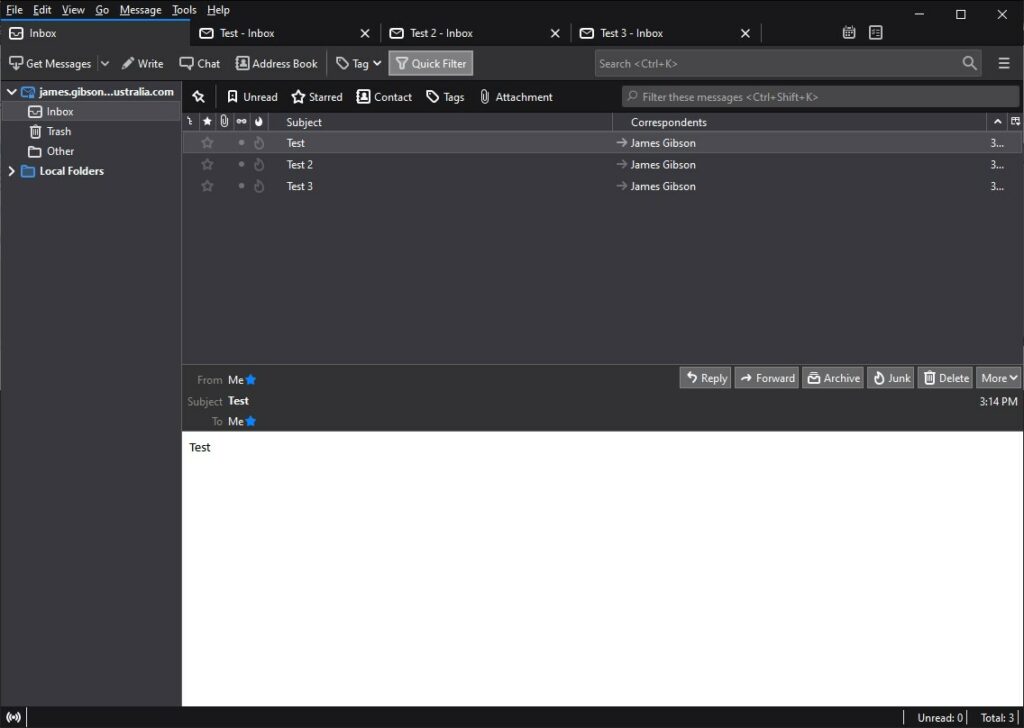
Not only does Mozilla help you to browse the internet with Firefox but it also helps you to receive emails with there email client Thunderbird. Mozilla Thunderbird is also supported by Windows, Linux and MAC. Thunderbird runs on Gecko which is a browser engine developed by Mozilla. This allows a simple easy to use interface with customizable themes, extensions, and add-ons.
Warns you when you click on a link which appears to be taking you to a different website than the one indicated by the URL in the message.
Allows experienced developers and security experts to help improve and create third party add-ons.
Lets you filter your emails fast by typing in words in the search box, they are displayed instantly.
Easily manage multiple emails by opening tabs rather than windows just like using the Firefox Browser.
Manage multiple email accounts by combining special folders like your Inbox, sent, or Archive folder.

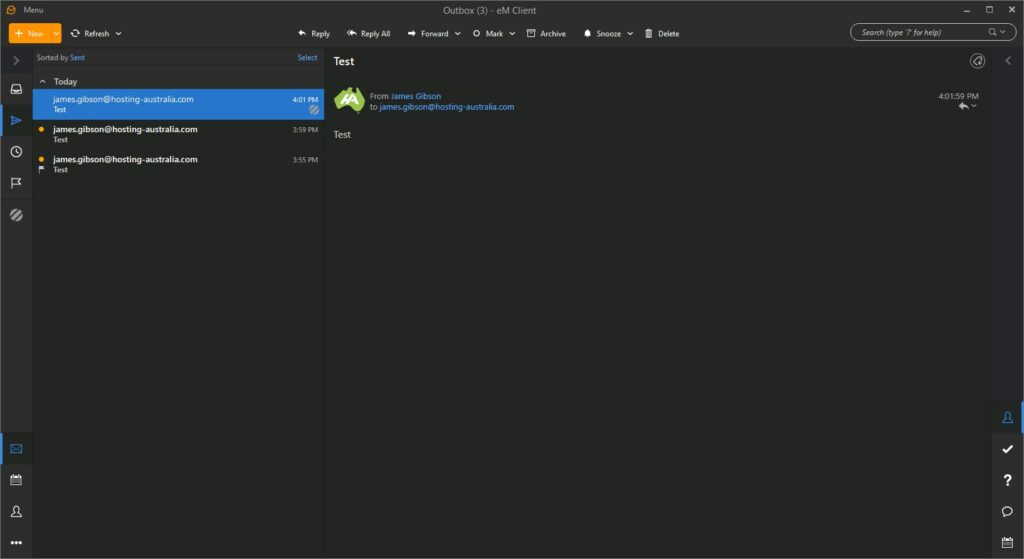
eM Client allows you to access your emails just like any other client. You do not need to log into eM Client through your browser, it requires a simple download and set up. One of eM Clients calling cards is that it is easy to set up. Unlike other email clients that can be confusing to configure, eM client’s setup is straight forward for two or more mail accounts.
Em Client’s will connect to any email servers such as your 2025.hosting-australia.com/ Exchange or personal hosted email.
Import your previously set up emails from other clients when you do choose to change clients.
Multiple different available including the popular Dark theme.
Built-in translation tools and spell-checker.
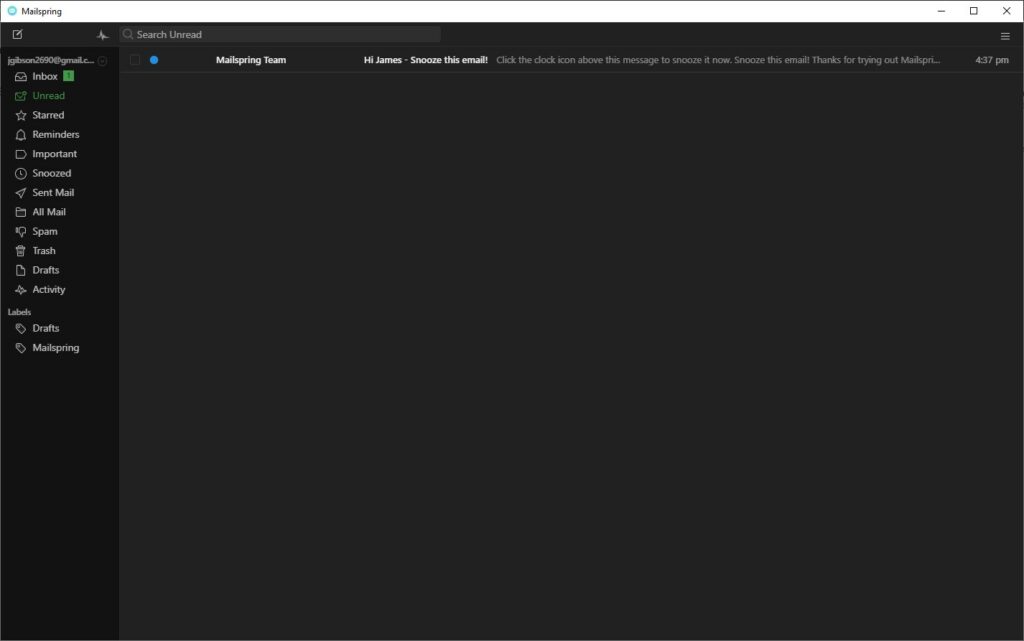
 Mailspring
Mailspring is an open-source email client just like Thunderbird. This allows a large community of contributors or programmers with varying coding abilities to provide add-ons and source code for features they want to add to the base program. It offers a host of features, including link tracking, quick search, customizable themes and layouts, and many others.
Mailspring indexes your mail so you can use advanced, Gmail-style search queries and search message contents across all your connected accounts. Never lose an email again.
Mailspring's signature editor makes it easy to create custom signatures, complete with images and links to social media profiles.
Using a single inbox for all your email accounts helps you get more done in less time. Mailspring supports every major mail provider—Gmail, iCloud, Office 365, Outlook.com, Yahoo!, and IMAP/SMTP
When you receive invitations to events via email, Mailspring displays the event information and allows you to RSVP without leaving your mailbox!
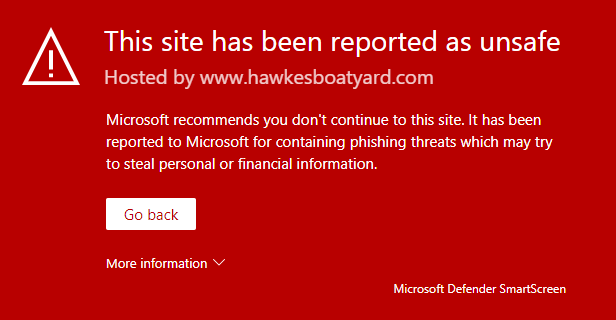
Everyone has heard the dreaded word, hacked. No matter how big or small your website is, it is always at risk of being targeted by hackers. There are many reasons as to why a hacker might target your site. Stealing Sensitive Information and Intellectual Property, holding a site hostage for a price and just for practice or bragging rights.
Common ways to tell if your site has been hacked, being alerted by google or a warning when you go to the site’s domain, unusual email spam. If your site runs into any of these problems, you need to act fast!
There is no excuse not to have antivirus on your devices anymore. With so many great, free antivirus programs such as AVG, Malwarebytes, Avast, Kaspersky so you no longer need to pay a premium for protecting your device.
Using a Firewall is another added protection on top of your antivirus to help prevent malware attacks on your devices.
Update passwords
Update all passwords directly connected to your website, as the hacker maybe be using it to have access to your site. If you need help changing passwords on your hosting services. Send a ticket via our site or call (07) 4914 2433.
Make sure your SSL Certificate is up to date for when your website is back online, leaving this invalid is another way for hackers to access your site.
Not updating your site leaves your site vulnerable to an attack, if you are unable to update it yourself. You need to contact your developer, ask them if they are able to update code, update plugins for your website to increase security.
Hackers use code found in .htaccess to edit your site, tricking users into giving them their private information or access to their devices. It is necessary to find this code and remove it.
Use a backup from a previous version before the attack.
It is important to get in contact with users of your website informing them the site has been compromised, they may need to update their details and not to trust certain emails.
After you have gone through all the steps in restoring and increased your website security, you may have one final steps. That is contacting google. Google will need to review your website before allowing it to be searchable again. There are a few steps you need to go through so the request will be successful, you can find it here.
Our support team is waiting to assist you with any questions you have in increasing your site security or in helping to restore your site from an attack. Send a ticket via our site or call (07) 4914 2433.
You may have read our recent blogpost What Is SEO, if you haven’t had a chance, check it out HERE!
There are tools that can assist you in improving your SEO to be a step above the rest. You may have searched SEO in the WordPress plugin manager and had seen the hundreds of plugins, but not sure which one to choose. Here at 2025.hosting-australia.com/, we know your time is valuable, so we have put together our top SEO WordPress plugins.
 Everyone’s site will grow larger and larger within time; it gets harder to keep up and constantly check whether your links are valid. The name of this plugin is exactly what it does. Broken Link Checker plugin checks for broken links on your website and alerts you if it finds any that require to be updated. This plugin is free so there is no reason not to have this plugin, sitting in your back pocket, it may pick up a link or two other plugins won't.
 Schema adds Google Rich Snippets and markup according to Schema.org guidelines to structure your site for SEO. Schema has more than 35 schema types such as Blog Posting, News article, Local Business, Webpage, Article, Recipes, Product, and video objects.
This allows you to easily pick an auto developed Schema for your site. Other features include Conditional Display. meaning it will include or exclude any posts, pages, post types, taxonomies and more. The ability to import data from other schema plugins such as the others mentioned in this article. Display your business google reviews and its schema markup on your website.
 Being a new plugin, Rank Math has taken parts from other SEO plugins and included it in the one. Rank math integrates with Google Search Console, which helps get the essential information you need to boost your SEO game.
With 15 built-in modules, you can enable and configure based on your requirements, it runs a detailed SEO analysis to identify issues based on 30 known factors. Check your ranking against other similar websites with the in-built Rank Tracker, and Import Schema Markup from other websites.
Rank Math also offers a Pro version with increasing your keyword tracking from 500 to 1,000, unlimited personal websites, Powerful Schema Generator with 24/7 support.
 Yoast SEO has been branded as one of WordPress’ top SEO Plugins. With over 27,278 5-star views and 5+ Million Active Installations, it is hard not to look past it. Yoast analyzes the optimization of your site and gives you improvement advice. It displays the current problems, what you need to improve, and what you are doing correctly. This takes the guesswork out of what your site is missing when it comes to SEO. This tool also helps you adjust the title or meta descriptions and making your content more relevant for your keywords.
If you’re not on a tight budget and can afford to buy the premium version of Yoast, you will get 24-hour support and extensions such as News SEO, Video SEO, Local SEO and WooCommerce SEO extensions.
Plugins are your best friends when it comes to WordPress, being free as well, they give you the freedom to explore and experiment in improving your websites.
If you have any issues or queries, please contact our support team on (07) 4914 2433 or open a ticket via our website.

Everyone has googled or searched for any and everything on all the various search engines and browsers. You may have wondered what is putting certain searches above others? These sites are utilizing the power of Search Engine Optimization (SEO).
SEO Stands for ‘Search Engine Optimization’. It is the practice of optimizing, improving the quality and quantity of website traffic of a website to make them reach a high position in search results of search engines such as ecosia, google, yahoo, bing and all of the other various search engines out there. SEO focuses on improving the rankings in a nonpaid search result.
There are steps to SEO just like everything else. These are quick steps y
ou can take to optimize your website for search engines to help push traffic to your website.
If you have a plumbing, book, dancing, or boating website these are all different products, but they all have something in common and that is a keyword. Deciding which keywords, you want to rank is especially important. You need to find keywords that will send targeted traffic to your site and enough search volume to be worth your efforts.
 There are plenty of helpful plugins-tools that help you find the correct keyword for your site.
Here are some of the top keyword tools to help your keyword research:
1. moz.com
2. uberSuggest
3. SEMrush
4. Google Keyword Planner
The meta title tag & meta description is an important HTML tag, it tells search engines what your webpage is about. It also an easy way for the user to see your website to help it stand out from the rest.
You can use this to your advantage and optimize your title tag and meta description making sure that you include your chosen keyword as detailed in the previous step.
Another important factor when ranking on search engines is determined by a website’s quality of inbound links to the site. A link from another website helps rank your website and shows that your site contains quality content. Getting links to your site, shows search engines that you are trustworthy and that you are creating content that people want to see.
There are many factors about links that search engines consider including.
What I mean by user experience is creating a website that will work on any device e.g.: mobile, tablet, desktop etc. Be sure that your site is easy to use and has intuitive navigation so that people can quickly find the content they are looking for.
Websites should load quickly, as slow loading sites frustrate users and cause them to leave, simply if you have users leave your website this causes your rankings to drop. This goes along with having annoying pop-ups and advertisements driving your users away from the site.
These are just some of the first simple steps for understanding SEO if you wish to keep learning about SEO we will be uploading weekly an SEO blog to help you better understand everything about SEO.
 A Virtual Private Server (VPS), not to be confused with a Virtual Private Network (VPN), is a virtual machine that provides its own server to clients. The best way to think of the VPS is like an apartment complex. Every account is renting space within the building and has their own resources they can use, yet shares the building.
If you think of shared hosting, all the resources are spread across everyone on the server. The VPS has specific resources assigned to your account, allowing you to use them however you need.
The VPS runs its own copy of an operating system (OS), and you may have to request for superuser level access within the OS. This will enable you to be able to install almost any software that runs on that OS. This can be a much-preferred method for customers as it allows Linux OS to run servers.
We could get into the nitty-gritty of how these VPS’s work, but to keep things simple here are the features and benefits of choosing a VPS with 2025.hosting-australia.com/
Scalable: 2025.hosting-australia.com/ can upgrade your resources when requested. You can simply do this by sending a ticket to our support team or calling us on (07) 4914 2433. This is extremely handy to adapt to your business growth if you require more resources.
High Performance: As mentioned above a VPS has its own allocated specific resources, unlike shared hosting this allows high-performance level with excellent speed, increasing website load times and a more responsive website
Security: As a customer of 2025.hosting-australia.com/, your security is our top priority, a VPS allows you better security options greater than our already state of the art malware-spam protect security offered with our other hosting packages. You can secure your partition of the server allowing you increased security.

You may be thinking about starting up a business, or even having a standalone email account for personal use and have seen a certain c-word pop up in your research. That word is cPanel and this article is to help you understand what cPanel also referred to as “control panel,” what actually you can do with it and what it actually does. cPanel is a web hosting control panel. It provides a graphical interface and automation tools designed to simplify the process of hosting a website/email.
Being a graphical interface, this is easy to learn and simple to use. cPanel is among the most popular control panels used because of its ease and functionality. Without this graphical user interface, it would be difficult to manage your server. You would need to learn advanced technical knowledge just to work out how to do a simple task. cPanel helps beginners manage their server environments without too much of a learning curve and is the most used control panels in the hosting space. It’s commonly used across shared hosting plans, these are created so you can have something as simple as a standard email or a WordPress website with multiple MySQL Databases and email accounts, all managed within cPanel.





For more information, you can also check out the extensive cPanel tour created by cPanel. Find Out More
Where can you access it?
You can easily log into your cPanel account in several ways. Log in via the client portal for 2025.hosting-australia.com/ – services – selected service – Login to cPanel. You can also go to [YOURDOMAIN]/cpanel and sign in with your cPanel credentials.
Email: Within cPanel you can create new email accounts, view/modify your existing accounts, change password, create filters/rules forwarders, and set certain size limited to email accounts.
https://www.youtube.com/watch?v=nS6q99yFmBY
[et_pb_section fb_built="1" _builder_version="4.6.3" _module_preset="default" hover_enabled="0" sticky_enabled="0" custom_padding="||3px|||"][et_pb_row _builder_version="4.6.3" _module_preset="default"][et_pb_column _builder_version="4.6.3" _module_preset="default" type="4_4"][et_pb_text _builder_version="4.6.3" _module_preset="default" hover_enabled="0" sticky_enabled="0"]
You may have heard the term DDoS, either via the media or maybe in relation to your own website or hosting services. It stands for Distributed Denial of Service. In short, it’s a method used by hackers to disrupt and/or take down online services, such as websites, gaming platforms or apps. At its best - it’s extremely frustrating. At its worst, its crippling and destructive.
[/et_pb_text][et_pb_image src="http://hosting-australia.com/wp-content/uploads/2020/10/ddos-attack-explained.jpg" _builder_version="4.6.3" _module_preset="default" title_text="ddos-attack-explained" hover_enabled="0" sticky_enabled="0"][/et_pb_image][et_pb_text _builder_version="4.6.3" _module_preset="default" text_orientation="right" text_text_color="#d6d6d6" link_text_color="#d6d6d6" text_font_size="11px" hover_enabled="0" sticky_enabled="0"]
Image Courtesy networkworld.com
[/et_pb_text][/et_pb_column][/et_pb_row][et_pb_row _builder_version="4.6.3" _module_preset="default" custom_padding="||3px|||"][et_pb_column _builder_version="4.6.3" _module_preset="default" type="4_4"][et_pb_text _builder_version="4.6.3" _module_preset="default" hover_enabled="0" sticky_enabled="0"]
DDoS attacks begin with the hacker - either an individual or a group - hijacking or taking over a computer system, generally a server but DDoS attacks can also originate from a Desktop device or in some cases, hackers will purchase genuine services from hosting providers using stolen credit cards and then use this service as part of the attack.
The devices, whether a compromised PC, server or a fraudulently purchased hosting service, are then directed by the hacker in charge to target or attack a specific IP address or website and send enormous volumes of spammy traffic. The target is then completely overwhelmed and shuts down under the wilting volume of traffic.
A good way to think of a DDoS in a real-world scenario is to imagine your local Fish and Chip Shop on a Saturday night - generally one of the busier nights for most operations.
On one particular night, our "hacker" begins calling the store, using various mobile phones or landline numbers, and placing orders. $10 of chips, 2 pieces of flake, 8 potato cakes etc. At first, the shop handles the orders and continues to operate - albeit with a bit of a spike in orders - after all, the single hacker may have multiple phones but he can still only make 1 call at a time. (This is actually referred to as DoS - as opposed to DDoS)
BUT - the hacker now enlists 20 of his nearest and dearest hacker mates to start hammering the same store - eventually, the store simply has too many orders and will stop taking any more and perhaps even turn off their phone. In this case, as the attack is coming from various locations - or Distributed, the correct name is DDoS rather the just DoS.
[/et_pb_text][/et_pb_column][/et_pb_row][et_pb_row _builder_version="4.6.3" _module_preset="default"][et_pb_column _builder_version="4.6.3" _module_preset="default" type="4_4"][et_pb_text _builder_version="4.6.3" _module_preset="default" hover_enabled="0" sticky_enabled="0"]
[/et_pb_text][et_pb_counters _builder_version="4.6.3" _module_preset="default" hover_enabled="0" sticky_enabled="0" bar_bg_color="#f28e35" use_percentages="off" title_font_size="18px" title_text_color="#096ead"][et_pb_counter percent="50" _builder_version="4.6.3" _module_preset="default" background_enable_color_default="on" parallax_default="off" parallax_method_default="on" bar_background_color_default="#f28e35" use_percentages="off" allow_player_pause_default="off" hover_enabled="0" sticky_enabled="0"]
2018 (7.9 Million)
[/et_pb_counter][et_pb_counter percent="61" _builder_version="4.6.3" _module_preset="default" background_enable_color_default="on" parallax_default="off" parallax_method_default="on" bar_background_color_default="#f28e35" use_percentages="off" allow_player_pause_default="off" hover_enabled="0" sticky_enabled="0"]
2019 (9.5 Million)
[/et_pb_counter][et_pb_counter percent="70" _builder_version="4.6.3" _module_preset="default" background_enable_color_default="on" parallax_default="off" parallax_method_default="on" bar_background_color_default="#f28e35" use_percentages="off" allow_player_pause_default="off" hover_enabled="0" sticky_enabled="0"]
2020 (10.8 Million)
[/et_pb_counter][et_pb_counter percent="79" _builder_version="4.6.3" _module_preset="default" background_enable_color_default="on" parallax_default="off" parallax_method_default="on" bar_background_color_default="#f28e35" use_percentages="off" allow_player_pause_default="off" hover_enabled="0" sticky_enabled="0"]
2021 (12.1 Million - predicted)
[/et_pb_counter][et_pb_counter percent="90" _builder_version="4.6.3" _module_preset="default" background_enable_color_default="on" parallax_default="off" parallax_method_default="on" bar_background_color_default="#f28e35" use_percentages="off" allow_player_pause_default="off" hover_enabled="0" sticky_enabled="0"]
2022 (13.9 Million - predicted)
[/et_pb_counter][et_pb_counter percent="100" _builder_version="4.6.3" _module_preset="default" background_enable_color_default="on" parallax_default="off" parallax_method_default="on" bar_background_color_default="#f28e35" use_percentages="off" allow_player_pause_default="off" hover_enabled="0" sticky_enabled="0"]
2023 (15.4 Million - predicted)
[/et_pb_counter][/et_pb_counters][et_pb_text _builder_version="4.6.3" _module_preset="default" text_text_color="#d6d6d6" text_font_size="12px" text_orientation="right" hover_enabled="0" sticky_enabled="0" custom_margin="||-24px|||"]
Source: Cisco Systems.
[/et_pb_text][/et_pb_column][/et_pb_row][et_pb_row _builder_version="4.6.3" _module_preset="default" custom_padding="||3px|||"][et_pb_column _builder_version="4.6.3" _module_preset="default" type="4_4"][et_pb_text _builder_version="4.6.3" _module_preset="default" hover_enabled="0" sticky_enabled="0"]
This is where DDoS can be damaging, not only has the Fish and Chip shop wasted resources dealing with the 'dodgy' orders, but they have eventually stopped taking orders from legitimate customers - so the effect is twofold.
DDoS on your website or email is similar - the hackers goal is stop the site functioning the way it should and damaging the sites traffic and reputation - an offline site is not a good look.
Whilst DDoS are hard to prevent, they can be mitigated. It has happened to the biggest and the best - Sony, Facebook, Australian Government to name a few. A reliable web hosting provider should have precautions in place, such as Firewall algorithms.
A DoS attack is much simpler to stop, as it's generally a single location – so in our Fish and Chip shop example, the store would eventually recognise the callers voice and stop accepting orders – or a hosting server would simply block the IP address.
A DDoS is much trickier – again in the Fish and Chip shop example, the orders or ‘attacks’ are coming from different numbers, with different voices. How can the store decide who is legitimate and who is not? Same for a server – how can it tell which traffic needs to be blocked and which is legitimate?
This is where the Firewall algorithms – such as those used by Hosting Australia’s Hosting Servers - come in. This basically means the Firewall system will look for patterns that indicate a DDoS attack and apply automatic blocking. (Our poor Fish and Chip shop is unfortunately on its own now!)
Hosting Australia constantly maintains Firewall configs, to ensure we minimise the impact of DDoS attacks on our clients - in most cases, you may not even notice an attack has occurred. We also subscribe to a number of providers that provide lists of known DDoS points of origin, which we block before they are even directed at Hosting Australia’s server. Whilst no server is ever fully protected from a DDoS – a best practice scenario will ensure your impact is minimised.
If your current host doesn’t provide you with this piece of mind, give our Australian Based Customer support team a call on (07) 4914 2433 and we can discuss your options for migrating to a reliable host.
[/et_pb_text][/et_pb_column][/et_pb_row][/et_pb_section]

Imagine if you had that same problem, but it was something much more important, for example, the website for your business. You wake up more morning and your website ceases to exist. Your customers cannot find your website. You would have to put a hold on your business while you get in touch with your hosting or designer to create your website from the ground up again.Therefore, you should always backup your website just like backing up that important document.
It is imperative to back up your site files at a second location to keep your content safe. Still not convinced? Here are four compelling arguments for why you should always back up your site files:
You might think your hosting service is safeguarding your site from hackers and other potential threats. While we do regular backups at 2025.hosting-australia.com/, it is important that you personally take a backup of your website, it’s better to be safe than sorry when it comes to your business.

You might have built your website on your own computer and feel it is protected. However, as time goes on that version becomes dated. If you have added in more information, refreshing content, optimizing your websites plugins or for search engines. That initial version of the website will progressively further removed from the live site your customers are viewing every day. It is important to take backups regularly, so there is less work when something does go wrong.
The statistics on hacking are remarkable, even startling. The National Cyber Security Alliance found that 20 percent of small businesses are compromised annually. Amazingly, three out of five organizations that get targeted are bankrupt within six months.
If you have a website no matter how big or small, there is always a possibility it will be targeted by hackers. You have enough concerns just dealing with passwords and trying to prevent intruders from invading again. Routine or daily backups allow you to recover lost, hacked, corrupted files or databases much more smoothly.
Backup recovery plans are critical so that any website can maintain business continuity and achieve efficient, stress-free disaster recovery. It’s simple if you keep on top of your back-ups by making sure it is always updated and something to fall back on. It will give you peace of mind knowing you will have something to fall back on “if” something does ever go wrong, instead of wondering what you would do it if did.
So, don’t fall into that fatal mistake of thinking everything is safe and saved once you are finished with your work or website Make sure your website is backed up, once you get into the routine it will save a lot of headaches in the future.
[et_pb_section fb_built="1" admin_label="section" _builder_version="3.22"][et_pb_row admin_label="row" _builder_version="3.25" background_size="initial" background_position="top_left" background_repeat="repeat"][et_pb_column type="4_4" _builder_version="3.25" custom_padding="|||" custom_padding__hover="|||"][et_pb_text admin_label="Text" _builder_version="4.6.6" background_size="initial" background_position="top_left" background_repeat="repeat"]
You've never built a WordPress website like this before. Divi is more than just a WordPress theme, it's a completely new website building platform that replaces the standard WordPress post editor with a vastly superior visual editor. It can be enjoyed by design professionals and newcomers alike, giving you the power to create spectacular designs with surprising ease and efficiency.
That’s what the people at DIVI say. We’ve heard it before. Visual page builders have been around for a long time and the demo videos look great but then you try to use them in the real world and the overheads and load speed are unworkable so you save no time.
That was then… NOW its different. There are a few page builders that all work at varying levels of ease and power. DIVI is one of the better ones. In fact its one of the Best.
The closest competition to DIVI are Beaver Builder and Elementor. Each has their own pluses and minuses but its basically a matter of opinion. Our opinion is DIVI is the one for us. This was based on the fact the DIVI was the first that we found that included a Front End editor.
This makes it easy for the novice user to design and build their own pages. You can still edit pages via the back end using DIVI but its not visual or as intuitive. So the Front End editor on any page builder should be the deal break these days. If it doesn’t have one what’s the point?
The most powerful feature of DIVI is that once you have installed the DIVI theme (includes DIVI builder) You can then build your site into any design you choose. You can build it to look like almost any site you want or simply use one of the inbuilt Layouts. Also the choice of free and commercial themes available from DIVI designers allows you a level of flexibility not seen before.
DIVI’s front end features and drag and drop functions allows you to build a site in a fraction of the time it used to. If something doesn’t fit just move it. Shorter time frames means you can build a website for a lot less than before. Sites no longer need to cost you Thousands of dollars to build a site whether you build it yourself or use a professional web developer.
[/et_pb_text][et_pb_video src="http://hosting-australia.com/wp-content/uploads/2020/10/build.mp4" _builder_version="4.6.6" _module_preset="default" hover_enabled="0" sticky_enabled="0"][/et_pb_video][et_pb_text _builder_version="4.6.6" _module_preset="default" hover_enabled="0" sticky_enabled="0"]
Article video courtesy of elegantthemes.com
[/et_pb_text][et_pb_text admin_label="Text" _builder_version="4.6.6" background_size="initial" background_position="top_left" background_repeat="repeat"]
Drag & Drop BuildingAdd, delete and move elements around on the front end of your website. No coding and no confusing back end options. | Inline Text EditingJust click and start typing! Editing your page has never been this easy. Draft pages on the front end and see the results instantly as you type. |
True Visual EditingDesign your page in real time and see the results instantly. Create and customize your pages using intuitive visual controls. | Save Your DesignsSave and manage unlimited custom designs. Easily re-use them to jump-start new pages. Create advanced design systems and streamline your work flow. |
Custom CSS ControlDevelopers can easily combine Divi's visual design controls with their own custom CSS. Divi's interface is simple yet not limiting. | Global Elements & StylesManage your entire website's design using global elements and website-wide design settings. Divi isn't just a page builder, it's a website design system. |
Responsive EditingBuilding beautiful responsive websites is easy. Divi is responsive by nature and also gives you full control over how your website looks on mobile devices. | Undo, Redo, & RevisionsDivi works like a modern software application. Easily undo, redo and travel through your entire editing history. If you make a mistake, Divi has your back. |
Design Options GaloreEnjoy dozens of unique page elements and thousands of design options. Divi gives you full design control over your website.
|
|
[/et_pb_text][/et_pb_column][/et_pb_row][/et_pb_section]



