
Before getting into the meat of this post, I want to ask you one question. Do you think your website design is the best it can be? If not, then read on the main factors that a redesign can benefit your company! There are many reasons why companies invest in a new site or revamp their old one. Whether it's to make their business feel more current, give them an edge over competitors, or just because they're bored with what they have now - there are plenty of good reasons to jump on board with a web project!
Take a minute to think about your website. What makes it unique? What would you change if you could? Take a moment to imagine your website completely redesigned, from top to bottom, and maybe even redesigned to serve a different purpose than the one it does now. Have you noticed that your web page is not functional or is it being read from a different part of the page? Don't you think it would be better if it could be accessed from the top and bottom, which is the original way? Why a website redesign could give your business an advantage over the competition Your website needs to be up to date, whether you are running an online store or selling products to clients. Many sites that are 10+ years old lack up-to-date features and websites.
A new website or redesign can do wonders for your business's image. We've all experienced it. It seems like every week a new restaurant, clothing brand, or entertainment venue gets caught in a bad publicity storm. Their website design could've done a lot to prevent the problem. Whether it's outdated design, a poor link structure, or a completely non-existent social media presence - I'm sure you can think of plenty of reasons to overhaul your company's website design. More visibility. If you're having issues getting people to your website, your redesign could help! Your website needs to be optimized so that it can be found. Did your website get overlooked because it's too crowded? When Google looks at your search results, it's looking for sites that have the most relevant content.
Creating an entirely new site from scratch can be a costly, time-consuming endeavor. However, At Hosting Australia we have a team of in-house web developers that will be able to build your dream website, communicate with you during the build, and then teach you all the ins and outs of your new websites. This way you are not in the dark about the whole process. there are several aspects that can be completed quickly and with minimal effort and cost.
Why do some companies not put in the effort to properly design a website? I'm sure the reason could be that they do not take the time to research, plan, and execute the project properly. Usually, the outcome of their website is not what they were after. A website that looks cool may not be valuable to their company or their customers. So the next time you come across a company that doesn't have a great website, you should ask yourself why didn't they put in the effort to do it right. Make sure that your website reflects the value of your business and the experience you want to create.
When considering a redesign, there are a few things to keep in mind: Research the different websites on the market Before your redesign project, it's good to know what's already available. You want to avoid copying someone else's design or simply putting up another website that you've designed yourself. There are plenty of sites and resources online that provide content, directories, or even templates for you to use for your redesign. If you're not familiar with them, do some research! There are great resources out there! Research what features are available in the competition This step is especially important if you're redesigning or revamping your website from scratch. This is not something you want to do in an instant!
There are so many reasons to start a website redesign, but I hope this article gives you some ideas of ways to start your own rebranding project. What kind of changes have you made to your website recently? Have you made any changes you've discovered are actually working? What have you seen as the effect of your changes?
As mentioned previously in this article. Feel free to reach out to our web development team, who will help you rebuild or build the website you have always wanted.
Bandwidth is a measure of how much data you can transfer to or from a single computer. When we say that a website has 1000 bps, what we’re actually saying is that your site can transmit data at a rate of 1000 bps. So for instance, if your site can only transmit at the rate of 100 bps (because it has no bandwidth available), it would take 100 milliseconds to load that webpage. What are bytes? Bits are small numbers of data, most commonly used in computing. BitTorrent, for example, is a peer-to-peer file-sharing protocol that sends data using a stream of data called bits. Websites transmit data through a variety of methods. A typical example is HTTP. HTTP sends data through TCP, or Transmit TCP Protocol.
One of the best ways to measure your site’s bandwidth is to use a free speed test tool like Solarwinds Pingdom for example. These tools will show you your current speed. The tool will tell you the maximum speed you can expect, depending on your bandwidth. For example, a speed test tool on Mac OS X might tell you that your site can access and display a total of 1 MB/s. You might be tempted to play around with different web pages and graphics, but in reality, your actual traffic speed will always depend on your bandwidth. You can also find bandwidth meters, devices, and tools online that will help you measure and estimate your site’s bandwidth. The good news is that you can use some free tools to calculate the amount of bandwidth your website will require.
Bandwidth is related to a number of factors including, but not limited to: How many visitors your website has. How many devices are connected to your website at a time How much bandwidth is needed for each device What are those devices? These can include a PC, a Mac, an iPad, a desktop, or even a smartphone or tablet. What types of devices have more bandwidth than others? What types of devices require less bandwidth? For example, there are a lot of people who use web-based applications and websites. One example of this is the lightning network. Other examples are using mobile apps, emails, SMS, or apps on a tablet. Do different types of devices need different amounts of bandwidth? What type of website does Google use for their mobile search results?
In addition to this blog post, here are some of the best ways to maintain a healthy website:
Having a reliable hosting service will ensure that you have a fast, responsive site no matter. This is why being with Hosting Australia is such an important step and the number one choice for your website health. We are proud of our ability to answer your questions and concerns quickly so that you won’t feel like they’re getting the run-around.
it can be useful to limit the bandwidth of your website, especially if you’re running a page that frequently uses large numbers of images or the site is often used by thousands of people.
Depending on what your website is built also gets taken into consideration for your bandwidth, WordPress is our CMS of choice as we know it provides our customers with excellent bandwidth and responsive pages.
At the end of the article, you will have a general understanding of the different ways that internet bandwidth can be calculated. The information provided in this blog post will be useful for several different purposes: If you are an individual internet service provider (ISP), you will want to know how much bandwidth you are responsible for. If you’re a designer who needs a website to work efficiently, you will need to calculate and record the data usage yourself. If you’re running a business that requires high bandwidth or video streaming, you will want to understand how much bandwidth you can use. As a business owner, you will want to use the bandwidth information you’ve collected to make decisions about what resources to buy or develop for your website.
[et_pb_section fb_built="1" _builder_version="4.10.6" _module_preset="default" global_colors_info="{}"][et_pb_row _builder_version="4.10.6" _module_preset="default" global_colors_info="{}" column_structure="1_2,1_2"][et_pb_column type="1_2" _builder_version="4.10.6" _module_preset="default" global_colors_info="{}"][et_pb_text _builder_version="4.10.6" _module_preset="default" global_colors_info="{}"]
When you have a website in mind, like anything else you should have a goal and a purpose. You can usually tell sites apart who have been able to find their goal and purpose as they are often indistinct, hard to navigate and present an overall bad experience for the user. You do not want your visitor left confused and wondering, “I'm not sure what I'm supposed to be doing here.”
[/et_pb_text][/et_pb_column][/et_pb_row][/et_pb_section][et_pb_section fb_built="1" _builder_version="4.10.6" _module_preset="default" global_colors_info="{}"][et_pb_row _builder_version="4.10.6" _module_preset="default" global_colors_info="{}"][et_pb_column type="4_4" _builder_version="4.10.6" _module_preset="default" global_colors_info="{}"][et_pb_text _builder_version="4.10.6" _module_preset="default" global_colors_info="{}"]When you decide to take the steps, in building a sitemap for your website. You need to start by answering important questions.
If you can answer these questions, then you are more than ready to start designing a website and plan your site map.
[/et_pb_text][et_pb_image src="http://hosting-australia.com/wp-content/uploads/2021/09/2021-09-13_15h12_45.png" _builder_version="4.10.6" _module_preset="default" title_text="2021-09-13_15h12_45" hover_enabled="0" sticky_enabled="0"][/et_pb_image][/et_pb_column][/et_pb_row][et_pb_row _builder_version="4.10.6" _module_preset="default" global_colors_info="{}"][et_pb_column type="4_4" _builder_version="4.10.6" _module_preset="default" global_colors_info="{}"][et_pb_text _builder_version="4.10.6" _module_preset="default" global_colors_info="{}"]
Every site has a primary navigation menu. So, you need to decide what these pages will typically be when users visit your website.
Once you figure out your main navigation, it is important to think of what pages you have within the main menu. For example, if you are products page, you may want to have a secondary page (dropdown) for each product within the initial product page.
If you answer question 6 of the initial sitemap questions. Then, it is important to leave room for site expansion in the future.
[/et_pb_text][/et_pb_column][/et_pb_row][et_pb_row _builder_version="4.10.6" _module_preset="default" global_colors_info="{}"][et_pb_column type="4_4" _builder_version="4.10.6" _module_preset="default" global_colors_info="{}"][et_pb_text _builder_version="4.10.6" _module_preset="default" global_colors_info="{}"]
 Slickplan includes the following features




This will probably be the first and main reason why you'll think you need a backup plan or maybe the reason you read this if you did have recently been hacked into your Web site. Websites can be compromised, especially if you are not familiar with the update on the framework and plug-in side of things. Brute force attacks are internet Bots that search the web for vulnerabilities on websites, from usernames to passwords of the week, weaknesses in a piece of code of a plugin, or WordPress install. The easiest way to keep those attacks on your door is to keep everything up to date on your website, with regular updates and upkeep, and having a viable backup solution is also the key to getting your website back up and running if it has been compromised by a brute force attack.
Even when you keep on top of your framework and plugin upgrades, things can always go wrong, having a viable backup solution in place is the key to getting your site to work again is a lifeguard in these situations. Sometimes an upgrade to a plugin or WordPress may cause conflicts between plugins or part of the encoding in your website. This can knock down your website and sometimes prevent you from connecting to the background of your website, your contact form might stop working, forcing you to lose business as prospective customers think you ignore their e-mails for you. If you have a backup solution in place, you can simply re-install your last backup from when your site was working well to see where everything went bad and have your website up and running.
Hosting Australia provides a fully integrated, off-server backup on selected hosting packages. This means that in addition to our nightly backups, which are included on all Hosting accounts, we also securely store backups based on the following archive schedule:
Because of the way the above backups cycle through, this means we can generally restore backups taken at least 30 days ago and up to a maximum of 60 days, depending on the cycle. We can also restore a backup up to 5 days or 1 or 2 weeks previous if required.
Overnight backups restorations are included with your hosting fees, however, there is a charge to have an archived backup restored, you can view the pricing of this on our PRODUCT PRICING page.
Having a business email always draws unwanted attention. This is great, to have your email address posted on your website, Otherwise, how will clients or users communicate with you?
So you end up receiving countless spam and phishing emails generally with the topic like: "Improve your SEO" "Get your ranking higher on Google”. These emails ultimately flood your inbox and you will never be able to find important emails again.
Luckily there are methods you can put in place to prevent and keep spamming at bay. Let's discuss the three best methods for keeping spam under control.
Log into your cPanel. If you need assistance logging into your cPanel, you can view our Knowledgebase article HERE.
From the Email Accounts page, click Email Filters.

Select Manage Filter, then Create New Filter.

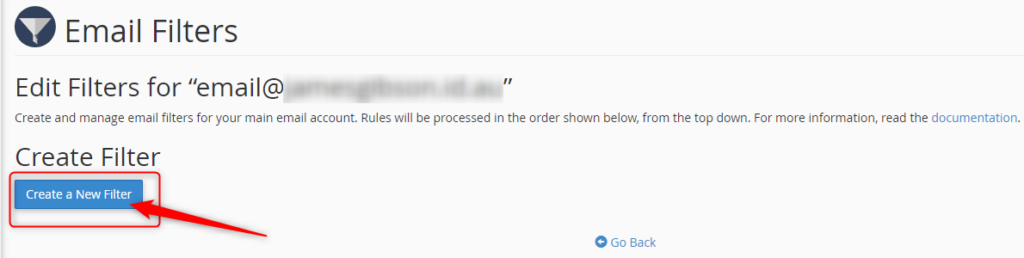
Name your filter in the Filter Name text area.

If you want to filter out certain email keywords that you have noticed are used in the spam email subject lines.
Choose your Roles and enter keywords.

Choose how you wish to deal with the email caught in the filter.
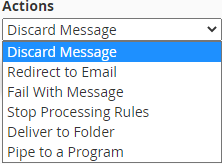
Click Create once you are happy with your filter.

All Hosting Australia hosting services include a basic SPAM Filtering service, called Mail Scanner. This service will deal with low-level spam and provide some form of filtering.
From the Email Accounts page, click Email Filters.

You can use this to allow (Whitelist) or block (Blacklist) all emails from a particular address.
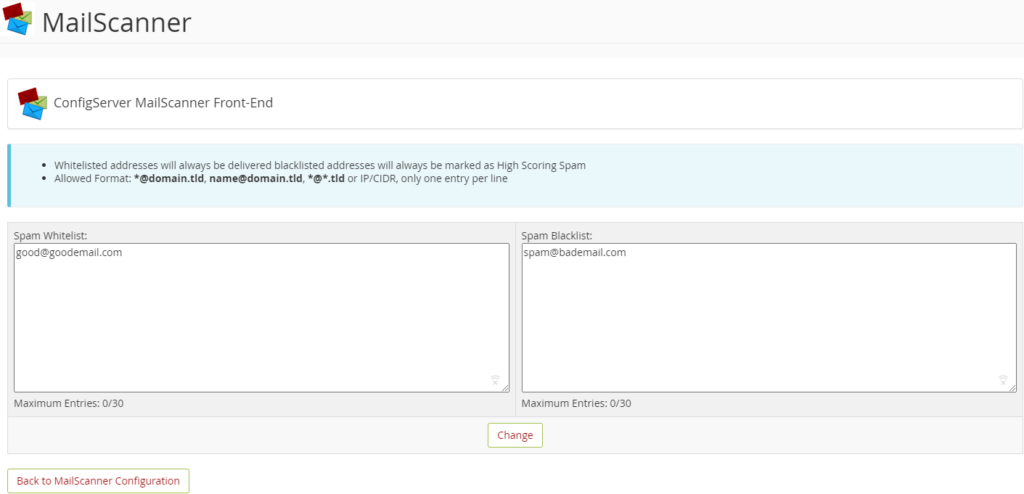
This page will allow you to adjust the filter settings. There are two settings to adjust here, and both are related to SPAM Scoring. Each email filtered via Mail Scanner is assigned a score based on several factors, including Email Content, Location of Sender, Type of attachments, To/From address, and many other factors.

For example, if an email is scanned that ticks all boxes as being deemed legitimate, it will be given a SPAM Score of zero or one.
However, should the email originate from a known SPAM location, have a zip file and a large list of random TO addresses, it would be assigned a higher score, such as 20 or 30.
The two settings available on the Other Settings Page are:
Low Scoring Spam: This setting refers to the lower end of the threshold. And you can set this as whatever score you like. It’s recommended to leave this setting as DELIVER in the delivery options section mentioned below, which makes this setting defunct.
High Scoring Spam: This is the most important option when configuring filtering.
The default setting is 20, but if you are seeing a lot of SPAM Delivered, you may wish to lower this to 15 or even 10. This means that any email reaching 10 or 15, will be handled as per the settings below, which is generally to Delete that email from the queue.
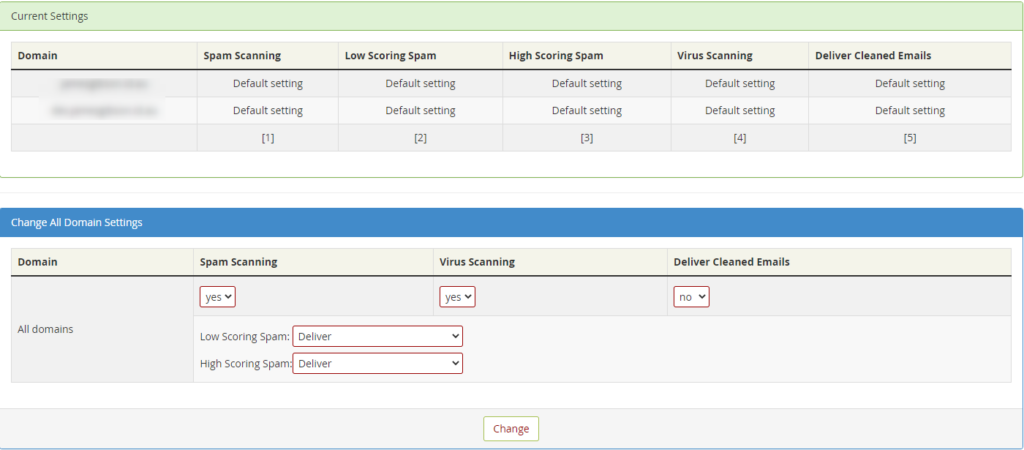
This shows an overview of the settings for all the email domains you have configured under this cPanel account.
From this section you can choose a number of options, they are:
SPAM SCANNING - Choose to disable or enable the scanning process.
VIRUS SCANNING - Choose to disable or enable the scanning process.
DELIVER CLEANED EMAILS - This will deliver emails that are cleaned of virus files. It’s recommended to leave this as "NO" as any virus-laden emails can still potentially contain dangerous links.
LOW SCORING SPAM - Choose what will happen to emails that reach the low-scoring spam threshold, as described above.
HIGH SCORING SPAM - Choose what will happen to emails that reach the high scoring spam threshold, as described above. Choose to disable or enable the scanning process.

The final method is your tried and true to Stop SPAM in its tracks, with Hosting Australia's Powerful Industry Grade email filtering product. 99.98% Accuracy when identifying and filtering SPAM. An incredible 0.0001% Rate of false SPAM Identification.
The SPAMProtect package options include inbound and outbound email filtering and archiving solutions. Powered by a cutting edge continuously updated Intelligent Protection & Filtering Engine to ensure your emails are always protected from threats, no matter how often new attacks emerge.
No contracts. You can upgrade, downgrade, or cancel as you need to. No risk.
Having a strong password is your first line of defense against online hackers. But you might find yourself having to reset your password a little too often. This can make the entire process frustrating when you are told that the password you have forgotten has already been used.
In frustration, you might want to revert and create an old password and hope for the best. However, this is an easy way to find yourself under a malicious attack after a hacker guesses your password.
So, how do you create a strong and secure password while still being able to remember it? Let’s explore the best strategies for creating and remembering a strong password.
In 2008, security expert Bruce Schneier suggested a new, clever password method. His advice is simple: take a sentence and turn it into a password. Assign each word a series of characters to help you remember it.
You can find some examples below:
The more random and stranger your series of characters the better. So, rather than having to remember a string of random letters and numbers, you’ll just need to remember a sentence.
You have reached your limit; you need to create a new password, but you have run out of ideas.
Luckily there is a site just like passwordsgenerator.net that helps you create a password. This can allow you to select and choose the Length, symbols, numbers, including lowercase, uppercase.
This will help you create a strong password with an easy click of a button.
Use 2FA (Two-Factor Authentication)
Two-Factor Authentication is a security system that requires two distinct forms of identification to access your account.
First, you will enter your newly secure password and then provide proof with something you have, or something you are. You may be required to answer questions about your favorite sports team or first job. You may also download an app on your devices and be required to enter a randomized number within a time limit.
Now that you have created your new strong password. You can test your password strength by visiting howsecureismypassword.net to see how long a computer is to break your password.
During 2020 - 2021 a lot of businesses have been required to make the switch over to an online platform. Without having a functional website before the pandemic, you may have found yourself in a bit of a tough situation trying to learn all the skills to improve your website.
So, if you are looking to learn web development, there are more than enough resources online and it can become overwhelming, not knowing where to begin, and how do you tell if you skills you are learning are useful or out of date.
As an owner of a website, it is important to be able to update your website on the fly. You can learn everything you need to know about web development online, taking the time to learn these skills will help take your website understanding and business to the next level.

Udemy is a massive open online course provider and my person going to for upskilling for anything. Udemy offers over 80,000 online courses in a wide variety of categories including web development. Each course that is offered within a category includes unlimited access to a series of video lectures by a specific instructor Plus you can always interact with the Udemy student community for extra help. Each course is paid separately allows you to preview the lectures for free before you start. They currently have a sale for new users looking for upskills.
You may already be familiar with LinkedIn as it is a must for professionals to connect in 2021. Therefore, LinkedIn has combined Lynda.com for a more personalized learning experience. Rather than taking you through a specific track, the site offers a staggering number of courses in various fields including almost a thousand courses for web development. For $29 a month you get unlimited access to courses that are broken up into a series of videos that are accompanied by walk-through examples and sample code when needed.
Codeacademy allows you to select a path you are wishing to learn, web development for example. The course-based online learning provides a unique hands-on approach to learning code. Each path includes lessons that begin with the basics and sends with advanced practical applications. Each lesson includes written instructions that help you write out actual code that progresses with each lesson.

Codewars is a great choice that allows you to master your web developer skills by solving challenges in the programming languages of your choice. You can even compare your solutions with other users for great understanding and great when learning with a partner.

W3schools does not providers courses as such but is more an index of knowledge that you can have in your back pocket and refer to. I still use W3schools.com to this day if I ever require a refresher on a certain topic.
When it comes to improving or learning a new skill, getting started can be the hardest part. But once you do, you might be surprised a just how much you can learn in a single day with online resources available.
2025.hosting-australia.com/ does also offer web development if you ever find yourself stuck on are wishing to upgrade your website to a newer and more updated version for your business. Just simply contact our support and one of our web developers will be in touch.

A website safety check is simple but effective to prevent future problems. There are multiple ways hackers and other malicious entities could infiltrate your network and website. Once they have access, they will be able to steal your data, use the website for nefarious purposes, they will destroy a business from the inside out. Therefore, it is so important to have a regular website safety check.
So, it’s best not to dwell on the idea of whether you should have a regular safety check that could only take a few hours. But save days, weeks, or even years of work.
So, this is a checklist that you can follow to make sure your website is safe.
You may have noticed that some websites have HTTPS:// before www. This is extremely important as the S in HTTPS stands for the Secure Socket Layer. Which encrypts traffic between the user’s browser and your website. This becomes so important; Google is now factoring the existence of an SSL into its SEO formula. This not only improves security but all the searchability of the website.
It is important to have your software and plugins up to date. You can easily update your plugins through the WordPress admin area. While you are updating your plugins, it's also important to remove plugins that are no longer required. Hackers can buy an out-of-date plugin, update it, and add their own malicious code. Then when the plugin is updated, you have the newer compromised version of the plugin. The hacker then uses this plugin as a backdoor into your site, risking all your and the user’s data.
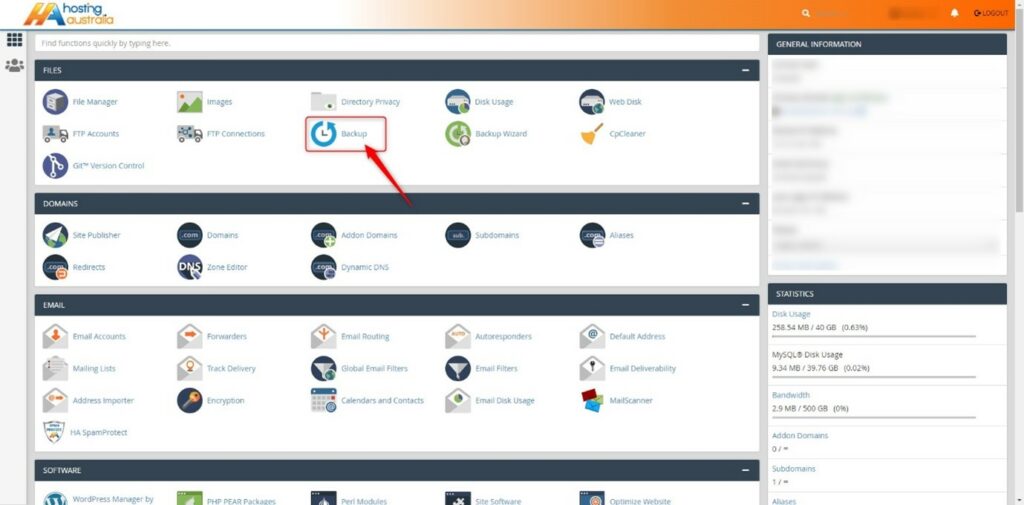
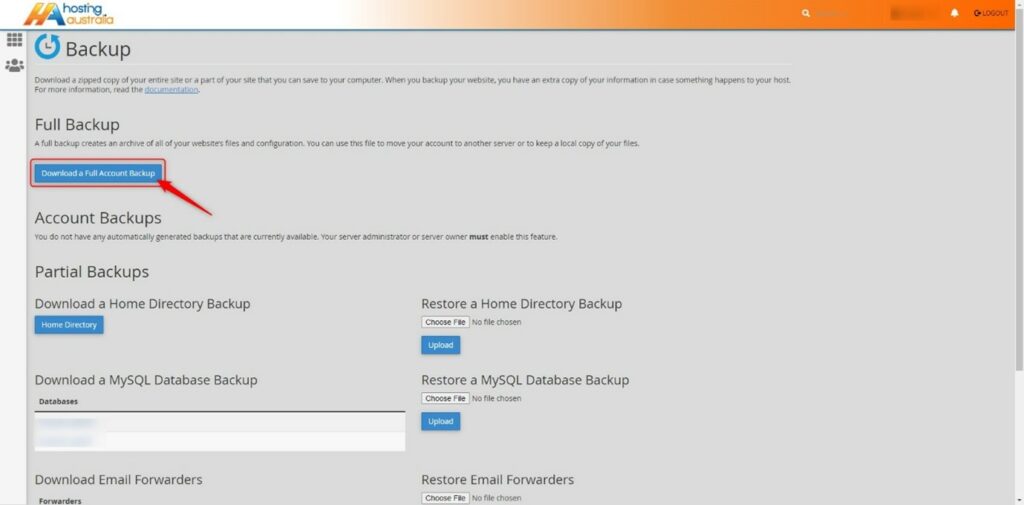
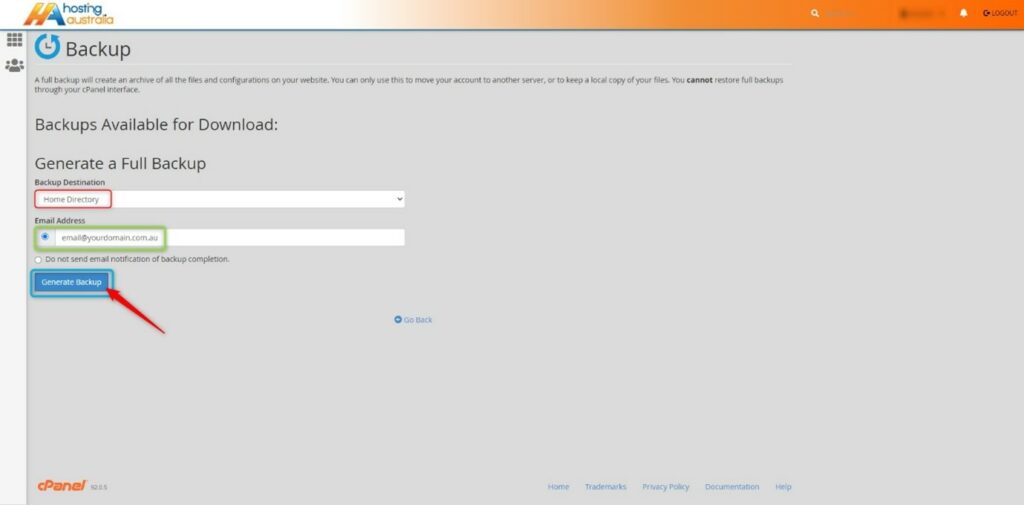
As mentioned before “It’s not a matter of if your website gets hacked, it’s when it will be”. I have seen firsthand entire websites that have been devastated by malicious attacks. Losing all their content and not having a backup to fall back on. Luckily, 2025.hosting-australia.com/ is backing up your cPanel and provides an off-server backup service. However, it is important to have your own personal backup. It doesn’t hurt to have two separate backups in case one of them fails. You can easily backup your cPanel, check your HA knowledgebase article for more information.
Pay attention to extra files you post on your website and include them in your website safety check. Any file that is uploaded such as, images, excel, Word, and PDFs may be corrupted.
Use complex passwords, with various letters, numbers, and special characters. WordPress also has an arrangement of plugins such as Limit Login Attempts Reloaded that are made to stop brute-force attacks and ban IP addresses.
A lot of people create a WordPress admin. But leave the username as “admin”. This is the first username hackers will use when they attempt to brute force into your website. Therefore, it is important to change your username to something less common.
You can use WHOIS to check to keep track of your registrar details for your domain. Hackers can reverse engineer email addresses then use the forgotten password feature on the domain registrar to take control of a domain. They then hold your domain at ransom and will not be released until the demands have been met.



