
The internet is a big place with billions and billions of web pages and databases. As the only public forum on the web, it's important that we all understand how to use and create databases.
Database management systems help you organize and analyze huge amounts of data. They're what powers search engines, email services, social media platforms, and so much more. If you want to be an informed web user today, you need to know how to use them as well! Read on for some quick facts on databases and why they matter.
Databases are how you organize and manage data. The power many of the internet's most popular services, from Google to Facebook to 2025.hosting-australia.com/. But databases aren't just important on the web: They can even help you at home.
Let's say you want to track the history of customer entries i.e.: Products, orders, and countries, but don't have a whole lot of time on your hands. You could use a database to do it for you! Database software is powerful enough to handle all sorts of projects.
If you want more information about databases, keep reading! We'll cover what they are, how they work, and some best practices for using them below.
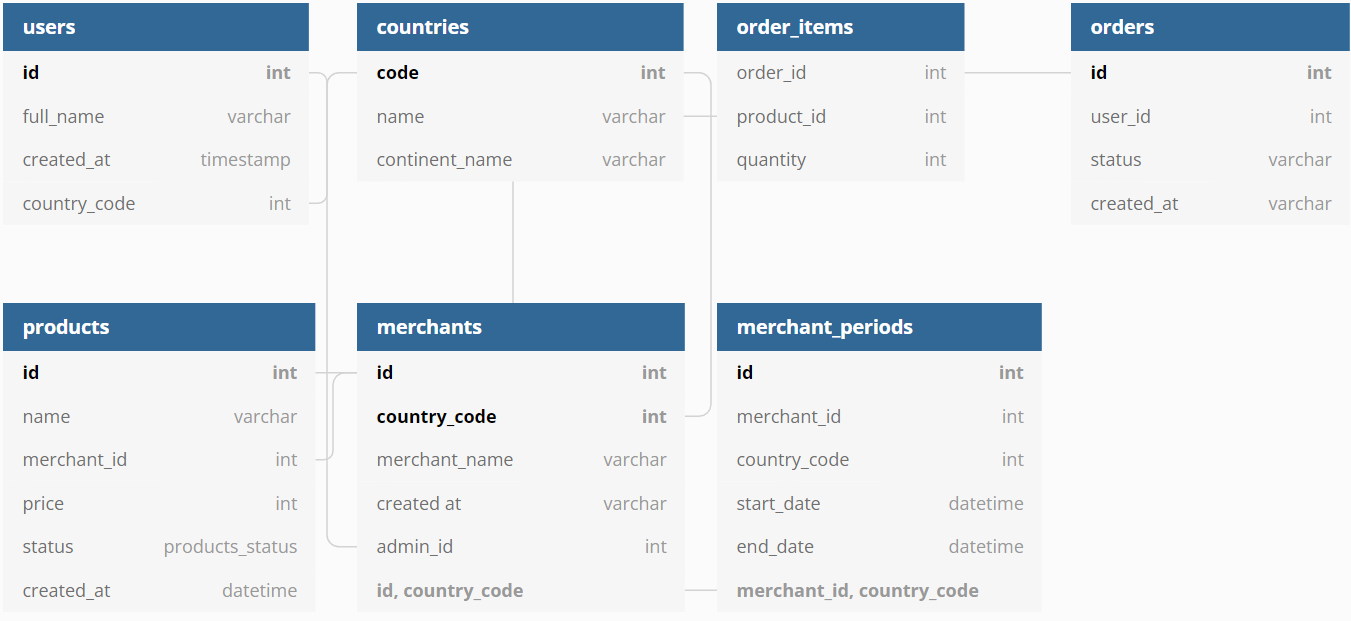
A database is a collection of data organized in an accessible way. They can be either structured or unstructured, but the goal of database management systems is to make the data easier to find and analyze.
This means that databases are organized information (ordered by categories, like articles or books) that can be searched for specific details. For example, if you want to find out how many people were born in your state this year, you could search for it on a database.
Databases can also be used to track information over time. They're what powers many popular websites, like Instagram or Google Maps - they record where you go and what you do so it's easy for them to show relevant ads to you when you log in again.
Database management systems were invented in the 1970s to help with computer storage and retrieval. They're a lot like a filing cabinet: they store information in a very organized way, with a specific table of contents.
Databases are also different from web servers, which store lots of content on the internet. Web servers make it possible for us to visit websites and use software without downloading all the data. Databases limit themselves to storing information from one area of the web, usually in an online form with a name and keyword indexing system. These databases can also be accessed by other programs through an API (Application Programming Interface). This is where programming languages such as SQL and PHP, previously mentioned in my other posts are used to communicate with the website pages to the database.
Database management systems are an essential tool for web users today. Not only do they power many of the most popular sites based on how much data is being stored, but they also make it possible for us to access and store information in a way that's easily accessed.
If you want your business to succeed in the 21st century, you need a good database system in place. You won't find success with a digital marketing strategy without them!
SQL is a programming language that lets you extract and manipulate data from a database. It's one of the oldest programming languages, but it's still widely used today. It has many uses. You can use it to create tables, run queries, define relationships between tables, and organize data in your database. In this article, we'll explore what it is and how it works. We'll also see some examples of SQL code so you can get familiar with the language. Keep reading to learn more about this important topic for website owners!
SQL stands for Structured Query Language. It's a programming language that's been used since the 1970s and is still widely used today. It has many uses, from creating tables to running queries to organizing data in your database. In this article, we'll explore how it works and some examples of SQL code!
The programming language designed to extract data from a database. The language is composed of four basic operations: SELECT, INSERT, UPDATE, and DELETE.
SELECT lets you pull data from the database. For example, you could use a SELECT operation to get a list of all clients at a company.
INSERT lets you add new data to the database.
UPDATE allows you to change the values in an existing row in the database. This can be useful if, for example, you need to update someone's phone number or email address on record with your business.
DELETE lets you remove rows from your database table entirely. You can think of it as "erasing" information from your table.




SQL is an important language for web developers because it lets them interact with databases.
It's also important for website owners to know about SQL for two reasons: You can use it to get information from your database and you can use it to create tables and organize data in your database.
Without the use of SQL, you would not be able to utilize websites how you do day today.
SQL is a crucial, structured, and object-oriented programming language. It is used by developers who need to manipulate data for websites. Developers use it to create tables, run queries, define relationships between tables, and organize data in your database.
A programmer that specializes in SQL is called a "DBA" or "database administrator." The DBA is responsible for all the actions related to building and managing databases. The DBA is also responsible for the security of your information.
You'll also often see SQL features in other languages like Python or PHP which I have spoken about previously in another blog article.
SQL is one of the most important skills for anyone in web development. There are many different ways to use SQL, and this article has given you some examples to get you started.
In summary, you can use SQL to extract data from your database, manipulate it in various ways, and use it again in reports or other analyses. SQL is an essential tool for anyone working in website design or development and the majority of websites would not be possible without the use of SQL.
HTML is the language of the internet. It’s what gives your website its structure and content, and it’s the thing that makes your connection to the internet possible. So, if you want to be an entrepreneur or just know how to use a smartphone, learning HTML is essential.
HTML was created in 1990 as a way for programmers to create web pages easily. It was originally designed as a markup language, which means that it uses tags and codes to tell the browser how to display text and images on different screens. These days, we also use HTML for CSS (or Cascading Style Sheets) and JavaScript programming languages--just like we do with any other website. Here are some basics about HTML:
HTML stands for Hypertext Markup Language and it’s the language of the internet. It’s what gives your website its structure and content, and it’s the thing that makes your connection to the internet possible.
HTML was created in 1990 as a way for programmers to create web pages easily. It was originally designed as a markup language, which means that it uses tags and codes to tell the browser how to display text and images on different screens. These days, we also use HTML for CSS (or Cascading Style Sheets) and JavaScript programming languages--just like we do with any other website.
HTML is a markup language and is used to define the content and structure of a web page. HTML is used to define content like:
HTML has tags that define data about the page like:
HTML is used for providing data about the page to the browser, so that it knows how to display text
In basic terms, HTML is what you use to create a web page. When you visit a website, you’re seeing a page made up of HTML. The HTML tells the browser how to display text and pictures, which is what you see when you visit a website.
The code for a web page is called a document or a document type. It includes tags with text between them. For example:
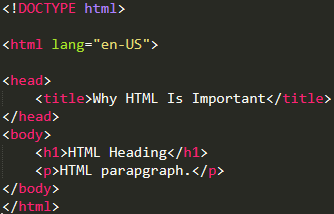
In this code, the '<!DOCTYPE html>' tags tell the browser that the website is in HTML, then the '<html lang="en-US">' tags tell the browser that the content will be in English, and the '<head></head>' tags tell the browser to start creating the head of the document. It also contains tags for other information like links, scripts, and stylesheets.
The '<body></body>' tags tell the browser to start creating the body of the document. The last tags are '</html>', which means that the document has ended. The browser then reads this document.
If you want to have a website, or if you just want to know how to use your phone, HTML is essential. In the simplest terms, HTML is the language of the internet. It’s what gives your website its structure and content. HTML was created in 1990 as a way for programmers to create web pages easily. It was originally designed as a markup language, which means that it uses tags and codes to tell the browser how to display text and images on different screens.
HTML is more than just a way for programmers to create web pages easily; it’s the thing that makes your connection to the internet possible.
This article isn’t meant to teach you all the ins and outs of HTML; instead, its aim is to give you some basics about what it is and why it’s important for your website.
In summary, HTML is a computer language that is used to create websites and other web pages. It's the language of the internet and with a little practice, if you are wanting to learn a Web language, HTML should be your first steppingstone.
The world of web design is constantly evolving. New technologies arise and old ones are left behind. In this ever-changing landscape, it’s difficult to stay current. One of the most important things for a web designer to understand is CSS. CSS, or Cascading Style Sheets, is a language that allows you to control the look and feel of a website with formatting commands.
Why is CSS so powerful? An extensive library of properties and values gives you a lot of ways to customize your site without having to piece together many different codes from scratch. If you want your site to be accessible on any device, be responsive to all screens, make use of animations or other effects, or add interactivity to your site using CSS3
Websites, by definition, are either dynamic or static. A dynamic site is one that is always changing. Whereas a static site will always have the same look and feel. A very simple example of a dynamic website is Flipboard. A Flipboard is where you have a short description of the articles that are currently displayed, but the site is constantly changing to reflect the news that is popular.
CSS controls how your site renders across different devices and screen resolutions. It also controls how links look. In general, it’s a good idea to use a combination of CSS and JavaScript as mentioned in my last blog article to give your site an even more dynamic feel.
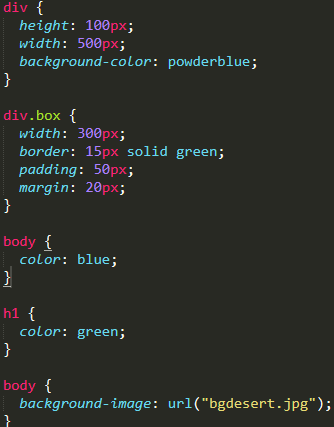
CSS is the bread and butter of any web design studio that seeks to differentiate itself from the pack. Today, this tool is almost as ubiquitous as HTML5, but the fact remains that every web designer should be familiar with how to use it. CSS makes it easy to design a site that not only looks good but works well too.
CSS is a tool, so as you might imagine, it does require some basic knowledge and experience to create some pretty slick websites. It’s not enough to merely understand CSS, you also need to be able to manipulate CSS to your liking. You can create your own code or use pre-made CSS. Once you’ve got it down, you can customize CSS to work exactly the way you want it to. But what does this mean? And how can you use it to your advantage? Read on.
Research shows that 36% of site visits come from mobile devices and desktops. It’s essential for your web design to cater to both types of user devices. Flexbox, which lets you easily modify the positioning of elements, is a great way to ensure that content and layout remain consistent on a wide variety of screen sizes.
A great way to ensure that your CSS is updated quickly is to use a micro framework, such as Bootstrap. These libraries allow you to build responsive websites using intuitive tools and technologies so that your site can quickly adapt to new screens.
When learning to design websites, you must understand and know the basics of HTML and CSS. They are a vital aspect of the web, so make sure you master them. If you find yourself in a situation where you’re struggling to understand CSS, the CSS There are a large amount of paid and unpaid courses that can be found online to help with your CSS journey.
JavaScript is a scripting language that runs in the browser and is used to create interactive web pages. It’s an integral part of your website and any other website you use that relies on it, such as Google Maps or YouTube. The language has been around since 1995 when it was created by Netscape. Since then it has evolved into a more powerful and versatile programming language. You’ve probably heard of HTML, CSS and now PHP after my previous blog post, but not JavaScript, which might make you wonder: what exactly does it do? If you’ve asked yourself this question, here are some things about JavaScript you should know.
JavaScript is a highly configurable programming language that was designed by Brendan Eich, the inventor of the language, to be much more complex than Java or C++. In fact, it is written in an abstract syntax tree. So, what does this mean? It is a collection of parts and rules that are put together to create a webpage. The JavaScript interpreter, as well as other parts, like the window or event handlers, are all written as JavaScript code.
After all, this is coded, a webpage is produced by the browser, which in turn is a program that is programmed in JavaScript. You will often hear people refer to the web browser as a “browser”, but it is what is running in your browser and is essential to make sure your website functions correctly.
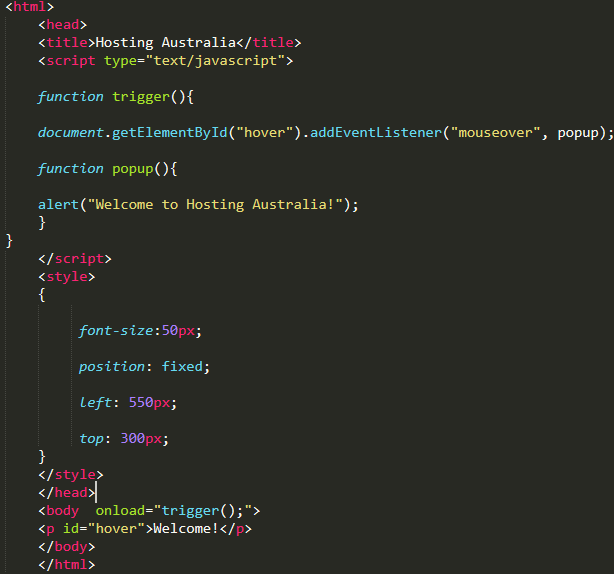
As previously mentioned without JavaScript you would not have such interactive web pages. For example, on YouTube, you can customize a video playback speed. With it you can select the speed you want your video to play at and the program will dynamically change the speed of the video.
JavaScript can also be used to handle “data-binding,” which is like Active Template Engine (ATE). When you link a data binding to the DOM (Document Object Model), your program will update the DOM (Document Object Model) whenever you change a value for that property. For example, with an, if statement you can add a condition to the HTML code that will trigger the program to execute when that condition is true.
Like most programming languages, JavaScript is a combination of both logic and syntax. However, unlike programming languages like Java or C, JavaScript has a built-in scripting capability that allows developers to create functions that create scripts that perform a variety of functions within the web browser. JavaScript is a scripting language that runs within the browser.
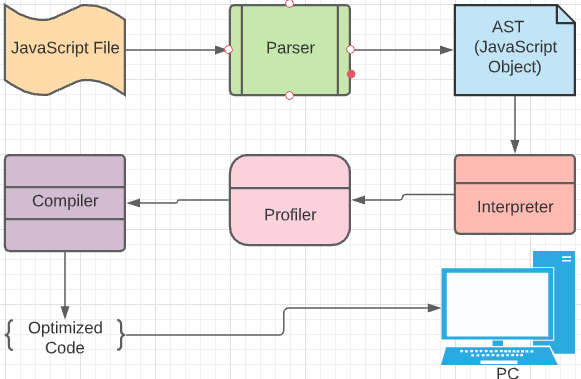
You probably already use it on your website by choosing a search engine or the right ad groups. You also use it on some forms of websites and apps. The most common use is writing scripts that interact with the user on your website. These are like mini-programs on your website. The user can click on links or buttons to perform actions like sending a tweet, playing a game, or even playing a video. This requires JavaScript.
Another common use is the ability to use your website without leaving your browser. This is particularly useful if you need to run your website behind a proxy or firewall that blocks it. You can also use it to access your website from other devices.
JavaScript has a lot of uses and applications. Although it was initially created for Internet browser programming, it’s versatile enough that you can use it on any web page. Using JavaScript ensures you’ll create a dynamic website that keeps your visitors engaged and talking to you. It allows you to create more engaging user experiences, with a better click-through rate (CTR) and a lower bounce rate. The next time you write a line of JavaScript code, do your research and make sure it’s for the right reasons and for your website.
<!DOCTYPE html>
<html>
<body>
<h1>Hosting-Australia</h1>
<?php echo "Find all your hosting needs!"; ?>
</body>
</html>
PHP is a programming language that can be used to create web pages. It's incredibly basic for beginners, yet includes sophisticated features for experienced programmers. Don't be intimidated by the long list of PHP's capabilities. You should hop right in and write your first PHP script in a matter of hours.
You've probably heard of a few other programming languages and are wondering why we chose PHP as our web programming language. Because PHP has a huge easily accessible online reference and a well-structured function structure.
As a result, the language is easy to pick up and has a significant online following. There are numerous forums and manuals available on various PHP approaches and challenges, so you should have no trouble seeking help if you require it. Here are some fundamentals.
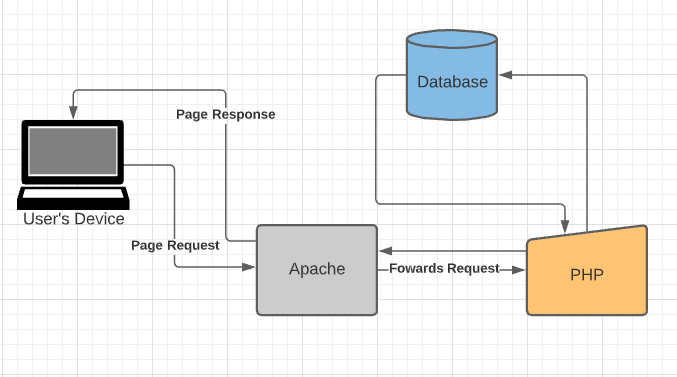
The PHP program communicates with the site server, which is the software that distributes web pages to the rest of the world. When you type a URL into your web browser's address bar, you're instructing the webserver at that URL to send you an HTML file. The web server responds by sending the requested file. Your browser reads the HTML file and displays the web page. When you request a file from the webserver by pressing a source on a web page, you're also requesting a file from the webserver. Additionally, when you click a button on a web page that submits a form, a file is processed by the webserver.
User send page request to the webserver
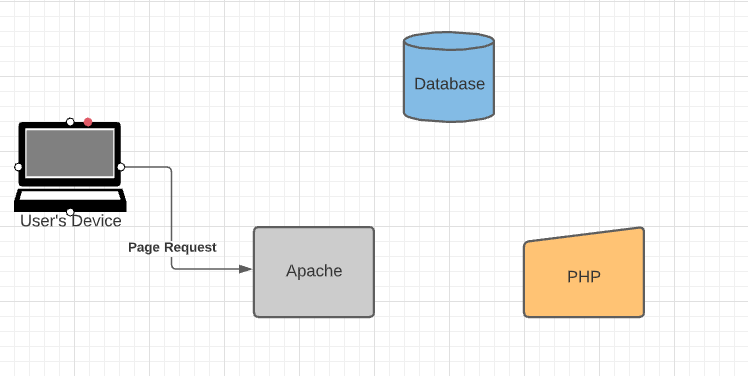
The server forwards that request to PHP
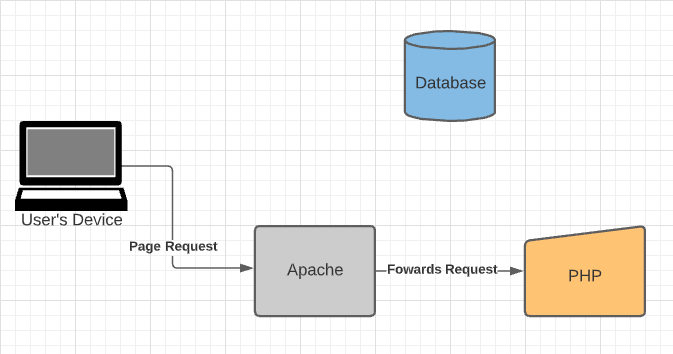
PHP will send the request to the Database and respond back to the server.
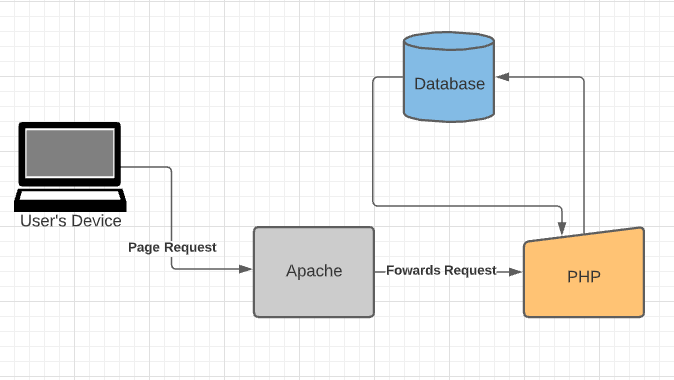
The request will be then sent back to the user's device
Essentially, a plugin is a piece of software that can enhance the functionality of your WordPress website. What’s unique about them is that they are independent of your website theme and are simply plugins. They work with WordPress and can be applied without the need to change any code on your website. A WordPress plugin is an advanced piece of software that you can add to your website to make it easier or more fun to use.
In order to be helpful, many plugins will connect to other services like Google Analytics, Google Maps, SoundCloud, or other services you may already have. For a more comprehensive look, consider searching around WordPress community forums. These communities often sell plugins as well. As a developer, it’s important to understand how plugins work as they integrate in and out of a website. For example, take WordPress Magento as an example. This plugin helps improve the speed of your site. However, this can have a negative impact on your site’s security. Using a plugin like Wordfence can solve this problem.
You’ll also want to consider what services you require a plugin to connect to. For example, you may not need to integrate your Google Analytics account.
YoastSEO is the one-stop-shop plugin when it comes to increasing your ranking on google.
Yoast SEO is packed full of features, designed to help visitors and search engines to get the most out of your website. Some of our favorites are:

WordFence is the one must-have security plugin; you may have seen this plugin brought up a couple of times in blog articles. Because we cannot recommend it enough.
Wordfence includes an endpoint firewall and malware scanner that was built from the ground up to protect WordPress. Our Threat Defense Feed arms Wordfence with the newest firewall rules, malware signatures, and malicious IP addresses it needs to keep your website safe. Rounded out by 2FA and a suite of additional features, Wordfence is the most comprehensive WordPress security solution available.
UpdraftPlus is the most widely used WordPress backup plugin. It enables you to create automatic backups and securely save them on Google Drive, Dropbox, S3, Rackspace, FTP, email, and other services.
It also makes restoring your website from a backup a breeze. Their free plugin is available, but they also offer a premium plan that includes additional features and priority support.
Because backups are such an important tool, this is an excellent plugin that should be installed on every WordPress blog and website.
WooCommerce is the most popular WordPress eCommerce plugin, with over 5 million websites using it.
It includes all the strong features you'll need to start an online business.
WooCommerce has established itself as the most popular eCommerce plugin for WordPress in recent years. It was created by the same people who created WordPress.com, Jetpack, and other well-known services.
WooCommerce currently has a healthy ecosystem with dedicated WooCommerce hosting, WooCommerce themes, and WooCommerce plugins.
Built-in tools and popular integrations help you efficiently manage your business operations. Many services are free to add with a single click via the optional Setup Wizard.
One of the most popular WordPress caching plugins is W3 Total Cache. It's a feature-rich WordPress cache plugin with a lot of settings, which can be intimidating for newcomers.
It has all the functionality you'll need to set up the WordPress cache properly. Page cache, object cache, gzip compression, limited minification support, CDN support, and other features are included.
There is a massive library of WordPress Plugins designed to help you increase the quality and functionality of your website. So, don’t be afraid to get out and give them all ago. But you can’t go wrong with the plugins previously listed to get started.
The threat of a hacked website isn't just on the internet – when a hacker breaches your network, he can use your credentials to hijack your personal aspects of your life. The threat is real:
Unfortunately, a hacked website is not the exception to the rule. In fact, data breaches are becoming more and more common, and a surprising number of individuals lose control of their personal data - even when they use the most secure methods, such as two-factor authentication.
But even if you think you’ve secured your site, you should still be wary of hacking attempts. In fact, just this past week, companies like Twitch and Twitter suffered large-scale data breaches.

Accessing your website can be achieved via social engineering(Phishing Email) – this involves tricking a web user into giving up their username and password (or, in some cases, device ID and/or IP address).
A variety of hack tools can be used to steal data from a computer without the user’s knowledge. Your website can also be broken into by hacking your visitors – the malware found on your computer can be used to gain access to your website.
Loss of personal information - in the form of credit card numbers, bank account details, or other identifying information - is the most frequent reason why hacking targets are breached. With the help of these tools, hackers can carry out impersonation attacks on your site.
(SSL) is shorthand for Secure Sockets Layer. It's a method of encryption that establishes a secure connection between your website and your customer's browser. It's not necessary to wait for an attack to obtain an SSL certificate; in fact, it's recommended to do so right away. Once installed padlock displays in the browser bar, indicating that your site is secure to the rest of the world.
The URL of any SSL-protected website will begin with HTTPS rather than HTTP. This is just another indicator to customers that your company takes data security seriously. The lock and HTTPS prefix indicate that data flowing between your company's website and the browser of your customers is encrypted.
If an update for your website, apps, or mobile devices is available, we recommend installing it right away. Yes, we're all busy, but acting quickly reduces the risk of you being a victim of a security flaw that the update is supposed to address. Quick action can literally save your life in the event of a cyber assault.
It can be tempting to use the same password for everything, but this is a recipe for disaster. This entails creating a password that includes numbers, symbols, and both upper and lowercase characters. Encourage your clients to change their passwords and settings on a regular basis if you have a customer portal on your website that requires login.
There's no need to try to remember these; password managers like DashLane or RoboForm Password Safe make it simple to use and update complex passwords on a regular basis.
The majority of hacking attempts occur as a result of website owners failing to update their software. This is frequently the case with WordPress websites, as hackers are attracted to old plugins and themes. It makes no difference if you have a small blog or a large website. If your software is old, dangerous bots can simply explore your website and hack it at some time.
Unfortunately, many small website owners are still ignorant of this flaw and fail to upgrade or backup their CMS until their site is hacked.
Malware frequently travels from one connected device to another, which is why anti-virus software should be installed on your website. Among the most often used programs are:
If you do not have any of these programs installed. We recommend these apps should be installed on all of your devices, including your smartphone and tablet. They'll protect your gadgets from online threats and notify you if hackers are prowling around.
Two-factor authentication is essentially an extra layer of protection. When you enter your login and password on a website, you'll receive a confirmation code via text message or email. This aids in the verification of your identification.
Change passwords on all of your devices straight away.
Then run one of the antivirus programs install on your device that we have recommended.
Contact HA support, so we can run our state-of-the-art malware scanner across all your website files to detect where there is a website breach.
**Fees will apply If you require HA support to assist in the removal of the malicious files after the malware scan**

Simply put, addon domains are different domains that point to the same site. They're often used by businesses for branding purposes or as an extra domain for a specific geographic location. A subdomain is a secondary domain that's tied to the parent domain and has its own webspace on the server. It may also be used as another way to access a site like adding another level of navigation for users who might not know how to spell the main domain name. An alias domain is essentially an additional address or URL pointing to one website. Alias domains can be used for marketing and promotional purposes and they're sometimes called vanity URLs.
A fully functional addon domain can be created from your cPanel. This addon domain is a new, distinct website that is housed in a new folder on your account so that you may manage several domains from a single dashboard. You may set up email addresses, forwarders, and other features for an addon domain, in the same manner, you can for a major (main) domain on the account.
When you create an Addon Domain the following will also be created.
The following routes (URLs) would be true if the primary domain was 'abc.com' and the Addon Domain 'xyz.com' was assigned to the folder 'XYZ:
A subdomain is a new domain that's related to a domain. For example, we know that this site exists as Domain A, but if someone were to search for Domain A, the results for Domain A would appear under Domain B, and so on. A subdomain is not tied to a specific domain, but it's sometimes referred to as an external domain. A subdomain is most commonly used for SEO purposes.
For example:
xyz.abc.com
In this example, ‘xyz' is the subdomain, ‘abc' is the primary domain, and ‘.com' is the top level domain in this example (TLD). You can use any text as your subdomain, as long as it's simple to type and remember.
There are multiple reasons why you would use a subdomain.
A subdomain is most commonly used to create a testing or staging version of a website. Developers frequently test new plugins and updates on a subdomain staging site before making them public.
Also, subdomains are also commonly used to create an online eCommerce store. Because eCommerce sites are often more difficult to set up, businesses often prefer a distinct subdomain to handle transactions.
You also find businesses use subdomains for their mobile websites (m.abc.com), location-specific sites (aus.abc.com), and creating sub-sections of the website.
You can install WordPress on your subdomain and have it function independently of your main website.
Subdomains such as ‘customer.abc.com.au,' ‘admin.abc.com.au,' and others can be used to serve a specific group of users on your site. Users can create custom websites using website builder platforms such as WordPress.com, Blogger.com, and others.
An alias domain is used as an address or URL for your website. It's often abbreviated to Alias. Instead of referring to your primary website, an alias domain has an address that points to a different website. Typically, you can register the domain using the service provider and then assign it to your site.
All three of these configurations can have very different benefits, so make sure to find the configuration that best suits your business needs.
You can create these domains via your cPanel. If you would like more information on how to access your cPanel, please visit our HA knowledgebase article.
If you require any more assistance. You can contact support via our ticketing system or (07) 4914 2433
Because of its customizability and flexibility, WordPress is the most popular content management system. While it isn't flawless, it is generally simple to use.
Although WordPress issues can be daunting, most of them are simple to repair. You may perform basic troubleshooting on your own if you know the error and what caused it.
This post will teach you how to diagnose and fix three of the most common WordPress problems
Before making any major changes to your website, create a backup of your files so you have a copy in case anything goes wrong.
If you are unsure how to create a backup, please view our helpful guide in creating a backup via cPanel.
After troubleshooting, always make sure you clear your browser cache. This helps the changes you made reflect instantly on your website, as it is not reading old, saved data from previous views.
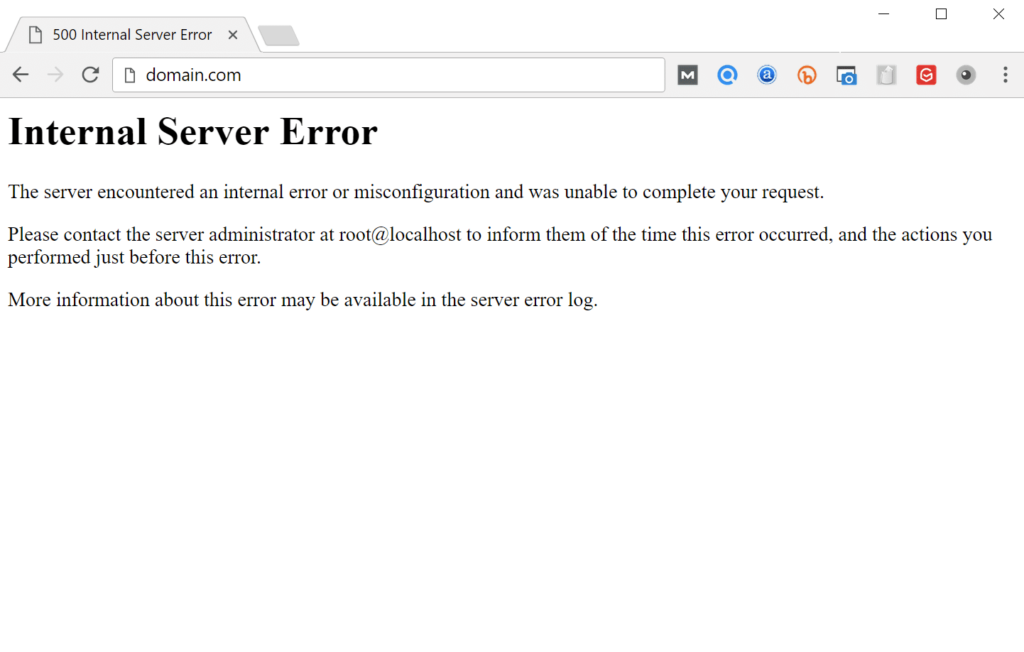
Internal server errors are frequently caused by a corrupted .htaccess file, but they can also be caused by theme or plugin issues.
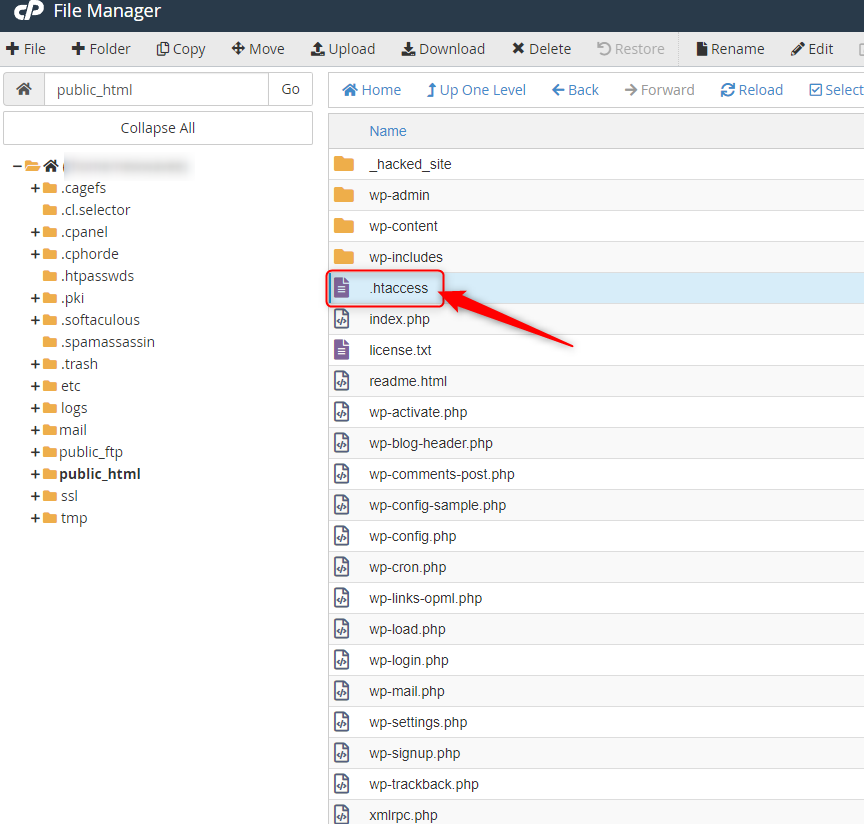
If you do get the internal server issue, try to use the file transfer protocol to get to the website root (FTP) or you can also access the website files via cPanel’s file manager.
Change the name of the .htaccess file (such as .htaccess-old). To see if reloading the website cures the problem, try it. If the problem has been resolved, go to Settings > Permalinks and create a new .htaccess file to reset your permalinks.
# BEGIN WordPress
<IfModule mod_rewrite.c>
RewriteEngine On
RewriteBase /
RewriteRule ^index.php$ - [L]
RewriteCond %{REQUEST_FILENAME} !-f
RewriteCond %{REQUEST_FILENAME} !-d
RewriteRule . /index.php [L]
</IfModule>
# END WordPres
If you've tried the first method and still get an error, it's possible that the issue is due to incompatible or outdated themes and plugins.
To fix your plugins, deactivate them via FTP or via the cPanel file manager. Then, reactivate them one by one until you find the error. Once you find the errant plugin, report it to the developer. You may also try reverting to the previous theme used when the website was still working.
Deactivate your plugins via FTP or the cPanel file manager to fix them. Then, one by one, reactivate them until you identify the issue. If you need assistance with reinstall your plugins, please contact Hosting Australia support. You might also try reverting to the old theme that was in use when the website was still up and running.
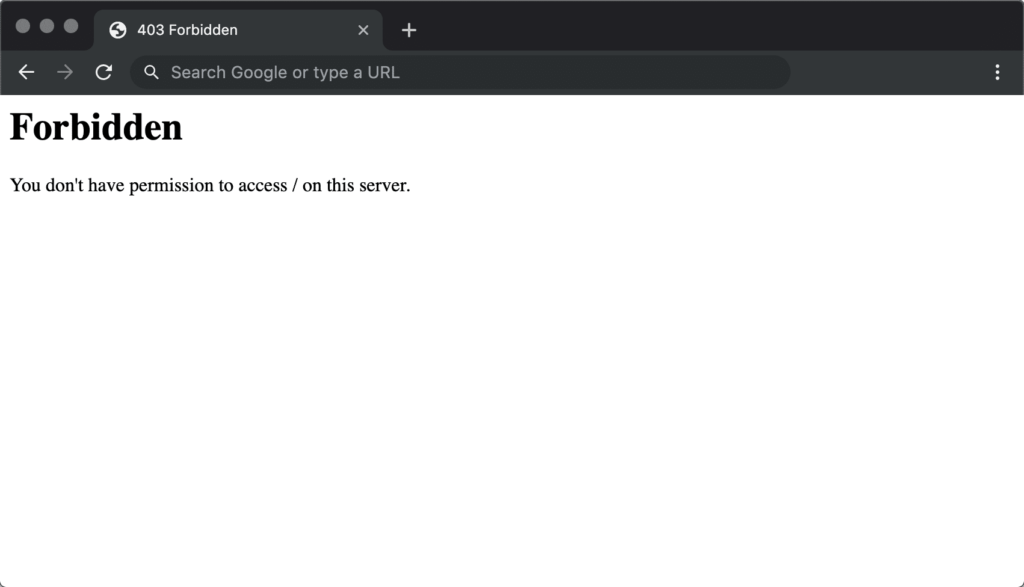
405 forbidden error may be caused by the following:
You may try these fixes for the 34 forbidden errors:
White Screen of Death (WSoD) error may be caused by the following:
You may try these fixes for the WSoD issue:
Try switching the admin side themes, renaming your directory, or modifying the "theme" and "stylesheet" entries in wp options if you get this problem message.
Although WordPress is typically stable, mistakes do occur from time to time. These challenges may appear daunting, but with the help of this guide, you'll be able to get your website up and operating in no time.
The majority of WordPress issues may be avoided by updating plugins and themes, double-checking your .htaccess files, and keeping your website secure.
If you are still having issues after attempting these troubleshooting issues. You can always contact Hosting Australia support via (07) 4914 2433 or alternatively via ticket support@hosting-australia.com.



