
A domain name system (DNS) is a set of guidelines for mapping Internet Protocol (IP) addresses to domain names. A DNS A record is the resource record that maps an IPv4 address to a host name. The DNS server stores this information and can answer queries from other nodes on the Internet that are trying to resolve the IP address. This way, you don't have to memorize IP addresses for individual websites or servers on the internet. These A records are stored in a database called Zonefile.
There are different types of DNS records, and each one has a different function. It's important to know these records. But, this article will be focusing on the most common DNS record - The A record.
An A record is a mapping between a domain name and the IP address of the computer that hosts the domain. An A record is used to find the IP address of a computer connected to the internet using a domain name.
It’s quite simple, The A in A record stands for Address. The address you type every time you visit a website, send an email, connect to Twitter or Facebook, or do nearly anything else on the Internet is a collection of words connected by dots.
For example, to get our site Hosting Australia website, type www.hosting-australia.com into your browser. There is an A record on our name server that corresponds to the IP address 151.139.128.10. This implies that a request to www.hosting-australia.com from your browser gets forwarded to the server with the IP address 151.139.128.10.
A records are the most basic sort of DNS record, and they are one of the most commonly used records in DNS servers.
A records can be used for a variety of purposes, including providing redundancy and fallbacks by employing numerous A records for the same domain. Additionally, many names could point to the same IP address, in which case each would have its own A record.
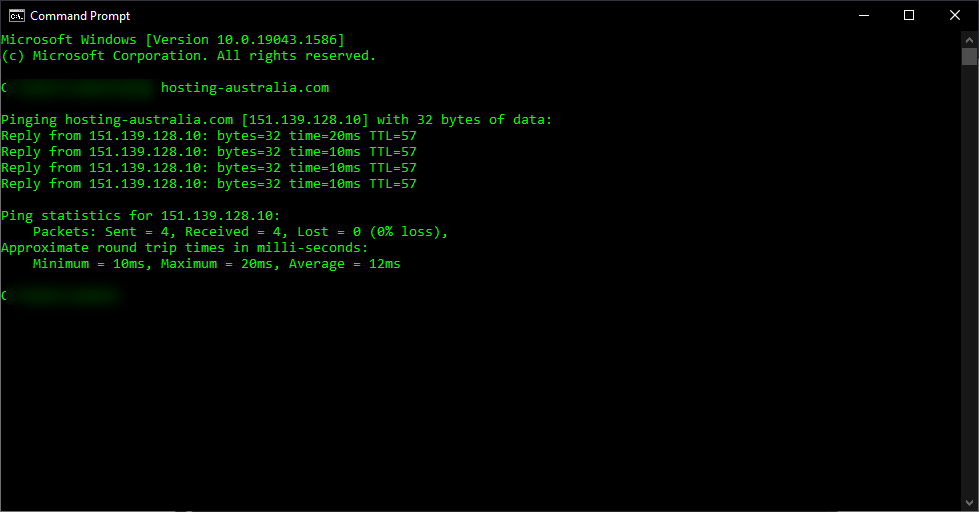
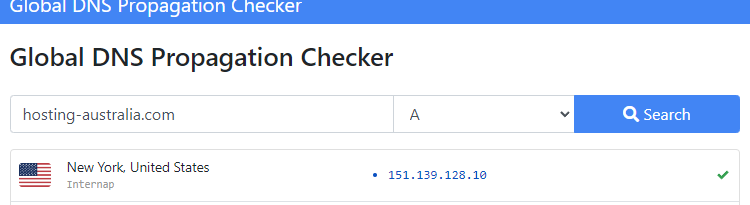
The A record is essential to the functioning of the Internet since it maps a domain name to an IP address for devices connected to the Internet.
With the rise of email, we’ve all become accustomed to using a webpage to check our email. After all, you can't exactly turn your phone upside down and shake it to see if you've received an email.
This is where MX records come in. MX stands for mail exchange and an MX record is the address that tells other computers how to deliver emails sent to your domain name. Here's what you need to know about DNS MX records and how they work, so you can make sure your emails are being delivered correctly.
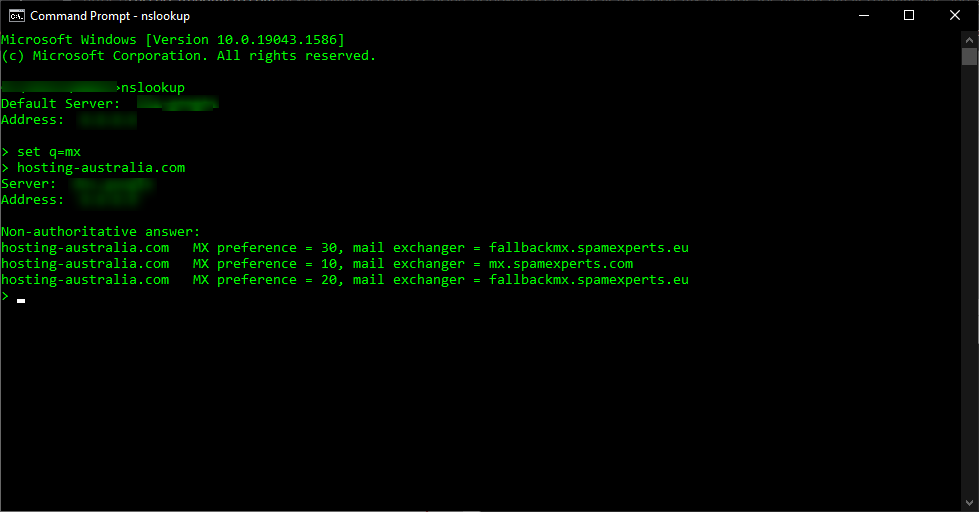
Email is directed to a mail server using a DNS'mail exchange' (MX) entry. As per the Simple Mail Transfer Protocol, the MX record specifies how email messages should be delivered (SMTP, the standard protocol for all emails). An MX record, like a CNAME record, must always point to a different domain such as mail. or the Google MX records listed below

For these MX records, the 'priority' numbers preceding the domains indicate preference; the lower the 'priority' value, the better. Because 10 is less than 20, the server will always attempt mailhost1 first. The server will fall back to mailhost2 in the event of a message send failure.
First, you will need to have access to your cPanel. If you are not sure how to access your cPanel, CLICK HERE.
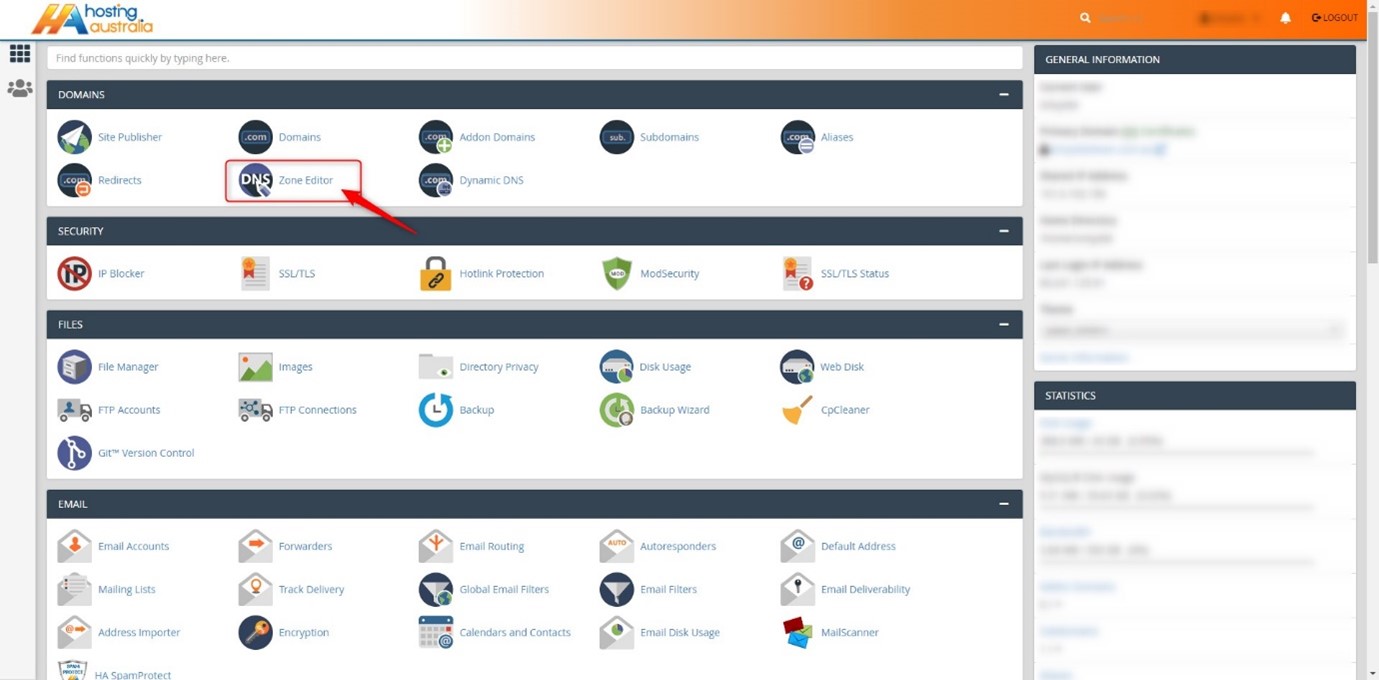
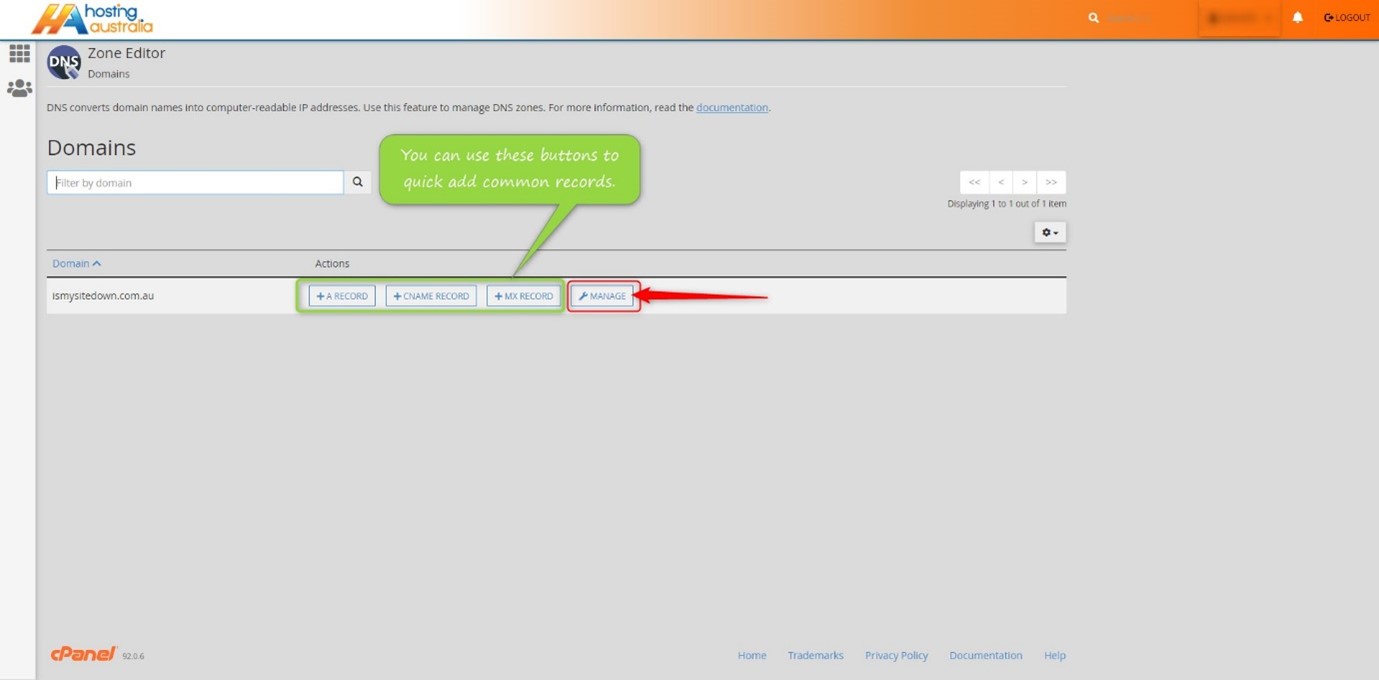
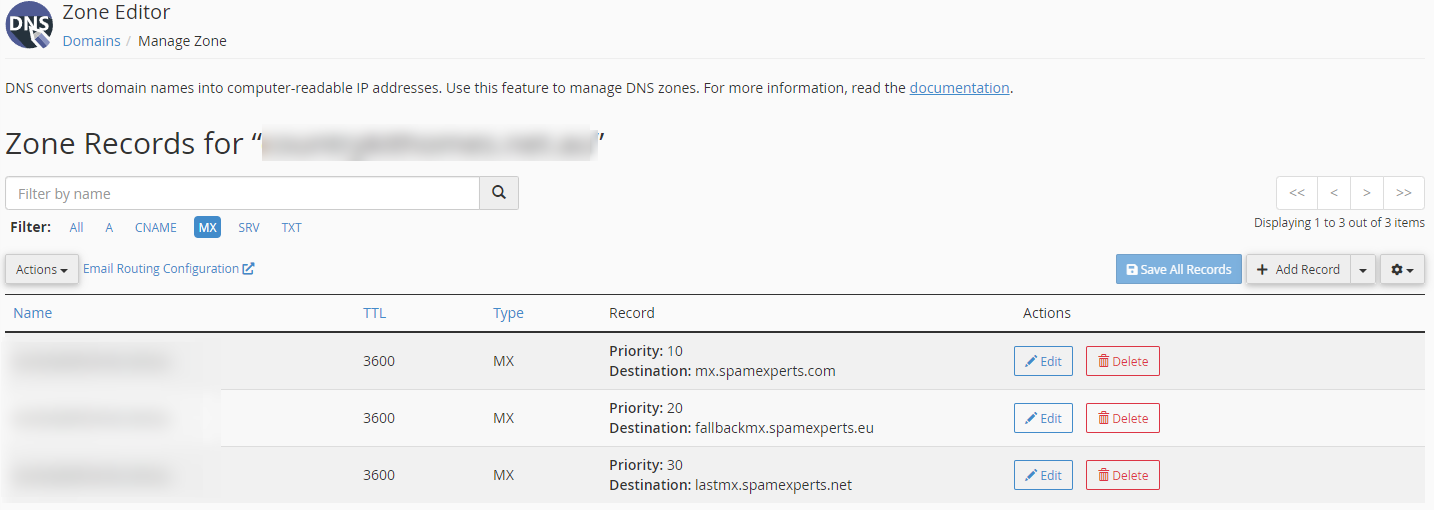
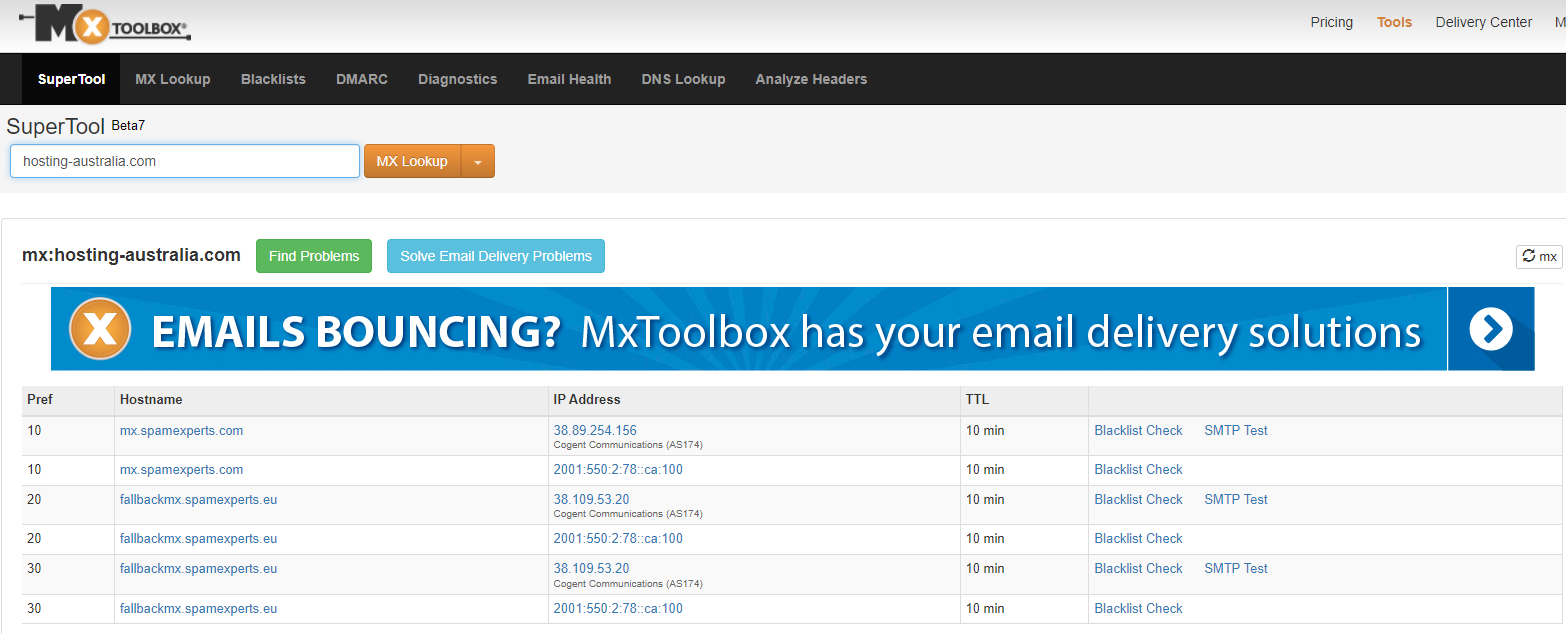
There are a lot of moving parts when it comes to managing your domain name. One of the most important things to have in order is an MX record. This is a record that controls how your email is delivered to your inbox. If you have a domain name, you have an MX record.
It's important that you know if your MX record is working correctly and if it's not, how to fix it. This is one of the simplest ways to keep your email flowing smoothly.
Have you ever wondered what an IP address is? An IP address is like your internet phone number. This number lets your computer talk to other computers over the internet. IP addresses usually look something like this: 192.168.1.1
If you want to visit a website, type in the web address (such as www.google.com) into your browser, and then hit enter to go there, your computer will contact another computer with the address of 192.168.1.1 and ask it for instructions on how to get there from where it is now.
a unique identifier is assigned to each machine in a network. Computers utilise unique identification to convey data to specific computers on a network, just like you would address a letter to send in the mail. The TCP/IP protocol is the standard for network communication in most networks today, including all computers on the internet. The IP address is a unique identifier for a computer in the TCP/IP protocol.
IP addresses are divided into two categories: IP Version 4 (IPv4) and IP Version 6 (IPv6) (IPv6). IPv4 addresses are used by all computers using IP addresses, and most also utilise the new IPv6 address scheme. The following are the distinctions between the two types of addresses:
IPv4 uses 32 binary bits to generate a single network address. Four integers separated by dots make up an IPv4 address. Each number is the decimal (base-10) representation of an octet, which is an eight-digit binary (base-2) number. Consider the following scenario: 14.203.8.145
To produce a single unique address on the network, IPv6 uses 128 binary bits. An IPv6 address is composed of eight groups of hexadecimal (base-16) numbers separated by colons, such as 2001:0db8:85a3:0000:0000:8a2e:0370:7334. To save space, groups of numbers with all zeros are frequently deleted, leaving a colon separator to highlight the gap (as in 2001:cdba::0370:7334).
The internet wasn't the commercial phenomenon it is now at the time of IPv4 addressing, and most networks were private and isolated from other networks around the world. With only 32 bits to establish a unique internet address when the internet first took off, there were fears that we'd run out of IP addresses before long. There are 232 potential IPv4 combinations, resulting in just over 4.3 billion distinct addresses. IPv6 increased the number of available addresses to a stress-relieving 2,128. Later, we'll look at how to decipher your computer's IPv4 or IPv6 addresses in more detail.
A dynamic or static IP address can exist. A static address is one that is assigned indefinitely. Internet service providers rarely assign static IP addresses. Static IPs can be assigned to devices on your local network, but doing so without a solid understanding of TCP/IP might lead to network problems. The most popular are dynamic addresses. The Dynamic Host Configuration Protocol (DHCP) is a network service that assigns them. Network gear, such as routers or dedicated DHCP servers, are commonly used to run DHCP.
A leasing system is used to issue dynamic IP addresses, which means the IP address is only operational for a certain time. The computer will automatically request a new lease if the current one expires. This may result in the computer receiving a new IP address as well, particularly if the computer was unplugged from the network between leases. Unless the computer alerts the user about a network IP address conflict, this process is normally invisible to the user (two computers with the same IP address). A conflict of address is uncommon, and today's technology usually resolves the issue automatically.
An IP address that does not change is known as a static IP address. When your device is given a static IP address, it usually stays that way until it is retired, or your network architecture changes. Servers and other key equipment typically utilise static IP addresses.
Internet Service Providers (ISPs) assign static IP addresses (ISPs). Depending on the terms of your service agreement, your ISP may or may not assign you a static IP address. Your options will be discussed later, but for now, except that a static IP address will increase the cost of your ISP contract.
A static IP address might be IPv4 or IPv6; the crucial quality is static in this situation. Every piece of networked equipment we have may one day have a unique static IPv6 address. We haven't arrived yet. For the time being, permanent addresses are normally assigned to static IPv4 addresses.
There are many reasons that you might need to have an IP address. For example, if you have an online business, you will need an IP address in order to connect to the internet. You can purchase one from your internet provider, or if you are looking to save some money, you can rent one. If you are running a business, it is important to know how IP addresses work, and how they can help you reach your goals.
An IP address is a unique number that distinguishes your computer on the internet. An IP address is separated by periods and is expressed as a set of four numbers – an example address might be 192.168.111.25.
Each number in the set can range from 0 to 255. So, the full IP addressing range goes from 0.0.0.0 to 255.255.255.255. Every device connected to the internet has its own IP address, which enables data packets to
be routed along with networks and prevents duplication of addresses.
IP addresses are not generated at random. The Internet Assigned Numbers Authority (IANA), a part of the Internet Corporation for Assigned Names and Numbers, creates, and assigns them mathematically (ICANN). ICANN is a non-profit organisation based in the United States that was founded in 1998 to assist keep the internet secure and accessible to everyone. Every time someone registers a domain name on the internet, they do so through a domain name registrar, who pays ICANN a nominal fee to do so.
Hosting Australia servers have security features in place to protect and prevent themselves from malicious attacks and block the IP address.
An IP blacklist may be caused by the following:
You may have had your IP blacklisted if you are unable to receive emails or access your website. If you believe your IP address has been blacklisted, please contact support at (07) 4914 2433 or via our ticketing system with your IP address so that we can unblock it and investigate why it was blacklisted.
If you need to know our IP address for support, go to whatsmyip.org and it will be displayed at the top of the page, or just Google – What's my IP and it will be displayed at the top of the results.
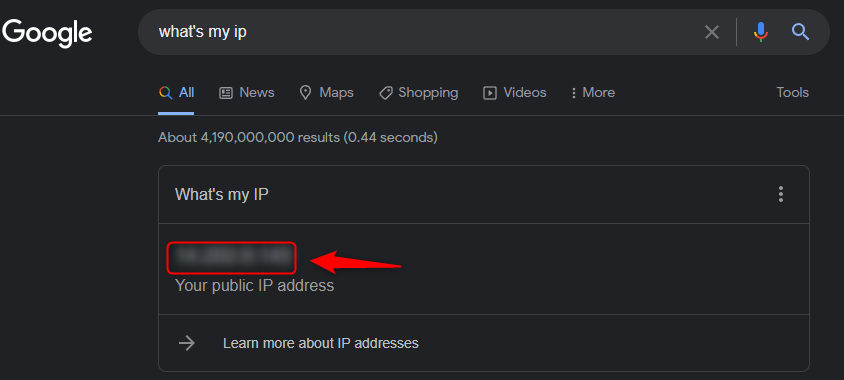
There are methods you can use to unblock your IP address without contacting Hosting Australia support – You can follow our step-by-step guide HERE!
Hosting Australia's support team will explain why the IP was blacklisted, why it happened, and the best way to resolve the problem. If the IP has been blacklisted because of a failed IMAP login, for example. Support will notify you of the account that is causing the problem and advise you that the account's password must be updated on all devices, or the block will occur again.
Hosting Australia will temporarily whitelist your IP, this prevents your IP from being blocked again while trying to correct the problem devices. If an IP address is whitelisted indefinitely and a device or account is hacked, it would allow the hacker complete control over the server, causing a slew of problems for all accounts and the server's integrity.
So, if you can't access your emails or your website, it's possible that your IP has been blacklisted, and you'll need to contact support to find out why and what you can do to prevent it from occurring again.
If you’re like most people, then you’ve probably spent the last few years upgrading your system. Why? Well, computers keep getting better and better. The more computing power they pack in, the more tasks they can handle. And the best part is the cost keeps going down. That means it pays to upgrade your system every few years or so! Here are six reasons why you should upgrade your system.
Upgrading your system every few years or so is a great idea because it gives you access to the latest in computing power. Computers keep getting better and better, and they’re coming out with more powerful units every year. That means if you don’t upgrade, you’ll be missing out on a lot of features that could make your life easier. Upgrading also helps keep the cost of your system down. It pays to stay current, especially when new technology keeps getting cheaper!
The biggest reason that you should upgrade your system is for performance. The more computing power your system has, the better it performs. That means programs run faster and smoother. Your system’s CPU determines how fast it can process tasks, so having a more powerful CPU will make your computer quicker. If you use your computer for intensive tasks like photo or video editing, then upgrading your system will make your workflow much smoother.
The newest computers are better than the old ones. And not just by a little bit, but by a lot. The newer computers come with all sorts of new features that can help you do your job faster and more efficiently.
One of the best reasons to upgrade your system is to save money. Computers cost a lot of money, and once you buy them, they’re not cheap to maintain. But as computers become more powerful, the cost goes down. For example, in 2007, an Macbook Pro 13 inch cost $1,499 (without upgrades). Today that same laptop costs $1,299. And upgrading that old computer for today’s prices would only cost about $700!
So what does this all mean? It means that using the latest technology actually saves you money in the long run. That also means it pays to invest in new technology when it’s available.
The last reason is saving the environment. Computers and monitors use a lot of power and they generate a lot of heat when they’re in use. With an upgraded system, you can run it at a lower power but still get the same performance out of it. You can also turn your monitor off when you’re not using it which will help reduce the amount of power and heat generated by your system.
So, should you upgrade your system?
In a day and age where innovation is king, you can’t afford to be stuck with a system from years ago. The benefits of upgrading are innumerable and the cost of not doing so will only grow as time goes on.
So, what would you rather have? A perfect system from a decade ago or a perfect system from today?
Have you ever thought about what it would be like to design a website without using cheat sheets? Most people don’t think about the complicated steps that go into designing a website. Websites are not just pretty pictures with the text on them. There is so much more than meets the eye. It isn’t until you start designing your own site that you see how much there is to know and understand about website design. You will be working on different elements, including navigation, fonts, colours, images, and more. This guide will help you learn what you need for your web design project so that it’s professional, clean, and user-friendly. This guide will also show you how to use cheat sheets to design an awesome website!
Before we get started, you might be wondering what a cheat sheet is. A cheat sheet is a simple, one-sheet reference that has the most important information from a larger document. In this case, it will be a one-page reference for web design.
This cheat sheet can be made of simple dot pots or website links just for a quick reference. This way you do not find yourself constantly on Google trying to find answers for all your questions or it can just simply have a list of the tasks that you require to do and the order of doing them.
There are many reasons why you might need a cheat sheet when designing your website. First of all, it will make your workflow more efficient. If you are working on multiple projects at the same time then having a cheat sheet will help you to manage your time efficiently. You can use one document that has all of the different elements for each project so that you don't have to flip back and forth between tabs. Secondly, using cheat sheets is a great way to save yourself from making mistakes. Picking the wrong font or colours could be costly in the future so it's best to know what choices are available before picking one. Lastly, cheat sheets are helpful for making sure everything is uniform throughout your website design. If you decide to change things up later on down the road, it can be difficult to update your design without messing up everything else in the process. But with a cheat sheet, you'll be able to make quick and easy changes with little effort.
The navigation is the first thing that you will want to design for your site. Navigation is what allows your visitors to browse through the site. It should be simple, easy to understand, and clean. You can use buttons or tabs for your navigation. Fonts are another important part of web design. They can help people connect with your website, so you want to make sure they are not too small or hard to read. You will also want to think about colours on your site because they can have an impact on how people feel about the website. Google’s Material Design https://material.io/design has guidelines that you can follow when choosing colours for your website design. When it comes to images, you always want them relevant and high quality because this is what will be drawing in new customers or readers of your site content. You should have graphics on every page of your site that are eye-catching and represent the business well.
Designing a website with cheat sheets is beneficial for both the designer and the project. Designers will be able to work more efficiently because they will have all of their information in one place. The site will also be easier for the user to navigate because there is less clutter on the page.
The benefits of using cheat sheets don’t stop there. Websites are expensive, so you want everything to be as professional as possible, which is why you should use cheat sheets. Not only does it help keep your design organized, but it also makes your site more professional. It saves you time and energy because you won’t have to go back and fix mistakes that could have been prevented with some organization beforehand. Cheat sheets can be used for any type of design project, not just web design.
Web design is a tricky thing. You have to think about things like content, audience, search engine optimization, and so much more. On top of that, it's tough to keep all of these things in mind without a cheat sheet. But with a cheat sheet in hand, you'll be able to create a website that's efficient and effective in reaching your audience and achieving your goals.
Cyber attacks happen every day. They’re a part of the new reality we live in. Advanced hackers use software and technology to infect your computer, steal your information and hold it for ransom. Cybercriminals and cyber terrorists alike are taking advantage of this digital age we live in.
The world is now more connected than ever, with countless ways to get involved online, from paying bills to arranging travel. But those connections also make us more vulnerable, as the bad guys find more ways to make their way into our lives. And they’ve become more brazen as well. In 2016 alone, there were 78 million people who had their personal data breached due to a cyber attack. It's important to know what you should do if you're faced with a similar situation. Here are some reasons why it's essential that you protect yourself by knowing your risk factors and getting educated on the basics of cybersecurity before it happens to you!
A cyber attack is any malicious act that gains unauthorized access to a computer or network with the intent to steal data or disrupt normal operations. This includes everything from a phishing email to a ransomware attack.
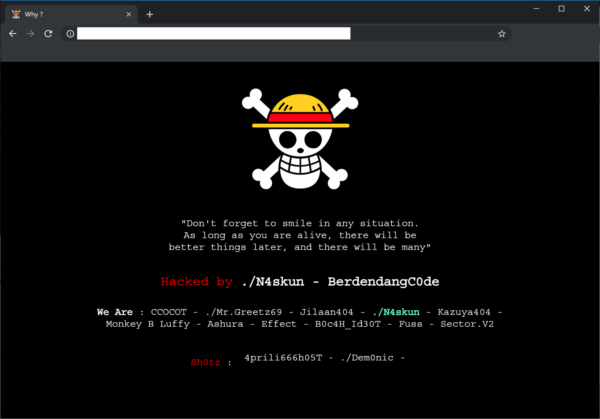
There are a few common warning indicators of a website breach, some of which are more obvious than others:
Viruses, worms, Trojan horses, ransomware, and spyware are examples of malware that can steal your customer data. If Google examines your website and detects anything harmful, it may blacklist your site.
If you have been the victim of a cyberattack, there are a few steps you should take to protect your information and minimize the damage.
First, if you have not been notified by Hosting Australia, you should contact us immediately via our ticketing system or (07) 4914 2433. We will then be able to identify where the attack originated and assist in removing the malicious files and restoring the site.
Make sure all new passwords are what security experts call complex making sure the length (the longer the better), a mix of letters (upper and lower case), numbers, and symbols, no connections to your personal information, and no dictionary words are all important features of a strong password.
If you are struggling to fix a password you can always use sites such as passwordsgenerator.net, random.org, or a password keeper like LastPass, KeePass Password Safe, which enables you to use very strong, complex passwords. No need to remember them — these services do it for you.
Malware is frequently transmitted from one connected device to the next. This is why you should have anti-virus software installed on all of your devices, including tablets and smartphones, such as Bitdefender, Kaspersky, or Malware Bytes. They'll protect your gadgets from incoming threats and notify you if there's a problem. You may buy a license online, and most of them will protect up to five devices.
If you suspect that your customers' data has been compromised, notify them right away. Notify them that there has been a security breach when it occurred, and what information has been compromised. Customers should be encouraged to change their passwords.
The best way to prevent a cyber attack is to educate yourself on the threats. If you know the threats, you will be better equipped to defend yourself. This means understanding your risk factors and getting informed about what different types of cyberattacks look like.
When you receive notifications that an update for your computer or mobile device is available, install it. It's most likely a security patch to keep you safe from a cyber assault. Make sure your website is up to date as well. If it's based on the WordPress platform, for example, make sure to update the WordPress core as well as any plugins you've added on a regular basis to ensure maximum security.
We have noticed there have been more and more phishing emails being sent out recently, If you are unsure about any of these emails DONT click any links. Contact us and forward the email so we can take a look.
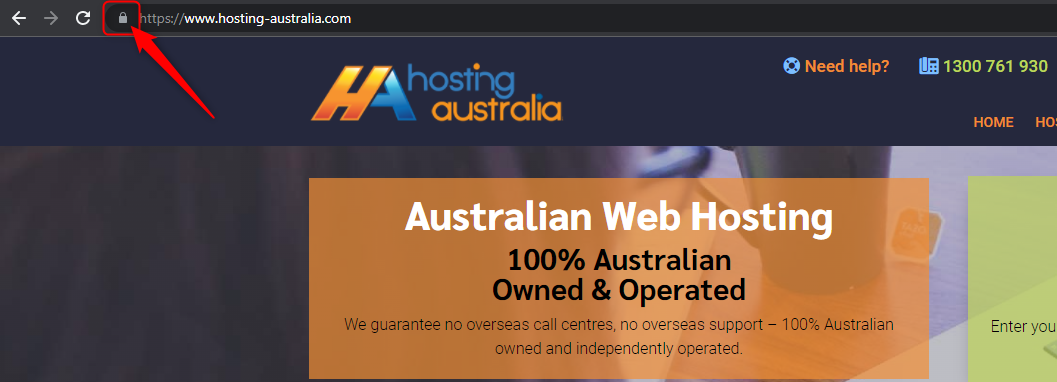
Look for a padlock in the browser bar if you're about to fill out an online form with any personal information you'd like to keep private. The website URL will begin with HTTPS if the lock is present. The lock and the HTTPS prefix indicate that the data sent from your browser to the website server is encrypted and secure. Hackers can steal your data if you don't observe these security indications.
As previously said, anti-virus software should be installed on your computer as well as any internet-connected devices, such as tablets and smartphones. We live in a world that is becoming increasingly connected, and one insecure gadget can expose your life to a cyber assault and the theft of your personal information.
When you use any client portal, such as cPanel, banking, social media, you'll almost certainly double-check that you've logged out successfully before continuing your web browsing. However, when it comes to other online accounts, consumers are less cautious, exposing their personal information. So, when you're finished, remember to log out of all of your internet accounts.
If you think you have been the victim of a cyber-attack, the first thing that you should do is to disconnect your computer from the internet. Don't connect it to any other computers on your network. You will need to change all your passwords on every account that you use. This will include your email, bank, social media, and anything else that you log on to.
Once you have done this, find a good internet security suite and install it on every computer in your house. You should also make sure that you have a firewall enabled on your router.
With these safety precautions in place, you will be able to protect yourself from any future cyber-attacks.
We understand the past couple of years has been tough for everyone. So, first, we want to wish you a happy new year from everyone at Hosting Australia and if you’re reading this, it means that you’ve created a website. Congratulations! It’s not easy to do something like this and we appreciate your efforts. You probably want to know what you can do to make sure your website is the best it can be in the year 2022 and beyond. The answer is simple: keep up with the times. There are many changes coming to the web in 2022 and it’s important to stay ahead of the curve if you want your site to succeed. In 5 years, digital transformations will have taken place across all aspects of our lives including how we design, interact with, and consume information online. These changes will affect everything from how we get information to how we buy things. Here are some tips on how you can get the most out of your site in 2022.
There are many changes happening in the world of technology. The web is constantly changing and it’s important to stay up to date on new developments if you want your site to remain relevant. Fortunately, there are a few ways you can do this!
This is something that should be done at any point in time but will become even more important in the coming years. You’ll need to make sure your website is easy to navigate, has fast loading times, and offers a reliable connection for visitors. Not only does this help people find what they’re looking for on your site quickly, but it also keeps them engaged with your content which will lead to more conversions.
It's not always easy to predict what projects will be successful in the future but there are some trends that have been emerging over the past few years that you should keep an eye on, so you know how best to create content for customers. For example, you may want to focus on high-quality images or videos since Google will now rank websites higher when they have these features. This is just one example of how changes are coming that will affect how we consume information online.
The first thing you want to think about is mobile optimization.
In 2022, the video will account for 70 percent of all consumer internet traffic. Imagine how many of those videos people want to watch on their phones! For your site to be successful, it must be optimized for small screens.
In order to optimize your site, you need to use a responsive web design that adjusts the layout of the site depending on what device is viewing it. You can also use a mobile-friendly CMS or a content management system that will simplify the process of building a website and making sure it's compatible with all screens and devices.
Luckily our hosting packages allow you to install the CMS WordPress with the one-click WordPress installer making having a mobile responsive site even easier.
The web is constantly evolving and it can be difficult to stay up-to-date on SEO methods. That's why it's important to remember that you're always in competition with other businesses vying for the attention of your desired audience. And if you want your website to rank higher than the competition, you need a solid SEO strategy.
Luckily, there are robust tools that will help you analyze online trends and develop a plan that will work for your business. One such tool is Google Analytics, which will help you track how people find your site. Based on this data, you can see what strategies work best and apply those lessons to improve your site. You'll also be able to determine what content resonates most with your audience, so you know what to focus on when creating new posts or content.
Continually investing in SEO will ensure that you maintain a competitive advantage over the competition and generate more leads for your business. So don't forget: invest in SEO now and reap the benefits later!
User experience design will be more important than ever in the next few years. It’s not enough to make a site that looks nice, you need to think about how visitors use your website. Keep your visitors in mind when designing your website and remember that there is no such thing as a one size fits all approach.
It’s not just how the site looks, but how it feels and what people can do on it. There are many different types of interfaces and users will have different preferences for which one they like best. A good user experience designer knows this and can create an interface that works for all types of users.
As technology changes, so do the way we interact with websites. This means that designers need to stay up-to-date with trends in web development and coding languages in order to provide the best user experience possible for their visitors.
What will the internet look like in the next 5 years?
It’s hard to say. But if you want to stay ahead of the curve, it’s worth thinking about what’s out there, what’s coming up, and how to stay one step ahead. Don’t fall behind in the race for web dominance—keep up with your competitors, find your niche, and stay flexible for what comes next. The internet is always changing, so you should too.
It's hard to believe that the holiday season is already here! For a lot of us, it means a time of festivities and celebrations with friends and family. It also means it’s time to get your website ready for the holiday season. There are a few things you need to do before your site goes live to ensure your business stays at the top of its game. Check out these four tips for getting your website ready for the holidays.
It can be easy to get busy and not update your site for a while. But now is the perfect time to ensure everything is up-to-date, especially before the holiday season. There are many new things happening in digital marketing, like changes in Google's algorithm, so make sure you incorporate those updates on your website.
It might also be a good time to think about refreshing your branding or updating your images. You want to make sure that your site looks current and up to date with what's happening in the digital world.
What better time to have a broken link than during the busiest time of year? It sounds counterintuitive, but it happens. Even if your website is updated monthly, there's a chance that a link has been broken for a while and you just didn't notice.
One way to check for broken links is to do an internal crawl of your site. This involves navigating through all the pages on your website and checking to see if any of them are no longer live or lead back to 404 pages.
If you're not sure how to do this, let Google be your guide! You can use their free tool Fetch as Googlebot on Webmaster Central. It will tell you what pages Google sees and whether they're working properly for it.
This is the most obvious of the four steps. But it’s also one of the most important. Add some holiday decor to your website so that it matches the season. This doesn’t have to be anything too fancy. A simple banner or Christmas tree will do!
The holidays are a time for family and friends. So, make sure to add some images of people enjoying time with one another on your site, too! This will also create an emotional connection between your business and your customers.
Your site is your company's virtual storefront. As such, you're always looking for ways to increase traffic and conversions. The more people visit your site, the more money your business will make. Cyber threats are a major concern for businesses during the holiday season due to the increased traffic to their site.
What can you do to protect yourself from cyber threats?
Need assistance in sprucing up your website to reflect the festive season? Our web development team is always happy to help!
The best way to get more done on your PC is by learning some helpful keyboard shortcuts for navigating around your computer. If you are using Windows, then you will have a ton of options. And if you are using Mac, then there are still plenty of shortcuts that can help. Whether you’re looking for the best browser shortcuts, or just want to be able to use your mouse less often, these are the shortcuts that will make navigating much easier. Here's the list below!
You can replace CTRL with CMD on Mac for the same functionality.
These days it seems like your computer has more shortcuts than buttons. Hopefully, with these shortcuts, you will find these shortcuts improve your productivity. The next time you're trying to scroll back up in a Word document or doing anything that requires a couple of mouse clicks, try using shortcuts instead. You'll save time and energy, and your hand will thank you for it.



