
In today's fast-paced world, customers expect immediate responses. Small businesses often face the challenge of meeting these expectations without the resources for round-the-clock support. That's where AI chatbot integration comes in, and at Hosting Australia, we’ve made it easier than ever for businesses to deliver seamless, 24/7 customer service.
AI-powered chatbots offer an efficient solution to customer service demands by automating common inquiries, processing requests, and providing information at any time of the day—without requiring additional staffing or infrastructure. Whether customers need help navigating a website, placing an order, or solving simple issues, chatbots ensure they receive the support they need, right when they need it. Installing a chatbot like TAWK, can be fairly simple - checkout our Tawk Installation guide for more info.
By integrating AI chatbot capabilities into your hosting package, small businesses can:
At Hosting Australia, we understand the need for a balance between automation and personalized customer service. That’s why our hosting packages can include both AI-powered chatbots and non-AI chat services.
While AI chatbots are efficient, they may not be the right fit for every business. For companies looking for a more personalized or hands-on approach, non-AI-powered chat services are still a highly effective way to enhance customer engagement. These allow you to have real-time conversations with your customers, providing them with the support they need through a live chat feature directly on your website.
Live chat systems ensure:
For businesses ready to embrace cutting-edge AI technology, ChatGPT offers advanced conversational capabilities that can handle complex customer interactions, provide personalized recommendations, and learn from each conversation to continuously improve. By integrating solutions like ChatGPT into your hosting package, you can elevate your customer service to new heights, offering your users a truly intelligent support experience.
Talk to us today about how ChatGPT can be seamlessly integrated into your website for a next-level customer experience!
At Hosting Australia, we believe in making technology accessible, affordable, and friendly for all Australian businesses. When you choose us, you’re getting more than just a hosting package. You’re partnering with a 100% Australian-owned company that prioritizes local support, ensuring there are no overseas call centres, no language barriers, and no impersonal experiences.
We offer:
Whether you’re looking to implement an AI-powered chatbot for 24/7 service or prefer the human touch of a live chat system, Hosting Australia is here to help you make the right choice.
If you're looking to enhance your website’s customer service capabilities with integrated chat solutions, we’re here to guide you every step of the way. Contact us today to learn more about how we can implement AI chatbot or live chat services into your hosting package—helping you better engage with your customers and boost your business.
By choosing Hosting Australia, you’re choosing a partner who understands your needs and is committed to providing affordable, reliable, and local support. Reach out today and see how we can transform your customer service experience!
Tawk.to is a free live chat application that allows you to communicate with your website visitors in real time. Integrating Tawk.to into your WordPress site is simple and can enhance customer engagement. Follow these steps to get started:
Install the Tawk.to WordPress Plugin
Adding Tawk.to to your WordPress site is an effective way to engage with your visitors and improve customer support. With just a few simple steps, you can set up a live chat feature that enhances user experience and drives conversions.
For more information, contact Hosting Australia.
In today’s digital landscape, speed and performance are paramount to a successful website. Whether you run a small blog or a large e-commerce site, having a fast, reliable website can be a game-changer for user experience and search engine rankings. One way to enhance your website’s speed is by using caching solutions like Redis and LiteSpeed Cache. In this blog post, we'll explore what Redis is, how it works with LiteSpeed Cache, and how it can benefit your Hosting Australia site.
What is Redis?
Redis is an in-memory data structure store that’s often used as a database, cache, or message broker. It’s known for its exceptional speed, as it stores data in RAM, which allows for near-instantaneous data retrieval. Redis is perfect for caching purposes because it can handle large volumes of data very quickly. In web hosting terms, this means Redis can significantly reduce load times and improve server performance by caching frequently accessed data, like database queries and user sessions.
Why Use Redis with LiteSpeed Cache?
LiteSpeed Cache is a popular caching solution specifically designed for LiteSpeed Web Server. It offers a powerful suite of tools to accelerate websites, including full-page caching, image optimization, and database optimization. However, pairing LiteSpeed Cache with Redis takes things a step further. Redis can store more complex data than LiteSpeed Cache alone, such as user sessions, which makes it an ideal companion for dynamic websites where users log in or interact frequently.
Here’s how Redis and LiteSpeed Cache work together to boost your website’s performance:
1. Session Management: Redis can store user sessions, ensuring faster login and interaction times for returning users.
2. Object Caching: LiteSpeed Cache can cache entire pages, but Redis can cache individual objects, like widgets and database queries, making page loads even faster.
3. Reduced Database Load: By caching queries and user sessions, Redis reduces the load on your database. This allows your site to handle more traffic without needing to upgrade your hosting plan.
4. Scalability: With Redis, you can quickly scale your site to handle spikes in traffic without experiencing slowdowns, which is especially beneficial for e-commerce and other high-traffic websites.
The Benefits of Using Redis with LiteSpeed Cache
By using Redis and LiteSpeed Cache together, Hosting Australia customers can enjoy several key benefits:
- Faster Load Times: Redis reduces the time needed to fetch data from your database, resulting in a snappier, more responsive website.
- Improved User Experience: With faster login times and page loads, users will have a better experience on your site, which can lead to increased engagement and conversions.
- Better SEO: Search engines like Google consider site speed when ranking pages. By optimizing with Redis and LiteSpeed Cache, you could see a positive impact on your search engine rankings.
- Cost Savings: Faster performance means you can handle more traffic with fewer resources, potentially saving on hosting costs by delaying the need for a server upgrade.
Conclusion
Redis and LiteSpeed Cache are a powerful combination for anyone looking to optimize their website’s performance. By caching both full pages and individual objects, this setup can dramatically reduce load times and improve the overall user experience. If you’re a Hosting Australia customer, integrating Redis with LiteSpeed Cache is a smart move for taking your site to the next level. Not only does it make your website faster, but it also provides scalability for when your site grows.
Get in touch with Hosting Australia today to find out how Redis and LiteSpeed Cache can transform your website’s performance!
In the digital age, the security of online interactions is paramount. As cyber threats continue to evolve, safeguarding sensitive information and ensuring secure communication channels have become critical priorities for website owners and users alike. One of the key tools in this security arsenal is the SSL certificate. This article aims to demystify SSL certificates and explain why they are essential for website security and search engine optimization (SEO).
SSL stands for Secure Sockets Layer, a standard security protocol for establishing encrypted links between a web server and a browser. An SSL certificate is a digital certificate that authenticates a website's identity and enables an encrypted connection. This encryption ensures that any data transferred between the web server and browser remains private and integral.
When a website has an SSL certificate, it uses HTTPS (HyperText Transfer Protocol Secure) instead of the standard HTTP. You can identify such websites by the padlock icon in the address bar of your browser and the prefix "https://" before the website URL.
SSL certificates work by initiating an SSL handshake between the server and the browser. Here’s a simplified process of how this works:
In an era where online security and privacy are paramount, SSL certificates are indispensable for any website. They not only protect sensitive information and build user trust but also play a crucial role in enhancing a website’s SEO performance. By encrypting data, validating identity, and improving search engine rankings, SSL certificates serve as a foundational element for a secure and successful online presence. As the internet continues to evolve, adopting SSL certificates is not just a best practice but a necessity for every website owner committed to security and user satisfaction.
For small businesses, having a strong online presence is crucial to reaching new customers and driving growth. One of the key elements of building that presence is choosing the right website hosting. If you're new to the world of hosting, the process can feel overwhelming with technical jargon and a wide range of options. This beginner's guide will help you navigate the essentials of website hosting for small businesses, so you can make informed decisions that set your site up for success.
At its core, website hosting is a service that allows individuals and organizations to make their website accessible on the internet. When you create a website, all the files (images, text, etc.) need to be stored somewhere. A web hosting provider stores these files on its servers and makes them available to users when they visit your domain (website address).
There are several types of hosting available, each with its own benefits and limitations. Understanding these options is key to choosing the right hosting for your small business:
Best for: Small businesses with low traffic and limited budgets.
Pros: Affordable and easy to manage.
Cons: Limited resources, and your site shares a server with other websites.
Shared hosting is one of the most common and cost-effective options for small businesses. In this setup, multiple websites share the same server resources, such as CPU, RAM, and bandwidth. This makes it cheaper, but it also means that if one website on the server experiences a traffic spike, it could affect your site's performance.
Best for: Growing businesses that need more control and scalability.
Pros: More resources than shared hosting, greater control over the server.
Cons: Higher cost and requires more technical knowledge.
With VPS hosting, your website still shares a server with other sites, but it's partitioned in such a way that you have your own dedicated portion of the server's resources. This allows for more customization and better performance compared to shared hosting.
Best for: Larger businesses or websites with high traffic.
Pros: Full control over the server, high performance, and security.
Cons: Expensive and requires advanced technical expertise.
Dedicated hosting gives you an entire server dedicated to your website alone. This means better performance, higher security, and the ability to fully customize the server to meet your business's needs. However, it's typically the most expensive option and requires a higher level of technical management.
Best for: Small businesses with variable traffic and a need for scalability.
Pros: Highly scalable, reliable, and flexible.
Cons: Can be more expensive depending on usage.
Cloud hosting spreads your website's resources across multiple virtual servers, ensuring that if one server fails, another can pick up the slack. This makes cloud hosting incredibly reliable and scalable, perfect for small businesses expecting growth or traffic spikes.
Once you've decided on the type of hosting that fits your business, it's essential to evaluate providers based on their features and services. Here are the most important factors to consider:
Uptime refers to how often your website is available and accessible to users. Look for a hosting provider that offers a 99.9% uptime guarantee or higher. Downtime can cost your business not only in lost sales but also in search engine rankings.
Website speed is crucial for both user experience and SEO. A slow website can frustrate visitors and lead them to leave before making a purchase or inquiry. Make sure your hosting provider offers fast servers and solid-state drives (SSD) for better performance. A hosting service that includes a server level caching service, such as LiteSpeed is a good idea. LiteSpeed Hosting is a great way to ensure your site loads quickly and reliably.
As a small business owner, you may not have the time or technical expertise to troubleshoot hosting issues. Ensure that your provider offers a high level of customer support through live chat, phone, or email, so you can resolve problems quickly. Some providers will boast 24/7 support - but in most cases, this will be via overseas sweat shops and of a lower quality. Be sure to weigh up if you need poor quality 24/7 support, or just good quality, Australian support during critical business operating times.
Your hosting needs will grow as your business expands. Choose a provider that offers scalable plans, allowing you to upgrade your resources as traffic increases without experiencing significant downtime or migration issues.
Security is a top priority for any business website. Look for a hosting provider that offers features like SSL certificates, automated backups, firewalls, and malware protection to keep your site and customer data safe.
Small businesses often operate on tight budgets, so affordability is important. However, it's also vital to ensure that you're getting value for your money. Cheaper hosting may come with limited resources or support, so weigh the cost against the features offered.
Once you’ve chosen your hosting provider and plan, setting up your website is relatively simple. Here’s a quick guide to get started:
When deciding on the best website hosting for your small business, consider your current needs, your technical expertise, and how much your business might grow in the coming years. If you're just starting out and need an affordable, easy-to-manage option, shared hosting may be the best choice. As your business grows, you can scale up to VPS, cloud, or dedicated hosting.
No matter which option you choose, the key is to prioritize performance, security, and support. A reliable, fast, and secure website will give your small business the foundation it needs to succeed online.
By following this guide, you’ll have a better understanding of website hosting and how to choose the right provider for your small business. Taking the time to invest in quality hosting now will pay off in the long run by providing a seamless, positive experience for your customers.
Get in touch with Hosting Australia today! Call (07) 4914 2433 and our team can help with all your questions.
Following our deep dive into the revolutionary updates in "Unveiling Google Analytics’ New Key Events: A Game-Changer for Web Analytics," it's time to revisit the fundamentals that make Google Analytics an indispensable tool. While the new key events offer enhanced capabilities, a solid understanding of the core elements of Google Analytics remains crucial for maximizing its potential. Here’s a comprehensive look at the essential components you need to master, and how they can be effectively utilized with Hosting Australia's web hosting services.
Google Analytics is organized into a hierarchical structure comprising Accounts, Properties, and Views.
Account: The top-level container for your analytics, typically representing your business.
Property: Represents a website or a mobile app. You can have multiple properties under one account.
View: A filtered perspective of the data for a specific property. Views can be customized to show different data sets, like traffic from a specific country or device type.
The tracking code is a snippet of JavaScript that you add to your website's code. This code collects data on user interactions and sends it to Google Analytics. With Hosting Australia's web hosting services, implementing the tracking code is straightforward. Our intuitive control panel and support team can assist you in adding the code to your site efficiently, ensuring accurate data collection.
The Dashboard is your Google Analytics home, providing a customizable overview of key metrics and reports. You can add widgets to monitor various aspects of your site's performance, such as real-time traffic, user behavior, and goal completions. Hosting Australia’s web hosting plans offer seamless integration with Google Analytics, making it easy to set up and customize your dashboard.
Real-Time reports allow you to see what’s happening on your website at any given moment. This includes the number of active users, their locations, the pages they’re viewing, and more. These insights can be incredibly useful for monitoring live events or campaigns. Hosting Australia’s reliable hosting ensures that your site performs optimally, even during high-traffic events, allowing real-time reports to reflect true user activity.
Understanding who your visitors are is crucial for tailoring your marketing efforts. Audience reports provide detailed information about your users, including:
Demographics: Age, gender, and interests.
Geo: Geographic locations.
Behaviour: New vs. returning visitors, frequency, and engagement.
Technology: Devices, browsers, and operating systems used to access your site.
Hosting Australia’s robust hosting environment ensures that your site remains accessible to diverse audiences, allowing you to gather comprehensive audience data without interruption.
Acquisition reports show how users find your website. These reports break down traffic sources into categories like organic search, paid search, social, direct, and referral traffic. Understanding which channels drive the most traffic helps optimize your marketing strategies. Hosting Australia’s SEO-friendly hosting options can help improve your organic search visibility, driving more traffic to your site.
Behavior reports dive into how users interact with your site. Key reports include:
Site Content: Performance of individual pages.
Site Speed: Page load times.
Site Search: How users interact with your site’s search function.
Events: User interactions such as downloads, video plays, or ad clicks.
Hosting Australia provides fast, reliable hosting, which positively impacts site speed metrics. Our support team can help you optimize your site’s performance, ensuring a better user experience reflected in your behavior reports. Our Fusion Management Plans ensure your site is healthy and up to date, which is crucial for maintaining accurate and comprehensive Google Analytics data.
Conversions are actions that fulfill your site’s goals, such as making a purchase, signing up for a newsletter, or completing a contact form. Conversion reports track these actions and provide insights into how well your site drives conversions. Key elements include:
Goals: Customizable objectives you set to track user interactions.
E-commerce: Tracks sales, revenue, and transaction data if you run an online store.
Multi-Channel Funnels: Shows how different channels contribute to conversions.
Hosting Australia’s e-commerce hosting plans are optimized for online transactions, ensuring that your site’s conversion tracking is precise and reliable.
Google Analytics allows you to create Custom Reports tailored to your specific needs. You can choose the metrics and dimensions to include, providing a more focused analysis of your data.
Google Analytics seamlessly integrates with other Google products like Google Ads, Search Console, and Data Studio. This integration allows for more comprehensive data analysis and reporting. Hosting Australia’s hosting solutions support these integrations, making it easier to connect and manage your digital marketing tools.
As we embrace the new key events and features, revisiting these core elements ensures a robust foundation for utilizing Google Analytics to its fullest. By understanding and leveraging these key components, you can make data-driven decisions that enhance user experience, improve marketing strategies, and ultimately drive business growth. With Hosting Australia’s reliable and feature-rich hosting services, you can seamlessly implement and optimize Google Analytics, unlocking the full potential of your website's data.
At Hosting Australia, we specialize in helping businesses leverage digital tools to achieve their goals. With our expertise in web hosting and digital marketing, we provide the support and resources you need to succeed online. Visit our website to learn more about our services and how we can help your business grow.
In today's online landscape, website security is a top priority for businesses of all sizes. Cyber threats are evolving, and no website is immune from malware, hacking attempts, or vulnerabilities. Thankfully, SiteLock offers an all-in-one solution to protect your website from malicious attacks and keep it running smoothly.
SiteLock is a leading website security tool designed to scan, detect, and resolve potential threats before they can cause damage. Whether your website is a small business site, an eCommerce store, or a personal blog, SiteLock provides advanced protection against a wide range of online threats. From malware detection to automatic fixes and a secure firewall, SiteLock ensures your website stays secure, fast, and trustworthy.
With over 18.5 million websites infected with malware at any given moment, online security isn't a luxury—it’s a necessity. Cyber attacks don’t just damage your website; they erode customer trust and can have devastating consequences for your business’s reputation and bottom line.
SiteLock provides peace of mind with its proactive security features, ensuring your website stays protected 24/7. Whether you're running a small business website or managing an online store, the need to keep your data and your customers' information secure cannot be overstated.
At Hosting Australia, we believe in offering robust security solutions to our clients, and that’s why we recommend SiteLock. This tool is more than just a website security solution—it’s an investment in your online presence and business success. SiteLock doesn’t just keep your site secure; it ensures you maintain trust with your customers by safeguarding their data.
Don’t leave your website vulnerable to cyber threats. Visit Hosting Australia’s SiteLock page to learn more about how SiteLock can protect your business and provide the security your website needs.
Keep your site safe, secure, and running at its best with SiteLock. Get started today and take control of your website's security!
In today's digital world, email remains one of the primary communication tools for businesses. However, with the increasing amount of spam, malware, and phishing attacks targeting inboxes, it's more important than ever to secure your email. That's where SPAM Protect comes in.
SPAM Protect is a powerful, cloud-based email filtering service that shields your inbox from unwanted and harmful content. Whether it's spam, viruses, or malicious links, SPAM Protect acts as a robust barrier, ensuring that your business communications remain clean and secure.
Did you know that the average office worker receives 121 emails per day, and around 45% of those are considered spam? This means that businesses spend a significant amount of time filtering through junk mail. In fact, studies show that dealing with spam emails can waste up to 30 minutes per day for each employee. That’s over 120 hours a year per person! With SPAM Protect, you can save your business from this unnecessary time drain and boost productivity by eliminating spam from your inboxes.
Your business can't afford the risks associated with unprotected email systems. With SPAM Protect, you get comprehensive email security that’s easy to use, highly reliable, and incredibly effective. Plus, Hosting Australia ensures local support, so you're never left waiting in a critical moment. Backed by SpamExperts technology, SPAM Protect gives you peace of mind, knowing your inbox is safeguarded 24/7.
Want to keep your email clean and secure? Visit Hosting Australia’s SPAM Protect page to learn more and get started today!
Don’t let spam slow your business down—let SPAM Protect do the heavy lifting so you can focus on what matters most!
[et_pb_section fb_built="1" _builder_version="4.16" custom_padding="||111px|||" global_colors_info="{}"][et_pb_row _builder_version="4.16" background_size="initial" background_position="top_left" background_repeat="repeat" custom_margin="|auto|11px|auto||" custom_padding="||68px|||" global_colors_info="{}"][et_pb_column type="4_4" _builder_version="4.16" custom_padding="|||" global_colors_info="{}" custom_padding__hover="|||"][et_pb_text _builder_version="4.17.4" background_size="initial" background_position="top_left" background_repeat="repeat" global_colors_info="{}"]
Google Business Profile is a free business listing from Google. It allows you to provide details and photos of your business, including your location, services, and products.
Creating this free profile is a great way to increase your visibility across Google services. Information from your Google Business Profile may appear in Google Search, Google Maps, and Google Shopping.
Google Business Profile is only available to businesses that have contact with customers. This includes businesses with a physical location (like a restaurant or store) and businesses that provide services by meeting with clients in other locations (like consultants or plumbers).
If you have an online-only business, you’ll have to stick to other Google tools like Google Ads and Google Analytics.
Whether you’re looking for foot traffic or web traffic, Google is the ultimate search referrer. A Google Business Profile helps ensure that people find your business when looking for products and services like yours in their local area.
Your Google My Business listing shows searchers where and how to visit your business. A Google Business Profile also improves your local SEO. In particular, a listing for a local business is more likely to appear when people search for a nearby business using Google Maps.
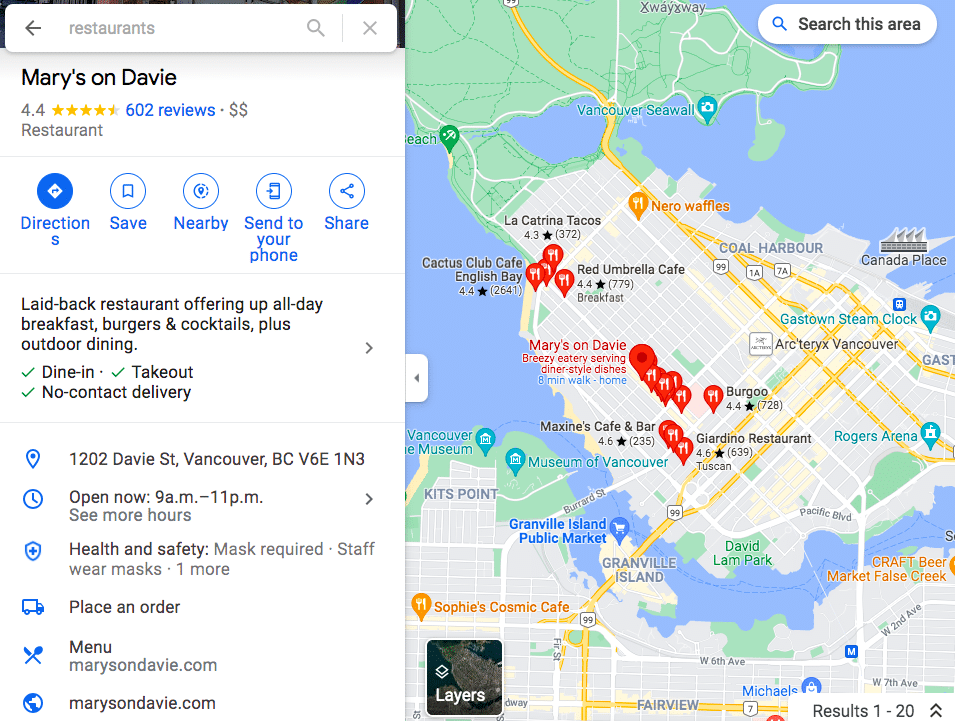
Your Google My Business profile allows you to control and update your contact information, business hours, and other essential details as needed.
You can post updates to share that you’ve expanded services, temporarily closed, or fully reopened (an especially useful feature during emergencies like COVID-19). Google Business Profiles have strong local SEO, so the information you share will rank above third-party sites that might have out-of-date details.
Reviews are a key element of social proof, and a meaningful way to build trust and credibility.
Google’s combined star rating and space for detailed reviews allows customers to share as much or as little information about their experience with your business as they like. All of it helps future potential customers decide which businesses to visit and products to buy.
It can be scary to think about reviews coming in on such a public platform, especially since you can’t pick and choose which Google My Business reviews to share. (Although you can respond to all reviews, as we’ll explain later.)
But don’t panic: Google finds that a combination of positive and negative reviews is more trustworthy than page after page of glowing recommendations.
Make sure to edit your business profile if you change your hours of operation, contact information, etc. Nothing annoys customers more than showing up within operating hours only to find you closed. If you have special hours for holidays or even as a one-off, make sure they are reflected in your Google Business Profile.
You can also create Google My Business posts to share updates, product news, offers, and events.
To edit your business information:
You can get back to the dashboard to make edits at any time at business.google.com. You can also edit your business information directly from Google search or Maps. Just search your business name on one of these tools to access the editing panel.
[/et_pb_text][/et_pb_column][/et_pb_row][/et_pb_section]



