
Website uptime is one of the most important parts of running a modern business. Even short outages can impact sales, search rankings, and customer trust. The simplest way to stay ahead of downtime is by using a dedicated monitoring system.
Uptime Kuma is a powerful uptime monitoring tool that can be deployed instantly on a Hosting Australia server through our one click app system. It gives you real time alerts, easy to read dashboards, and full visibility over the health of your websites and services.
This guide explains what Uptime Kuma does, why we recommend it, and how you can start using it with a single click.
Uptime Kuma is a self hosted uptime and monitoring platform. It checks your websites and services on a set interval and alerts you immediately if something goes offline.
It supports:
It is clean, lightweight, reliable, and perfectly suited for Hosting Australia’s infrastructure.
Many website owners only discover their site is offline when customers report it. Uptime Kuma prevents that by giving you instant alerts.
Instant notifications
Get notified the moment your site or service stops responding.
100 percent self hosted
Your monitoring runs inside your Hosting Australia environment. No third party tracking and no usage fees.
Accurate local checks
Because it runs on an Australian server, your uptime monitoring reflects actual performance for Australian visitors.
Covers all important services
Monitor websites, email ports, WHM, cPanel, databases, APIs, and scheduled tasks.
Great for agencies and developers
Create public status pages for client reporting and service visibility.
Hosting Australia provides an instant deployment option for Uptime Kuma. There is no need for manual installation, Docker setup, or command line work.
Steps to deploy:
Your server will automatically configure and install Uptime Kuma for you.
Once complete, you can access the dashboard through the URL provided in your control panel. Set your admin account and begin adding monitors.
That is all that is required.
Here are the most important monitors to set up straight away.
Use an HTTPS check with a 30 to 60 second interval.
Never let a certificate lapse without warning.
Monitor IMAP, POP, and SMTP ports to ensure mailboxes stay reachable.
Monitor ports like:
Add TCP monitoring for MySQL or MariaDB.
Use heartbeat mode to confirm your scheduled tasks continue to run.
We support thousands of Australian businesses and one of the most common issues we see is downtime going unnoticed. Uptime Kuma solves this by giving you real time visibility with no reliance on external services.
Using Hosting Australia’s one click deployment gives you:
It is ideal for web developers, e commerce stores, agencies, and businesses that depend on consistent website performance.
If you prefer, our support team can deploy and configure Uptime Kuma for you. Just open a support ticket and we will assist.
If you’ve ever logged into cPanel and seen a warning about your PHP version, you’re not alone. Most small business owners brush it off, assuming it’s just another technical message they can ignore. But here’s the awkward truth: your PHP version can make or break your website’s speed, security and long-term reliability. Whether you’re running WordPress, WooCommerce, a custom booking system or a simple brochure website, the version of PHP your site uses has a direct impact on how smoothly it runs.
And when that version becomes outdated, things get slow, glitchy or downright broken. So this article walks you through, in plain English, why PHP version matters, what risks outdated PHP introduces, and how Australian small businesses can confidently manage upgrades through Hosting Australia’s cPanel tools.
Most business owners think website slowness is caused by a “bad host”, too much traffic or large images. But outdated PHP is one of the biggest – and most overlooked – performance bottlenecks. Each new PHP release is significantly faster than the last. That means your website literally runs more code per second just by being on a modern version.
Older versions of PHP also rely on older functions, older libraries and older ways of executing code. When your WordPress install, theme or plugins try using features your PHP version doesn’t support, you end up with errors, failed updates or the dreaded “white screen of death”.
So even if your website looks fine, outdated PHP can quietly be slowing your sales funnel, checkout process or lead generation down. That’s why Hosting Australia provides easy, one-click PHP switching inside cPanel – so business owners can stay ahead of the curve without needing a developer.
Cybersecurity threats have evolved dramatically in the past few years. When your PHP version passes its “End of Life” date, it stops receiving security patches. Hackers love this, because they can target known vulnerabilities that will never be fixed. WordPress sites using unsupported versions like PHP 5.6, 7.0 or 7.1 are particularly easy targets.
Modern PHP versions introduce improvements that close gaps attackers have used for years. Running an updated PHP version is essentially the same as locking your shop door at night. You might get lucky without it – but eventually, luck runs out. For small businesses relying on their website for bookings, payments or data collection, PHP upgrades are non-negotiable.
WordPress powers more than 40% of the web, and it evolves constantly. Themes and plugins are updated to match modern PHP features, leaving older versions behind. If your PHP is too old, you’ll see:
These issues don’t happen because your site is “broken” — they happen because developers stop supporting outdated versions of PHP. Keeping your PHP version fresh ensures everything continues to work as expected, especially as WordPress pushes deeper into PHP 8.x and beyond.
Hosting Australia provides a simple cPanel tool that lets you switch PHP versions in seconds. You don’t need coding knowledge, and you don’t need to touch configuration files. It’s as easy as choosing your website domain, selecting the PHP version you want and clicking Apply.
But before upgrading, there’s a smart way to avoid issues: test compatibility. WordPress users can install a plugin such as “PHP Compatibility Checker”. This scans your themes and plugins to identify potential conflicts with newer versions of PHP. If everything passes, upgrading is safe. If you see warnings, you can update or replace those conflicting plugins before switching.
Here’s the safe, simple method used by thousands of Hosting Australia customers:
If something doesn’t look right, you can instantly switch back to the previous version while you investigate – there’s zero risk of permanent damage.
Small businesses aren’t upgrading PHP to be “tech savvy”. They upgrade because modern PHP versions deliver immediate improvements:
Faster load times: Modern PHP delivers up to 50% faster performance on many WordPress themes, reducing bounce rates and boosting conversions.
Better SEO: Google measures speed as a ranking factor. Faster PHP improves your Core Web Vitals without changing a single plugin.
Lower resource usage: Newer PHP versions need fewer server resources to run the same site, meaning less strain on shared hosting plans.
Tighter security: New releases patch emerging vulnerabilities, keeping hackers out and protecting customer data.
Improved plugin support: Up-to-date PHP gives you full compatibility with the latest WordPress features and integrations.
There are rare cases where rushing a PHP upgrade can cause issues:
If your website is more than three years old and hasn’t been maintained, it’s worth having Hosting Australia perform a quick audit or update before upgrading PHP. Better yet, consider freshening up your WordPress hosting or design stack altogether.
One of the biggest advantages of hosting with an Australian provider like Hosting Australia is local assistance when something goes wrong. Instead of waiting days for overseas ticket replies, you get real people who understand cPanel, WordPress and PHP inside out.
If your upgrade fails or a plugin stops behaving, the support team can help diagnose the cause, roll back safely or guide you through updating your software. For small businesses without a developer on standby, this support can save hours of downtime and lost revenue.
Every WordPress site, no matter how small, deserves the speed, stability and security that modern PHP provides. Upgrading doesn’t need to feel technical or risky – and with Hosting Australia’s guided tools and local support, it’s one of the quickest wins you can give your website in 2025.
If you want help choosing the right PHP version, cleaning up old plugins or preparing your site for a safe upgrade, reach out to the team anytime. A simple PHP update could be the difference between a sluggish, unreliable website and one that feels brand-new.
Contact Hosting Australia for a PHP health check or upgrade assistance.
As your WooCommerce store grows, you might notice things start to feel slower. Product pages take longer to load, the Checkout screen hesitates, or the WordPress Dashboard becomes sluggish.
A very common cause of this slowdown is something called transients.
Do not worry if that word means nothing yet. We will break it down simply.
Transients are temporary stored data that WordPress creates to help your site load faster.
Think of it like:
Your website taking quick notes to avoid repeating the same work again.
Example:
Instead of calculating postage rates every time someone visits the Cart, WooCommerce may save that result temporarily as a transient. This speeds up the next visitor.
So transients are good when they work properly.
Over time, these temporary notes pile up and do not get deleted like they should.
This is usually because:
This causes your database to get too big, especially a table called wp_options.
Your store has a messy “junk drawer” that keeps filling up, and eventually it slows everything down.
Your WooCommerce store may show:
| Symptom | Why It Happens |
|---|---|
| Product pages load slowly | Website is searching through too much stored data |
| Checkout takes a long time | Cart and shipping info gets stuck in the database |
| Dashboard is laggy | WordPress settings become harder to read due to database size |
| CPU and RAM usage spike | Server is doing extra work to handle the clutter |
This is one of the most common performance issues we see on WooCommerce sites.
Technically:
wp_options table.Simply:
Your website settings storage area gets clogged with old temporary data.
If this table gets too big, the whole site slows down.
We check your database for entries matching:
option_name LIKE '%_transient_%'
If we find thousands (or more), it confirms the issue.
Hosting Australia performs this check as part of a WooCommerce Health Audit.
For our support team or developers:
wp transient delete --all
This safely removes temporary data.
Good options:
These help keep the junk drawer empty moving forward.
Redis stores temporary data in memory instead of the database.
Plain English:
Instead of filing temporary notes in a drawer, Redis keeps them on a sticky note on your desk. Faster and no mess.
At Hosting Australia, Redis is offered as an add-on for WooCommerce sites.
Redis is one of the fastest and most reliable ways to improve WooCommerce performance.
To avoid transients building up again:
Hosting Australia can:
If your store is feeling slower than it used to, we can help restore speed and stability.
If you're still reaching for FileZilla every time you want to manage your website files, it might be time to upgrade your workflow. The cPanel File Manager is a fast, secure, and powerful tool – and it's already built into your Australian cPanel hosting account.
Whether you're updating your WordPress config file, uploading an image, unzipping a backup, or tweaking permissions, File Manager lets you do it all – no FTP client required.
Let’s dig into the features you can start using right now to manage your website smarter and faster with cPanel File Manager.
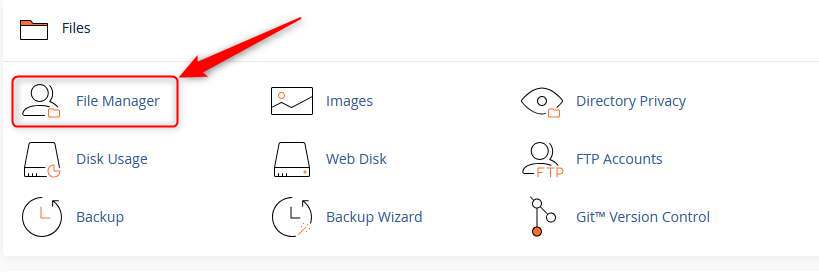
First things first: log into your cPanel dashboard via your hosting account. Once inside, find the File Manager icon (usually near the top under the “Files” section).
Click it and you’re in – no setup, no FTP credentials, no hassle.
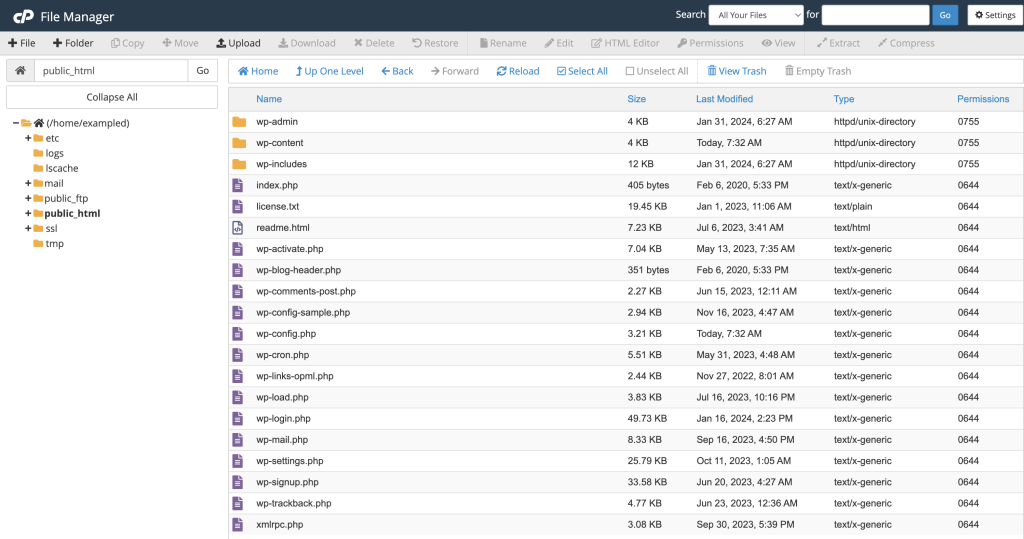
Your website lives inside the public_html folder. Think of it as the “root directory” for your domain. Here’s a breakdown:
Tip: If you don’t see hidden files like .htaccess, click “Settings” in the top-right and enable “Show Hidden Files”.
You can upload anything – WordPress themes, PDFs, images, zip archives – directly into any folder. Here’s how:
Pro Tip: Upload .zip files and extract them inside File Manager – way faster than uploading 50 individual files.
Need to back up a folder? Or unpack a theme? File Manager handles compression and extraction with ease.
This is especially handy for backups, migrations, or packaging up a dev copy of a site.
No need to open a code editor – File Manager has one built in. Just right-click any file and choose Edit or Code Editor.
This is perfect for:
wp-config.php to update database credentials.htaccess for redirects or security rulesSyntax highlighting, line numbers, and quick saves make it feel like VS Code Lite – right inside your browser.
Every file and folder has permissions that determine who can read, write or execute them. In File Manager, click “Permissions” in the toolbar or right-click > Permissions.
For most WordPress sites:
755644Never set folders to 777 – that’s a big security risk. If unsure, your hosting provider can help restore safe defaults.
Need to test a static page? Or create a temp folder? Use the + File or + Folder buttons to create them instantly anywhere in your structure.
Examples:
robots.txt filemaintenance.html pageWhen you first open File Manager, you’ll get a choice: open in home directory or the Web Root (public_html).
Choose Web Root to jump straight to where your actual website lives. It saves time, especially if you’re doing daily maintenance or uploads.
If you’ve broken your site by installing a bad plugin or theme, File Manager is your friend. Just:
wp-content/pluginsplugin-name-disabled)WordPress will deactivate it automatically – letting you get back into wp-admin to fix things!
For small business owners managing their own websites or working with a developer occasionally, File Manager is the perfect middle ground. It gives you full access, with none of the technical roadblocks of FTP clients or SSH access.
On premium Australian cPanel hosting, File Manager is lightning-fast, secure, and always available – giving you total control of your site files from anywhere in the world.
File Manager is encrypted via HTTPS and requires cPanel login credentials. To stay safe:
You don’t need a developer, an FTP client, or a computer science degree to manage your website files. With File Manager in cPanel, it’s all at your fingertips:
If you're using small business web hosting and want to take more control of your site – or simply save time – File Manager is where to start.
Want access to blazing-fast, feature-packed cpanel web hosting? Get in touch and we’ll help you find a hosting plan that gives you all the tools (and none of the clutter).
Building a website on WordPress is a smart move. It’s flexible, SEO-friendly, and powerful. But here’s the catch: WordPress is not “set and forget.” Just like you wouldn’t leave your car unserviced for years and expect it to run perfectly, your WordPress website also needs regular maintenance – or it will break, slow down, or worse, get hacked.
For small business owners across Australia, the danger isn’t in building a bad site – it’s in building a great one and walking away. In this post, we’ll explore the very real consequences of WordPress neglect, and what you can do to prevent your website from quietly self-destructing while you’re busy running your business.
WordPress core, themes, and plugins release updates for a reason – most of the time, it’s to patch vulnerabilities. Hackers specifically look for out-of-date sites with known issues. If you’re not keeping your software current, you’re practically inviting malicious bots to try their luck.
In fact, over 52% of WordPress vulnerabilities exploited in the wild come from outdated plugins. Once exploited, attackers can deface your site, insert spam links, steal data, or inject malware that gets your site blacklisted by Google.
That’s why reliable Australian WordPress hosting should include proactive update monitoring – or better yet, managed updates done for you.
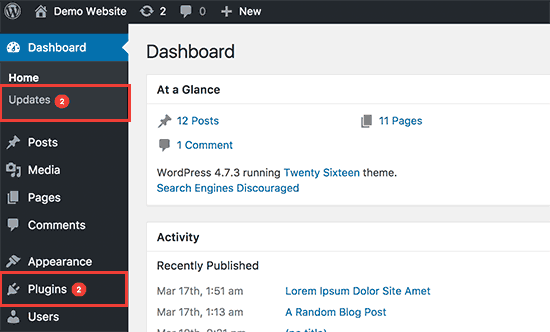
Even if your website still looks good, performance degradation creeps in slowly. Unused plugins accumulate. Databases fill with old revisions. Image folders grow bloated. Theme files go unoptimised.
The result? A slow, sluggish website that frustrates users and damages your SEO. Google considers speed a ranking factor – and users expect sites to load in under 3 seconds. If yours takes longer, don’t be surprised when bounce rates rise and rankings fall.
Proactive hosting with LiteSpeed cache, server-level optimisation, and regular clean-ups can help keep your WordPress site snappy without needing a developer on speed dial.
How confident are you that your site can be restored if something goes wrong today? If you’re relying on an old plugin or a vague promise from your host, you could be in for a nasty surprise.
Backups should be automatic, off-site, tested, and easy to restore. Too many small businesses find out too late that their backup failed, or worse, didn’t exist at all.
At Hosting Australia, our plans include daily backups with fast rollback options – because real peace of mind doesn’t come from crossing your fingers.
When was the last time you tested your contact form? Or clicked your own CTA button? Over time, things break. APIs change. Plugins conflict. A customer might try to reach out... and hit a dead end.
Most website owners don’t realise there’s a problem until someone tells them. By then, how many leads have been lost? How many frustrated users clicked away?
A monthly site audit – including basic functionality checks – is a simple way to catch these issues early. Or better yet, set up uptime monitors and form check tools that notify you automatically.
When Google detects issues like malware, slow performance, or mobile usability problems, it responds quickly – by demoting or even removing your site from search results.
Neglected WordPress websites often end up with:
If you rely on Google for traffic – and what business doesn’t – you need to stay in Google’s good books. That means keeping your site fast, clean, and secure.
Websites are not billboards. They’re living platforms that need fresh content and up-to-date messaging. An untouched blog from 2021? A homepage that still says “Happy Holidays” in July?
This kind of neglect doesn’t just affect SEO – it affects how potential customers perceive your business. You wouldn’t keep old newspapers in your reception area. Why let your digital front door look neglected?
Regular updates show you’re active, engaged, and evolving. Even a quarterly refresh of your homepage or blog can make a big difference.
Let’s be clear – WordPress isn’t the problem. It’s the neglect that hurts. When maintained properly, WordPress is an incredibly powerful business tool. It ranks well, scales beautifully, and gives you total flexibility. But it demands upkeep.
Think of it like a commercial vehicle: you wouldn’t let a delivery van run without oil changes and tyre checks. The same goes for your business website.
If you’re short on time (or technical confidence), here’s a quick solution:
Or outsource it all. We offer WordPress maintenance plans designed for small businesses who want their site taken care of – without lifting a finger.
Leaving your WordPress site on autopilot might seem convenient, but the risks are too high. Downtime, security breaches, lost leads, or a drop in Google rankings can cost your business far more than the small effort of regular upkeep.
Need help getting your site back in shape? Contact us today for a free WordPress health check – we’ll show you what’s working, what’s not, and what to fix first.
With the rise of AI models like ChatGPT, Google Gemini, and Perplexity, more crawlers are accessing public websites to collect content for training datasets. If your site is hosted with Hosting Australia on cPanel, this guide explains how to control which bots can crawl your site, using tools built right into your hosting panel.
AI crawlers work like traditional search engine bots, but instead of indexing pages for search results, they scan content to train language models. Examples include:
ChatGPT-User (OpenAI)Google-Extended (used by Google Gemini)CCBot (used by Common Crawl)These crawlers may pull large amounts of text from your public pages. If you prefer to control how your content is used, you can restrict access directly from your cPanel account.
robots.txt File via cPanelpublic_html).robots.txt exists. If not, right-click anywhere and choose Create New File, name it robots.txt.robots.txtEdit the file and add the following:
User-agent: ChatGPT-User
Disallow: /

User-agent: CCBot
Disallow: /

User-agent: Google-Extended
Disallow: /
This tells those specific bots not to crawl your website. Reputable bots will obey these instructions, though some third-party scrapers may not.
Once done, save the file and confirm it’s publicly accessible at:
https://yourdomain.com/robots.txt
For more granular control, you can add meta tags inside the <head> section of specific pages. For example:
<meta name="robots" content="noindex, nofollow">
This prevents indexing and link following for a given page. If you’re using WordPress, SEO plugins like Yoast or Rank Math let you control this per page or post.
If you notice strange behavior, you can check visitor logs from cPanel:
ChatGPT-User or anything suspiciousAI crawlers are now a common part of web traffic. If you want to protect your content or reduce unwanted load, you can manage access easily through cPanel by editing your robots.txt file. This gives you full control over which bots can scan your site.
If you're unsure how to implement this or need assistance with anything in cPanel, reach out to Hosting Australia's support team. We're happy to walk you through the process or make the changes for you.
Managing and maintaining your WordPress website is vital to ensure it performs optimally, remains secure, and continues to provide a positive user experience. Here’s an essential WordPress maintenance checklist to help webmasters streamline regular tasks and stay organised.
Having regular backups of your website is your safety net. Ensure your website is backed up consistently—preferably daily or weekly, depending on how often your content changes. Consider using reliable backup plugins or services that allow easy restoration if something goes wrong.
Keep the WordPress core up-to-date. Regular updates help protect your website against vulnerabilities, improve functionality, and ensure compatibility with themes and plugins. Always perform backups before applying major updates to avoid data loss.
Plugins and themes require regular updates to patch vulnerabilities and ensure optimal performance. Regularly check for available updates in your WordPress dashboard and apply them promptly. Remove inactive plugins and themes to reduce security risks.
Regularly scan your website for malware and suspicious activities. Use trusted security plugins to detect and remove threats, keeping your website protected from malicious attacks. Security should always be a high priority for webmasters.
Databases can quickly accumulate redundant data, causing slow website performance. Regularly optimise your database using plugins or manual methods to improve the loading speed and responsiveness of your website. Hosting Australia's database experts can help with this - contact our support team today!
Broken links negatively impact user experience and SEO rankings. Regularly scan your website for broken links and fix them promptly. Implement redirects for removed pages to relevant content to maintain a smooth user experience.
Your website's availability is critical for your visitors. Employ uptime monitoring tools to instantly detect downtime and resolve hosting-related issues quickly. Ensure your hosting service offers robust reliability and support.
Website speed is crucial for visitor retention and SEO. Regularly test your website speed using tools like Google PageSpeed Insights or GTmetrix. Optimise your website performance by compressing images, leveraging caching plugins, and reducing resource-intensive scripts.
Fast, reliable WordPress hosting can also ensure your site is performing at its peak.
Periodically review and refresh your website’s content. Check your website SEO health, optimise keywords, meta descriptions, and headers to maintain strong visibility in search engines. High-quality, updated content consistently attracts and retains users.
Regularly ensure your website complies with accessibility standards, making your site inclusive for all users. Utilise WordPress accessibility plugins to help audit and improve accessibility.
Keeping on top of these maintenance tasks might seem overwhelming, but it ensures your WordPress website remains robust, secure, and efficient. For professional assistance, or to enhance your WordPress Web Design, feel free to Contact Us. Our team of experts is always here to help you.
[et_pb_section admin_label="section"]
[et_pb_row admin_label="row"]
[et_pb_column type="4_4"][et_pb_text admin_label="Text"]
Cybersecurity is a top concern for businesses and individuals managing online services. One of the best ways to protect your infrastructure is by hosting your own firewall. Instead of relying solely on cloud security solutions, self-hosting a firewall on a VPS gives you full control over network traffic, firewall rules, and security configurations. In this guide, we'll explore how you can set up a self-hosted firewall using a VPS from Hosting Australia.
A self-hosted firewall offers several advantages:
Many of our clients host websites on our shared hosting platform, where security measures are managed at the server level. However, for clients using a VPS, a self-hosted firewall can provide additional layers of protection, including:
If you are using shared hosting, many security protections are already in place at the network level. However, clients who need more control over their security policies should consider upgrading to a VPS and deploying a self-hosted firewall.
Before setting up your firewall, you need a reliable VPS that can handle network traffic filtering and security enforcement. Hosting Australia offers VPS plans with high availability, scalable resources, and DDoS protection, making them an ideal choice for hosting your own firewall.
There are several open-source firewall solutions available for self-hosting. Here are three popular options:
A powerful, open-source firewall with a web-based interface and extensive security features.
A widely used firewall that supports advanced networking features like VPN, VLANs, and traffic shaping.
A lightweight option built into Linux systems, perfect for quick firewall configurations.
sudo apt install ufwsudo ufw default deny incoming & sudo ufw default allow outgoingsudo ufw allow 22/tcpsudo ufw enableOnce your firewall is up and running, you can further harden your security with the following:
Self-hosting a firewall on a VPS provides a cost-effective, secure, and highly customizable solution for protecting your online assets. Whether you choose OPNsense, pfSense, or UFW, Hosting Australia’s VPS ensures you have the performance and reliability needed for robust firewall security.
For clients using shared hosting, security is already built into the platform. However, for those needing advanced configurations and greater control, a VPS with a self-hosted firewall is the best choice.
Ready to enhance your network security? Check out Hosting Australia's VPS plans today and start self-hosting your firewall with ease![/et_pb_text][/et_pb_column]
[/et_pb_row]
[/et_pb_section]
If you're new to web hosting, the terminology can be overwhelming. With all the technical jargon, it’s easy to get lost in words like “bandwidth,” “cPanel,” or “VPS.” Understanding these terms is essential for making informed decisions about your website, and this glossary will help clarify some of the most commonly used web hosting terms. Let’s break them down to ensure you feel confident as you navigate your hosting needs.
Web hosting is the service that allows you to store your website’s files on a server, making them accessible via the internet. Without web hosting, your website wouldn’t exist online. Hosting providers offer different types of hosting plans (such as shared, VPS, or dedicated hosting) depending on your needs.
For example, Hosting Australia offers various web hosting services tailored to different website requirements, from small blogs to large business websites.
A domain name is your website's address on the internet (e.g., www.example.com). It’s how people find you online. Domain names are registered through domain registrars, and many hosting providers, including Hosting Australia, offer domain registration as part of their services.
Learn more about domain registration on our Domain Registration page.
Bandwidth refers to the amount of data that can be transferred to and from your website in a given period (usually measured in gigabytes per month). A higher bandwidth allows for more traffic to your site. If your website exceeds your bandwidth limit, it may become slow or even crash.
cPanel is a control panel that simplifies website and server management. It provides a user-friendly interface for tasks like creating email accounts, managing files, and installing software (like WordPress). Most hosting providers, including Hosting Australia, offer cPanel with their hosting plans.
You can get more details on cPanel here.
Shared hosting is when your website shares a server with other websites. It’s the most affordable hosting option, ideal for small websites or personal blogs. However, since resources like CPU and RAM are shared, it can lead to slower performance if other websites on the same server use a lot of resources.
Explore Hosting Australia's Shared Hosting plans for more details.
A VPS is a type of hosting that provides you with your own slice of a physical server. Unlike shared hosting, where resources are shared, a VPS gives you more control over your server environment. It's suitable for websites that have outgrown shared hosting but don’t yet need a full dedicated server.
Learn about Hosting Australia’s VPS hosting options.
Dedicated hosting gives you an entire server for your website. This means you have full control over the server, including the software, security, and performance. It's ideal for large websites or businesses that need high performance and security.
Uptime refers to the amount of time your website is live and accessible to visitors. The goal is to have 100% uptime, but realistically, most providers aim for a minimum of 99.9% uptime. Hosting Australia guarantees reliable uptime, ensuring that your website stays online and accessible.
An SSL (Secure Socket Layer) certificate encrypts data between your website and your visitors, ensuring that sensitive information (like credit card numbers) remains secure. It also boosts trust by showing the padlock icon in browsers, signaling to users that the website is secure.
Visit our SSL certificates page to learn more about the security benefits they offer.
Email hosting is a service that allows you to use a custom domain name for your email addresses (e.g., contact@yourdomain.com). Hosting providers like Hosting Australia offer email hosting as part of their packages, ensuring your communications are professional and secure.
Explore email hosting services here.
Website backups are copies of your website's data, including files and databases, which can be restored in case of data loss, hacking, or server failure. It's essential to regularly back up your website to avoid losing important information. Many hosting services offer automated backup features.
A CDN is a network of servers located around the world that helps deliver your website’s content (images, videos, etc.) faster to users by serving it from the nearest server. This reduces load times and improves the user experience, especially for websites with global audiences.
MySQL is a popular relational database management system used by many websites. It stores and organizes website data, including user information, posts, and other dynamic content. Many web applications, such as WordPress, rely on MySQL to function.
FTP is a standard network protocol used to transfer files between your computer and your hosting server. It allows you to upload files to your website, such as images or pages, and download them if needed. FTP clients like FileZilla are commonly used for this purpose.
DNS is like a phonebook for the internet, translating human-readable domain names into IP addresses that computers use to communicate with each other. Properly configuring your DNS settings is essential for ensuring your website is accessible to users.
HTTP (HyperText Transfer Protocol) is the protocol used for transferring data on the web. HTTPS (HTTP Secure) is a more secure version of HTTP that uses encryption to protect the data transmitted between the user and the website. Websites with HTTPS have a padlock icon in the address bar, indicating they are secure.
Cloud hosting is a type of hosting where your website is hosted on a cluster of interconnected servers. This allows for scalable resources, meaning your website can handle sudden traffic spikes more easily. Cloud hosting offers flexibility and can be more reliable than traditional hosting options.
RAID is a data storage technology that combines multiple hard drives into a single unit to improve performance and provide redundancy (data protection). It helps ensure that your data is safe even if one hard drive fails.
PHP is a popular scripting language used to create dynamic web pages. Many content management systems (CMS) like WordPress are built using PHP. It processes server-side code to display content based on user interactions and database queries.
WHM is a web hosting control panel that allows web hosting providers to manage multiple cPanel accounts. It is commonly used by reseller hosting providers to manage customer accounts and offer hosting services. Learn more about cPanel & WHM hosting solutions here.
SSL (Secure Socket Layer) and TLS (Transport Layer Security) are encryption protocols used to secure data between a user’s browser and a website. Websites with SSL/TLS certificates protect users' personal information during online transactions. Learn more about SSL Certificates here.
Softaculous is an auto-installer that allows you to easily install a variety of web applications (like WordPress, Joomla, and Drupal) with just a few clicks. It simplifies the process of setting up a website and is often included in cPanel hosting plans.
Root access refers to administrative control over a server. This allows you to make system-wide changes, install software, and configure server settings. Root access is typically available in reseller hosting and some VPS plans. Learn more about reseller hosting here.
A load balancer is a tool that distributes incoming website traffic across multiple servers to ensure no single server is overloaded. This improves website performance, especially for high-traffic sites, and ensures uptime by preventing server crashes.
Managed hosting is when the hosting provider takes care of the server's technical aspects, such as security, updates, and maintenance. It allows you to focus on your website without worrying about server management. Hosting Australia offers managed hosting services to help you manage your website efficiently. Learn more about our Managed Hosting services here.
Navigating the world of web hosting can seem complicated at first, but understanding these key terms will help you make better decisions when setting up and managing your website. Whether you're just starting with shared hosting or need more control with VPS or dedicated hosting, Hosting Australia provides a variety of options to suit your needs.
Explore our services and start your hosting journey with us today at Hosting Australia.
Tired of hearing the same old tracks on your Spotify, even with the so-called "Random shuffle"?
Fed up with searching for someone else's playlist, only to have your heartwarming Celine Dion marathon suddenly hijacked by a random Rammstein track?
Let’s face it, Spotify’s algorithm might as well be run by a confused robot trying to pick a song at random. Don’t worry, we’ve got your back!
This guide will show you how to create the perfect playlist using ChatGPT and import it into Spotify with Spotlistr—because, honestly, Spotify needs some help!
Open ChatGPT:
Access ChatGPT in your browser or app.
Provide Clear Instructions:
Ask ChatGPT to generate a list of songs. Be specific about the genre, mood, decade, or theme. For example:
Refine the List:
Review the list generated by ChatGPT. If needed, ask for adjustments, like "Replace Song X with another popular track in the same genre."
Export the List:
Copy the list from ChatGPT and save it to a text file or keep it handy for the next step.
Ensure Proper Formatting:
Spotlistr requires the song list in this format: Song Title - Artist Name.
Example:
Blinding Lights - The Weeknd
Shape of You - Ed Sheeran
Rolling in the Deep - Adele
Edit if Needed:
Use a text editor to adjust formatting, ensuring each song is on a new line.
Visit Spotlistr:
Go to Spotlistr's website.
Login with Spotify:
Click "Login" or "Connect to Spotify" and authenticate with your Spotify account.
Select Import Method:
Choose "Text to Playlist" from the menu.
Paste Your Song List:
Copy your formatted list and paste it into the provided text box on Spotlistr.
Review and Confirm:
Spotlistr will match your song titles to Spotify tracks. Review the matches and make adjustments if there are mismatches.
Create Playlist:
Once satisfied, click "Create Playlist" and name it. The playlist will now appear in your Spotify account.
Open Spotify:
Open Spotify on your desktop or mobile app.
Review the Playlist:
Play the playlist and ensure all songs are correct. Add or remove tracks if needed.
Share Your Playlist:
Share your playlist with friends or keep it private.
Be Specific:
The more detailed your request to ChatGPT, the better the results.
Check for Matches:
Spotlistr relies on exact matches, so double-check song titles and artist names.
Explore Themes:
Experiment with unique themes for playlists, like "Motivational Songs for Workouts" or "Indie Rock Road Trip."
By following these steps, you can quickly and efficiently create custom playlists that align with your preferences. Happy playlist-making!



