PHP is another important factor for your website. Upgrading and maintaining your current version of PHP is not just important for compatibly. But also for the security of your website. New security features are implemented with each new PHP version. While older versions reach their life cycle and are no longer supported, not receiving updates, creating security vulnerability as they are no longer patched for these new vulnerabilities.
PHP is a hypertext processor that is used with HTML to create scripts for your website. When anyone visits a website, the browser sends the site a request, and PHP scripts compile the HTML packets to send them back to the browser.
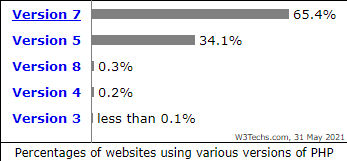
PHP version 7 alone is used by 65.4% of all the websites that use PHP. 34.1% are still using PHP version 5. It is also one of the best-maintained languages because new updates and features are constantly being pushed out, Version changes happen about once every year. So how do you know what version of PHP your current website is using, and how do you update it?
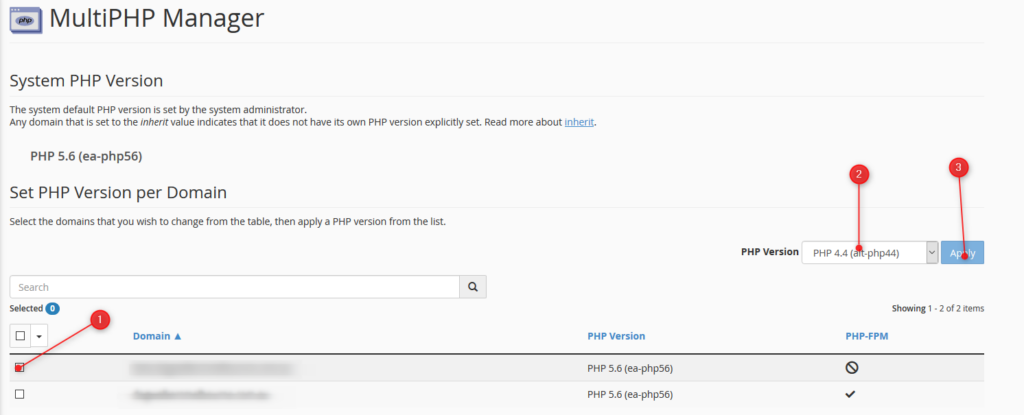
Finding out your version is simple; you can access all of PHP information by logging into your cPanel. Unsure how to access your cPanel? Its simple just follow this guide!
NOTE - The below will change the PHP version for the entire cPanel. If you have an independent site or development site, that requires a newer version of PHP than other installed sites in your cPanel, we recommend setting the newer site up as a Sub-Domain or addon domain, depending on what your scenario is. Then set the PHP version for that subdomain/addon domain as required via the MultiPHP Manager in cPanel. See THIS ARTICLE for details.

You can also check your PHP Compatibility with the WP Engine PHP Compatibility Checker. This plugin can be used by any WordPress website to check your PHP version. Once the plugin is installed follow the instructions to run a scan. The results report will help you identify any potential PHP version conflicts in your code, so you can have them fixed before upgrading.