Cyber attacks happen every day. They’re a part of the new reality we live in. Advanced hackers use software and technology to infect your computer, steal your information and hold it for ransom. Cybercriminals and cyber terrorists alike are taking advantage of this digital age we live in.
The world is now more connected than ever, with countless ways to get involved online, from paying bills to arranging travel. But those connections also make us more vulnerable, as the bad guys find more ways to make their way into our lives. And they’ve become more brazen as well. In 2016 alone, there were 78 million people who had their personal data breached due to a cyber attack. It's important to know what you should do if you're faced with a similar situation. Here are some reasons why it's essential that you protect yourself by knowing your risk factors and getting educated on the basics of cybersecurity before it happens to you!
A cyber attack is any malicious act that gains unauthorized access to a computer or network with the intent to steal data or disrupt normal operations. This includes everything from a phishing email to a ransomware attack.
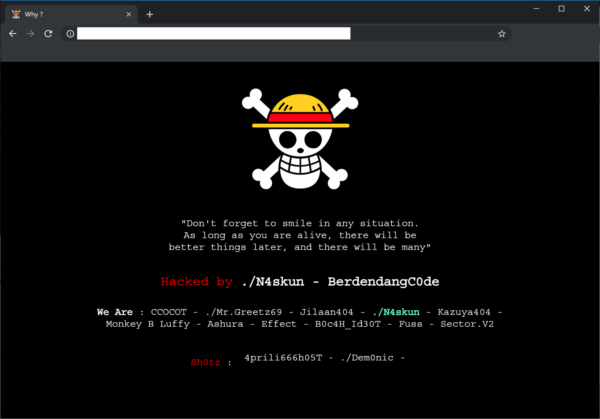
There are a few common warning indicators of a website breach, some of which are more obvious than others:
Viruses, worms, Trojan horses, ransomware, and spyware are examples of malware that can steal your customer data. If Google examines your website and detects anything harmful, it may blacklist your site.
If you have been the victim of a cyberattack, there are a few steps you should take to protect your information and minimize the damage.
First, if you have not been notified by Hosting Australia, you should contact us immediately via our ticketing system or (07) 4914 2433. We will then be able to identify where the attack originated and assist in removing the malicious files and restoring the site.
Make sure all new passwords are what security experts call complex making sure the length (the longer the better), a mix of letters (upper and lower case), numbers, and symbols, no connections to your personal information, and no dictionary words are all important features of a strong password.
If you are struggling to fix a password you can always use sites such as passwordsgenerator.net, random.org, or a password keeper like LastPass, KeePass Password Safe, which enables you to use very strong, complex passwords. No need to remember them — these services do it for you.
Malware is frequently transmitted from one connected device to the next. This is why you should have anti-virus software installed on all of your devices, including tablets and smartphones, such as Bitdefender, Kaspersky, or Malware Bytes. They'll protect your gadgets from incoming threats and notify you if there's a problem. You may buy a license online, and most of them will protect up to five devices.
If you suspect that your customers' data has been compromised, notify them right away. Notify them that there has been a security breach when it occurred, and what information has been compromised. Customers should be encouraged to change their passwords.
The best way to prevent a cyber attack is to educate yourself on the threats. If you know the threats, you will be better equipped to defend yourself. This means understanding your risk factors and getting informed about what different types of cyberattacks look like.
When you receive notifications that an update for your computer or mobile device is available, install it. It's most likely a security patch to keep you safe from a cyber assault. Make sure your website is up to date as well. If it's based on the WordPress platform, for example, make sure to update the WordPress core as well as any plugins you've added on a regular basis to ensure maximum security.
We have noticed there have been more and more phishing emails being sent out recently, If you are unsure about any of these emails DONT click any links. Contact us and forward the email so we can take a look.
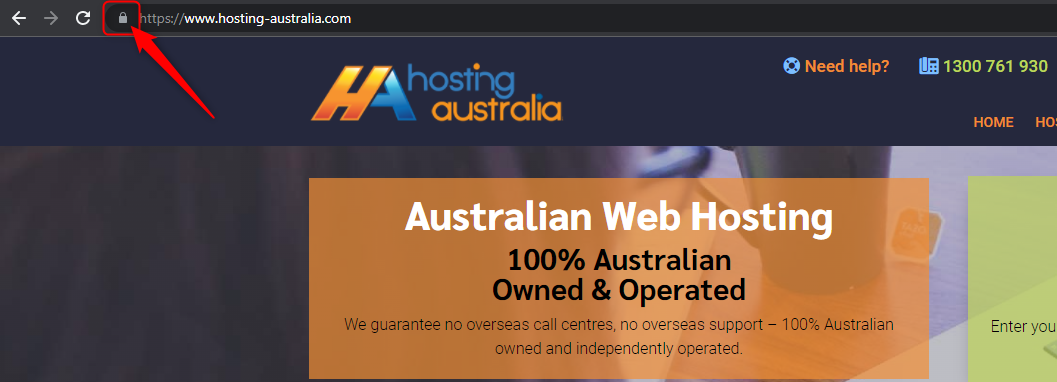
Look for a padlock in the browser bar if you're about to fill out an online form with any personal information you'd like to keep private. The website URL will begin with HTTPS if the lock is present. The lock and the HTTPS prefix indicate that the data sent from your browser to the website server is encrypted and secure. Hackers can steal your data if you don't observe these security indications.
As previously said, anti-virus software should be installed on your computer as well as any internet-connected devices, such as tablets and smartphones. We live in a world that is becoming increasingly connected, and one insecure gadget can expose your life to a cyber assault and the theft of your personal information.
When you use any client portal, such as cPanel, banking, social media, you'll almost certainly double-check that you've logged out successfully before continuing your web browsing. However, when it comes to other online accounts, consumers are less cautious, exposing their personal information. So, when you're finished, remember to log out of all of your internet accounts.
If you think you have been the victim of a cyber-attack, the first thing that you should do is to disconnect your computer from the internet. Don't connect it to any other computers on your network. You will need to change all your passwords on every account that you use. This will include your email, bank, social media, and anything else that you log on to.
Once you have done this, find a good internet security suite and install it on every computer in your house. You should also make sure that you have a firewall enabled on your router.
With these safety precautions in place, you will be able to protect yourself from any future cyber-attacks.