[et_pb_section fb_built="1" _builder_version="4.16" custom_padding="||111px|||" global_colors_info="{}"][et_pb_row _builder_version="4.16" background_size="initial" background_position="top_left" background_repeat="repeat" custom_margin="|auto|11px|auto||" custom_padding="||68px|||" global_colors_info="{}"][et_pb_column type="4_4" _builder_version="4.16" custom_padding="|||" global_colors_info="{}" custom_padding__hover="|||"][et_pb_text _builder_version="4.17.4" background_size="initial" background_position="top_left" background_repeat="repeat" global_colors_info="{}"]
Google Business Profile is a free business listing from Google. It allows you to provide details and photos of your business, including your location, services, and products.
Creating this free profile is a great way to increase your visibility across Google services. Information from your Google Business Profile may appear in Google Search, Google Maps, and Google Shopping.
Google Business Profile is only available to businesses that have contact with customers. This includes businesses with a physical location (like a restaurant or store) and businesses that provide services by meeting with clients in other locations (like consultants or plumbers).
If you have an online-only business, you’ll have to stick to other Google tools like Google Ads and Google Analytics.
Whether you’re looking for foot traffic or web traffic, Google is the ultimate search referrer. A Google Business Profile helps ensure that people find your business when looking for products and services like yours in their local area.
Your Google My Business listing shows searchers where and how to visit your business. A Google Business Profile also improves your local SEO. In particular, a listing for a local business is more likely to appear when people search for a nearby business using Google Maps.
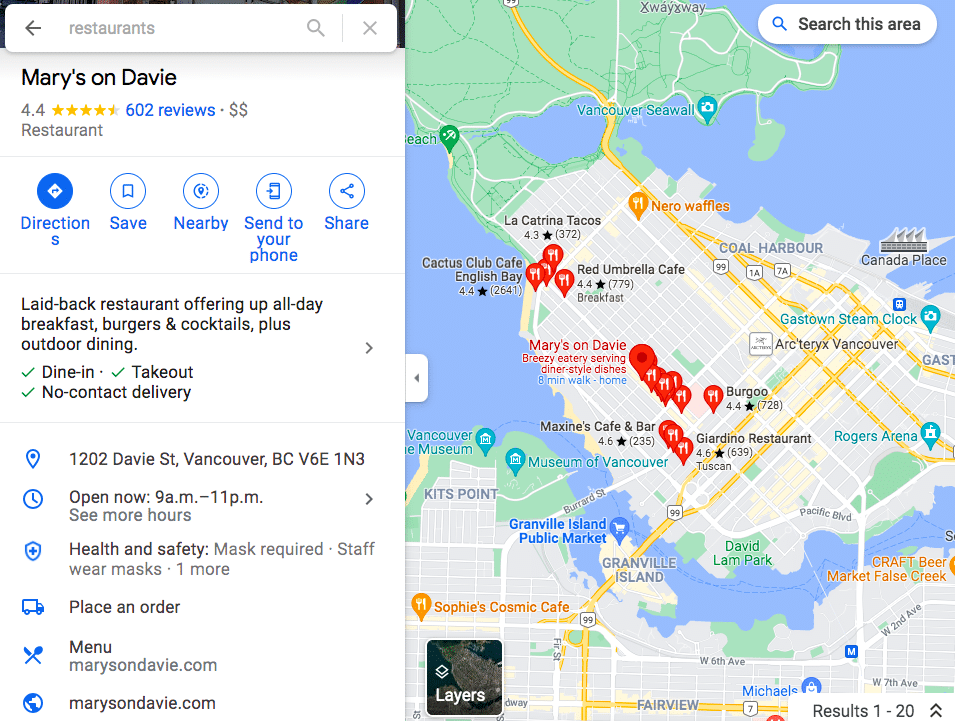
Your Google My Business profile allows you to control and update your contact information, business hours, and other essential details as needed.
You can post updates to share that you’ve expanded services, temporarily closed, or fully reopened (an especially useful feature during emergencies like COVID-19). Google Business Profiles have strong local SEO, so the information you share will rank above third-party sites that might have out-of-date details.
Reviews are a key element of social proof, and a meaningful way to build trust and credibility.
Google’s combined star rating and space for detailed reviews allows customers to share as much or as little information about their experience with your business as they like. All of it helps future potential customers decide which businesses to visit and products to buy.
It can be scary to think about reviews coming in on such a public platform, especially since you can’t pick and choose which Google My Business reviews to share. (Although you can respond to all reviews, as we’ll explain later.)
But don’t panic: Google finds that a combination of positive and negative reviews is more trustworthy than page after page of glowing recommendations.
Make sure to edit your business profile if you change your hours of operation, contact information, etc. Nothing annoys customers more than showing up within operating hours only to find you closed. If you have special hours for holidays or even as a one-off, make sure they are reflected in your Google Business Profile.
You can also create Google My Business posts to share updates, product news, offers, and events.
To edit your business information:
You can get back to the dashboard to make edits at any time at business.google.com. You can also edit your business information directly from Google search or Maps. Just search your business name on one of these tools to access the editing panel.
[/et_pb_text][/et_pb_column][/et_pb_row][/et_pb_section]